Web Recon
Categories:
The primary goals of web recon are to:
- Identify assets (web pages, subdomains, IP address, tech stacks, etc.)
- Discover hidden information
- Analyze the attack surface
- Gather information that can be leveraged for further exploitation.
Similar to recon targeted toward other environments and services, web recon can be categorized into passive and active recon.
- Passive Recon avoids interacting with the target(s) directly.
- Active Recon interacts with the target(s) directly.
This article will mainly go over Active Recon techniques.
Subdomain Discovery
Subdomains exist as extensions to a main domain. For example, domain example.com may have subdomains blog.example.com, shop.example.com and so on. Subdomains can be set up to point to the same or different IP addresses as the main domain, making it an easy way to organize and access different network resources.
There are many ways to discover subdomains.
Subdomain Brute Forcing
Subdomain brute forcing uses a wordlist of common subdomain names (dev, blog, admin, mail, etc.), prepent each of them to the main domain and queries it against a DNS server, either a public one or a private one on the target network.
Tools such as DNSEnum can be used for subdomain bruteforcing
dnsenum --enum <DOMAIN> -f <WORDLIST>
Certificate Transparency Logs
Certificate Transparency (CT) Logs are public, append-only ledgers that record the issuance of TLS certificates. When a Certificate Authority (CA)issues a new certificate, it must submit it to multiple CT logs for anyone to inspect. CT logs exist to maintain the trust in the Public Key Infrastructure by exposing rogue certificates and the CAs that issues them.
However, CT logs also provides a publically available and definitive list of subdomains to attackers.
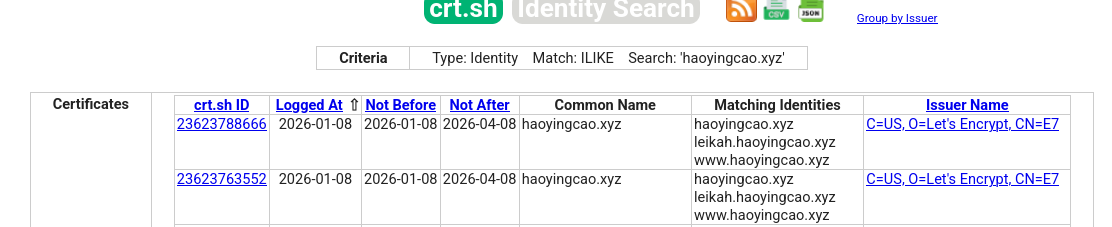
crt.sh is a simple, web-based search tool for CT Logs. Below is a search result for haoyingcao.xyz, which discovers subdomains leikah.haoyingcao.xyz and www.haoyingcao.xyz among others.
Virtual Host Discovery
Vitual hosts (vhosts) allow web servers to distinguish between multiple websites or applications sharing the same IP address. They are set up inside the web server’s configuration file. The web server then distinguishes requests for different vhosts via the HTTP Host header.
Gobuster can be used to brute force vhosts on a web server.
gobuster vhost -u http://<target_IP_address> -w <wordlist_file> --append-domain
File/Directory Discovery
Each website or applications contain different files, directories and endpoints. Other than navigating to them like normal users, we can also discover them in multiple ways:
robots.txt
robots.txt is a simple text file placed in the root of the website (e.g. www.example.com/robots.txt). It tells bots and web crawlers of which parts of the website they can or cannot crawl. From the attacker’s perspective, robots.txt can help us discover potentially interesting files and redirectories.
Example robots.txt:
User-agent: *
Disallow: /admin/
Disallow: /private/
Allow: /public/

User-agent: Googlebot
Crawl-delay: 10

Sitemap: https://www.example.com/sitemap.xml
File/Directory Brute Forcing
Directory Brute Forcing is often effective as many website has similar directory naming convention, especially if they use commonly available web technology. Gobuster and Ffuf can be used for this purpose:
Gobuster:
gobuster dir -u <URL> -w <WORDLIST>
- Useful optional arguments:
--follow-redirect: If a certain endpoint returns a redirect status code (301, 302), gobuster will follow the redirect automatically.-x: File extension(s) to add to the brute force, can handle comma-separated list.-t <THREAD_COUNT>: Adjust the amount of threads-k: Skip TLS validation, useful if the website uses a self-signed certificate.-b: Blacklist status codes, can handle comma-separated lists and ranges.--xl: Blacklist responses with a certian length, can handle comma-separated lists and ranges.
Ffuf is a web fuzzer that can also be used for directory busting. It will replace the keyword FUZZ with each entry in the wordlist.
ffuf -w <WORDLIST> -u <URL>/FUZZ
Feedback
Was this page helpful?
Glad to hear it! Please tell us how we can improve.
Sorry to hear that. Please tell us how we can improve.